Search  for anything...

Crucial MX500 1TB 3D NAND SATA 2.5 Inch Internal SSD, up to 560MB/s - CT1000MX500SSD1

  • Based on 109,042 reviews
Condition: New
Checking for the best price...
$245.00 Why this price?

Buy Now, Pay Later


As low as $40.83 / mo
  • – 6-month term
  • – No impact on credit
  • – Instant approval decision
  • – Secure and straightforward checkout

Ready to go? Add this product to your cart and select a plan during checkout.

Payment plans are offered through our trusted finance partners Klarna, Affirm, Afterpay, Apple Pay, and PayTomorrow. No-credit-needed leasing options through Acima may also be available at checkout.

Learn more about financing & leasing here.

Selected Option

Free shipping on this product

30-day refund/replacement

To qualify for a full refund, items must be returned in their original, unused condition. If an item is returned in a used, damaged, or materially different state, you may be granted a partial refund.

To initiate a return, please visit our Returns Center.

View our full returns policy here.


Availability: 11 left in stock
Fulfilled by CorteseInc

Arrives Saturday, Mar 28
Order within 1 hour and 33 minutes
Available payment plans shown during checkout

Protection Plan Protect Your Purchase
Checking for protection plans...

Memory Storage Capacity: 1 TB


Features

  • Sequential reads/writes up to 560/510 MB/s and random reads/writes up to 95K/90K on all file types
  • Accelerated by Micron 3D NAND technology
  • Integrated Power Loss Immunity preserves all your saved work if the power unexpectedly gets cut
  • Aes 256-bit hardware-based encryption keeps data safe and secure from hackers and thieves
  • Crucial 5-year limited warranty

Description

Start your system in seconds, store up to 4TB of data, and upgrade with an SSD you can count on. Join more and more people who are keeping their family videos, travel photos, music, and important documents on an SSD, and get the near-instant performance and lasting reliability that comes with solid state storage. Upgrade with the Crucial MX500 SSD, a drive built on quality, speed, and security that’s all backed by helpful service and support. Even if you’ve never installed an SSD, don’t fear – our step-by-step guide walks you through the process to make installation easy. It’s worth it.

Digital Storage Capacity: 1 TB


Hard Disk Interface: Solid State


Connectivity Technology: SATA


Brand: Crucial


Special Feature: Hardware Encryption


Hard Disk Form Factor: 2 Inches


Hard Disk Description: SATA


Compatible Devices: This drive is compatible with desktops and laptops that accept 2.5" 7mm SATA drives


Installation Type: Internal Hard Drive


Color: Blue/Gray


RAM: ‎1 TB


Hard Drive: ‎1 TB SATA


Brand: ‎Crucial


Series: ‎Crucial MX500 SSD


Item model number: ‎CT1000MX500SSD1


Hardware Platform: ‎PC; Mac


Item Weight: ‎1.39 ounces


Product Dimensions: ‎3.95 x 0.28 x 2.75 inches


Item Dimensions LxWxH: ‎3.95 x 0.28 x 2.75 inches


Color: ‎Blue/Gray


Computer Memory Type: ‎DIMM


Flash Memory Size: ‎1 TB


Hard Drive Interface: ‎Solid State


Hard Drive Rotational Speed: ‎7200 RPM


Manufacturer: ‎CRUCIAL TECHNOLOGY


Is Discontinued By Manufacturer: ‎No


Date First Available: ‎December 21, 2017


Frequently asked questions

If you place your order now, the estimated arrival date for this product is: Saturday, Mar 28

Yes, absolutely! You may return this product for a full refund within 30 days of receiving it.

To initiate a return, please visit our Returns Center.

View our full returns policy here.

  • Klarna Financing
  • Affirm Pay in 4
  • Affirm Financing
  • Afterpay Financing
  • PayTomorrow Financing
  • Financing through Apple Pay
Leasing options through Acima may also be available during checkout.

Learn more about financing & leasing here.
Top Amazon Reviews


  • It's a pretty good drive.
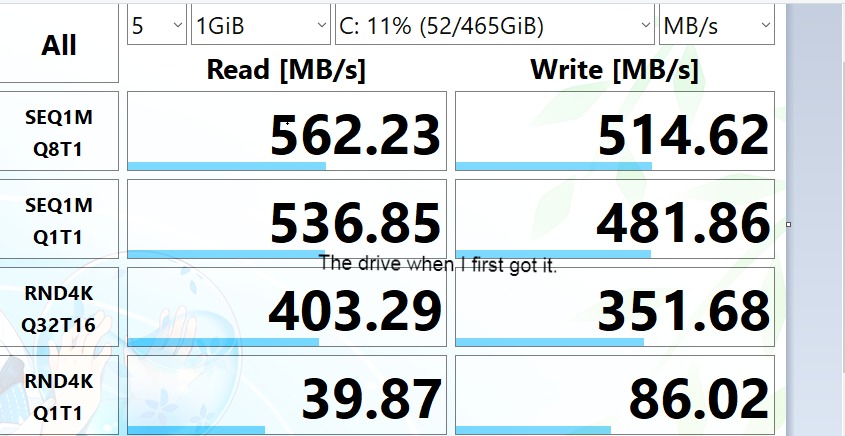
Would I recommend this SSD? Yes, I've had it for a little over a month now and I've had no issues. (I bought the 500 GB version and am only talking about the 500 GB version) I would recommend you also check if you want a different similarly priced SSD. (This entire review is talking about the 500 GB versions of each drive as of January 2021) For example: The ADATA SU760 $52.99 https://www.amazon.com/gp/product/B07TDW86SQ/ref=ox_sc_saved_title_5?smid=A2UXO5LPTDY3LN&psc=1 (I included a picture of the performance of my brother's drive that he has been using for many months now) The ADATA SU800 $54.99 https://www.amazon.com/gp/product/B01K8A29CS/ref=ox_sc_saved_title_5?smid=A2UXO5LPTDY3LN&psc=1 (I don't know anyone who has one, so I can't say how good it is from experience, but the overall star rating is pretty good) The Samsung 860 EVO $54.99 https://www.amazon.com/dp/B0781Z7Y3S/ref=cm_sw_em_r_mt_dp_voubGb4T4G14K?_encoding=UTF8&psc=1 (It's a Samsung drive so it will usually be high quality but it's not always in stock) *If the links don't work I'm not fixing them, just search the name of the drive. Why I bought it (please skip if you do not care): I have a laptop that had a hard drive. The hard drive would blue screen like once a month for a few months before it decided to completely brick itself. It would blue screen about 1 minute after booting. It would still let me boot into safe mode without blue screening but I couldn't use wifi so there was no point. I could no longer write to the drive. I have a HP laptop and since they come with HP hardware diagnostic tools, I was able to determine that the problem was the drive and not something else. I bought this drive just because it was the first one I saw that would arrive the next day. My laptop broke on Friday and I was able to get it working before school on Monday. Instillation (Drive and Windows): Installing the drive was very easy for me because I have a good amount of computer knowledge. This drive and my old hard drive are exactly the same size so all I had to do was remove my old drive. Then I took the vibration cover off the hard drive, this cover also held the drive in place. I put the cover on my SSD and slid it into the drive area. It fit tightly in there just like my old hard drive. After that, I turned on my computer and went to the bios to make sure it would boot off of a usb. I plugged in my window install usb and the computer was able to boot into the windows install manager. I was able to painlessly install and boot into windows 10. My old windows used secure boot but the new windows used legacy boot so I did have to change that in to bios to be able to boot. Since I have an HP laptop my virtual windows license automatically transferred to the fresh install of windows. Performance: I have uploaded 2 pictures of this drive's performance. The performance is as advertised and the differences could be do to a lot of different things. In day to day tasks it is a lot faster and smoother then my old hard drive with 16 gb of optane. Windows boot time is significantly faster. Downloading, transferring, and unzipping files is a lot faster. Being able to use my computer while windows is updating in the background is also nice. For gaming, don't expect a significant improvement in most games. Maybe your load times will be a bit faster but most games just don't really rely on your drive. Overall: This drive has not given me any issues over the month that I have owned it. I highly recommend buying it. ... show more
Reviewed in the United States on January 18, 2021 by Amazon Customer Amazon Customer

  • Great value and quality!
I've run this drive in my Thinkpad T560 for over a year, installation was easy and it has worked perfectly. Great boot times, quick file transfers, and has had no issues so far. Great value for such a high quality drive.
Reviewed in the United States on November 1, 2025 by UIK

  • Faster computer startup time. Great value.
Memory Storage Capacity: 1 TB
I just installed CT1000MX500SSD1 and it performed as expected. I installed this in my 7 year old HP Pavilion HPE h8-1360t Desktop PC which had Windows 7 (now Windows 10) with an Intel i7 3770 CPU @ 3.4GHz, 16GB RAM and a 1TB hard drive. At the time, I had no need for a SSD drive as it booted up in 30 seconds at the time of purchase. Over the years with Windows update and upgrade, the boot time increased progressively. I resorted to just hibernating the computer as it was faster than turning it off/on. Now it's about 1.5 minutes and even after signing into my account and after waking from hibernation or a restart. It was less responsive due to all the background services at startup. Opening a simple web browser was sluggish. I had to wait about 5-7 minutes before the system would become more responsive. Last week, I finally decided to upgrade to a SSD as the price has gone down. I was trying to decide between this and one of the Samsung 860 1TB SSD models. The price of the Samsung was a little higher with slightly better performance than this one, but I didn't need the fastest SSD. In my mind this and Samsung were both relatively fast. I chose this one as the best value at the advertised price. The drive came with a small manual and a drive spacer. I did not need the spacer for my desktop. I also bought this drive together with the suggest dual mount kit and a separate SATA III data cable. There was no need to purchase the SATA to USB adapter for my situation as I already had the extra room and with data and power connector inside the desktop. The drive installation was not difficult. The online directions for the migration process were helpful. I wished that the online directions would have displayed separate instructions for notebook/laptop users since they are more likely to benefit from a SATA to USB adater. I downloaded the Acronis True Image 202 0 version for Crucial from the link provided through the enclosed manual. There was no need for a special key to be entered for activation. The software contains the essential features required for the migration process. For Crucial users, a full version can be purchased for an additional fee. I don't see the need for it yet, but it's good to know that they provide the option in case I would like to purchase it in the future. The migration was simple but not as intuitive. If I was cloning the drive directly, it would have been perfect. I chose the manual route to resize the partitions on my target drive and took a little longer. The software instructions didn't really explain very well on how to resize the partitions manually. I had to play around with the settings before getting it to resize the way I wanted it. Ensure that all other applications are closed before committing to the cloning process as the partition will be locked down without additional confirmation. The transfer process estimated that it would take about 4-5 hours, but when I came back an hour later, it was already done. The system reboot was then required. I had to go into the BIOS and switch the boot drive to the Crucial SSD. It definitely booted up faster and the system was not sluggish during startup. The GUI was ready for me immediately. Afterwards, the Storage Executive installation was recommended. The Momentum Cache was a nice feature, but have not enabled it yet. As for overprovisioning, if I had known that it required dedicated space, I would have reserved some before the migration process. After searching on the Internet, I didn't really need the OP feature anyways. I just have to remember not to fill the drive to the max and allow for some room as a swap space like the disk hard drive, but if I do ever get to that point down the road, I can upgrade or add another drive. The computer now boots up faster with about 30 seconds from off/on and 20 seconds with hibernation. I didn't really care to test the read/write speed but the faster boot time definitely renewed the life of my desktop. I would rate the SSD as 5 star and the migration software as 4.5 star. ... show more
Reviewed in the United States on May 30, 2020 by ·

Can't find a product?

Find it on Amazon first, then paste the link below.
Checking for best price...