Search  for anything...

Brother MFC-L8730CDW Business Color Laser All-in-One Printer with Duplex Print, Scan, Copy, Wireless Networking, and Advanced Security Features

  • Based on 0 reviews
Condition: New
Checking for the best price...
$599.99 Why this price?

Buy Now, Pay Later


As low as / mo
  • – Up to 36-month term if approved
  • – No impact on credit
  • – Instant approval decision
  • – Secure and straightforward checkout

Ready to go? Add this product to your cart and select a plan during checkout.

Payment plans are offered through our trusted finance partners Klarna, Affirm, Afterpay, Apple Pay, and PayTomorrow. No-credit-needed leasing options through Acima may also be available at checkout.

Learn more about financing & leasing here.

Selected Option

Free shipping on this product

30-day refund / replacement

To qualify for a full refund, items must be returned in their original, unused condition. If an item is returned in a used, damaged, or materially different state, you may be granted a partial refund.

To initiate a return, please visit our Returns Center.

View our full returns policy here.


Availability: Only 5 left in stock, order soon!
Fulfilled by Amazon

Arrives Tuesday, Feb 10
Order within 22 hours and 23 minutes
Available payment plans shown during checkout

Protection Plan Protect Your Purchase
Checking for protection plans...

Style: Current Model


Pattern Name: Printer


Features

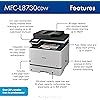
  • UPDATED DESIGN, PROFESSIONAL RESULTS. High-quality output with vibrant color and sharp black printing. Fast print and copy speeds up to 33ppm(1) help boost productivity. Reliable performance and durable, compact design, 25% smaller than the previous model.
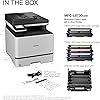
  • MAXIMIZE PRINTING BUDGETS. Offers built-in value with included Brother Genuine 3,000-page black and 1,800-page color toner cartridges. Print cost-efficiently by using high yield replacement toner cartridges providing 5,500 pages black and 4,500 pages color(2).
  • ADVANCED SCANNING. High-speed, two-sided scanning up to 104ipm(3) with 80-page auto document feeder(4) and legal-size glass. Scan to cloud, email, SharePoint, and more from the touchscreen(5). Supports the added benefit of creating searchable and editable Microsoft Office documents(6).
  • PRODUCTIVITY-ENHANCING FEATURES. Flexible connectivity, including built-in dual-band (2.4GHz / 5GHz) wireless networking and Gigabit Ethernet networking. 3.5 color touchscreen for easy menu navigation, scan preview, and up to 48 customized shortcuts for frequently used tasks.
  • TRIPLE LAYER SECURITY. Advanced security features to help keep devices secure, protect documents in transit to and from print devices, and safeguard networks. Includes an integrated NFC card reader for easy badge authentication.
  • ECO-FRIENDLY PRINTER FEATURES. EPEAT Silver rated, ENERGY STAR certified, EPS-free (expanded polystyrene) packaging, 12% Post Consumer Recycled (PCR) material.

Description

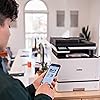
The Brother MFC-L8730CDW Business Color Laser All-in-One Printer is ideal for business work teams, supporting maximum productivity in high-demand environments with reliable performance. Fast printing and copying with lifelike color and sharp black output for professional documents, presentations, and marketing collateral, plus advanced scanning capabilities. Maximize printing budgets with included Brother Genuine standard yield toner cartridges and achieve cost-effective printing using the TN635XL high yield replacement toner cartridges. Triple Layer Security features help to keep the device secure, protect documents in transit, and safeguard against network intrusions. The printer includes dual-band (2.4GHz/5GHz) wireless and Gigabit Ethernet for wireless or wired networks, plus convenient mobile device printing and scanning(7). Disclaimers: (1) Based on one-sided printing. Change from default setting required. (2) Approximate toner cartridge yields in accordance with ISO/IEC 19798 (Letter/A4). (3) Color and monochrome scan speeds in accordance with ISO/IEC 17991 with all advanced features turned off, using letter-sized paper at 200/300dpi. (4) Maximum capacity based on using 20 lb. paper. (5) Requires an Internet connection and an account with desired service. (6) Requires an Internet connection. (7) May require free download. Compatibility may vary by device and operating system. May require connection to a wireless network.

Brand: Brother


Connectivity Technology: Ethernet, USB, Wi-Fi


Printing Technology: Laser


Special Feature: Auto Document Feeder, Auto-Duplex, Double Sided Scanning, Energy Star, Epeat Qualified, Network-Ready, Scan To E-Mail, Touch Screen See more


Color: White


Model Name: MFC-L8730CDW


Printer Output: Color


Maximum Print Speed (Color): 33 ppm


Max Printspeed Monochrome: 33 ppm


Item Weight: 67.9 Pounds


Product Dimensions: 20.7"D x 16.1"W x 21"H


Maximum Media Size: Legal (8.5 x 14 inches)


Power Consumption: 630 Watts


Included Components: Toner Cartridges


Print media: Card stock, Envelopes, Glossy photo paper, Labels, Paper (plain)


Scanner Type: Flatbed, Sheetfed


Max Input Sheet Capacity: 800


Max Copy Speed (Black & White): 33 Pages per second


Compatible Devices: Laptops, PC, Smartphones, Tablets


Maximum Color Print Resolution: 2400 x 600 dpi Dots Per Inch


Sheet Size: 8.5" x 14"


Maximum Black and White Print Resolution: 2400 x 600 dpi Dots Per Inch


Dual-sided printing: Yes


Initial page print time: 9.9 Seconds


Duplex: Automatic


Hardware Interface: Ethernet, USB 2.0


Additional Printer functions: All In One, Copy, Scan


Compatible Cartridge: TN635 Standard Yield, TN635XL High Yield,


Specific Uses For Product: Enterprise, Office, School


UPC: 012502676713


Supported Media Sizes: Letter (8.5 x 11 inches)


Memory Storage Capacity: 512 MB


Item Weight: 67.9 pounds


Item model number: MFCL8730CDW


Date First Available: September 16, 2025


Manufacturer: Brother


Frequently asked questions

If you place your order now, the estimated arrival date for this product is: Tuesday, Feb 10

Yes, absolutely! You may return this product for a full refund within 30 days of receiving it.

To initiate a return, please visit our Returns Center.

View our full returns policy here.

  • Klarna Financing
  • Affirm Pay in 4
  • Affirm Financing
  • Afterpay Financing
  • PayTomorrow Financing
  • Financing through Apple Pay
Leasing options through Acima may also be available during checkout.

Learn more about financing & leasing here.

Top Amazon Reviews


  • High-quality printer, for personal or enterprise use. Still working and supported after six years!
Style: Previous Model Pattern Name: Printer
I'm posting this as a preliminary review, since I have only owned this printer/scanner/FAX for a few weeks. I'll post a followup once I've had it long enough to put it through its paces, see how often jams happen (and how difficult they are to clear), see if any other usability or maintenance issues arise, and see how long the supplies last. INITIAL IMPRESSIONS: First of all, this model seems to be VERY NEW, so much so that Amazon Dash Replenishment hasn't been integrated yet -- though Brother promises that it will be soon. Nevertheless, there was a firmware update available when I finished configuring the device. Also, for a SOHO or small-workgroup printer, it is BIG and HEAVY, though relatively quiet. You WILL want two people to lift it out of the crate, which is of the same kind that heavy servers are shipped in: removing four retaining clips allows the box (top 90%) to be lifted straight off the base (bottom 10%), in order to get hands under the device easily. Other than this the heavy lift, basic setup was a breeze. In terms of hardware, there were a lot of tape, clips, and other protection to remove, but instructions point out the location of each. Despite the plastic exterior chassis, the build quality was very high. For example, the pull-out tray (actually the drum unit) containing the toner cartridges, and providing easy access to the other replaceable components, is one of the cleanest designs I've seen outside of datacenter equipment. Additionally, the various trays, flaps, rollers, and access doors involved in the printing and scanning paper paths move smoothly and engage/disengage with a positive audible and tactile "click". In terms of software, one of the biggest pains in the neck for new devices is usually joining the local WiFi. Here, Brother made the process easy, in the same way the Google does with their Chromecasts: the device advertises a peer-to-peer WiFi network which the manufacturer's software can use to connect to the device and upload the correct network settings from the computer. After that, local install of drivers etc, was fairly painless. And that's as far as most SOHO users need to go. For those with more complex requirements, it is worth noting that in almost every instance Brother did The Right Thing with the firmware on this device. For example, EVERYTHING can be configured through an embedded webserver, which also supports HTTPS, and allows the admin to create and upload REAL certificates if they choose. It supports just about every local and remote printing protocol imaginable, from the old BSD lpd protocols to AirPrint and Google Cloud Print, and everything in between, along with a full suite of file-transfer and network management protocols... all individually disableable, of course. The WiFi can operate in the "personal" (same password for everyone) or "enterprise" (EAP) modes, and IPV6 is supported but can be disabled. The device can update its own firmware over the network, and the process was basically painless. It was great to see a multi-function laser printer that was as easy to set up as a consumer device (and easier than many cheap inkjets) while having the configuration flexibility, protocol flexibility, and "enterprise" options to meet the needs of a more secure (or more complicated) network environment. In terms of the desktop software, I have only tried the MacOS version. They got the job done, but were not actually as polished as the printer's firmware. For example, the network-install wizard, which connects to the printer's ad-hoc WiFi network to transfer WiFi credentials and parameters, claimed to have failed with a timeout, despite having successfully configured the printer's network interface. The rest of the computer-side install worked well, and it was nice to see that the print drivers use CUPS rather than some weird proprietary interface. The only other gotcha was in the Control Center application, setting up the presets for scanning. This application controls the presets (for example, resolution, file format, destination directory) both for "pull" scanning (initiated by the computer) and "push" scanning (initiated by the printer), but it was difficult to figure out how to configure the latter. The program provides buttons for "Image", "OCR" (which is integrated, fast, and reasonably accurate), "email" and "file", but clicking these configures (and initiates) a "pull" scan. A net nearch revealed that to configure the presents for "push" scanning, in is necessary to hold the "control" key while clicking one of these buttons.. this worked fine, but was counterintuitive and not well documented. These were really the only troubles with the MacOS desktop software. Again, I can't comment on the Windows software as I haven't used it, but the MacOS software has all the necessary features, and gets the job done. It just lacks the level of user-friendliness and polish that I would expect given both the excellent firmware on the device and the high build quality. OVERALL ASSESSMENT: Brother did a really good job with this device, especially for less than $500. The model seems very new, with room to improve via software and firmware updates. I hope that future versions of the MacOS desktop software will smooth out some of the rough edges, and future versions of the device firmware will integrate Amazon Dash Replenishment as well as additional web services for print sources and scan targets. ... show more
Reviewed in the United States on August 8, 2017 by Segv Segv

  • A beast. In a good way.
Style: Previous Model Pattern Name: Printer
Replaced a consumer grade "all in one" brother color laser that needed new drums. This is a higher volume small business grade printer. Comes with enough toner to print 3k pages so it was almost a wash compared to just getting all OEM consumables for the older printer. Works fine. Has a multi page source doc feeder for single sided copies. It can scan to USB, or mail a scan as an attachment. The only minor gripe, the wireless N does not support the 5ghz band. It is large and heavy, needed 2 people to unpack. The previous Brother model lasted us 4 years w several toner refills and one set of new cartridges. Update : The factory toner in this new printer did run out in 9 months (2-3k pages). Note that the page rating given is typically at 5% coverage which is not realistic. (your actual coverage will be vary between 5-20%). Given that, I think the factory cartridges did pretty good. Update2: We had this printer now for 28 months, using it as a copier and a scanner as well. (Scan to USB stick ). Replaced cartridges with aftermarket ones, and refilled some of these, and the printer is still going strong, no failures of any kind, print quality looks good. Maybe the aftermarket black is not quite as black as the OEM, but good enough for me. Per the page counter, we have printed 11K pages so far, 3k copies. All parts report 86-96% life left. I highly recommend this printer. Well though out, functional, and proven to be reliable for us. Replacement drums are pretty inexpensive for this model, so when those wear out, I will probably replace the drums unless a more compelling, similar model comes out by then. I expect to get another 2-4 years out of it. ... show more
Reviewed in the United States on October 30, 2018 by Coder

  • Best Color Printer I Will Ever Own
Style: Previous Model Pattern Name: Printer
Have owned for about 1yr. My specific use case is for color printing manuscripts which allows me to read anywhere without the need for electronics. I am very satisfied with this purchase. Very fast, double sided color prints and wireless. I can print from my phone using the app, which can be a little slow when printing large pdf files (~20Mb). I highly value reading ink on paper. I can quickly print 2-4 hours worth of reading materials in a few minutes and have a very relaxing reading period without a laptop or a tablet. Just note that it needs to cool off for 5-10 minutes every 50-80 (double sided) pages printed sequentially. When comparing the 80th page vs the 1st page It looks as if the prints start to lose contrast but are still legible. I use ink owl's refills available through amazon. I still have the original cartridges and have refilled them twice now - three times for the black toner. See ink owls videos for how to refill cartridges and reset the toner level indicator. *Be warned that this voids warranty* I think it is worth it after one refill. I have spent 250 on refills, but saved about 1000. The inkOwl items on Amazon or inkOwl site are PUN-8438 (caps to reseal cartridges), TBR-436-CMYK (CMYK refill toner), TBR-433-G4 (the reset gear for the cartridges that come with a newly purchased printer). The included brother cartridge is high quality plastic with metal parts - better quality than many car parts. These are not "disposable" items. It is a sturdy container with a roller and gears. It will last for hundreds of refills. Be very careful when refilling. Make sure you lay out a large plastic sheet, use gloves, a mask and clothing that you don't mind getting stained. Also make sure your AC/fans are tuned off. I spilled a little of the toner and stained my rug, my wooden floor and some tools. It kind of comes off with cold water, but it is a hassle. Just take your time and avoid squeezing out the toner, let gravity do the work. ... show more
Reviewed in the United States on January 4, 2022 by Bubba Shope

Can't find a product?

Find it on Amazon first, then paste the link below.
Checking for best price...