


Search  for anything...

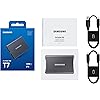
Samsung T7 Portable SSD 2TB Titan Gray, USB 3.2 Gen 2, Up to 1,050MB/s

  • Based on 9,891 reviews
Condition: New
Checking for the best price...
$381.40 Why this price?
Save $98.59 was $479.99

Buy Now, Pay Later


As low as / mo
  • – Up to 36-month term if approved
  • – No impact on credit to apply
  • – Instant approval decision
  • – Secure and straightforward checkout

Ready to go? Add this product to your cart and select a plan during checkout.

Payment plans are offered through our trusted finance partners Klarna, Affirm, Afterpay, Zip, Apple Pay, and Google Pay. No-credit-needed leasing options through Acima may also be available at checkout.

Learn more about financing & leasing here.

Selected Option

Free shipping on this product

FREE 30-day refund/replacement

To qualify for a full refund, items must be returned in their original, unused condition. If an item is returned in a used, damaged, or materially different state, you may be granted a partial refund.

To initiate a return, please visit our Returns Center.

View our full returns policy here.


Availability: In Stock.
Fulfilled by Amazon

Arrives Friday, Oct 16
Order within 21 hours and 49 minutes
Available payment plans shown during checkout

Protection Plan Protect Your Purchase
Checking for protection plans...

Color: Titan Gray


Memory Storage Capacity: 2 TB


Features

  • MADE FOR THE MAKERS: Create; Explore; Store; The T7 Portable SSD delivers fast speeds and durable features to back up any endeavor; Build your video editing empire, file your photographs or back up your blogs all in an instant
  • SHARE IDEAS IN A FLASH: Dont waste a second waiting and spend more time doing; The T7 is embedded with PCIe NVMe technology that brings fast read and write speeds up to 1,050/1,000 MB/s1, making it almost twice as fast as the T5
  • ALWAYS MAKE THE SAVE: Compact design with massive capacity; With capacities up to 4TB, save exactly what you need to your drive from large working files to game data and everything in between
  • ADAPTS TO EVERY NEED: Whether using a PC or mobile phone, count on the T7 for extensive compatibility2; Its a true team player when it comes to heavy-duty application usage or file-saving
  • HI RESOLUTION VIDEO RECORDING: Record Ultra High Resolution (4K 60fs) videos directly onto the T7 Portable SSD with your favorite camera or mobile devices; Supports iPhone 15 Pro Res 4K at 60fps video and more3
  • ALL FOR THE SHOT: This strong, sturdy sidekick will help you see it through with shock resistance and fall protection up to 6 feet4; With its solid aluminum unibody construction, its made to withstand any adventure
  • WORLDS #1 FLASH MEMORY BRAND: Performance and reliability from the worlds #1 brand for flash memory since 20035; All firmware and components are produced in-house, including our world renowned DRAM and NAND, for quality and you can trust

Description

The Samsung Portable SSD T7 is the next standard in external storage. With transfer rates up to 9.5x faster than traditional external hard drives and read/ write speeds up to 1050 MB/s, you can move massive files around with unparalleled ease and fluidity. Its sleek, shock-resistant design is uncommonly durable, capable of withstanding drops from up to 6ft, so you can take it on-the-go with complete peace of mind. The T7 is compatible with PC, Mac, Android devices, gaming consoles, and more. Included in the box are USB Type C-to-C and Type C-to-A cables for added convenience. All firmware and components, including Samsung's world-renowned DRAM and NAND, are produced in-house, allowing end-to-end integration for quality you can trust. Performance may vary depending on host configuration. To reach maximum read/write speeds of up to 1,050/1,000 MB/s, respectively, the host device and connection cables must support USB 3.2Gen 2 and the UASP mode must be enabled. Based on internal test results compared to a Samsung external HDD 1TB (HX- MTD10EA). Test system configuration: ASUS Z370 ROG MAXIMUS X APEX (USB 3.2 Gen 2 Type-C), Intel Core i7-8700K CPU @ 3.70GHz(Coffeelake), OS-Windows 10 RS6. Based on an internal free fall shock test conducted under controlled conditions. For more information on the warranty, please visit According to the Samsung internal quality standards for heat management and safety, T7 maintains its outer casing temperature below 118.4o F, except when the ambient temperature is above 118.4 F. Software requires Windows 7 and higher, Mac OS X 10.10 and higher, or Android 5.1 (Lollipop) and higher. Older versions of the Windows, Mac, and Android operating systems may not be supported. Firmware update requires PC or Mac and internet connection. Android app available on Google Play. Compatibility with host devices may vary. Some operating systems may require T7 Touch reformatting. Please find the compatible devices list on Samsung.com/support. T7 Touch is compatible with USB 3.0 and USB 2.0. Source: 2003-Q3 2020 IHS Markit data: NAND suppliers' revenue market share.

Digital Storage Capacity: 2 TB


Hard Disk Interface: Solid State


Connectivity Technology: USB


Brand: Samsung


Special Feature: 256-Bit AES Hardware Encryption, Read Speeds up to 1050 MB/s, Shock Resistant, Thermal Control, Write Speeds up to 1000 MB/s See more


Hard Disk Description: Solid State Hard Drive


Compatible Devices: Gaming Console, Mac, PC, Smartphone, Tablet


Installation Type: External Hard Drive


Color: Titan Gray


Hard Disk Size: 2 TB


Digital Storage Capacity: 2 TB


Hard Disk Interface: Solid State


Connectivity Technology: USB


Additional Features: 256-Bit AES Hardware Encryption, Read Speeds up to 1050 MB/s, Shock Resistant, Thermal Control, Write Speeds up to 1000 MB/s


Compatible Devices: Gaming Console, Mac, PC, Smartphone, Tablet


Specific Uses For Product: Personal


Read Speed: 1050 megabytes_per_second


Media Speed: 1000 megabits_per_second


Cache Memory Installed Size: 1


Data Transfer Rate: 10 gigabits_per_second


Form Factor: Portable


Hardware Connectivity: Solid State Drive


Compatible Video Game Console Models: Sony PlayStation 5


Hardware Platform: PC


Hard-Drive Size: 2 TB


Item Weight: 2.08 ounces


Item Dimensions L x W x Thickness: 3.3"L x 2.2"W x 0.3"Th


Number of Items: 1


Unit Count: 1 Count


Brand: Samsung


Model Number: MU-PC2T0T


Hard Disk Description: Solid State Hard Drive


Built-In Media: USB Cable


Model Name: T7


Manufacturer: Samsung


Global Trade Identification Number: 07


UPC: 887276410807


Item Type Name: External Solid State Drive


Mfr Part Number: MU-PC2T0T/AM


Warranty Description: 3 year limited warranty


Installation Type: External Hard Drive


Color: Titan Gray


Enclosure Material: Flash Memory


Frequently asked questions

If you place your order now, the estimated arrival date for this product is: Friday, Oct 16

Yes, absolutely! You may return this product for a full refund within 30 days of receiving it.

To initiate a return, please visit our Returns Center.

View our full returns policy here.

  • Klarna Financing
  • Affirm Pay in 4
  • Affirm Financing
  • Afterpay Financing
  • Zip Pay in 4
  • Financing through Apple Pay
  • Financing through Google Pay
Leasing options through Acima may also be available during checkout.

Learn more about financing & leasing here.
Top Amazon Reviews


  • Provides a large amount of storage + peace of mind
Color: Blue Memory Storage Capacity: 2 TB
I've been using this external SSD for over a year now to back up data from my laptop and phone. It works great for that purpose! It's given me a lot of peace of mind, since I don't have to worry about losing my photos, documents, etc. if something were to happen to my phone or laptop. Pros! - It's manufactured well. It feels fairly durable, and it's held up great over the year that I've used it. I like the blue color, too! - The 2 TB of storage have allowed me to back up basically whatever I want without worrying about running out of space. - It has pretty fast speeds for transferring data, sometimes upwards of 200 megabytes per second, which saves time during large file transfers. - It's compact and doesn't weigh much! It fits in the palm of my hand, so if I wanted to I could take it on the go. - Comes with two cords, one USB C and one USB A! I use the USB C cord usually, but the USB A cord is a nice option. - Works on most devices! I've used it on both my Windows laptop and my Samsung phone no problem. As long as the device has a USB 3.0 port or a USB C port, this SSD should work! Cons! - This isn't really a con for the SSD itself, but it encourages you to use the Samsung Magician app with it. The app has some nice features including tests to verify that the SSD is working well, but on my laptop the app would be using the SSD even when I'm not. It was a bit of a headache when I'd go to eject the SSD safely. I just changed the app's settings so that it doesn't launch on startup and that fixed it, but that might be good to keep in mind if you plan on using the SSD on a PC and want to use the app. Overall, this SSD was a great buy for me! I'm very happy with it. I'll definitely consider Samsung's SSDs in the future if I'm in the market for something like this again. ... show more
Reviewed in the United States on April 29, 2026 by Elowen Skaarup

  • Unleash Blazing Speeds and Security with the SAMSUNG SSD T7 Portable 2TB External Solid State Drive
Color: Titan Gray Memory Storage Capacity: 2 TB
I recently acquired the SAMSUNG SSD T7 Portable External Solid State Drive in its 2TB variant, equipped with USB 3.2 Gen 2 connectivity. This sleek and portable storage solution has truly impressed me with its exceptional performance and reliability. Firstly, the design of the SSD T7 is sleek and modern, featuring a compact form factor that easily fits into the palm of my hand. The metallic finish gives it a premium feel, while the shock-resistant build provides peace of mind when carrying it around. In terms of performance, this SSD is an absolute powerhouse. With USB 3.2 Gen 2 interface, I've experienced blazing-fast read and write speeds, significantly reducing data transfer times. Whether I'm transferring large files, editing high-resolution videos, or running demanding applications, the SSD T7 handles it all with ease. The storage capacity of 2TB is ample for my needs, allowing me to store a vast amount of data, including multimedia files, documents, and software applications. It's perfect for professionals, content creators, and anyone who requires large storage capacity on the go. One of the standout features of the SSD T7 is its advanced security options. The drive offers password protection and AES 256-bit hardware encryption, ensuring that my data remains safe and secure, even if the drive falls into the wrong hands. Furthermore, the SSD T7 is compatible with a wide range of devices, including laptops, desktops, gaming consoles, and mobile devices. The USB-C to USB-C and USB-C to USB-A cables included in the package make it easy to connect to various devices without the need for additional adapters. Overall, the SAMSUNG SSD T7 Portable External Solid State Drive 2TB is an outstanding storage solution that offers top-notch performance, reliability, and security. Whether you're a professional on the go or a content creator in need of high-speed storage, this SSD is an excellent choice. ... show more
Reviewed in the United States on March 9, 2024 by Igor Kuts

  • Great security
Color: Blue Memory Storage Capacity: 2 TB
I’m not the most tech savvy and wanted backup on an external drive for graphics heavy work and photos. I remember the challenge of making my last external drive compatible and especially deleting old files, so I was a little anxious trying to find a solution. In case it helps someone else, I work primarily on an iPad Pro in a design program (Affinity) and needed a backup storage solution besides the Cloud. I didn’t really want a second cloud solution to be backup and can’t use an external drive with the iPad. I also have a MacBook, which has massive storage, but can’t be backed up to ICloud, while the ipad can backup to iCloud. My workaround for immediate file saving is to create shared files which are stored on iCloud (I call them Desktop) on the ipad. Desktop is stored on the hard drive of the MacBook and gets updated via ICloud device sharing even though I can’t initiate an iCloud backup from the MacBook. Inside Desktop I have labeled files as usual and a parent file for graphic design from the Ipad, broken down into 100+ named project files and sub files. Whenever I save from the ipad, I save to Desktop (in iCloud) and then choose the appropriate file within Desktop to save. This way I have the folders on the hard drive of the MacBook as interim backup, and am working around not having iCloud backup storage available when I’m on the MacBook. The T7 comes in as secure and portable physical data storage. The T7 drive is the hard copy backup of the files shared between the iPad and MacBook, I think necessary in case of some dreadful software issue, fire, or other unanticipated loss of access. I plan to have more than one as soon as I can afford it, to rotate. Again hopefully this may help someone like me who spent some solid hours figuring out a better way to secure my data and workaround the Mac user experience. Since I am wanted to do manual backups I needed the process to be easy so I wouldn’t avoid doing them, for obvious reasons. Though we don’t need to get into it here I don’t want to use Time Machine on my Mac to back up the disk. So I had to figure out something else. The T7 is great, easy to use, no time at all to install, self explanatory pretty much. I dragged folders full of work from the desktop (yes I like to see them, don’t judge) to backup. The initial backup was very quick and painless, most files were a few seconds. The graphics heavy files perhaps took about 10 minutes? These are massive, not a problem, and may have been quicker than this, I expected it to take more time. (My last iCloud backup was over 13 hours of anxiety - I kid you not and have since deleted almost all the working files from the drawing app after saving them in Desktop so they happen more quickly now, but still, I thought this was a daylong project). I experimented with dragging an old file to the trash from the T7 disk pane, and it worked as expected. I had to read online about how to go about copying my photos library (Mac) to disk, but it wasn’t hard. I have over 40,000 images, and it took about 20 minutes as I recall, if longer probably max 25. I tested the backup by remaining in the open pane and opening the photo files, which worked. Amazingly all this data barely touches the capacity of the drive, maybe 10% or less of a TB? Minuscule, anyway. 2 TB is overkill for me, especially since old files can easily be deleted. (This may be different for a user in Time Machine because it keeps multiple versions of your backups, and maybe more settings etc. which can take up a lot of space?- not tech savvy, as I said, but I had trouble with my older system and Time Machine and being unable to delete backups which rendered my backup disk unusable, and I didn’t want to deal with this again even though it’s less convenient to do it manually). I think the T7 drive will fail before I need more space, which is a great problem to have. I’m planning to get another disk (with less storage) and use it as a failsafe backup- ideally storing it in a safe or out of the house just in case, and keeping a rotation to protect against loss. On the critical end, I’d love it and think it would be much safer for data if the user pane of the T7 was visibly different from the one on my desktop. It’s the same color, font, everything, as my desktop window (maybe that’s just how these things work?), which makes me triple check when I’m deleting or updating. Don’t do this on a Friday night after an adult beverage…. I’d also love it if there was a simple tutorial available when you opened the disk up, just for ease of first use, a how to (experimented with a throwaway file deleting because it wasn’t obvious that dragging files to the trash would work) for most, and as a reminder for others. I hesitate getting one for my parents because of this. But I’m happy and will buy another, looking forward to the peace of mind it gives me. ... show more
Reviewed in the United States on December 18, 2023 by Yetanotherjen

  • Huge speed boost for my older Mac — worth every penny
Color: Titan Gray Memory Storage Capacity: 2 TB
I bought the Samsung T7 2TB portable SSD mainly to give my older 2017 Mac a new lease on life. The internal 500GB platter style hard drive drive in that machine was painfully slow, so I set up macOS to run directly off the T7. The difference was night and day — boot times dropped to seconds, apps opened almost instantly, and overall the computer felt like a brand-new machine. Honestly, it sped things up exponentially compared to the stock drive. Beyond that, the T7 has been great for general storage and file transfers. It’s small, lightweight, and built solid with its aluminum casing, so I don’t worry about tossing it in my bag. Transfer speeds are fast enough that moving large projects doesn’t feel like a chore anymore, and I haven’t had any reliability issues. It also stays cool during everyday use, which isn’t always the case with portable SSDs. Compared to the older external hard drives I used before, this is in another league for both speed and portability. Against other portable SSDs, I think Samsung’s combination of performance and reliability is hard to beat at this price point. If you have an older computer that’s slowing you down, or you just need fast and dependable storage on the go, the T7 is an excellent choice. For me, it completely transformed the usability of my Mac and has become a tool I use every single day. ... show more
Reviewed in the United States on October 2, 2025 by Amazon Customer

  • Perfect for Xbox Games!
We have 2 Xbox consoles in our house, one is the last-gen Xbox One S and the other is a current-gen Xbox Series X. While the Series X has blazing fast built-in storage, its capacity is lacking for modern game sizes, which is why I purchased this. Note of Caution (with Series S/X): This will not allow you to play some current-generation games created specifically for Series S/X as they require the extremely fast built-in storage that allows the game to load some assets "on-the-fly". You will be able to store them but will have to transfer to internal storage (or the optional expansion storage card). This is not an issue specific to this particular device this is a limitation of the console itself. You will still be able to play non-optimized games straight from this. This uses the fast USB 3.2 protocol that transfers data much faster than the older USB 2 versions that many are used to. If you have a previous-gen console with high-speed internet, you will likely even notice increased download speeds as well, due to the fact that your download speeds are not only reliant on actual internet speeds but the speed of your storage that your download needs to write data to - and the previous gen consoles used a very slow storage solution that created a huge bottleneck on download speeds. As long as you know what your intentions are for using this for console gaming (as in non-optimized games on current-gen systems or all games on previous gen consoles) then this is a very good purchase that I would highly recommend. I even bought the T5 version a few years ago and the speed difference with this T7 was highly noticeable and I was very impressed with the improved game-load and new game install/download speeds on my Xbox One. On previous gen console, I like to store the small "apps" on the slower internal storage and use this for game installs. If you have a ton of games that you need to use both storage locations for installs, I would recommend placing 360/PS3 backwards-compatible games on the internal storage first (since they are usually significantly smaller in size and load times won't have as much as an impact) and then games that you play the least. Some additional notes: I have gigabit fiber internet (both upload & download speeds). When downloading a new game, I was getting a consistent 550-600 mbps install speed. It's very important that you understand "consistent" because some SSDs will have a small cache that has very fast write speeds, but once it's filled up it will immediately drop down to a significantly slower speed - I did not experience this issue with this particular device. Also, it's quite likely that my speeds mentioned above is limited by the game server itself (or your ISP/hardware) and not this device - this device is capable of much faster write speeds than what I've mentioned, but I have not tested its actual throughput on a PC. So in summary, if you are on previous gen consoles (Xbox One, Xbox 360, PS4, etc), then this is an absolute excellent buy. This will be much faster than the built-in storage of the console and you will notice improved DL speeds and game loading times. If you are on current gen consoles, this is good for the additional storage of non-optimized games so you can save the internal storage for games that require it. ... show more
Reviewed in the United States on October 19, 2022 by BasicNullification

  • Great ssd ... at $60 per tb
Color: Titan Gray Memory Storage Capacity: 2 TB
This is a great ssd. I purchased two in the past, in 2023 and 2025. Haven't had any issues so far. They are very fast, even on my old potato. The current price however is crazy!! I paid $120 for both my prior purchases. I believe the 2025 one was during a sale. The $360ish price in 2026 is only like a 200% price jump ... tarriffs working as intended? Actually I here the implementation of ai everything is also a factor in memory and ram costs. Anyway, 5 star item all day apart from the current price tag. ... show more
Reviewed in the United States on February 21, 2026 by John

  • I love this thing and you will also!
Color: Titan Gray Memory Storage Capacity: 2 TB
I love this thing! Small, fast and reliable. Use it as an external drive on a MAC to hold virtual machine images. Have had 3 of the VM's active at the same time. No issues with this drive.
Reviewed in the United States on August 26, 2026 by Chad Nines

  • Great backup!
Color: Blue Memory Storage Capacity: 2 TB
I bought this almost four years ago for my mom as a Christmas gift. She wanted to have one as a backup in case her laptop gave out. She never used it until very recently, and her laptop broke, and she used this to back everything up. She said it was really easy and gave her no issues and she got to save all of her stuff! 100% recommend. ... show more
Reviewed in the United States on September 4, 2026 by Heather W.

Can't find a product?

Find it on Amazon first, then paste the link below.
Checking for best price...