Search  for anything...

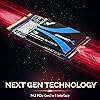
SABRENT 1TB Rocket NVMe PCIe M.2 2242 DRAM Less Low Power Internal High Performance SSD (SB-1342-1TB)

  • Based on 847 reviews
Condition: New
Checking for the best price...
$159.99 Why this price?
Save $30.00 was $189.99

Buy Now, Pay Later


As low as $26.67 / mo
  • – 6-month term
  • – No impact on credit to apply
  • – Instant approval decision
  • – Secure and straightforward checkout

Ready to go? Add this product to your cart and select a plan during checkout.

Payment plans are offered through our trusted finance partners Klarna, Affirm, Afterpay, Zip, Apple Pay, and Google Pay. No-credit-needed leasing options through Acima may also be available at checkout.

Learn more about financing & leasing here.

Selected Option

Free shipping on this product

FREE 30-day refund/replacement

To qualify for a full refund, items must be returned in their original, unused condition. If an item is returned in a used, damaged, or materially different state, you may be granted a partial refund.

To initiate a return, please visit our Returns Center.

View our full returns policy here.


Availability: Only 1 left in stock, order soon!
Fulfilled by Amazon

Arrives Oct 2 – Oct 8
Order within 20 hours and 43 minutes
Available payment plans shown during checkout

Protection Plan Protect Your Purchase
Checking for protection plans...

Capacity: 1TB


Features

  • M.2 PCIe Gen3 x 4 Interface. PCIe 3.1 Compliant / NVMe 1.3 Compliant.
  • DRAM-less Low Power Consumption. Power Management Support for APST / ASPM / L1.2.
  • Supports SMART and TRIM commands. Supports ONFi 2.3, ONFi 3.0, ONFi 3.2 and ONFi 4.0 interface.
  • Advanced Wear Leveling, Bad Block Management, and Over-Provision.
  • All Sabrent SSDs come with FREE Sabrent Acronis True Image for Sabrent Software for easy Cloning.

Description

Visit the Store Visit the Store Visit the Store Visit the Store Visit the Store Visit the Store Visit the Store Visit the Store Visit the Store Visit the Store Visit the Store Visit the Store Visit the Store Visit the Store Sabrent is a leading provider of innovative consumer electronics. We are committed to designing and developing products that provide the utmost quality, dependability, and value. Sabrent strives for excellence with each product we develop by providing cutting-edge features at affordable prices. Our company thrives on creativity, innovation, honesty, and integrity in all aspects of our business operations. Sabrent 1TB Rocket NVMe PCIe M.2 2242 DRAM-Less Low Power Internal High Performance SSD (SB-1342-1TB) The Sabrent 1TB Rocket delivers all the advantages of flash disk technology with PCIe Gen3 x4 interface and it is fully compliant with the standard Next Generation Form Factor (NGFF), commonly known as M.2. Based on Toshiba’s BiCS4 TLC NAND Flash memory, its speed performance can reach up to 2500MB/s read and 2100MB/s Write. DRAM-less Low Power SSDs use much less power than traditional hard drives, making it the best-embedded solution for new systems. Features: Package Content:

Digital Storage Capacity: 1 TB


Hard Disk Interface: PCIE x 4


Connectivity Technology: NVMe


Brand: SABRENT


Special Feature: 2242 FORM FACTOR


Hard Disk Description: Solid State Drive


Compatible Devices: This drive is compatible with servers and arrays that accept M.2 2242 PCIe drives


Installation Type: Internal Hard Drive


Color: Blue


Hard Disk Size: 1 TB


Digital Storage Capacity: 1 TB


Hard Disk Interface: PCIE x 4


Connectivity Technology: NVMe


Additional Features: 2242 FORM FACTOR


Compatible Devices: This drive is compatible with servers and arrays that accept M.2 2242 PCIe drives


Specific Uses For Product: Business, Gaming, Personal


Read Speed: 2500 megabits_per_second


Media Speed: 2100


Cache Memory Installed Size: 1 TB


Data Transfer Rate: 2500 megabytes_per_second


Form Factor: 2242


Hardware Connectivity: PCI, Solid State Drive


Hard-Drive Size: 1 TB


Item Weight: 6 g


Item Dimensions L x W x Thickness: 1.65"L x 0.87"W x 0.1"Th


Number of Items: 1


Unit Count: 1 Count


Brand: SABRENT


Model Number: SB-1342-1TB


Hard Disk Description: Solid State Drive


Built-In Media: 1TB NVMe PCIe M.2 2242 SSD, User Manual


Model Name: SB-1342-1TB


Manufacturer: SABRENT


Global Trade Identification Number: 68


UPC: 840025248168


Item Type Name: internal solid state drive


Mfr Part Number: SB-1342-1TB


Warranty Description: 1 Year Limited. Register your product atfor an extended 5 Year limited Warranty.


Installation Type: Internal Hard Drive


Color: Blue


Enclosure Material: 3D NAND flash


Frequently asked questions

If you place your order now, the estimated arrival date for this product is: Oct 2 – Oct 8

Yes, absolutely! You may return this product for a full refund within 30 days of receiving it.

To initiate a return, please visit our Returns Center.

View our full returns policy here.

  • Klarna Financing
  • Affirm Pay in 4
  • Affirm Financing
  • Afterpay Financing
  • Zip Pay in 4
  • Financing through Apple Pay
  • Financing through Google Pay
Leasing options through Acima may also be available during checkout.

Learn more about financing & leasing here.

Top Amazon Reviews


  • Satisfied with product. Works as advertised.
Works perfectly. One caution: it comes with really tiny mounting screw that easy to get lost. Use a good magnetic screwdriver. Installation can be tricky depending on the motherboard.
Reviewed in the United States on March 22, 2026 by William Wheeler

  • Not fully compatible with MacBook pro A1708, but just minor issue. OK.
I replace 256GB SSD of my MacBook pro A1708 with this drive at 1TB. The drive is small. after combining with adapter, it fits perfect or almost perfect. I don't see bump or bending in bottom case at all. If there is bump/bending, it is very little. Performance is good for normal usage. Note that it is DRAM less SSD, So transferring big file will have speed drop after some certain size. One thing to be noted for MacBook pro. The Drive is not fully compatible. You can not use Restart option in macOS. You have to use Shutdown option and then start macOS from power button manually. Using Restart improper shutdown macOS and does not start macOS back. You have to press power button to start. And after it starts, macOS will report that previous shutdown has problem. However this is minor issue that is acceptable for me to have 1TB instead of 256GB storage. Some people report issue about MacBook display "? folder" after start. but i do not encounter it at all. ... show more
Reviewed in the United States on May 7, 2021 by aeykung

  • Great Fit for MacBook Pro 13 inch 2017
Installed hard drive with ALIKSO M.2 NVMe SSD Adapter Card. No issues with installing MacOS Big Sur from bootable USB with MacOS Big Sur install. I’ve run into similar issues with MacOS panics when my Mac is coming off sleep mode. I’ve been doing a complete shutdown to avoid the panics. I was able to utilize boot camp to install Windows 10 Pro with no issues. Recommend the drive in spite of panic issues. I upgraded from 256 GB to 1 TB. Great performance as indicated. ... show more
Reviewed in the United States on January 5, 2021 by Miguel I Ruiz

  • Install tips for Mac A1708 MacBook Pro 2017
I had initially purchased a 'no-name' SSD/adapter drive on eBay, and was not satisfied with the read speed (<500 MB/s). I therefore returned it and bought this Sabrent, as well as the Sintech ST-NG2016PRO adapter. Here are some tips for installation (most of which are probably obvious to many of you): - back up Mac on external HD (I used Time Machine) - install MacOS installer on external HD as well (I did both Big Sur and Mojave, just in case) - when removing bottom of MacBook, first lift the non-hinge side, then use a suction cup to slide the cover away from the hinge (find a youtube video that explains). It doesn't lift straight up - find a video that shows how to disconnect battery. Something that wan't obvious to me was how to remove connector just above the battery. First slide the larger (~1/2" x 3 ") plastic protector to the left (mine didn't lift straight up because the pads underneath were holding on to the tiny ribbon connector). Then use the tab on top of the connector to gently pull the connector to the left, removing it from its socket. Then disconnect battery - Once you install the adapter, then the drive, you can use Kapton tape to replace the tape you'd removed from the drive (I'm not sure it's necessary) - When starting up, press option. Use disk utility to format new SDD. Make sure you use "View" pulldown menu at the top left to select "Show All Devices". This is required to format the drive. I chose APFS and GUID. If you don't select GUID you won't be able to install MacOS on the drive --> And now to the review. Everything seems to work fine - I'm getting read/write speeds at about 1800-1900 MB/s. Definitely recommend this combination. I was having problems formatting the drive (User error - before I discovered the "Show All Devices" pulldown). I'd called Amazon, and they immediately put me in touch with Sabrent customer service. ... show more
Reviewed in the United States on January 1, 2021 by J. Moore

  • Worked Beautifully Well Except For One Thing
My son's late 2016 MacBook Pro 13" no Touch Bar had to have it's logic board replaced and after that it ran perfectly. Only problem was the SSD was 256GB and now that seemed so small to me. So I bought this drive and installed it with an adapter also sold by Amazon. Everything was great! Fast (2600MBps read; 2100MBps write) and cool running. Then I restarted for the first time. And by that I mean using the "Restart" menu option, or button as required, and things got dicey. Every Restart crashed the machine and caused, as expected, a crash report. This happened EVERY Restart without exception. In a beautifully running machine I could make this happen at will. Powering up was possible by closing the lid and waiting ... then it would restart when the lid was opened. I chatted with Sabrent and they did their best to get to the root cause of this with nothing working. Finally I put the Apple proprietary SSD back in the machine and the crashing immediately was no more. I was disappointed and that's an understatement. I later read in a blog post (sorry don't remember which) a list of compatible SSDs for this machine. This Sabrent NVMe M.2 2242 was not on the list. Should it have been? I got no idea, but reinstalling the Apple SSD fixed the problem. And I fully understand the fallacy of Post hoc, ergo propter hoc but replacing the Sabrent fixed my problem. Was this problem unique to me? Again, got no idea, but this IS what happened and I feel I need to at least let others know. ... show more
Reviewed in the United States on May 19, 2021 by David

  • For MacBook Pro
I installed this disk in a MacBook Pro laptop, I used a "Deal4GO NVMe M.2 NGFF 2230 2242 mSATA SSD Hard Drive Adapter Bay for MacBook Pro A1708 2016 2017" adapter. This hard disk "Sabrent 1TB Rocket NVMe PCIe M.2 2242" fits into this adapter, longer disks than 42mm tend to be to thick for the thin housing of the MacBook Pro, but this 42mm disk is excellent. Prior I had tried to fit an 80mm disk, I started the computer up from that disk but I did not want to return the computer to the owner with it, so I ordered this "Sabrent 1TB Rocket NVMe PCIe M.2 2242". The write and read speed are very good, reading is up to 2000 M/s but the new Apple file system tends to slow read and write somewhat, but this disk is ideal for proper upgrading the small harddisks in most of the Apple laptops from 2016 and 2017 (not the thouchbar models though) but the thouochbar models and later ones have soldered and then non upgradable harddisks, and that is a pity. Youtube shows installing longer (80mm) disks in these laptops and then gluing the disk with tape and then in most cases the bottom lid is bulging. After installing then it is probably best to sreset NVRam at startup. Carbon Copy Cloner works wonders when cloning the data on the older disk onto the new disk that I connected to the computer with an USB adapter, this only takes few minutes. ... show more
Reviewed in the United States on December 23, 2020 by Ívar Arason

  • Work superbly on my Macbook Pro 2017(A1708)
I purchased this SSD to use it on my Macbook Pro A1708. Installation is pretty easy and straightforward. You just need to buy an adapter for this SSD to fit on your Macbook. The performance is even faster compared to stock Apple SSD. This is definitely more better and cheaper options over the expensive Apple stock SSD. ... show more
Reviewed in the United States on December 15, 2021 by Syed Afiq

  • #Sabrent has great stuff.
I was happy to buy a product from a US based company that makes very handsome devices. So paying a little extra to Sabrent and Amazon was worth it. The Acronis software used to clone your discs is very good, but *the instructions* specifically are ambiguous. The most ambiguous part is the instructions say remove your old disc and install the new one to clone, but then Acronis has a video that seems to say the opposite: leave your old disc installed and clone that to your new disc on the outside. Support at Sabrent was friendly and helpful—more kudos to Sabrent. I ended up installing the new disc, putting the old disc into one of those external drive enclosures (bought a used Sabrent on Amazon—also handsome) and had success. It’s a slow process HOWEVER you clone (software or a clone machine) your disc. I imagine a Nvme PCIe 4.0 is faster but I was using 3.0. ... show more
Reviewed in the United States on March 23, 2021 by Royce B. Bishop

Can't find a product?

Find it on Amazon first, then paste the link below.
Checking for best price...