




Phomemo M08F Portable Printers Wireless for Travel, Thermal Printer Support 8.5" X 11" US Letter Thermal Paper, Bluetooth Inkless Printer Compatible with iOS, Android, Laptop for Travel, Office, Home
Condition: New





Notify me when this product is back in stock
$75.99
Holiday Deal
· 20% off
was $94.99
Buy Now, Pay Later
As low as
$12.67
/ mo
Learn more
- – 6-month term
- – No impact on credit to apply
- – Instant approval decision
- – Secure and straightforward checkout
Payment plans are offered through our trusted finance partners Klarna, Affirm, Afterpay, Zip, Apple Pay, and Google Pay. No-credit-needed leasing options through Acima may also be available at checkout.
Learn more about financing & leasing here.
Selected Option
Free shipping on this product
30-day returns
Learn more
30-day refund/replacement
To qualify for a full refund, items must be returned in their original, unused condition. If an item is returned in a used, damaged, or materially different state, you may be granted a partial refund.
To initiate a return, please visit our Returns Center.
View our full returns policy here.
Availability:
Unavailable
Recently Viewed


At a glance
- Condition
- New
- Color
- Gray
- Style
- Printer
- Model
- Phomemo-M08F
- Storage
- 64 MB
- Dimensions
- 4"D x 13.7"W x 3"H
- Weight
- 34.99 g
- In the box
- InstructionsQuick Start GuideM08F-Letter portable printerSoft storage pouchUSB-A to USB-C charging cable (80cm)10 sheets Letter thermal paper
- Works with
- Smartphones, PC
Features 6
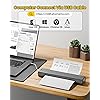
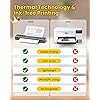
- Portable Printer - Upgraped M08F Printer - Do you travel a lot and can't find a printer to print your documents, the M08F will be a great help for you! Phomemo M08F portable Printer, utilizes leading-edge thermal printing technology. Allows you to print wherevery you stay, providing convenience and freedom wherever you go. Whether you're traveling or simply at office, Phomemo M08F Thermal Printer is your perfect companion
- Bluetooth Printer - Go Wireless by Bluetooth - Get the "Phomemo" app from Google Play or Apple Store to print via Bluetooth on your Portable Thermal Printer for iOS and Android. (Note: Mobile devices cannot be directly connected to Bluetooth and need to be used through the Phomemo app.)
- Wireless Printer - High Quality Printing (Black and white print) - The M08F Bluetooth Thermal Printer offers superior print clarity - high-quality clarity with fast processing speeds and support for hundreds of sheets of thermal paper. Whether you're in the car, at home, outdoors or traveling, you can print contracts, office documents, lists, invoices, labels and whatever you need
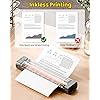
- Inkless Printer - Inkless Printing - Bluetooth Printer use thermal technology - doesn't require ink, toner, or ribbons. Instead, you only need to replace the thermal paper and you're good to go, each thermal paper costs only $0.06-0.12, cheaper than ink cartridges + paper. (Note: different from a traditional printer, requires a special paper (Thermal Paper) in order to utilize it., not support regular copy paper)
- Mobile Printer - Strong Compatibility - Print PDF, Word, Images, Web from your phonewhenever, wherever. You can also use a USB cable to connect for computer printing; (PC devices only work with USB connection, need to download the driver first: m08f.phomemo.com)
- How to Print on Phones - 1.) Power on inkless printer. 2.) Download the Phomemo from your app store. 3). Enable Bluetooth travel on your phone > return to the Phomemo app & and click to add device. 4.) Selected the M08F (for this model)- wait for one second you should be connected. It took not even 5 minutes to set up and print. **If pairing took too long - reboot the printer by holding the power button down then back on again & and return to the app to pair. It was so easy to set up. Charge 5V2A -Don't use the charger with an output above 5V
Specs 38
| Brand | Phomemo |
|---|---|
| Connectivity Technology | Bluetooth, USB |
| Printing Technology | Thermal |
| Special Feature | Fast Charging Battery, Inkless Thermal Printing, Compatible with Mobile Phone & PC, Portable,Wireless |
| Color | Gray |
| Model Name | Phomemo-M08F |
| Printer Output | Monochrome |
| Max Printspeed Monochrome | 2 |
| Item Weight | 34.99 Grams |
| Product Dimensions | 4"D x 13.7"W x 3"H |
| Controller Type | iOS, Android |
| Printer Media Size Maximum | 8.5 x 11 inch |
| Print media | Paper (plain) |
| Scanner Type | Portable |
| Max Input Sheet Capacity | 250 |
| Max Copy Speed (Black & White) | 4.2 ppm |
| Sheet Size | 8.5x11 inch Inches |
| Warranty Type | limited warranty |
| Color Depth | 1 bpp |
| Dual-sided printing | No |
| Initial page print time | 14.29 seconds |
| Max copy resolution black-white | 200-300 dpi |
| Duplex | simplex |
| Hardware Interface | USB |
| Ink Color | black |
| Additional Printer functions | Print Only |
| Control Method | Remote |
| Number of Drivers | 2 |
| Number of Trays | 1 |
| Processor Count | 1 |
| Total USB Ports | 1 |
| Model Series | Phomemo |
| Specific Uses For Product | Travel, Gift |
| Printer Ink Type | Thermal |
| Memory Storage Capacity | 64 MB |
| Item model number | Phomemo-M08F |
| Batteries | 1 Lithium Ion batteries required. (included) |
| Manufacturer | Phomemo |
No specs match.
Frequently asked questions
This product is currently out of stock. Please check back later for shipping info.
Yes, absolutely! You may return this product for a full refund within 30 days of receiving it.
To initiate a return, please visit our Returns Center.
View our full returns policy here.
- Klarna Financing
- Affirm Pay in 4
- Affirm Financing
- Afterpay Financing
- Zip Pay in 4
- Financing through Apple Pay
- Financing through Google Pay
Learn more about financing & leasing here.
Similar Products


Top Amazon Reviews
Great no-mess ultraportable thermal letter printer
Color: Black
Style: Printer


The media could not be loaded. Disclaimer: I was compensated for the cost of the printer by the manufacturer without any request other than to provide feedback directly to them on what would make this printer better which I also offer here. Phomemo M08F Letter Size Thermal Printer Straight-to-the-Point Overall Usability Great portable printer for the times when you absolutely must have a hard copy a non-intricately detailed document. Works well for text and line art in non-permanent things like tickets or event signage which I happen to print often enough. Since this printer uses thermal paper, I would not recommend it for long-term legal documents (Quick Guide states 7-10 year print viability if kept dry, at room temperature, and out of sunlight) but if you need a semi-permanent document, it completely fits the bill. You will likely want to purchase additional thermal paper to do any appreciable printing Likes • Compact • No ink - no mess • Easy to use hardware • Easy to use Android app • Easy to print on Windows with driver installation • Relatively quick for a non-industrial thermal printer • Great quality prints for the right use-cases • Great battery life Dislikes • Paper can get misaligned on insertion every now and again • Difficult to cancel or know if a print job has been cancelled • Noisy prints if on a resonant surface Things to consider • Prints can be expensive at 15¢ to 26¢ per page • Photos and very small text are not the intended use for the printer • Color graphics should be converted to grayscale before printing In the Box • Printer carefully supported in foam • Two Quick Start Guides (one more graphical and the other more text laden) • 2 ft. USB-A to USB-C for computer connectivity and charging • USB flash drive of computer drivers • Velvet carry bag • 5 sheets Phomemo thermal letter paper which are creased in thirds from being packed in the box and best to flatten a bit before use Build Quality As with all the Phomemo products I own, the quality is tops. There is no wasted space in the case and the entire printer feels sturdy if not a bit heavy (721g / ~1.6lbs). The hinge and hinge opening buttons, which allow for paper release or roller and thermal head cleaning, have a good feel without any play. The printer has two rubber feet which do a good job of preventing printer movement but they do little to address one of my few complaints about printing. Phomemo App (Android) I have used and generally like the Phomemo label printer Android Apps ‘Print Master’ and ‘Labelife’. The eponymously named ‘Phomemo’ App is no different. In app, it is easy to connect the printer with Bluetooth or the QR code on the printer’s top sticker, change settings (Auto Shutdown – I recommend setting to at least 30 mins.), and print all or individual pages from various sources of documents (browse the filesystem or Share to ‘Phomemo’ from an open document. There is even an available library of line art drawings over a range of categories for simple sign or coloring sheet printouts. The one thing that wasn’t entirely clear with the app was the best method for cancelling a multi-page print and what I found to work for me was powering off the printer and force stopping the app. Windows 10 Driver The ‘Phomemo’ App, Quick Start Guides, and the printer’s top sticker all make it easy to locate the drivers form Windows and MacOS. I only have Windows machines and had no issues finding, downloading, and installing the M08F driver. Printing was as simple as connecting the printer to the computer with the USB-A to USB-C cable and choosing the printer by name in any print dialog. Printing My test prints were done from a 100-sheet pack of Phomemo branded letter thermal paper that was on-sale for $20.99 (21¢ per sheet, a 200-sheet pack is available for $29.99 for 15¢ per sheet). Inserting paper and getting it to be properly aligned in the printer can be tricky if done too slowly. Make sure the thermal paper is oriented with the correct side up (‘This side should face up.’ is labeled on one side) and insert it as straight and swift as you can until it butts up against the roller bar inside. An improperly aligned sheet will print but the page can be skewed and the page edges torn ragged (only 2 of 20 printed sheets). If a sheet is inserted incorrectly, it is possible to open the printer and re-insert the sheet again. I printed using both Medium and Heavy darkness settings and observed a minimal difference in quality for most documents. If you have very small details or text (8pt or less) the Heavy darkness setting will make those parts more legible. Be warned that 6pt or smaller font can be spotty or illegible. All linear bar, Data Matrix ,and QR codes on tickets that I printed scanned with ease using my cellphone. The average time for a full sheet print was ~25 seconds. Battery Usage and Charging When unboxed, the printer had 97% charge. I printed 20 sheets, 18 at Heavy darkness, and that only took the charge to 84%. I cannot envision many scenarios that would have this printer use more than 25% charge. Charging back to 100% took about 30 minutes and, as stated in the text heavy Quick Start Guide, had to be done using the 5V 2A power which I had on my computer’s USB hub. Neither my Samsung Fast or Super Fast phone chargers nor my Anker 20W or 45W chargers would charge the printer. Recommendations to Phomemo to Improve the Printer • Adding pop-out or fold-out paper guides could ease proper paper alignment on insertion • Adding thicker or more dampening rubber cushions on the bottom of the printer could reduce the amount of resonant sound generated by the printer • Depending on the desired typical usage per charge, the battery size could be halved and still allow for 50+ pages per charge while likely taking the weight of the printer to less than a pound
...
show more
Reviewed in the United States on November 13, 2022 by Joshua J. Joshua J.
Wow! An awesome mobile printer!
Color: White
Style: Printer
This printer is magical! It is a compact and lightweight printer that is easy to set up and simple to use. It comes in multiple appealing colors to match any decor. It has a built-in battery that lasts for quite a while and recharges with USB-C. It connects to your PC via USB or Bluetooth and can also connect to any smart phone. The Phomemo app is easy to navigate and use. The print quality is very good for text, but not the best for images. Overall, I am very happy with the printer and would recommend it to others.
...
show more
Reviewed in the United States on March 22, 2025 by Common sense
Fast, portable, and easy to use.
Color: Black
Style: Printer
Disclaimer: The manufacturer compensated me for the cost of the printer, with the only expectation being that I provide direct feedback. Box comes with: 8.5 x 11" Thermal Printer, USB-C to USB-A adapter, USB-C to USB-A chord, 10pc of Sample Thermal Paper, Soft suede fabric cover, and instructions. The printer is compact and small right out of the box. I tested the connection using the Phomemo app, and it worked smoothly without any issues. However, the box included sample thermal paper that was creased, and I noticed that the thermal "ink" tends to smear around those creased areas. Other than that, the quality of the print is pretty good. I wouldn't create a whole painting on it due to the print only being semi-permanent. Over time the ink will fade due to UV, heat, or how it's been stored. Since my box did not come with a USB, I had to go to their website to install the driver. It did take me awhile to realize that it doesn't turn on automatically when plugged in. You do have to hold the power button to turn it on and it will connect via Computer. After it's connected, it will read that you have an available printer to use. Printing works well on the computer and had no issues whatsoever. The box only came with 10pc of sample paper and you would need to invest in purchasing thermal paper, which is about $0.12/p if you purchase one from Amazon. You can tell which side based on the material. The "Print" side feels more glossy and soft while the side facing up is more matte. If you rub the two sides together you can feel it. Overall, I feel like it is pretty useful if you are in a hurry and need to print something very quickly. I would say to not use it to store important information that needs to be printed. I would just a laser or inkjet. Just remember that thermal ink has a shelf life of about 3 years.
...
show more
Reviewed in the United States on March 24, 2025 by Alysia
A must have for everyone!
Color: Pink
Style: Printer


This is definitely a must have for everyone. It’s because of the quality of the printed product. I am so impressed with how vivid it looks (as you can see on the photo). It’s a top notch! I also love how it’s very easy to use. The app and the bluetooth connection are both great. I loved the design and features. I am so happy that it came with different colors to choose from. The buttons are easy to press. And it’s very affordable. It’s so worth your money. I have been collecting their products and I’m always satisfied with their quality, affordability and durability.
...
show more
Reviewed in the United States on April 18, 2025 by JustMeMarco JustMeMarco
Good printer on the go
Color: Sliver
Style: Printer
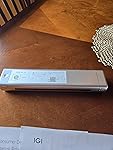
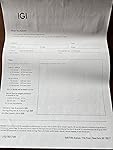
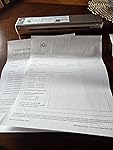
Great little portable printer! I downloaded the app and was able to connect the printer and print files on my phone in 2 minutes. This would be great for someone preparing quotes on the go, receipts at a festival, or needing to print from the car. Print quality is good and pretty quick. Found a protective case on Amazon for $10. Only drawback is that the thermal paper is kind of thin and more expensive than normal paper.
...
show more
Reviewed in the United States on March 20, 2025 by Trusted Advisor Trusted Advisor