


Search  for anything...
OWC

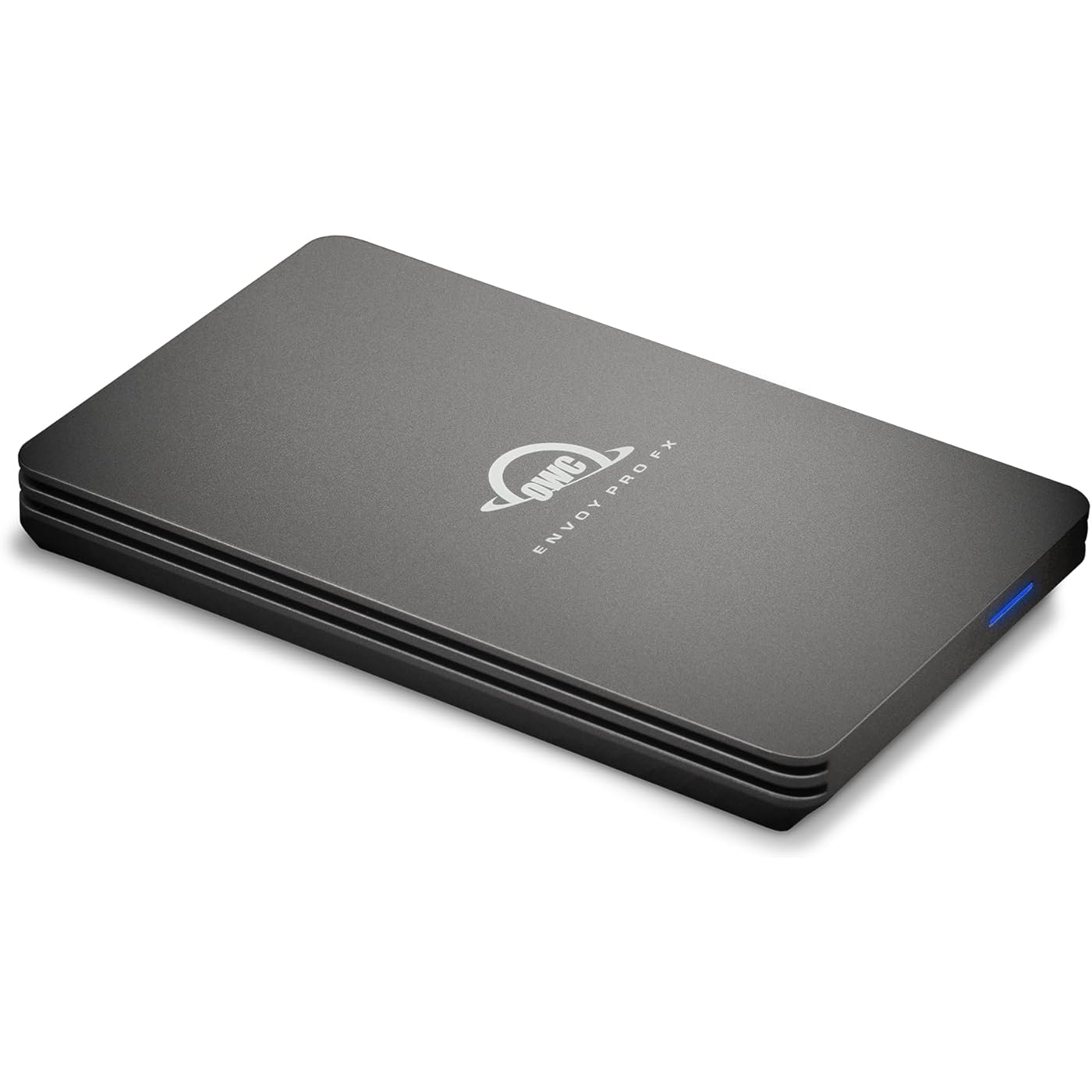
OWC Envoy Pro FX 2TB Thunderbolt 40Gb/s + USB-C 10Gb/s Portable NVMe SSD

  • Based on 189 reviews
Condition: New
Checking for the best price...
$815.30 Why this price?

Buy Now, Pay Later


As low as / mo
  • – Up to 36-month term if approved
  • – No impact on credit to apply
  • – Instant approval decision
  • – Secure and straightforward checkout

Ready to go? Add this product to your cart and select a plan during checkout.

Payment plans are offered through our trusted finance partners Klarna, Affirm, Afterpay, Zip, Apple Pay, and Google Pay. No-credit-needed leasing options through Acima may also be available at checkout.

Learn more about financing & leasing here.

Selected Option

Free shipping on this product

This item is eligible for return within 30 days of receipt

To qualify for a full refund, items must be returned in their original, unused condition. If an item is returned in a used, damaged, or materially different state, you may be granted a partial refund.

To initiate a return, please visit our Returns Center.

View our full returns policy here.

Availability: Only 2 left in stock, order soon!
Fulfilled by Rover Mall

Arrives Sunday, Nov 1
Order within 23 hours and 20 minutes
Available payment plans shown during checkout

Protection Plan Protect Your Purchase
Checking for protection plans...

Style: Envoy FX (40Gb/s)


Capacity: 2TB


Features

  • Flexible compatibility: Plug and play with yesterdays, todays, and tomorrows Macs; Windows and Linux PCs; and iPad Pro, Chromebook, and Surface devices.
  • Xtremely fast: supports the max performance capability of any Thunderbolt and USB interface up to 2800MB/s
  • OWC Aura SSD powered: advanced storage technology with TRIM support combined with Thunderbolt delivers the fastest and most reliable performance available in a portable drive
  • Silently cool: fanless, heat dissipating aluminum housing for distraction-free operation
  • Connected: included Thunderbolt / USB cable plugs into to any machine anywhere

Description

1. Up to 2711MB/s sequential read/write (max) performance based on testing a 4.0TB OWC Aura Pro P12 equipped Envoy Pro FX connected to a Windows 10 PC equipped with a Gigabyte Technology motherboard with an AMD 3960X 3.8GHz processor and 32GB RAM running AJA System Test (4K-Full resolution, 4GB file size, 16bit RGB codec, single file test). Performance will vary depending on drive and application used. 2. Dropped over 25 times at every angle from a height of four feet by a third-party testing and certification service. Water resistant for up to 30 minutes at < 1 meter.

Digital Storage Capacity: 2000 GB


Hard Disk Interface: Thunderbolt


Connectivity Technology: Thunderbolt, USB


Brand: OWC


Special Feature: Waterproof


Hard Disk Description: Solid State Drive


Compatible Devices: Laptop


Installation Type: External Hard Drive


Color: Blue


Hard Disk Size: 2 TB


Digital Storage Capacity: 2000 GB


Hard Disk Interface: Thunderbolt


Connectivity Technology: Thunderbolt, USB


Additional Features: Waterproof


Compatible Devices: Laptop


Specific Uses For Product: Gaming,Personal


Read Speed: 2800 megabytes_per_second


Media Speed: 2800 megabytes_per_second


Cache Memory Installed Size: 2


Data Transfer Rate: 2800 megabits_per_second


Form Factor: Portable


Hardware Connectivity: Thunderbolt, USB 3.0


Compatible Video Game Console Models: Microsoft Xbox SERIES S, Microsoft Xbox SERIES X, Nintendo Switch, Nintendo Switch - OLED Model, Nintendo Switch 2, Nintendo Switch Lite, Sony PlayStation 5, Sony PlayStation 5 Slim


Hardware Platform: Mac, PC


Installation Type: External Hard Drive


Color: Blue


Enclosure Material: Aluminum


Brand: OWC


Model Number: OWCTB3ENVPFX02


Hard Disk Description: Solid State Drive


Built-In Media: Thunderbolt / USB cable


Model Name: Envoy Pro FX


Manufacturer: Other World Computing


Global Trade Identification Number: 75


UPC: 810586037075


Mfr Part Number: TB3ENVPFX02


Hard-Drive Size: 2 TB


Unit Count: 1 Count


Frequently asked questions

If you place your order now, the estimated arrival date for this product is: Sunday, Nov 1

Yes, absolutely! You may return this product for a full refund within 30 days of receiving it.

To initiate a return, please visit our Returns Center.

View our full returns policy here.

  • Klarna Financing
  • Affirm Pay in 4
  • Affirm Financing
  • Afterpay Financing
  • Zip Pay in 4
  • Financing through Apple Pay
  • Financing through Google Pay
Leasing options through Acima may also be available during checkout.

Learn more about financing & leasing here.

Top Amazon Reviews


  • Envoy Pro FX is the SSD to buy for your iMac upgrade
Style: Envoy FX (40Gb/s) Capacity: 2TB
I needed to upgrade my 2019 Retina 5K 27" Intel iMac because the Fusion Drive had developed file directory hash errors that couldn't be resolved with Disk Utility First Aid, even after running First Aid for several days. I eventually backed up (externally and offsite) and reformatted the Fusion Drive and reinstalled MacOS to remedy the disk errors. But the disk errors seemed like a harbinger of a potential impending hardware failure, and time to consider replacing the aging Fusion Drive with newer, faster solid state drive technology. SSDs have come way down in price since I purchased my iMac. There are three good options for upgrading the 2019 iMac drive: 1.) Add a Thunderbolt external drive and make it the boot drive 2.) Add an internal SSD mounted in place of the existing SATA drive inside the iMac 3.) Replace the NVME drive connected to the PCIe bus behind the iMacs mainboard. This small NVME drive is part of the Fusion Drive and acts as a sort of drive cache. But since it connects to the PCIe bus on the mainboard, it has the potential to be the fastest upgrade option by far. Installing these options increase in complexity in the order listed above. But the internal SATA replacement is actually slower than the external Thunderbolt option. The PCIe NVME option #3 is the fastest option, but the hardest to do. It requires almost completely disassembling and removing the innards of the iMac to access the backside of the mainboard. And due to the technical depth of the task, it's pretty easy to screw things up. I opted for the easy upgrade, Option #1. The OWC Envoy Pro FX ($300) was $60 more expensive than a SanDisk alternative (SanDisk Pro 2TB Pro-G40 at $240). At first I ordered the SanDisk to save money. But after reading about very many user complaints about failed SanDisk external SSD, I cancelled my order and ordered the OWC Envoy Pro. I'm glad I did. The Envoy Pro FX drive has incredible build quality. The enclosure is beefy, machined anodized aluminum. Very thick and massive as a heat sink. I didn't appreciate this until I held it in my hands and felt the weight and solid construction. Nice job OWC! BlackMagic disk speed test now shows Write speeds exceeding 1518 MB/s and Read speeds of 2664 MB/s on the external Thunderbolt drive. That's almost 3 times faster than the internal Fusion Drive. I recommend the OWC Envoy Pro FX drive. And I am no longer a fan of SanDisk due to the controversy about lost data. I already have a 4TB SanDisk Extreme Pro Portable SSD. But due to the stories online, there's little confidence in SanDisk reliability today. ... show more
Reviewed in the United States on November 20, 2023 by Dave B.

  • The Best! Great Product & Design; A Tank; Very Fast w Mac Studio M1 Monterey TB & mini (2012) USB 3
Style: Envoy FX (40Gb/s) Capacity: 2TB
This OWC Envoy Pro FX 2TB Portable NVMe M.2 SSD [ASIN B08YMR64RT] design is unusual and almost unique— it can't be overstated. Having the current interface Thunderbolt speed and (TB/ USB-C) connector for a Mac Studio (M1 Max, 2022) running macOS 12.3.1 ("Monterey"), OR being also able to alternatively use USB 3.0's full speed (5Gbps) with a Mac mini (Late 2012) running macOS 10.13.6 ("High Sierra"), OR alternatively use USB 2 (480Mbps) with a 17" MacBook Pro (Mid 2010) running macOS 10.13.6 ("High Sierra"), OR USB 1 (12Mbps) on legacy G4 Macs, allows me to have one single 2TB fast, rugged, portable drive that I can use as my primary user account folder! Now, I don't have to waste time syncing files on various Macs, nor duplicating directory structure changes to enable syncing. The latter is especially significant. No matter how diligent I try to be, there are always spontaneous directory structure changes I make, which I don't have time or access to duplicate on other Macs—then syncing becomes a nightmare. Perforance of this OWC Envoy Pro FX 2TB Portable NVMe M.2 SSD is excellent. Using ChronoSync 10, I created a 1.61TB 1.85 million file bootable clone of a Mac mini (Late 2012) internal SSD via USB 3.0 (5Gbps) in 3 hours 33 minutes 20 seconds, with full verification. ChronoSync scans the source, copies the source file, writes the target file, then fully reads the target written file, compares with the source file, and then writes a detailed log file entry. The NET aggregate throughput achieved was 132MBps (1.03Gbps) (3 to 10 times faster than similar ChronoSync cloning operations to a WD 12TB My Book HDD). As a software and hardware engineer, I can't rigorously compute the isolated write speed without more research, but I suspect it is roughly at least double the above net aggregate measured. This OWC Envoy Pro FX 2TB Portable NVMe M.2 SSD is physically built like an armored tank—I seriously think I could run over it (slowly) with a large SUV without fracturing the solid aluminum case. (Do NOT try this at home! ;-) The $549 I paid for this OWC Envoy Pro FX 2TB Portable NVMe M.2 SSD is small compared with the value received. Being able to buy new Macs with base SSD capacity already has saved me the OWC's price, AND I don't have to wait for a BTO (built to order) model to be queued. A stock base model Mac Studio 512GB SSD was immediately available. I would have had to wait 4 – 10 weeks, and spend $600 (for 2TB SSD) to $2,400 (for 8TB) more had the OWC Envoy Pro FX 2TB Portable NVMe M.2 SSD not been available. (As you may have noticed, Macs are generally useful for a long time. 10 – 20 years isn't extraordinary—for a Mac, that is. My 2003 Xserve G4 is still hosting Internet services.) Now that most new Macs generally do not have user upgradable drives, nor RAM, I would tend to max both. So $549 OWC likely saved me $2,400. I would definitely buy this OWC Envoy Pro FX 2TB Portable NVMe M.2 SSD again, and recommend others purchase as well. ... show more
Reviewed in the United States on April 19, 2022 by swreader

  • Ready for adventure and editing on the go!
Style: Envoy FX (40Gb/s) Capacity: 4TB
As ssd prices are rising and may stay up for another 2 years with ai companies sucking up all the resources I decided to invest in something that will last a long time for my 6k video editing services. My research landed me on the owc envoy pro fx - rugged build, waterproof design so I can edit while traveling with my M1 Max MacBook. High compatibility with multiple types of connectivity. Brilliant design on the heat synch and easily mounted to my laptop via strong Velcro for portability. It was pretty pricy but I found the value in it for these reasons - having suffered from lost data from ssd accidents in the past - this seemed like a reliable choice for the long term. ... show more
Reviewed in the United States on April 18, 2026 by Styro

  • Fast and versatile
Style: Envoy FX (40Gb/s) Capacity: 1TB
Extemely fast. Compatible with PC and Mac and the USB-A adapter is pretty useful for old computers. I would give 5 stars but the product description did not mention I needed to pay their software if I want to work both PC and Mac simultaneaously which is the main resason I bought this product.
Reviewed in the United States on April 2, 2026 by Cliente de Amazon

  • OWS drive is perfect for large photo libraries
Style: Envoy FX (40Gb/s) Capacity: 4TB
I purchased the 4 TB version to serve as the external drive on my Mac Studio M1 Max for my (large) Lightroom and Apple Photos photo libraries. The speed of this drive is exceptional and perfect for large photo libraries (78K in Lightroom, 37K in Photos). LightRoom images load almost instantly. There is no observable delay as you click from one photo to another. I'm just sorry that I didn't get this earlier. I have a number of OWS devices, and they have always been top-notch. Maybe a bit pricey, but the performance and reliability are well worth it. ... show more
Reviewed in the United States on April 19, 2025 by E. Williams

  • Fast, big, compact.
Style: Envoy FX (40Gb/s) Capacity: 4TB
Well it's 4 terabytes of space, SSD. It works and it's fast. My MacBook pro has a 1 TB SSD and it boots in approximately the same amount of time either internal or this external drive.
Reviewed in the United States on September 30, 2025 by Smooth Operator

  • Provided the speed I was looking for
Style: Envoy FX (40Gb/s) Capacity: 2TB
I bought an M1 Mac Mini to use for Lightroom, and with several hundred thousand images in my catalog, I was tight on space for the catalog/previews on my internal 256G drive. I did not want to compromise speed and I'm not able to upgrade the internal drive. I bought this OWC Envoy Pro FX based on positive reviews and prior experience with OWC. It came quickly and the only glitch I had was the built in OWC utility would not run for some reason, but its totally unneeded. No worries, as its simple to format the drive with the Disk Utility. I quickly ran a speed test with Black Magic and very happy with the results. My internal drive averages 2,200-2,400MB speed and the Envoy Pro FX is averages 1,800-2,100 with highs and lows with the two overlapping sometimes. This completely meets my needs for extending my internal storage. It came with a TB3 USB-C cable. The drive is well made and feels like a solid block of aluminum. I highly recommend this if you need a fast drive for your Mac. ... show more
Reviewed in the United States on November 1, 2023 by Convergent

  • Awesome little SSD!
Style: Envoy FX (40Gb/s) Capacity: 4TB
Great drive, and the personnel at other world computing are absolute pros!
Reviewed in the United States on July 22, 2026 by PearceReader

Can't find a product?

Find it on Amazon first, then paste the link below.
Checking for best price...