Search  for anything...

Kinhank 12tb Retro Game Hard Drive with 96000+ Games, Retro Game Consoles Compatible with 400+ Emulators, Portable Game Hard Drive Disk Compatible with Win 7/8/10/11

  • Based on 65 reviews
Condition: New
Checking for the best price...
$312.99 Why this price?

Buy Now, Pay Later


As low as / mo
  • – Up to 36-month term if approved
  • – No impact on credit to apply
  • – Instant approval decision
  • – Secure and straightforward checkout

Ready to go? Add this product to your cart and select a plan during checkout.

Payment plans are offered through our trusted finance partners Klarna, Affirm, Afterpay, Apple Pay, and PayTomorrow. No-credit-needed leasing options through Acima may also be available at checkout.

Learn more about financing & leasing here.

Free shipping on this product

30-day refund / replacement

To qualify for a full refund, items must be returned in their original, unused condition. If an item is returned in a used, damaged, or materially different state, you may be granted a partial refund.

To initiate a return, please visit our Returns Center.

View our full returns policy here.


Availability: 19 left in stock
Fulfilled by Amazon

Arrives Sunday, May 24
Order within 23 hours and 58 minutes
Available payment plans shown during checkout

Protection Plan Protect Your Purchase
Checking for protection plans...

Features

  • 96000+Games:Kinhank 12TB retro gaming hard drive built in 96000+ supported games in this front end,including 6000+3D games, 400+ game collections and 2500+ AAA games. Allow you to play your favorite Arcade, home-console, and classic PC games etc. And you can relive the arcade experience and recreate memorable funny moments
  • Powerful Performance:3.5-inch kinhank Game Drive, rotating speed 7200 rpm, cache 256MB, speed 6GB/s, equipped with SATA 3.0 to USB 3.0 interface, ensuring a smooth gaming experience with stable and faster transfer speeds
  • Widely Compatible: Retro Hard Drive is compatible with Win7 and above systems, turning your old computer into a game console in an instant. Note: If you want to run large games smoothly, it is recommended to have a processor above i5 and a graphics card above 1050ti
  • Smooth Operation Interface: roulette operation interface, beautiful interface, when you stay in the collection, the game will be displayed in the form of video. It can be used without restarting under windows, and there are a large number of games that can be supported. Long press the back button to exit the current game
  • Easy Operation: This retro hard drive game console does not require complicated settings, you only need to install some simple plug-ins, and you can add or delete games according to your preferences. NOT 5 IN 1 VERSION

Digital Storage Capacity: 12 TB


Hard Disk Interface: USB 2.0/3.0


Connectivity Technology: USB


Brand: Kinhank


Special Feature: Portable


Hard Disk Form Factor: 3.5 Inches


Hard Disk Description: Mechanical Hard Disk


Compatible Devices: Laptop, Desktop


Installation Type: External Hard Drive


Hard Disk Size: 12 TB


Digital Storage Capacity: 12 TB


Hard Disk Interface: USB 2.0/3.0


Connectivity Technology: USB


Additional Features: Portable


Hard Disk Form Factor: 3.5 Inches


Compatible Devices: Laptop, Desktop


Hard Disk Rotational Speed: 7200


Read Speed: 6 Gigabytes Per Second


Media Speed: 6 gigabytes_per_second


Cache Memory Installed Size: 256


Data Transfer Rate: 6 Gigabits Per Second


Form Factor: Portable


Hardware Connectivity: USB


Installation Type: External Hard Drive


Brand: Kinhank


Model Number: KHD-12T


Hard Disk Description: Mechanical Hard Disk


Model Name: KHD


Manufacturer: kinhank


UPC: 768502068897


Hard-Drive Size: 12 TB


Item Weight: 1.23 Kilograms


Number of Items: 12


Enclosure Material: Aluminum, Glass, Ceramic


Frequently asked questions

If you place your order now, the estimated arrival date for this product is: Sunday, May 24

Yes, absolutely! You may return this product for a full refund within 30 days of receiving it.

To initiate a return, please visit our Returns Center.

View our full returns policy here.

  • Klarna Financing
  • Affirm Pay in 4
  • Affirm Financing
  • Afterpay Financing
  • PayTomorrow Financing
  • Financing through Apple Pay
Leasing options through Acima may also be available during checkout.

Learn more about financing & leasing here.

Top Amazon Reviews


  • Not perfect but well worth the money
At first I had a lot of issues playing many of the games despite the fact I have a pretty high end gaming PC. But after making some adjustments and working through the problems I’m pretty happy with this. It is definitely not perfect and there are a lot of bugs. However for the sheer amount of content that I could never hope to obtain on my own by downloading myself, I am really happy with it. The hard drive alone is worth probably 2/3 of the total cost of this. I really like the user interface, and the short little videos of pretty much every single game that give me a good idea if I actually want to play them or not. If after following all the instructions your still having a lot of problems, try disabling v sync and limiting your FPS to 60, this should help with many issues. ... show more
Reviewed in the United States on October 19, 2024 by Joshua R.

  • Incredible Value
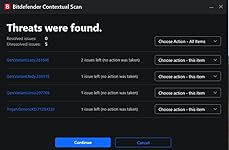
In my opinion this is an incredible value. The 12TB enterprise grade drive and the external drive enclosure alone could cost what this does. Add in the enormous amount of games and emulators that this has. I only gave 4 stars because this isn't exactly intuitive to use. It isn't a simple plug n play unit. There is definitely some knowledge that is needed to make full use of this product. I have a generic Playstation controller that works perfectly well at navigating the menus and getting into the games. Once in the games the controller does nothing. Turns out that I have to go into all of the purported emulators and map out the controller for each of them. Many of which I have yet to figure out how to do. When I contacted the seller for support on this issue I received a single response of, we'll get back to you. The instructions for installation were quite easy to read, understand and follow. Everything went into my system as it was intended. On that end they did a marvelous job. Update - After running this through a virus scan I discovered the hits described in the picture. I also discovered 2140 password protected files that could not be scanned. I would urge caution when considering this product. ... show more
Reviewed in the United States on December 27, 2023 by Craig K.

  • Important Info
Very nice.. Lots of Games. The Instructions tell you for best performance you need at least an RTX 1030 or Higher. That may be needed to run games that require it, but I build my own Gaming PC's & using an Asus ROG Strix B550 E Gaming Motherboard a Ryzen 7 5800X @ 4.5 Ghz & 16 Gigs DDR 4 @ 3200 Mhz & a Gforce 1080 TI GPU they run Great. just follow the instructions & you will be fine.. It comes with an Enclosure for the Hard Drive.. But I had another with a Built in Fan to keep it cooler. I'm happy with it.. :) ... show more
Reviewed in the United States on April 17, 2026 by Vince Cooper

  • Need A Beefy pc for pc games but I LOVE THIS!!
The media could not be loaded. I have been cataloging retro games for about 10 years. But having everything in one collection with artwork and videos and this front end it’s exactly what I wanted. There are some systems I had not even heard of that were only released in China, Japan, etc. If you follow the instructions exactly, it works flawlessly. Mame: for this one, your controllers will not work, but if you watch a five minute YouTube video it will show you exactly what to do. Just type mamecontrol set up. Switch: same thing for the Switch open up the folder, name, emulators and access the yuzu emulator, and go to controls under settings and use your desired control, set up You can even run it on the ROG ally. As long as you don’t mind being connected while doing so. ... show more
Reviewed in the United States on December 4, 2023 by Faviola vega

  • Lotta good games
Good quality
Reviewed in the United States on November 18, 2025 by Daddy

  • Mostly Great, A Little Bit Bad.
There are a ton of games on here, and most of them work. That being said, some of the games are in Chinese and can't get past the menu, others flat out don't work. The PC games can give off a false positive for your Anti-virus, but I deleted those cause I don't want them. The final bad mark on an otherwise great collection, the hard drive randomly disconnects from my computer and reconnects. For a hard drive, that's a bad sign. I'm hoping it's the cable and not the drive. ... show more
Reviewed in the United States on April 24, 2025 by JRBD

  • Avoid like the plague it is!!!
Drive had at least 5 nasty Trojans, and ton of Rootkits on it. Mind you the stuff on it is not exactly on the up and up, but still do not connect to a computer that you plan on ever connecting to the internet again. It was installed on a virgin win 11 PC that was pristine. It changed the host file to prevent websites for virus removal. Closed ports and sites that allow remote access. The PC had a ton of changes to Windows system files. Sandboxed the drive scanned the trojans found, and a number of keyloggers and redirects. Even Chrome was blocked from allowing connections of certain ports. All on a blank slate PC, which needed to be fully wiped to make functional again. Caveat Emptor ... show more
Reviewed in the United States on May 1, 2024 by E. Koerner

  • Has tons of games & most work well
It's not exactly plug & play. Follow the setup guide included with the drive. But I download and installed the files from the official websites instead of installing them from the game drive..most of the files on the drive would be outdated anyway. Also download the Bebas Nueue font from Microsoft. I did find one malware file when I ran a scan..it seems like a crack for a pinball game. Like it says, make sure your system is up to date & meets the requirements. Locate that Bebas Nueue font on the game drive and rename the updated file you download to the same as it is on the drive. Copy the file you downloaded and paste it in the drive where the file is located.. select overwrite file. Then open or right click the file and click install. If you'll be using a HDMI cable to play on a larger screen, hook it up first before starting the game. Once all of this is done, plug in a controller and fire it up. Some games may need download or locate the required emulator files to play. I haven't gotten the higher end games like ps5 to work yet..I have a Asus gaming laptop with an i5 so that could be the reason. GameCube, and Switch games run just fine; just the normal slowdown when you have a lower end system and other people playing with you. I used an Xbox One controller and it works fine. ... show more
Reviewed in the United States on March 1, 2024 by Lee

Can't find a product?

Find it on Amazon first, then paste the link below.
Checking for best price...