Search  for anything...

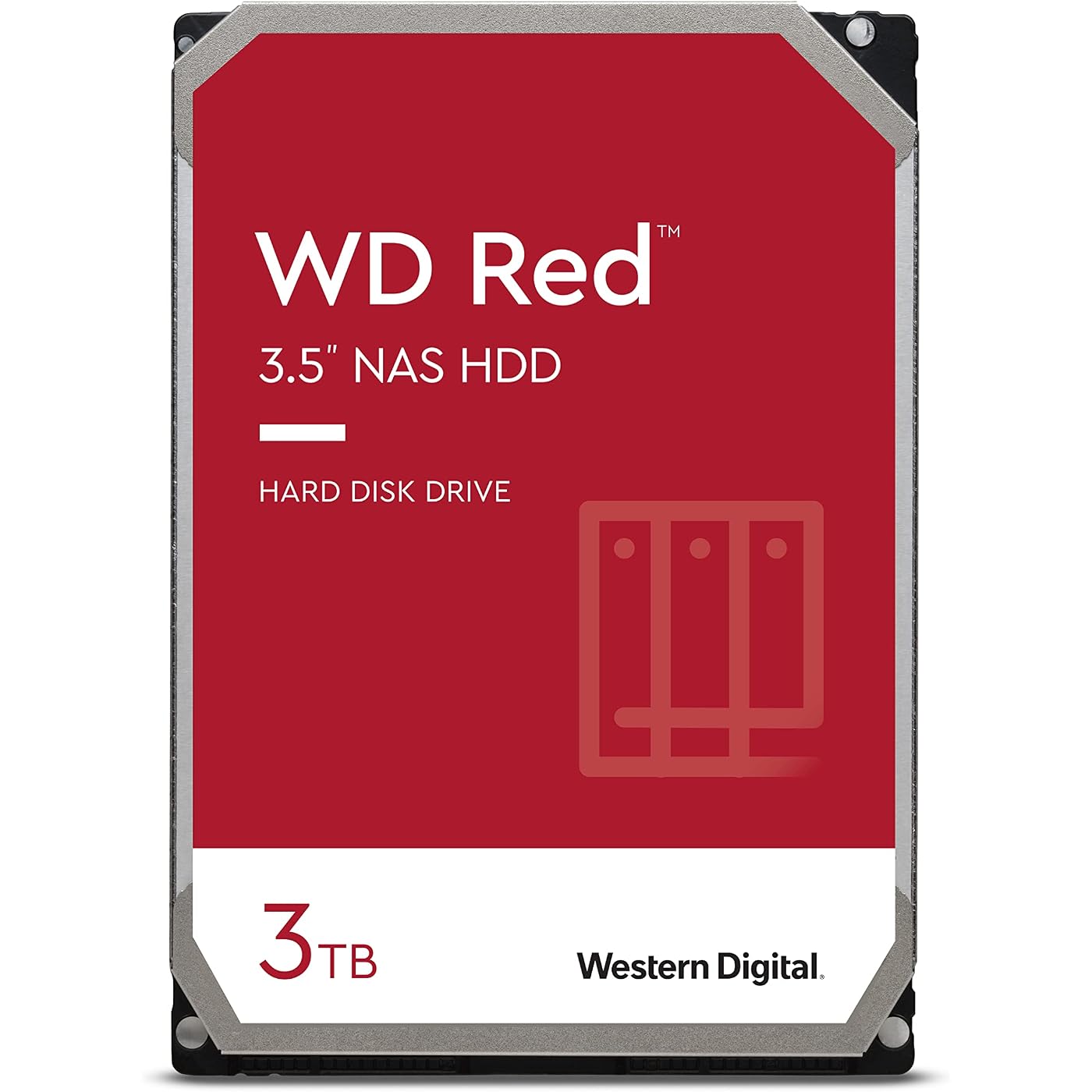
Western Digital 3TB WD Red NAS Internal Hard Drive HDD - 5400 RPM, SATA 6 Gb/s, SMR, 256MB Cache, 3.5" - WD30EFAX
Based on 12,509 reviews
Condition: Used - Like New
Checking for the best price...
$299.89
Save $140.10 was $439.99

Buy Now, Pay Later


As low as $49.98 / mo
  • – 6-month term
  • – No impact on credit to apply
  • – Instant approval decision
  • – Secure and straightforward checkout

Ready to go? Add this product to your cart and select a plan during checkout.

Payment plans are offered through our trusted finance partners Klarna, Affirm, Afterpay, Zip, Apple Pay, and Google Pay. No-credit-needed leasing options through Acima may also be available at checkout.

Learn more about financing & leasing here.

Selected Option

Free shipping on this product

This item is eligible for return within 30 days of receipt

To qualify for a full refund, items must be returned in their original, unused condition. If an item is returned in a used, damaged, or materially different state, you may be granted a partial refund.

To initiate a return, please visit our Returns Center.

View our full returns policy here.


Availability: Only 1 left in stock, order soon!
Fulfilled by Nationwide Tech Biz

Arrives Nov 6 – Nov 12
Order within 9 hours and 34 minutes

Available payment plans shown during checkout

Protect Your Purchase

Easy claims online, fast replacements, no fees

Checking for protection plans...

At a glance

Condition
Used - Like New
Capacity
3TB
Style
Red
Pattern
Hard Drive
Model
WD30EFAX
Storage
3 TB
Weight
1.8 oz
Warranty
3-year manufacturer's limited warranty
Works with
Desktop

Features 6

  • Available in capacities ranging from 2-6TB with support for up to 8 bays
  • 5400RPM performance class
  • NASware firmware for compatibility
  • NAS systems with daily workloads associated with personal and home office environments and idle time available to perform necessary background operations

Description

There’s a leading edge WD Red drive for every compatible NAS system to store your precious data. With drives up to 6TB, WD Red offers a wide array of storage for customers looking to build a NAS solution. Built and tested for personal and home NAS systems with up to 8-bays, these drives pack all the punch you need in one powerhouse unit for storing, archiving, and sharing. With WD RedTM, you’re ready for what’s next.

Specs 33

Digital Storage Capacity 3 TB
Hard Disk Interface Serial ATA-600
Connectivity Technology SATA
Brand Western Digital
Special Feature Data Recovery Service
Hard Disk Form Factor 3.5 inches
Hard Disk Description Mechanical Hard Disk
Installation Type Internal Hard Drive

Frequently asked questions

If you place your order now, the estimated arrival date for this product is: Nov 6 – Nov 12

Yes, absolutely! You may return this product for a full refund within 30 days of receiving it.

To initiate a return, please visit our Returns Center.

View our full returns policy here.

  • Klarna Financing
  • Affirm Pay in 4
  • Affirm Financing
  • Afterpay Financing
  • Zip Pay in 4
  • Financing through Apple Pay
  • Financing through Google Pay
Leasing options through Acima may also be available during checkout.

Learn more about financing & leasing here.

Top Amazon Reviews


Reliable background storage; not built for speed
Capacity: 6TB Style: Red Pattern: Hard Drive
Why I ordered this item: My old backup drive started clicking. Likes: * It showed up in my NAS setup right away and let me format it in a couple clicks. * Transfers to it are zippy for a spinning drive. I moved a folder of old video files over and it kept a steady pace the whole time. * It's quiet. I can barely tell it's running when I'm sitting a few feet from the closet where my NAS lives. * The case is plain metal, not fancy, but it's got some heft to it and doesn't feel cheap or hollow. No likes: * This is an SMR drive, and if you're doing a big RAID rebuild that can get really bad. Mine took way longer than I wanted to sit around waiting for. * This drive spins slow, not built for anyone wanting fast random access, just steady background storage. Would I pay full price for this product: Yes Final thoughts: This is a background storage drive, not a speed demon. I wouldn't put it in anything doing constant read/write work though. ... show more
Reviewed in the United States on September 4, 2026 by Amazon Customer

Used to Easily Replace Failed Drive in Tivo Roamio
Capacity: 2TB Style: Red Pattern: Hard Drive
I considered throwing away my six year old Roamio, model 846500, when it failed. The Tivo wouldn't get past the "Welcome" screen. I fixed the failure in less than an hour with only this WD20EFAX drive, and now have four times the storage as a bonus. The internet knowledge base (and the Weaknees company that's probably the best third party support company for Tivo) says that this failure mode is almost always caused by a failed hard drive. They also recommend this particular model replacement drive. Replacing the drive in Tivo Roamio is extremely easy. It's easy both both physically and because this Tivo will automatically format a new drive (as long as the drive size is 3TB or less) and automatically load all the required Tivo software during boot up. You will, unfortunately, lose any recordings and such drive-kept data as channel lists, scheduled recordings and One-Passes, and so on that were on the old failed drive. There are plenty of decent videos on the internet to show how to do this, but here is a quick procedure to give you an idea of how easy it is: Remove two torx head screws in the back of the unit and use a thin blade such as a common dinner knife to carefully pry up the top of the box. Remove three torx screws that attach the drive's adapter rails to the box and disconnect the drive's data/power cable by pulling the connector away from the drive. Remove the drive mounting rails from each side of the drive, noting their original position, by removing the two torx screws connecting each rail to the drive. Using the new drive, put everything back together. Reconnect the Tivo to your TV system, plugging in the power cable last. Plug in the Tivo's power and let the system boot up. Be patient because it will take some time for the Tivo to automatically format the drive and load all the software needed. Follow the screen guide to set up the Tivo as for a new unit. Your current account with Tivo and any monthly or All-In programming are still in place because the account is based on the box'es ID number which is stored on Tivo's motherboard rather than its hard drive. Voila...You just saved yourself the cost of a new Tivo and upgraded your video storage capacity, as I did! ... show more
Reviewed in the United States on November 20, 2019 by RWT

Western Digital NAS Hard Drive
Capacity: 2TB Style: Red Pattern: Hard Drive
This is not your average Western Digital desktop hard drive. The WD Reds are made for heavy duty, high duty cycle use. They are made for use in Network Attached Storage devices. The NAS environment can really torture a hard drive. Especially when it has to support a lot of users and devices. This hard drive is made to be able to function in such an environment. I have a Terramaster NAS in my home network. That system has two Seagate Ironwolf hard drives. It has been flawless in operation. I attached an external hard drive enclosure to the Terramaster to have a backup of all the data. The hard drive enclosure does not come with its own hard drive. You get to choose, depending on your needs. I bought this WD Red hard drive to use as the backup for the Terramaster. I backup the data from the NAS on this hard drive and then store the drive in a safe location. The WD Red has been flawless. It is easily the equivalent of the Seagate Ironwolf. The operation is silent and reliable. I have not had any issues with these NAS hard drives. Yes you can use a regular desktop hard drive for this purpose. A WD Blue caviar hard drive will also work. However, the WD Red is a more robust hard drive. It is more expensive than a regular desktop hard drive. But the reliability and peace of mind are worth it. NAS hard drives will also work on your desktop computer. You can swap out your WD Blue hard drive for this one. You will get added durability and dependability. But it will only be worth the extra cost if your computer is regularly stressed. A one-user desktop PC that gets used for 5 hours per day is not under stress. However, if you have a PC that is used for security monitoring purposes or as a home server, then yes, invest in a more robust hard drive. I love solid state hard drives for their performance and lighter weight when used on a laptop. However, for storage purposes, I still prefer a mechanical hard drive. If I were building my own desktop PC, yes, I would use a NAS hard drive such as the WD Red. But I would not throw out a working WD Blue that comes with a new PC. Evaluate your needs carefully. A data storage system used in a business setting should have robust hard drives. If you are a content creator on Youtube, get at least a four bay NAS storage device and fill those drive bays with WD Reds or Seagate Ironwolves. If you surf the internet, shop online, and basically only consume social media, then a regular PC with a traditional desktop hard drive will be good enough. Highly recommended for NAS Storage systems and heavy-duty desktop use. ... show more
Reviewed in the United States on August 30, 2020 by citan-uzuki

Good enough for a mac fusion drive
Capacity: 2TB Style: Red Pattern: Hard Drive
I didn't realize it was an SMR drive when I bought it, but it turns out to not make any real difference when paired with an SSD in an iMac fusion drive. Writes go to the SSD first, then some time later the less frequently used data gets migrated to the hard drive in the background, usually in large chunks. Small file writes are where SMR performance suffers. Maybe the initial restore of my data took a little longer. I think it was about 12 hours for 1TB of data, copied from a USB2 external drive, so not unreasonable and the USB2 was probably the limiting factor. Day to day performance since then has been just as quick as before. As it was not an Apple OEM replacement hard drive, I used a 2n3904 npn transistor as a temperature sensor to stop the fans from going crazy. ... show more
Reviewed in the United States on September 15, 2020 by John Davison

Returns are risky
Capacity: 4TB Style: Red Pattern: Hard Drive
I bought 4 of these to put into a 5 bay drive. I'm using them as a RAID 5 and it's been running continuously for a couple of months now. I've had no problems. I looked into buying used Hitachi drives, but I decided it wasn't worth the time and money to buy used hard drives. You never know what you'll get. I've been very happy with these. _____________________ It's now almost 2 years since I ordered 4 of these for a RAID 5 array. One of them has failed. It's the first WD drive that I can remember failing on me, and I've been using them for years. WD has agreed to honor the warranty (they were warranted for 3 years). The problem is that the drive failed in a way that it can't be reformatted. In order to make useless any data on the hard disk platters my only option is to physically destroy them. But then WD won't honor the warranty if there is physical damage to the drive. They assured me that the disk would be reformatted. BUT, in a previous, unrelated order from Amazon in 2020, I received a "new" WD drive. In preparing that drive for use I discovered that it had already been formatted and there were several Word files on it from the former owner. Some of the files were immigration forms containing personal information. In light of this knowledge, I asked WD if I could drill holes through the platters before sending them in. The reply was a quick "No, physically damaged disks aren't covered under the warranty". My only 2 choices were to keep the disk and destroy it myself, or return it for a replacement and hope that WD follows up and re-formats it. I chose to keep it and eat the loss. I think that WD should formulate a better policy for situations like this, and that's why I've given them a 4 star rating instead of 5. ... show more
Reviewed in the United States on June 13, 2021 by tokyodj

6TB Hard Drive Worked Great!
Capacity: 6TB Style: Red Pattern: Hard Drive
Buying anything off Amazon related to computer equipment can be a risk. Great experience from this seller and would buy 4 more hard drives if I had the money. Received it, bench tested and ran with no errors. Formatted and spun right up on my NAS. Great customer service and very responsive! Saving for future purchases 5 Star! ... show more
Reviewed in the United States on November 20, 2025 by T. Rivera

Excelente disco para NAS
Capacity: 6TB Style: Red Pattern: Hard Drive
Hasta el día de hoy siguen funcionando y ya van cerca de 3 años
Reviewed in the United States on May 17, 2026 by Patricio

Not appropriate for NAS usage
Capacity: 6TB Style: Red Pattern: Hard Drive
I've been a long time fan of using WD Red drives in my servers and they've served me well... until now. These drives are SMR, which renders them useless for NAS. They'll work great, I've got no complaints about performance, and the four I own are all working fine 2.5 years later without a single reallocated sector. However, when you resilver to replace a failed drive, the SMR technology completely falls apart and turns it into literally a 2 - 3 week long process (VS under 24 hours for a standard CMR drive). If you're at one drive of redundancy then you'd better hope you don't get a second drive failure that month... and you're NAS performance is going to be terrible during the process as well. Thus these drives are not significantly better than any cheap drive, for a significant price premium. What's worse, when I bought my drives there was zero indication that they'd switched from CMR to SMR drives in the WD Red product line, and even today they don't explain why that matters. As such, I'd be extremely nervous about buying a WD drive in the future, as who knows what new cost-saving technology they'll silently implement. Aside from performance and reliability, the next most important aspect of a NAS drive is the warranty. Harddrives fail, regardless of the company or price point, so if you're running a NAS with several drives then you're inevitably going to get some that die prematurely. I've had to send a couple drives in for replacement, and the process is typically doing an RMA on the manufacturer's website and they'll ship a replacement to you for free. WD now charges to replace defective drives. They want you to mail your drive to them, at your own expense, then once they receive it and process it in a couple weeks they'll mail you a refurbished replacement with you paying for shipping ($8 for it to arrive in ten days, upwards of $50 for faster shipping). If you want them to ship immediately you need to pay $25 (non-refundable) plus the cost of the replacement drive (refundable after they receive and process your old drive). Yes, that's right, if they send you a dead drive then you'll need to pay another $50+ and wait for weeks for a replacement. Oh, and the replacement will probably have thousands of hours of use so you can look forward to repeating the process in another year or two. ... show more
Reviewed in the United States on May 19, 2021 by Izomiac
Checking for best price...