Search  for anything...

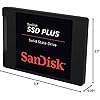
SANDISK SSD PLUS 480GB Internal SSD - SATA III 6 Gb/s, 2.5"/7mm, Up to 535 MB/s - SDSSDA-480G-G26, Black

  • Based on 51,268 reviews
Condition: New
Checking for the best price...
$223.57 Why this price?

Buy Now, Pay Later


As low as $37.26 / mo
  • – 6-month term
  • – No impact on credit to apply
  • – Instant approval decision
  • – Secure and straightforward checkout

Ready to go? Add this product to your cart and select a plan during checkout.

Payment plans are offered through our trusted finance partners Klarna, Affirm, Afterpay, Zip, Apple Pay, and Google Pay. No-credit-needed leasing options through Acima may also be available at checkout.

Learn more about financing & leasing here.

Selected Option

Free shipping on this product

30-day refund/replacement

To qualify for a full refund, items must be returned in their original, unused condition. If an item is returned in a used, damaged, or materially different state, you may be granted a partial refund.

To initiate a return, please visit our Returns Center.

View our full returns policy here.


Availability: Only 3 left in stock, order soon!
Fulfilled by FamilyTech deals

Arrives Wednesday, Oct 28
Order within 16 hours and 20 minutes
Available payment plans shown during checkout

Protection Plan Protect Your Purchase
Checking for protection plans...

Capacity: 480GB


Features

  • Easy upgrade for faster boot-up, shutdown, application load and response (As compared to 5400 RPM SATA 2.5 hard drive. Based on published specifications and internal benchmarking tests using PCMark Vantage scores.)
  • Boosts burst write performance, making it ideal for typical PC workloads
  • The perfect balance of performance and reliability
  • Read/write speeds of up to 535MB/s/445MB/s (Based on internal testing; performance may vary depending upon drive capacity, host device, OS and application.)
  • Shock-resistant for proven durability even if you drop your computer (Shock resistant (up to 1500G) and vibration resistant (5gRMS, 10-2000 HZ/4.9 gRMS, 7-800 HZ), Temperature (from 0 degrees Celcius to 70 degrees Celcius))
  • 3-year limited manufacturer warranty

Description

SanDisk, a pioneer in solid state storage technologies and the brand pros trust, delivers improved speed and performance with the SanDisk SSD Plus. With sequential read speeds of up to 535MB/s [480GB, 960GB and 1TB]; 530MB/s [120GB & 240GB], this solid state drive performs faster than a typical hard disk drive(1). You'll appreciate faster startups, shutdowns, data transfers, and application response times than with a hard disk drive(1). The SanDisk SSD Plus also offers quiet, reliable performance, and dashboard(4) status monitoring for your favorite media applications. | 1GB=1,000,000,000 bytes. Actual user storage less. | Based on internal testing; performance may vary depending upon drive capacity, host device, OS and application. 1MB=1,000,000 bytes. | (1) As compared to 5400 RPM SATA 2.5” hard drive. Based on published specifications and internal bench marking tests using PCMark Vantage scores. | (3) Shock resistant (up to 1500G) and vibration resistant (5gRMS, 10-2000 HZ/4.9 gRMS, 7-800 HZ), temperature (from 0 degrees Celcius to 70 degrees Celcius) | (4) Download required This drive is compatible with servers and arrays that accept 2.5” 7mm SATA drives

Digital Storage Capacity: 480 GB


Hard Disk Interface: Serial ATA-300


Connectivity Technology: SATA III


Brand: SANDISK


Special Feature: Boost burst write performance making it ideal for typical PC workloads


Hard Disk Form Factor: 1 inches


Hard Disk Description: SSD gives significantly faster speed and improved overall system responsiveness


Compatible Devices: This drive is compatible with servers and arrays that accept 2.5" 7mm SATA drives


Installation Type: Internal Hard Drive


Color: Black


Digital Storage Capacity: 480 GB


Hard Disk Interface: Serial ATA-300


Connectivity Technology: SATA III


Additional Features: Boost burst write performance making it ideal for typical PC workloads


Hard Disk Form Factor: 1 inches


Compatible Devices: This drive is compatible with servers and arrays that accept 2.5" 7mm SATA drives


Specific Uses For Product: ...


Read Speed: 535 megabytes_per_second


Media Speed: 445 megabits_per_second


Cache Memory Installed Size: 480


Data Transfer Rate: 750 megabits_per_second


Form Factor: 2.5-inch


Hardware Connectivity: SATA 6.0 Gb/s


Hardware Platform: PC


Hard-Drive Size: 480 GB


Item Weight: 1.12 ounces


Item Dimensions L x W x Thickness: 3.9"L x 2.7"W x 0.25"Th


Number of Items: 1


Unit Count: 1 Count


Customer Package Type: Standard Packaging


Brand: SANDISK


Model Number: SDSSDA-480G-G26


Hard Disk Description: SSD gives significantly faster speed and improved overall system responsiveness


Built-In Media: SSD Plus Drive


Model Name: SanDisk SSD Plus Internal SSD


Manufacturer: Sandisk Technologies, Inc.


Global Trade Identification Number: 57, 00, 45


UPC: 619659146757


Item Part Number: SDSSDA-480G-G26


Mfr Part Number: SDSSDA-480G-G26


Warranty Description: kkk


Installation Type: Internal Hard Drive


Color: Black


Enclosure Material: Nand Flash


Frequently asked questions

If you place your order now, the estimated arrival date for this product is: Wednesday, Oct 28

Yes, absolutely! You may return this product for a full refund within 30 days of receiving it.

To initiate a return, please visit our Returns Center.

View our full returns policy here.

  • Klarna Financing
  • Affirm Pay in 4
  • Affirm Financing
  • Afterpay Financing
  • Zip Pay in 4
  • Financing through Apple Pay
  • Financing through Google Pay
Leasing options through Acima may also be available during checkout.

Learn more about financing & leasing here.
Top Amazon Reviews


  • Significantly improved the speed of my travel laptop that I use for work.
Capacity: 1TB
All right a few things to establish before I get into this: 1.) I installed this hard drive on a laptop I only use for writing word documents and browsing the web. I do not game or do any video card intensive things on here. Just admin and work purposes. 2.) I didn't rate easy to install because the hard drive itself is easy to install. However, the device you install it to will make a huge difference in how easy it is. If you're sticking this in a desktop case, it's as simple as 1, 2, 3. In my case, I was installing it on a Dell laptop with touch screen capability. The amount of steps took me at least an hour or two because I had to follow a Youtube video. So, I have a old Dell laptop that I bought in 2014-2015 that I needed to use while riding the train to work. It served me well until recently when I started to notice that the laptop was taking longer and longer to boot up and run applications. Boot up time would be about 3 minutes into Windows 10, then launching an app could take anyway from 7-10 minutes before it was ready. So we're looking at almost a total of 15 minutes just to do something basic like open word or a website. I assumed it was because I bought a slow laptop, but when I went into task manager I saw that the HD was always hitting 100% usage the entire time the computer was on. In task manager, under performance, your PC should be between 1% if you're not using anything or running any background programs. But my computer was at 100% with absolutely awful read and write speeds. Meanwhile my CPU was at normal values. So I bought the Sandisk SSD which was compatible with my laptop and went through the process of opening up my laptop to take out the original drive. I highly recommend using the IFixit toolkit with magnetic pad to not lose the dozens of screws you will be messing with and to keep notes. Once I got the original laptop drive out (a Seagate ST1000LM024) I plugged the Seagate and the Sandisk drive into my desktop PC and used a software called AOMEI dynamic disk manager pro edition. (Yes you have to buy this software but it's relatively inexpensive at around $50-$60. I cloned the original Seagate drive to the Sandisk drive. Plugged in the Sandisk, reassembled my laptop, and voila works like a charm. Now the laptop takes less than 30 seconds to boot up and be ready for me to use apps. It's even faster than my other work laptop I use strictly for my job which is newer and more expensive than my old machine. Great little drive that has significantly sped up my laptop which I was going to trash and sell. Really happy with this purchase. ... show more
Reviewed in the United States on January 30, 2022 by Wilmar Luna

  • Great budget SSD; huge upgrade from a hard drive
Capacity: 480GB
Why I ordered this item: My old laptop still had the original spinning hard drive in it and it was slow to boot. I wanted a cheap way to speed things up without buying a whole new machine. Likes: * This thing made my laptop boot up in what feels like ten seconds. Going from a spinning drive to this is a crazy good jump. * Install was easy. I cloned my old drive over with some free software and swapped the drive in my laptop. * It's light and feels snazzy for how cheap it was. The case is metal, not some flimsy plastic shell. * Programs open instantly now. Chrome, Word, whatever, it just pops open instead of chugging along. * It runs cool. I was worried about heat in a laptop with bad airflow but the case stays barely warm to the touch. No likes: * 480GB fills up fast if you have a lot of games or media on there. I already had to move some files off to an external drive. * It's SATA, so it's not going to touch the zippy speeds you get from an NVME drive. For a laptop upgrade thats fine, but dont expect the same numbers you'd get from a newer drive. Would I pay full price for this product: Yes Final thoughts: This is a good pick if you have an older laptop or desktop with a spinning hard drive in it. It won't compete with newer NVME stuff but for the price it turned my sluggish old laptop into something that feels new again. ... show more
Reviewed in the United States on September 5, 2026 by Amazon Customer

  • Fast, easy to install
Capacity: 480GB
This is a recent revision of the 480Gb SanDisk SSD PLUS. Overall, I am satisfied with this drive. Versus the previous version, the top end transfer rates for read and write show as slightly slower, but on actual usage, there is no measurable difference. In my use case, this was to replace a 500G traditional drive in an older Thinkpad t450 which was showing its age. After replacing the drive with an SSD my boot time went from about 2 minutes to about 20 seconds., with a good 5s of this in the BIOS. This time is from pressing the power button to having a login screen available. Once logged in, everything was faster. Google Chrome loads in about 2s versus around 5s previously. I don't do a lot of compile processes anymore which really stressed the disk, but a couple random maven builds ran within seconds. This is not the fastest drive out there, nor the cheapest, but it's a very good balance of price and cost. Storage is ample for my needs. The write cycle rate will likely exceed the useful life of the laptop. Dollar for dollar it was the best upgrade available for this older laptop. ... show more
Reviewed in the United States on December 9, 2019 by Kwan L. Lowe

  • Great Upgrade for Extra Storage
Capacity: 1TB
This SanDisk SSD Plus is a solid storage upgrade. The 1TB capacity provides plenty of space for files, applications, and media. The 2.5-inch size makes installation straightforward for compatible systems, and the SATA III interface provides good everyday performance. Overall, a practical option for adding more storage to a laptop or desktop. ... show more
Reviewed in the United States on October 14, 2026 by Romell Nelson

  • Unreliable SSD but very good customer service
Capacity: 1TB
Changed rating from one star for defective SSD to four stars for great customer service. I bought this SSD in February 2019, and it started having severe issues within 4 months. I wish it would have acted up within the return window as I would have shipped it back instantly. Recently it got to a point where the computer would not boot up properly, or if it did, it would take about 10 minutes to load a few programs and the desktop icons would not function at all. It would take over two hours to do about a five minute scan with my previous SSD. Often times the screen would be black with just the mouse cursor present (latest graphic drivers were installed on the computer), which rendered the computer useless. I removed this SSD and put my previous smaller SSD back in the computer and everything works perfectly. This SSD is garbage and I would not recommend it to anybody. Save yourself the headache and buy a Samsung SSD. ***UPDATE*** SanDisk customer support reached out to me after seeing my one star review. They worked with me and paid for me to return the defective SSD and they upgraded me to their 1TB Ulta 3D SSD at no cost to me. Very happy with the customer service I received, so hopefully this SSD will last longer than a few months... ... show more
Reviewed in the United States on July 18, 2019 by Paul McLaughlin

  • Good for SATA. Won't beat NVMe, but still pretty fast.
Capacity: 2TB
If you're going all SSDs and don't want to rely on external drives, storage is still a bit of a problem. Most boards only have one or two M.2 slots, so if you want to keep going you need SATA drives too. Especially if you don't want it to cost an arm and a leg. These SATA drives aren't as fast as NVMe, but they're still pretty fast. For just about any normal task they should still exceed any reasonable requirements. Games run just fine on this drive and it's still fast enough for most high performance tasks like video capture or etc. Maybe UHD in uncompressed video couldn't keep up, but I think for most normal people this drive will do just fine. So far this drive seems to be reliable. It doesn't run especially hot or anything, so I have no complaints. ... show more
Reviewed in the United States on June 18, 2025 by Joshua

  • Great upgrade from HHD to SSD
Capacity: 2TB
I got this Samsung 2Tb SSD to upgrade my 2012 Dell XPS 8500 tower with Windows 10 Pro. The machine is perfect for my needs, but boot-up, shut down. and loading programs was like watching paint dry. I didn't need the 2Tb, but my machine came with a 7200 2Tb HHD. Research and advice from experts suggested I match size to avoid cloning problems. Quick delivery and competitive price. I advise that you order the companion mounting bracket and USB to SADA cable. The cable makes it so easy to clone the SSD from your HHD without opening the box. I only used abut 480Gb of the 2Tb. I don't know enough about computer hardware to attempt to open the box and start moving cables, resetting the Bios, etc. to set it up to clone. With the USB to SATA cable, just plug into an open USB and follow the video instructions. I downloaded Macrium Reflect 7 Free Home version to clone the drive. Macrium has a Webinar they converted to a Youtube video that gives step by step instructions for making a Boot Drive and cloning a drive. It even shows how to clone drives with more or less capacity. I used the free version, but when I get help with making my old HHD a backup drive I can clone, I plan to purchase the software, then every month I can create a reserve drive. My research indicates that SSD's are not as reliable as the old HHD's and booting from a clone is a breeze. When the cloning process was complete (less than an hour), I disconnected and opened the box. removed the open bay, attached the SSD inside the bracket, reinstalled the bay and connected the old cables from the HHD to the new SSD, closed the box, reattached power, video and sound and powered it up. In about 40 seconds boot-up was complete. The old HHD took about 4 to 5 minutes and shut down in 15 seconds or less compared to about 2 minutes before. I wish I had not waited so long to upgrade. I recommend upgrading to SSD if you are unhappy with the slow performance of your computer and are using a HHD. Everything you need to do the job is Macrium Reflect, a USB to SATA, a USB stick for Boot Drive and mounting hardware (dependent on your box). ... show more
Reviewed in the United States on July 11, 2020 by Jim Palmer

  • Great Improvement
Capacity: 2TB
My computer had a 1T HDD drive (That's the kind where there is a disk that spins and not a solid state drive like this one). It was taking my computer over 20 minutes to reboot and the thing was always stopping to catch up with what I was doing. I could have fixed a lot of the problem by reinstalling the operating system, but that would have meant repurchasing some expensive apps. Some companies just will not let you reinstall an app after you reinstall the operating system. They think you are installing it on a new computer. Anyway, this drive doubled my storage and it was fairly easy to install. The end result is that my computer reboots in about 20 seconds instead of 20 minutes and my apps open and run at light speed. This thing totally solved the problem. Of course, I had to clone the drive to copy everything from the old drive to the new one or I would have had the same problem of needing to buy my apps again. I used EZ Gig Cloning and it did a great job. If you need instructions on how to install one of these, just go to YouTube and there is very likely a video for your exact computer. I cannot comment about longevity because I just installed this a few days ago, but I love the speed. It saves a whole lot of time. Highly recommended. ... show more
Reviewed in the United States on March 17, 2020 by Grace1

Can't find a product?

Find it on Amazon first, then paste the link below.
Checking for best price...