Search  for anything...

roborock Q7 M5+ Robot Vacuum and Mop, Up to 7-9 Weeks Self-Empty, 10000Pa

  • Based on 25,420 reviews
Condition: New
Checking for the best price...
$249.99 Why this price?
Save $110.00 was $359.99

Buy Now, Pay Later


As low as $41.67 / mo
  • – 6-month term
  • – No impact on credit to apply
  • – Instant approval decision
  • – Secure and straightforward checkout

Ready to go? Add this product to your cart and select a plan during checkout.

Payment plans are offered through our trusted finance partners Klarna, Affirm, Afterpay, Zip, Apple Pay, and Google Pay. No-credit-needed leasing options through Acima may also be available at checkout.

Learn more about financing & leasing here.

Selected Option

Free shipping on this product

FREE 30-day refund/replacement

To qualify for a full refund, items must be returned in their original, unused condition. If an item is returned in a used, damaged, or materially different state, you may be granted a partial refund.

To initiate a return, please visit our Returns Center.

View our full returns policy here.


Availability: Only 5 left in stock, order soon!
Fulfilled by Amazon

Arrives Thursday, Oct 22
Order within 13 hours and 22 minutes
Available payment plans shown during checkout

Protection Plan Protect Your Purchase
Checking for protection plans...

Set name: Q7_M5+


Features

  • Up to 7-9 Weeks Hands Free Cleaning: With a 2.7L sealed dust bag, the RockDock Plus efficiently collects pet hair, dirt, and debris without the need for constant emptying. This means longer cleaning cycles and more time between maintenance, ensuring your home stays consistently clean.
  • 10000Pa HyperForce Suction Power: High-performance suction lifts pet hair and debris from every surface, reaching deep into carpets and along edges for a thorough clean in every pass.
  • Dual Anti-Tangle Design: Spend less time detangling and more time enjoying your day. The JawScrapers main brush and 0% hair-tangling side brush resist pet hair wrap, even from long-haired breeds. With fewer cleaning interruptions, your robot stays ready with minimal effort.
  • Removes Dust You Hardly See: This advanced system combines vacuuming and mopping in one go, effectively capturing even the finest dust that traditional vacuuming may leave behind. With three adjustable water flow settings, you can tailor the cleaning power to meet your specific needs.
  • PreciSense LiDAR Navigation System: PreciSense LiDAR maps your home with precision, ensuring efficient and thorough cleaning. Its real-time mapping technology enables optimized cleaning paths, perfect for homes with pets and multiple rooms.
  • Multiple Ways to Control: Take charge of your Roborock through the Roborock App and enjoy hands-free control. Whether you're relaxing at home or on the go, experience personalized and effortless cleaning without lifting a finger.
  • Easy and Effortless Control with the Roborock App: Automate your cleaning routine with scheduled cleanings, start a quick spot clean when needed, set no-go zones around pet areas, and monitor progress and battery life in real time. All of these features are easily accessible from your smartphone, offering you greater convenience and control. Please note that the app supports 2.4GHz Wi-Fi only.

Description

Say goodbye to frequent emptying with RockDock Plus. The large 2.7L dust bag lets you clean for up to 7 - 9 weeks, making it perfect for every kind of household. For deep, powerful cleaning on various floor types, tackling tough debris with ease. Dual anti-tangle system efficiently lifts dirt, dust, and debris while reducing hair tangles. Q7 M5+ Q7 L5 Q10 S5+ Q7 M5 Q8 Max

Brand: roborock


Model Name: Roborock Q7 M5+


Surface Recommendation: Wood, Tile, Marble, Carpet


Special Feature: App Control, Dual Anti-Tangle Design, VibraRise 2.0, PreciSense LiDAR Navigation, Up to 7-9 Weeks Hands Free Self Emptying, 10000Pa HyperForce Suction Power See more


Color: Black01


Surface Recommendation: Wood, Tile, Marble, Carpet


Other Special Features of the Product: App Control, Dual Anti-Tangle Design, VibraRise 2.0, PreciSense LiDAR Navigation, Up to 7-9 Weeks Hands Free Self Emptying, 10000Pa HyperForce Suction Power


Controller Type: App Control


Filter Type: Cartridge


Battery Life: 150 minutes


Cleaning Path Width: 12.8 inches


Battery Type: Lithium Ion


Voltage: 120 volts


Capacity: 2.7 liters


Power Source: Battery Powered


Control Method: Push Button


Compatible Devices: Smartphones


Form Factor: rectangular


Color: Black01


Indoor Outdoor Usage: Indoor


Noise Level: 65 db


Number of Wheels: 2


Maximum Suction: 10 meters


Number of Power Levels: 4


Brand Name: roborock


Model Name: Roborock Q7 M5+


Included Components: Quick Start Guide(1) Moisture-Proof Mat(1) User Manual(1) Robot(1) Mop Module(1) Auto-Empty Dock(1) Power Cord(1) Mop(1)


Model Number: Roborock Q7 M5+


UPC: 195043007151


Unit Count: 1 Count


Item Highlight: Upgraded from Q5 Max+, Dual Anti-Tangle System for Pet Hair & Carpet, PreciSense LiDAR Navigation, App Control, Black


Item Type Name: Robotic Vacuum Cleaner


Manufacturer: roborock


Number of Items: 1


Manufacturer Part Number: Roborock Q7 M5+


Item Dimensions L x W x H: 19.57"L x 12.8"W x 10.24"H


Item Weight: 10.6 pounds


Frequently asked questions

If you place your order now, the estimated arrival date for this product is: Thursday, Oct 22

Yes, absolutely! You may return this product for a full refund within 30 days of receiving it.

To initiate a return, please visit our Returns Center.

View our full returns policy here.

  • Klarna Financing
  • Affirm Pay in 4
  • Affirm Financing
  • Afterpay Financing
  • Zip Pay in 4
  • Financing through Apple Pay
  • Financing through Google Pay
Leasing options through Acima may also be available during checkout.

Learn more about financing & leasing here.

Top Amazon Reviews

  • Good at what it does
Set name: Q55_DuoRoller+
This is my first robot vacuum, and I have only had it for one month, so far I am quite satisfied with my purchase. I chose a model that only vacuums as that was my need, I cannot speak to mop functions (apparently there is an add on for this model if wanted). I have a mix of carpet, hardwood, tile, and a number of area rugs in various sizes (incl. faux-fur, woven, low profile, and non slip mats). If you manage your expectations (read be realistic) about what a programmable piece of machinery is going to be able to do, I find the Q5 Duoroller + is excellent at its job. Does it completely remove the need to vacuum? No, but for our house (2 story, 3k+ sq ft), it keeps the floors generally free of dirt, debris, and pet hair (3 cats & a chinchilla) on a day to day basis. I can handle occasionally doing the fiddley bits of vacuuming. It does require the Roborock App be downloaded if you want to fully take advantage of the robot’s capabilities, but can do very basic functions with just the three buttons on the robot. The App is a bit clunky, and not always intuitive, but it doesn’t stand out as more so than the majority of Apps I’ve come across. There are definite improvements that could be made but I have managed to map the house and set up several automations without too much hassle (it has been kind of fun actually). How does the robot perform? It is not a genie, there are areas that the robot cannot reach (under the sectional/recliners, thru narrow openings, etc). While it does vacuum up the majority of debris, the robot is not able to get absolutely everything from the very edges of rooms and around the very base of furniture (dressers, bed frames, etc). This is a limitation of automation & design (from reviews of various robot vacuums it is common issue). I have read several posts about it getting stuck on cords/rugs, getting “lost”, falling off “cliffs”, and knocking over furniture. I spent the better part of several afternoons following it around to see how it handled challenges: the 3 cats (not just them but their toys), 2 story home (stairs and ledges), changes in floor surface, and other obstacles (shoes, remote controls, backpacks, etc). Did it have issues cords and rugs? Yes, but more importantly, it managed to extract itself without destroying either. Shaggy area rugs and slender device cords were more of a problem, as one would expect, low profile rugs/mats and heavier duty electrical cords it went over without a care.Did it sometimes take a few minutes to sort itself out? Yes but I did not once have to “rescue” it as others suggested would be the case. It handled doorway sills/thresholds, of various materials, and even managed to vacuum the bases of my bar stools (an unexpected bonus). It has not driven itself off any stairs, nor committed a “Thelma & Louise” under the second story banister, even while it was initially mapping the house. Your mileage may vary. This model has LiDAR, cliff sensors, and the “bump” sensor. The robot navigates quite well considering how cluttered some of the rooms in my house are. I’ve only had it get “lost” once, that was when I was picking it up and moving it multiple times from room to room to test out its limitations (not a recommended practice). It can “bump” gently against objects during cleaning as it is navigating. I was impressed that in doing so it did not cause water to spill out of the cats’ water dish, move the food plate more than a ¼” (we have an auto feeder for the cats and that was a bit of a concern), nor did it push the pillow cat beds across the floor or knock over anything. I have not found any new scuff marks on furniture or baseboards but it has startled a couple of the cats by bumping them (no cats were injured during these experiments). It is limited in what it can sense below ~ 4” (from the ground), think small toys, tails, shoe laces, pet “accidents”, etc, so be aware of that (and plan accordingly). The robot has sucked up a few cat toys, interestingly they did not cause it to stop vacuuming although it’s efficiency was diminished. When I later retrieved the toys from inside the robot they were in fairly good condition (considering their ordeal) and the robot was not damaged. I’m certain there are things it could suck up that would cause damage (broken glass, stripped coaxial, etc) which is a hazard all vacuums face to one degree or another. The robot will notify you of any problems it encounters, such as not being able to return to the dock because there is an obstruction or the suction pathway being clogged so I suspect you’d learn of any damage pretty quickly. Set up of automations in the App was a bit time consuming and not the most straightforward. The company does release software updates. If you don’t want to set it to download/update automatically, you will need to check regularly for updates in the App. This model does have the ability to store up to 4 maps to work from, which is necessary if you have a multi level house. You do have to carry the little robot up/down to whatever area you want cleaned if it is not on the same level as the charging dock (it’s not very heavy) so be strategic when placing it’s home base. It will obediently return to its starting location when the job is done and wait to be retrieved (for some reason I find that amusing). Maintaining and cleaning the robot is pretty straightforward/easy. I found the two rubber rollers particularly quick to clean as they are easily removed and disassembled without tools. I expect to spend about 15-20 minutes a month on maintaining the robot/dock for longevity. The rollers, side brush, and filter are replaceable and the App has a page where you can easily monitor them for how much “life” they have remaining. The included combo brush/cutter tool I find very useful, the tiny Philips head screwdriver not so much. I recommend using a larger screwdriver along the lines of a #2 size, to remove the few screws you may need to for maintenance. The dock is likewise easy to maintain. Yes, some small amount of dust escapes the holding bin, but the majority is contained and sucked from the robot into the dock bin efficiently. This is the only time I find it to be a bit loud, but you can program when it does it’s emptying so there is that, it is not overly loud during normal vacuum runs. The dock bin has a disposable bag (like in the typical old-style bagged vacuums gramma had) which is supposed to be able to hold around 7 weeks worth of debris. I say take that with a grain of salt. I have already had to replace mine once so I expect it will be a monthly chore at our house. It is super easy to do and the bag opening very neatly closes when removing it from the compartment to minimize dust, just slide in the new bag and the robot is ready to go get the little dust devils again. To wrap up: This little robot does one thing, it vacuums. It has enough bells and whistles to do it effectively (within reason). The programming is competent enough that I can sort of “set it and forget it”. I feel confident enough that it can run itself while I work but I will likely turn it off when away on vacation. ... show more
Reviewed in the United States on November 13, 2024 by Windblownls

  • The smartest vacuum ever!
Set name: S60
My wife and I are in the process of 'smart-tizing' our new home; so, of course, we needed to invest in a robot vacuum. After 'some' research, we initially bought the Shark IQ (more like low-IQ) - disastrous...didn't function as a vacuum or a robot; didn't vacuum anything (lint, hair, dust), and couldn't map the room or find its station...it was like a lost dog roaming around in circles, bumping into walls. Needless to say, we returned it. Subsequently, my wife and I did A LOT more research - Reddit posts, endless YouTube videos, tech reviews, etc...stumbling upon this lesser-known robot - Roborock S6. In that it was only offered for sale via Amazon or eBay, we were a bit skeptical, but the reviews were unanimous...excellent performance. Enter the S6. Due to our previous experience, I was leery out of the box, nervously syncing the bot to app and network. I have to say, despite a recurring error (5) within the first few days (resolved, see below) and a less-polished app, the robot is amazing. It mapped our entire upstairs (600 sq ft) in 1 run, and vacuumed the carpet (all carpeted floors) impressively. It runs in complete darkness due to its laser optics which is one of the lesser-known perks; should be one of the more marketed features, as a robot is supposed to function unattended - often times when home is vacant and dark! Absolutely love it! For the price and the performance, this is a must-buy for robot vacuum shoppers! Now, I need to mention several of out-fo-the-box cons; one of which has been resolved, the other, from what I hear, will be resolved, the last of which may be resolved with help of Amazon (Alexa) and app dev: 1. Error 5...error 5...error 5. This was a recurring theme within the first few days. The robot would stop completely, notify via audible voice from robot itself and app. Error 5 occurs when the main brush becomes jammed, prompting the user to 'un-jam'...which is actually quite easy; but, this required constant attention. Now, you could override this by simply resuming remotely, but the user wouldn't know if the brush was truly jammed. Most of the times, the brush was indeed jammed with hair that had gotten tangled mostly in the space between the axle and rotor fittings. It occurred so regularly that my heart began to sink because I feared I'd need to return a robot that I loved for all other reasons. I did try to rectify initially with vinyl electrical tape to better seal said gap to prevent entanglement; but, that only delayed the inevitable error 5. But, wait! After researching online, I learned there is a 'Carpet Mode' in the app’s peripheral vacuum settings that, when activated, supposedly enables maximum suction and main brush roller agitation upon sensing carpeting. After activating, I was a bit nervous; but, lo and behold, the darned function worked...and resolved the issue...no more error 5...and no more tangles! Amazing! I understand why this carpet mode is a selection and not a default mode…higher suction and more vigorous brush action requires more battery which is less economical; however, in that the robot has an automatic recharge and resume function that resumes right where it left off after charging in addition to the battery life being one of the largest of the robots we’d researched (5200mAh), I’d suggest having this carpet mode engaged by default. 2. The less-refined Roborock app. Now, I know there is an alternative Mi-home app that's a universal smart app for multiple devices from a third party that has more features; but, I wanted to stick with the manufacturer-sponsored app. This is a Chinese product; so, there are a few English-based grammatical errors you'd expect from non-native speakers...those are trivial. My biggest gripes are the layout itself, the clunkiness of the mapping, and lack of storing multiple floor maps. First, the layout, some menu items (like the schedule /timer or the aforementioned carpet mode) that are buried in places that should be more prominent as they're features that are more routinely used. Second, the mapping system. Again, part of this is the function that actually enables map memory is a toggle that actively needs to be selected by the user, and is located in a peripheral menu. Why is this not just natively enabled by default? It does, in its current state, save multiple back-up versions of the map in case the user accidentally deletes or needs to redo an edit. Speaking of the edit, the editing needs to be refined. Currently, the edit modes are partitioned into ‘room’, ‘no-go’ and ‘entire map’ - this could easily be integrated into one edit menu. Also, even though the map can be partitioned into sections, there is no way to label/name each section which may be nice with things like Alexa. Speaking of partitions...when the original run that maps is complete, the robot’s algorithm tries its hardest to define sections; but, we needed to refine it. The split function to manually separate sections is a bit wonky…it ultimately worked; but, took several edit retries. Now, all these things re. app being said, I’ve read from 2020 CES reports, Roborock is working to polish and improve their app, specifically enabling the ability to map and memorize multiple floors. This would be great, as we would love to be able to have our robot vacuum and mop (yes, there is a mop function) both floors. 3. This is the least important; even though Alexa is a big part of the routines governing other sections of the house. Alexa seems to have limited functionality with the Roborock app skill enabled…allowing simple vocal commands like clean (entire house), stop, return to station. I have yet to be able to have Alexa recognize the device so that routines can be enabled. I’ve had no trouble finding my other 20+ devices. This has been reported to be an app issue. It would also be nice, as stated earlier, to be able to label the rooms by name, and then be able to vocally request Alexa to have the robot to clean certain rooms / sections. Anyway, overall, this is an exceptional robot that does everything it advertises. We love it, and highly recommend it! ... show more
Reviewed in the United States on January 31, 2020 by None

  • Great value for money, but keep your expectations realistic.
Set name: Q8_Max
I've been using this for a while, and it's a solid budget-friendly option. It lacks premium features like auto-mop washing, so you do have to wash the mop pad manually every time. Also, you still need to regularly clear out dust and tangled hair from the rollers. The 5500Pa suction is decent, though slightly underwhelming if you expect deep-carpet cleaning.However, considering the price point, these downsides are totally reasonable. It navigates well and handles daily maintenance perfectly. If you want top-tier automation, look elsewhere, but for this price, you won't find a better value-for-money model. Highly recommended for budget shoppers! ... show more
Reviewed in the United States on July 17, 2026 by Seunghyun Lee

  • A solid vacuum for hard floor cleaning but may disappoint with carpets
Set name: S6_MaxV
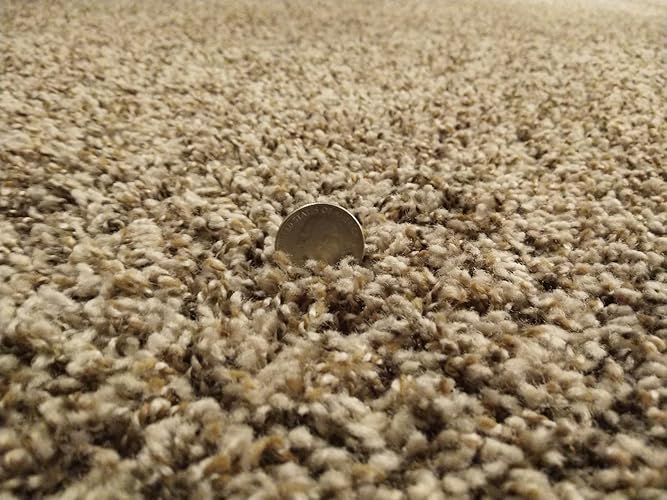
I'll start by saying that I rarely leave Amazon reviews, but I felt that this issue was important enough to warrant one. I was a big fan of my previous Roborock S5. I used it primarily in an environment with hardwood, tile, and low pile carpet, but it always cleaned extremely well and navigated better than any other robot vacuum I'd seen. I'd recommend it to all my friends and tell my family how awesome it was, despite very few of them having an actual interest in purchasing a robot vacuum of their own. This positive experience was what prompted me to look for an upgrade whenever I moved into a house. I had been very excited after hearing about the announcement of the Roborock S6 MaxV. The idea of a robot vacuum being able to determine what objects to avoid would, in my mind, bridge the gap between a truly autonomous assistant and an ineffective annoyance that frequently eats cords and gets stuck on furniture. I will say that I was impressed with the navigation abilities of the S6 MaxV. It does actually seem to avoid items that it could get caught up on. The previous generations were already great at navigation, but would still require prep work beforehand so that they didn't suck up unintended items. While the S6 MaxV object recognition is not perfect yet, I have no doubt that improvements will be made though future updates. It's also very neat to see the robot mark obstacles on the in-app map and try to label what it believes them to be. I did have an issue that cropped up several times. The robot would mark something as an obstacle in the app, but it wouldn't try to avoid it at all. For example, it marked a couple bar chairs with pedestal bases as an item that needed to be avoided. I was impressed that it even identified them as "pedestal" in the app. However, whenever it got to them, it still tried to climb the sides and ended up getting stuck for several minutes. After it sorted itself out, I figured that it would avoid them during the next pass. Unfortunately, it did the exact same thing and tried to drive up the side of the chair base again. The biggest problem that I had with the S6 MaxV (and the reason I'm going to be returning it) is the carpet performance. The navigation issues that I mentioned are minimal by comparison and this vacuum still plans its routes better than any that I've seen previously. However, the carpet performance was pretty much nonexistent in my particular situation. I realize that most robot vacuums are oriented at hard floor cleaning. I fully understand that it's potentially going to be a very long time before we see a robot vac that's as effective on carpet as a human being using a full fledged vacuum. However, this product is advertised as being able to operate on carpet. Of course, one could make the reasonable assumption that it would have difficulties with shag carpet or other types of uncommon surfaces. Regular vacuums have the same problem when it comes to very high pile materials. My home has what I would describe as moderately thick medium pile carpet. See the included photo for an illustration of the length. I didn't choose it and it definitely would not be my preferred flooring, but it's what I'm stuck with for the time being. I hadn't even considered that this vacuum might run into any issues with this surface because it is not shag or high pile, but I found that I was very wrong. Upon reaching the carpeted area during its first run, I noticed a strange sort of whining noise. It wasn't very loud, but it was definitely different than the previous sounds the vac was making. Turns out that the whining noise was the brush getting jammed up on the carpet and remaining almost completely stationary. I was able to open up the top cover while the vacuum was operating and view the brush rotation (or lack thereof) through the semi-transparent dustbin. It would either remain completely stationary or very slowly rotate with the forward motion of the vacuum as it was being pushed by the carpet below. As most people know, a vacuum's effectiveness is determined by both suction and agitation and not just one or the other. Upon reporting the issue to Roborock support, they asked me to provide documentation of the carpet style as well as video of the issue, which I was more than happy to supply. After several back and forth messages, they told me that the behavior was "normal" and that I "don't have to worry about it." Yeah, that didn't sit right with me. I've owned a Roomba and a Neato - both of which were considerably more affordable than this vacuum - in the past and they've never encountered issues with the brush roll being inoperative on carpet. Roborock told me that the suction alone is enough to clean the carpet but this is simply not true. If this were factual, why would any vacuum include a brush bar at all? In the end, I cannot justify paying $750 for an appliance that won't clean half of my home satisfactorily. Maybe this would be acceptable if it was commonplace for all other robovacs to struggle on carpet in a similar fashion, but it is not. In conclusion, if you mainly have hard floors or very low pile carpet, I think that the Roborock S6 MaxV could be a decent choice for you. However, at that price point, there are other robovacs that can also do the job just as well for cheaper, including some of Roborock's other models. I'd primarily go for the S6 MaxV if you're interested in the AI recognition technology or have many obstacles around the house that are below the line where the LIDAR would detect them. For me personally, after additional evaluation I have decided to go with the Ecovacs Deebot Ozmo T8 AIVI. It offers almost the exact same functionality as the S6 MaxV, very similar navigation and object recognition, and even has double side brushes and an optional self-emptying stand. You can sometimes find the robot and self-empty stand bundled together for just marginally more than the S6 MaxV is going for currently. The biggest plus is that I've found that it has no issues with the brush roll at all. In fact, it picked up tons of debris that the S6 MaxV had missed on the carpet just minutes before. I still prefer the app functionality of Roborock and I really like the company as a whole. I just wish that they would have done some more testing and refining so that they could have spotted some of these potential issues before release. ... show more
Reviewed in the United States on October 2, 2020 by Chris Young

  • Impressive Robotic Vacuum
Nice robotic vacuum. I had initially tried the base model shark vacuum and was amused. That particular vacuum used the bump to bump method of cleaning and overall did a good job. Moving into the future was nice since I now didn't need to sweep the floor myself. I wondered how nice it would be to have a robotic mop as well. I found this Roborock with the added mop function and was impressed by the reviews so I decided to give it a try. I have now had the vacuum in operation for the past three weeks and I now feel qualified to provide a review. The vacuum function has five modes: Mop, Quiet, Balanced, Turbo, and MAX. So far I've tried three of the modes, the Balanced, MAX, and the MOP. The Balanced mode allows the Roborock to automatically increase and decrease the suction power depending on the terrain that it goes over such as bare floor vs carpeting, works fine and is not too loud. I could still watch TV while it's doing its thing without too much distraction. The MAX mode is loud and sounds like a quieter version of a full vacuum. I noticed that with MAX mode, the Roborock seems more aggressive when bumping into things. This makes sense as I suspect the primary use for MAX mode would be carpeting. I mostly used the Roborock for hardwood flooring so the Balanced mode has worked fine even though we have four small dogs in the house. The Mop mode drops the vacuum to a bare minimum and is a one time use that needs to be activated in the settings before beginning a cleaning cycle. This should only be used if the floor had already been cleaned. However, I normally use the mopping container on the balanced mode which using higher suction and does the mopping at the same time. I do this about two times per week and it does well in keeping my floors clean. Also, the cleaning pattern of the Mop mode doesn't look any different than the balanced mode so it's almost unnecessary but I can see how it could be handy if used while at home so you can monitor the cleaning. I often fill the water container in the morning before going to work and let it vacuum/mop while I'm away and it does fine just on its own. I think the manual states to be home when using the mopping container but my floors are smooth and I remove anything on the floor that can be so I've yet to have any issues. Obviously, the mopping won't be as good as manually mopping or a steam mop but I have found that with regular use, it does a pretty good job that I can live with. On one occasion, I added vinegar to the water in an attempt to provide a bit of cleaning power to the water and it worked ok but I noticed that the moisture on the floor wasn't as evenly distributed so I don't think that is a winner. On another occasion, I added a little bit of chlorinated surface cleaner to the container and I think it worked a little better since I could smell a little chlorine clean in the air. I think I will be trying this again. Also, the instructions do say not to add cleaners to the water because it could cause the small filtered water distribution ports on the bottom of the container to clog. Well, I just purchased a 12 pack of the filters here on Amazon for less than five bucks so I will be experimenting with adding different types of cleaners that won't leave a residue on the floor https://www.amazon.com/gp/product/B07JZZ3RF3/ref=ppx_yo_dt_b_asin_title_o02__o00_s00?ie=UTF8&psc=1. I have also bought an additional 10 microfiber mopping pads for less than twenty bucks to allow me to replace the cloth after each mopping cycle https://www.amazon.com/gp/product/B07GJNR3TN/ref=ppx_yo_dt_b_asin_title_o03__o00_s00?ie=UTF8&psc=1. In this manner, once I have a few dirty cloths, I can wash a bunch of them using my washing machine at the same time. The cleaning pattern that the Roborock uses is impressive. Since it literally can see using the laser on its little cupula, it creates a map of the area and does a great job a covering just about every inch of the floor. I have noticed a couple glitches though when I set the software to store the map. On at least two times, I left a loose rug on the floor that caused the robot to get stuck. Someone walking by picked up the robot and set it off of where it stopped and restarted the cleaning. The Roborock appear to "ghost" the room map as seen on my phone app. Basically, the original room map was still there but there was a second offset map as well. This caused the Roborock to extend the cleaning cycle since it wasn't able to know that the issue occurred. However, it still cleaned the entire floor just in some places it did so more than once. At the end of the cycle it struggled to find its home since the dock on the map was offset because of the "ghosted" image. The software provides an option to not save the map which I activated. In this manner it resets the map each time and works well. I didn't set any exclusion zones so have no need to save the map. If I did need to add zones, I would toggle the map saving function and once it completes a new cycle the map would be saved where zones could be added. The voice on the Roborock is adequately loud and clear. It announces when a cleaning cycle is about to start and end, when the dirt container needs to be emptied, and if an error occurs such as when it has gotten stuck on the rug. There may be more things that it announce but the above are the ones I've heard so far. Also, there are several languages and voices that can be set. For english, there is only one option at the moment and it's a female voice - it is nice though. Another interesting thing is that the first few times that the robot mapped the rooms, it would vacuum at an angle to the direction of the square rooms. This bothered my touch of OCD but it did do a good job of cleaning. The last time I reset the map, it now vacuums perpendicular to the walls which are north, south, east, and west - so basically it is now vacuuming in a north south pattern which makes me happy (lol). The timer works perfectly as well. I set the Roborock to clean in balanced mode every day during the week and to MAX mode on the weekends when I'm home. On at least a couple of days during the week, I install the mopping container. On the weekend, I allow the MAX vacuum cycle to complete then perform a second cleaning using the Mop mode for extra cleaning. This cycle is working very well for me. Overall, I am very happy with the Roborock and would definitely buy it again if I had to do it all over again. It cleans well, has a mop feature that I can now not live without, and it is smart! It's currently snowing outside and I sure wish there was a robotic snow cleaner for my driveway! ... show more
Reviewed in the United States on January 19, 2019 by Alemore

  • what an amazing little robot
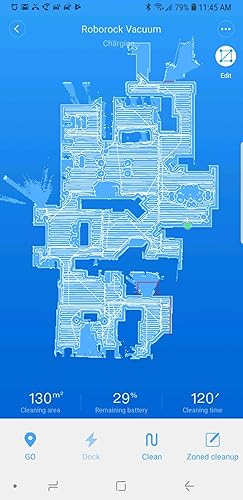
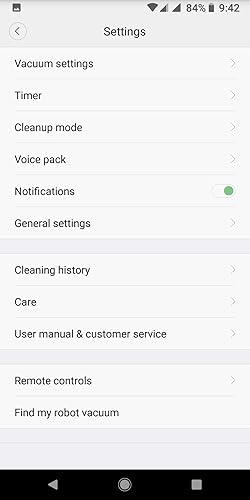
1 month Update: So, I've owned this little robot (we named him "Rocky") for 1 month now. A few observations: - The app is awesome. It gives you a notification when he starts up every day and you can watch him as he cleans the house. I've only noticed a couple bugs. First, when I was trying to show him off to some relatives over dinner one evening, I realized we had had the bedroom door closed that day so he didn't clean our bedroom. So, I set up a zone cleanup for our bedroom. He started up, backed away from the dock, did a few circles for a few minutes and finally just went back to the dock. I tried several times all with the same result. I tried a different zone in the house and he cleaned that just fine but he absolutely refused to go to the bedroom. I think perhaps since he couldn't get into the bedroom during the normal cleaning that day that area was technically "off the map?". I don't know, but that's the only time I've seen that happen. 2nd, we moved our couches (actually just laid 2 of them on their backs and moved the 3rd one to a different part of the room) and again I started him up for a zone cleanup in that area so he'd clean under the couches. Boy did he get confused. He actually strayed completely out of the zone and started trying to clean a whole other area. I think moving most of the large furniture in the room really confused him. I sent him back to the base and tried it again and he did better the 2nd time. -Maintenance: So I still wish they'd come out with a main roller brush that had removable caps. The hardest part of cleaning it, as others have mentioned is getting the hair that's wound around the inside of the caps off. Strangely enough, the very first time I cleaned the brush, it had many long hairs wound around the entire brush, making it quite difficult to clean, just like my first generation Roomba. Unlike the Roomba though, it was just that first time. I just cleaned him up after neglecting him for a couple weeks and while there was plenty of hair wound around the end caps, there was almost none wound around the rest of the brush. Other than that, maintenance is very easy. The app reminds you when it's time to perform various maintenance tasks, which is very helpful. Once again, cleaning out the dust bin is far easier than any other vacuum I've seen. So while the dust bin is smaller than some other robots, it's easier to get to and easier to clean. -Most spectacularly, since I have the map all set up now and I now have the red barrier tape lines (the little red lines you can draw on the map using the app) exactly where I want them, can you believe that in a month's worth of cleaning he's never gotten stuck even once? I knew the few places where roomba would always get stuck and predicted where Rocky would also likely get stuck, just drew in barrier tape to prevent him from getting to those problematic locations and poof, no more getting stuck. This part of the app appears to work flawlessly. So, overall, I am still extremely satisfied with this little Robot and I'm still happy to give it 5 stars. Someone said something about fake reviews on this product. This is not a fake review. I'm a former Roomba owner (several generations of Roombas, actually) and got tired of various Roomba problems (described below) and so went searching for a different option. I'll leave my first impressions here, since this amazing little robot has completed a couple cleanings now, and will update this review in a couple months if any problems crop up. 1. The foreign thing. Yep, it's definitely a Chinese robot. The manual has some awkward typos, typical of Chinese products, although not as bad as others that I've seen. I was a little concerned about quality, and customer service, since it's an overseas company, and still am, and will update in future months if this becomes a problem. On the flip side, you can change the language the robot speaks in the app. It's silly, but fun, because there are about a dozen different chinese voices you can choose from, one of which sounds an aweful lot like one of those giant transformer robots. I can't understand a dang thing it's saying, but it's fun. Changing it back to English is super easy as well. Just one click inside the app. 2. The setup was a little odd. Connecting to my home's wifi network wasn't explained very well. I downloaded the Mi Home app and expected it to tell me to connect to a wifi provided by the Roborock (like the Roomba 960 does) and then use that connection to configure the robot, but it didn't. I have no idea how it works, but after I downloaded the Mi Home app, it just asked me to move closer to the robot and then asked me for the network and password and next thing I know, Roborock is announcing that it was connected to the wifi. Somehow, the Mi Home app on my phone was able to communicate with the robot without me ever having to establish a connection between the two. Scary? A little? Oh well. Moving on. 3. Updating the firmware: Ok, don't get impatient with this. Since this was the first thing I did after getting the robot connected, I got a little impatient at how long it was taking to update the firmware and exited the app. I went back into it and restarted the update. Thankfully, that didn't screw anything up and the 2nd time I just waited it out. It took, no kidding, like, 10 minutes. Long enough to make me sure it wasn't going to work, but eventually, it did. I'd advise being patient here, because interrupting a firmware update in the middle can cause serious and unfixable errors. 4. That's another odd thing about the app. Several times now, when I've tried to do something in the app (like setting up the "Timer" (you know it as "The Schedule", they call it "Timer", in another example of the somewhat awkward Chinese syntax in some places) I got an error from the app that I didn't have a network connection. I did, of course. I tried it a little later and it worked fine. As I said, that has happened a couple different times in a couple different places in the app. Not sure why, but trying again a little later has always worked. 5. Finally, performance. Ok, so problems and quirks out of the way, here's the good parts. Man I love this little Robot. First off, it maps out your home using it's magical little laser. This way, it knows where everything's at. Then, as its approaching, say, your expensive dining room table leg, instead of ramming into it at full speed like Roomba loves to do, a few inches from the leg, it will slow to a crawl and very gingerly, bump the leg. Can't even really call it a "bump". It more just touches it. Very, very gentle. I LOVE that. I hated the way Roomba treated my furniture like a bull in a china shop (Roomba has literally knocked TV trays over rampaging around the house the way it does..) and I'm pretty sure that's one of the reasons I was constantly having to repair it. Also, it moves at a more stately pace than Roomba does. I see this as a very good thing. We have tile floors in the kitchen and Roomba rumbling across those tiles sounded like a truck unloading a ton of bricks. You can still hear Roborock click clacking across the tiles, but it's much, much quieter about it, either because the wheels are softer or because it's moving more slowly. Not sure, but I'm just happy it's so much quieter and I imagine that will result in less wear and tear on the machine as well. Speaking of quiet, it is. It does sound like a vacuum cleaner, just far quieter. Someone else mentioned it's about as loud as a microwave. I dunno if it's that quiet, but it's certainly tolerable. You can have a conversation in the room with it while it's cleaning, although you'd probably have to turn up the TV a tad to hear it. I guess it's about as loud as my wife using her blow dryer in the next room. You can hear it, but can still function completely normally. You don't feel like you have to leave the room, or the house.. Not bad at all. Finally, that app. Ok, so I am in love with the map and the ability to edit it. Someone in one of the many, many reviews I looked at before I bought this little guy said that this is the wave of the future when it comes to robo vacuums and I totally agree. Screw magnetic tape, and invisible wall towers and all that other junk. After this little guy maps out your house you can edit the map and just draw little lines on the map where you don't want it to go. For instance, referencing the pic I've attached to this review, see the longish red line in the bottom right hand corner of the map? That's our bathroom. We have tile floors in there too so my wife has a big throw rug in front of the bathroom cabinets because her feet get cold. Unfortunately, Roomba, in the rare moments it actually made it into our bathroom, would get stuck on top of that rug and under the cabinets. Like, not occasionally. Like, every. Damn. Time. They make these robots just the right height to fit under cabinets and that rug meant it was just tall enough to get wedged under the cabinet and hopelessly stuck. Same thing with RoboRock. It got in the bathroom and while it didn't get stuck, it struggled to free itself in the same spot that Roomba would always get stuck. So, I just drew a line across the front of the cabinets and voila, now it will stay a few inches away from the cabinets. Also, see the "U" shaped red lines in that same bathroom? That's our closet. Roomba would go in there and get hung up on my wife's long dresses. So, for Roborock, I drew that little U so that it will go into the closet, clean a little in the middle of the closet where there's nothing it can get hung up on, but stay out from under the clothing. Just brilliant. Finally, the cleaning pattern is also brilliant. It will box out a little section, outlining it and determining where everything is, then clean inside that section, then move onto the next. It's extremely efficient and works amazingly well. That solved yet another frustration with Roomba. So, while I'm sitting at my desk, working from home, Roomba would come along and butt into my chair. I'd move and it would clean under the desk. 5 minutes later it'd be back, butting into my chair ... again. And again. And yet again... Roomba very nearly got tossed across the room a few times when it interrupted me, multiple times, in the middle of doing something important. More often, I'd just turn the damn thing off and our floors wouldn't get cleaned. Roborock, however, will venture into my office and when it does, I get out of the way. I can do so because I have the app pulled up on my phone and can see where it will be heading to next. I get of the way, it cleans under my desk, efficiently, going over everything exactly once, and the away it goes, not to be seen again. Puuuuuurrrrrfect. So, long review, I know, and I don't usually post such long reviews, but after years of frustration with Roomba, this little guy has solved so many of them. I couldn't be happier. If that changes, I'll be sure to post an update. Oh, one other thing. Others have mentioned the dust bin is small. It is. And that is a bit unfortunate. It fills up pretty darned fast. Fortunately, it's far easier to access and clean out than even the Roomba 960s was. Emptying Roombas was a whole process. It was narrow and the door barely hinges open. Then, there's no way to really "tap" the filter clean, so you have to remove that and bang it against the inside of the garbage can. It just kinda takes a little while to do it and it's annoying. Roborocks is far, far easier. Open the little door, tap a few times on the filter with the palm of your hand and bam, clean. Much, much faster. Anyhow, the first cleaning, I cleaned the bin out 4 times and it was full every time. Hopefully, since it covers 100% of the house every time, it'll accumulate less stuff in there and I can go back to just cleaning it out once a day. Also, we have relatives visiting, and they brought their 2 huskys with them, so the amount of dog hair Roborock has to clean up should go down significantly after they leave. I'll post an update in a couple weeks letting you know how that's going. ... show more
Reviewed in the United States on March 15, 2019 by Jason Ashton

  • Fingers crossed!!
I'm nervous about writing this review. We had another robot vacuum (starts with an sh and ends with ark) that I absolutely loved, but once it hit that year mark when the item would no longer be covered under warranty, it quit working. I tried everything. All the tips and tricks I could find. Nothing worked. It was nothing more than a large paperweight, sitting in our dining room. Side note: Companies need to give an option for turning off cliff sensors. Not everyone needs them. Anyway, I contemplated not even getting another one, but we have an Anatolian Shepherd/Hound mix and he sheds like I've never seen a dog shed. I could sweep and sweep and sweep. All he has to do is move ever so slightly and it's raining hair. Having a robot vacuum really helps keep up with it all. I started researching and this brand came out on top. I took a deep breath and ordered. It arrived quickly and packaged well. When I say well, I mean it. I think, in total, it was 3 different boxes I had to open to finally see, what I hoped to be, a long term cleaning buddy. Once I got it removed from its container, I found it a home. I downloaded the app, paired to wifi, got everything set up and connected it to our Alexa. It was simple and flawless. I then let it do its mapping. We are only using it on the main floor so it won't be used elsewhere as the only other area is a basement (underground) and it's not finished. I figured it was going to take a while so I headed downstairs to start some laundry and put some stuff away. Imagine my surprise when my Apple Watch alerted me to the fact that 15 minutes in, it was done. What?? My last one took almost 2 hours to map the 970 square feet that is our main living area. I went back upstairs and stared at it, baffled. Looking at my phone with the open app, I set up a schedule for cleaning and went about the rest of my day. That evening (I have it set up for 5:30pm) I heard a strange voice and almost jumped out of my chair. Our dog barked, the cats scattered. Feeling panicked because I am home alone at the moment, I clutched my chest and peered around the corner. It was just the vacuum telling me it was starting to clean. I let out a breath. I hadn't expected that. My last one only talked when she was telling me why she couldn't vacuum, which in the end, was every time she turned on. I watched carefully. It went around the outer edge of the entire house, hitting every room, then came back and went back and forth until it was satisfied it had covered every spot. Then it told me it was done and was going back home. Huh. After using it for a few days, I checked the bag. Wow! It definitely picked up more than our last one did. I could have made a whole new dog with what was in there. I don't love that it isn't bagless though but I can deal with that. The app is easy to use but unlike our last one, you can't name the cleaner. Gimmicky, but I kinda liked being able to do that. Not a huge deal because cleaning wise, it's amazing. I still can't get over how much hair it picked up. I showed my husband and he was impressed. Well, after first wondering why I was showing him a pile of our dogs hair. It's pretty quiet when vacuuming but when it empties, you can definitely hear it. That doesn't last long though so not something that bothers anyone. I guess it also mops but I honestly have zero intention of using that. We only have one area in our house that has waterproof flooring so I prefer to do that myself. I get why this brand is highly rated. I love it already but because my heart was broken by another, I'm still feeling nervous. I can't help it. The last one let me down and I'm really hoping for longevity this time around. My fingers are crossed..... ... show more
Reviewed in the United States on April 15, 2024 by Charlee, The (Mostly) Happy Shopper

  • Impressive robot vacuum, with a few hiccups
Set name: S55_Max
The short version; This is a terrific vacuum. My floors have never been cleaner. I am very satisfied with my purchase and could confidently recommend it. I really feel bad for giving it only 3 stars, however, a few minor issues detract from making it the perfect product. At this price point, there should be no compromises. If these issues are corrected in future firmware and app updates, I absolutely will give it 5 stars. If you are looking at the S6, save a few bucks and get this model. If you don't need the mopping feature, save a few more bucks and get the S4. The longer version; I have owned two random navigation robot vacuums in the past (Roomba and Ecovacs), but I really wanted one with smart navigation and single room cleaning. I spent a fair amount of time comparing different options by reading Amazon reviews, comparing models on manufactures websites and watching YouTube reviews. I had finally decided to get the Roborocks S6. Just before making my purchase, I noticed that Roborocks had a brand new S5 Max model. At the time there were no Amazon reviews or ratings, and no YouTube videos. The Roborocks product comparison showed that the S5 Max had all of the same features as the S6, at a lower price. Sure, the S5 Max is slightly louder and has a slightly smaller dust bin, but it adds being able to control the water level per room through the app. I took a gamble on the S5 Max and I am happy with my purchase. The Good: - The mapping feature is very good. I love that it maps in real-time, on the first run. It doesn't need to dock to generate the map like other robots. And it doesn't need to run several times to generate a usable map like other robots. It can work with no map, or a partial map. The map is also updated in real time on each cleaning, so if you move a piece of furniture, you don't need to create a new map. It is very addicting to watch the map updating in the app as the robot runs through the house. - The smart navigation is very good. Although it seems to take a few odd patterns here and there, and it does go over a few of the same spots multiple times, it efficiently cleans the whole house, and makes it back to the dock. I only two small complaints which I will address below. - Great battery life. I have a 2000 sq. ft., 2 bed, 2 bath home and it can clean the whole house in a single charge. The very first time I ran it, it did have to return to its dock to top up before continuing, however, now that it has generated a full map of the house it can do a full clean on a single charge. A typical cleaning for me is 75 minutes and it will finish with just under 50% battery remaining. At 20% battery remaining, it will automatically return to the dock and charge to 80% and continue cleaning where it left off. This allows it to do larger homes. However, it does charge slowly, so if recharging during cleaning is necessary, it's going to take a while. - Dust bin is sufficient for me. The dustbin is smaller than most competing robots. With daily runs on weekdays, I only need to empty the bin once a week. My house is mostly hard wood and I have no pets, so that helps. People with larger homes, more carpet, or pets may need to empty it more often. - Great suction and cleaning. Most competing robots have two side brushes, this only has one so I expected to have to manually sweep up corners. Amazingly, with only a single side brush, it is very effective at cleaning the whole floor, including corners. - No-go / No-mop zones. This was an essential feature for me. Other robots require physical barriers, magnetic tape, or expensive virtual barriers. I don't want to have to constantly put up and remove barriers, place unsightly magnetic tape all over the house, or clutter the house with expensive laser towers. Also, since my house is mostly hard wood, I have rugs in all of the high traffic areas. With no-go zones set in the app, I don't have to worry about cables under my entertainment center being sucked up, and with no-mop zones I don't have to worry about soggy rugs. You are limited to 10 no-go zones and 10 no-mop zones in the app. You can add additional virtual walls if you hit the limit. - Cleaning. The robot is remarkably easy to clean. The dustbin comes out easily and the area surrounding it is spotless. The filter is washable and easy to clean with the supplied brush. The main roller comes out easy and the ends of the roller come off for simple hair removal. Very little hair gets trapped in the main roller and the wheels are spotless. The silicon side brush stays clean and will last a long time. Cleaning the sensors just takes a quick wipe with a soft microfiber towel. The mopping pad is washable and reusable and you don't have to empty the mopping water tank when you are just vacuuming. With how simple cleaning and servicing this robot is, I hope it will last for years to come. The Meh: Mopping - It just drags a wet microfiber cloth across the floor. Although you can adjust the level per room (heavy on the bathroom tile, light on the hard wood everywhere else), it doesn't clean worth a damn. I wish you could add some dish soap, vinegar or Bona to the tank, but it runs the risk of clogging or corroding the vacuum. I still use it to mop weekly, but I have to get the spots it leaves behind. Had I known, I would have just got the S4 which has all the same vacuum features, but no mop. No-go, No-mop zones - While I love the virtual zones, and it is easy to add a zone in the app, even at the highest zoom level it is difficult to place them accurately. When you finally get them to your liking and save the map, the zones will shift a few pixels, so you need to end up creating a larger zone than you intend. Setup - The pairing started without a hitch, but because I was still connected to my VPN at the time of pairing, it failed to confirm the WiFi configuration. After disconnecting from my VPN it couldn't communicate with the vacuum at all because it already had a saved WiFi configuration. After several failed attempts, I reset the device and repairing worked flawlessly. This was mostly my mistake so I can't fault the vacuum, but the app could have been more clear about the issue. I had to spend time debugging to figure it out and how to reset it. One word of caution is that the vacuum requires 2.5ghz. This is good for longer range, but not if you don't have a dual band router. I use Google WiFi, so I have strong dual band signal all through the house. A lot of routers only work at a single frequency and newer top end robot vacuums do support 5ghz. App - For the most part the Roborock app is good, but the app only supports portrait mode (only tested on Android). Sometimes the map disappears for a few seconds and sometimes the app stops tracking the vacuum. Exiting and re-entering the robot reloads the map and starts tracking again. They have 2 apps which both support different features, so to make full use of it, you need two apps and two accounts. I opted not to create an Xiaomi account and deleted the Mi Home app. As far as I know the only features I am missing are room naming and Alexa integration. Size - It is small enough to get just about anywhere, but I wish it were just a little bit smaller and shorter. It is larger than my prior vacuums and cannot fit in places others could, like under one of my couches, between my office chairs or beside the toilets, etc. The mopping hardware and lidar both add to the size so it's excusable given the features. The bad: Navigation - While it generally does a good job navigating the house with a few questionable patterns, it is completely fooled by my dark bedroom rug pattern. I open the curtains in the morning and have scheduled my bedroom lights to come on full brightness at the same time the vacuum runs and it helps a bit, but it still runs around in circles and sometimes eventually gets lost or stuck under the king size bed. This isn't supposed to happen with Lidar. Setting no-go zones means there is a huge part of the bedroom it can't clean and with the furniture placement and vacuum size, it can't navigate around the foot of the bed to clean the other side of the hard wood. Setting a large no go zone also will make it get trapped sometimes. The only thing that seems to work even a little bit is using virtual walls to guide it in a straight line, but this is far from foolproof. Roborocks has suggested that I cover the cliff sensors, which is fine in my single story home, and I will update after I have tried it. However this solution won't work for everyone. No room naming- I believe technically you can name a room if you use the Mi Home app, but the Mi Home app doesn't have all the features of the Roborock app and requires setting up a different account. This feature is promised later, but this is a new company I have no experience with so I have no idea how much faith to put in them to keep their promises. No Google Home integration - For privacy and security, I do no have any smart home apps installed on my primary phone. I have to hunt down a secondary device, boot it up, open an app, and select a room to clean instead of just saying 'OK Google, vacuum the living room'. This is another promised feature, so we'll see if it ever arrives. At least in the meantime scheduled cleanings work for me. Object detection - This robot wants to climb up into my shoe rack, scratching the paint in the process. Even though it knows it has mapped out a large piece of furniture. It also wants to climb my speaker stands. My wife likes to leave slippers laying around that it will suck up and drag all around the house. I have tried using magnetic tape on the shoe rack and speaker stands, but the sensor is under the vacuum, so it needs to climb the objects before it's detected. Again the only solution is no-go zones which are nearly impossible to set accurately around a small object like a speaker stand and there is a 10 no-go zone limit. Conclusion: A smart robot vacuum with a few annoyances. Despite only a 3-star rating, I could confidently recommend this product. When Xoami / Roborock figure out the app situation and finally release a single app with the promised features, it will get a star back. Even then though, it is a 4-star product because of it's issues with object avoidance and inability to clean in dark spaces. If a later firmware updated resolves these issues, I will gladly give it 5 stars. Update 1: I have uploaded a picture of the map of my bedroom showing the crazy pattern it takes through the room. I have a large no-go zone so that it can only take straight lines under the bed by the headboard and foot of the bed. There is also a picture of the rug which confuses it and a picture of it getting stuck under the bed even with the no-go zone and plenty of light and a strong wifi signal. ... show more
Reviewed in the United States on January 6, 2020 by Stewart

Can't find a product?

Find it on Amazon first, then paste the link below.
Checking for best price...