Search  for anything...

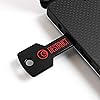
DESTRUCT USB Gadget - Military Grade Hard Drive Wiper - Permanently Erase All Data on PC and Laptops Before Selling

  • Based on 436 reviews
Condition: New
Checking for the best price...
$29.99 Why this price?
Save $180.00 was $209.99

Buy Now, Pay Later


As low as $7 / mo
  • – 4-month term
  • – No impact on credit
  • – Instant approval decision
  • – Secure and straightforward checkout

Ready to go? Add this product to your cart and select a plan during checkout.

Payment plans are offered through our trusted finance partners Klarna, Affirm, Afterpay, Apple Pay, and PayTomorrow. No-credit-needed leasing options through Acima may also be available at checkout.

Learn more about financing & leasing here.

Selected Option

Free shipping on this product

30-day refund/replacement

To qualify for a full refund, items must be returned in their original, unused condition. If an item is returned in a used, damaged, or materially different state, you may be granted a partial refund.

To initiate a return, please visit our Returns Center.

View our full returns policy here.


Availability: In Stock.
Fulfilled by Amazon

Arrives Sunday, Mar 8
Order within 2 hours and 43 minutes
Available payment plans shown during checkout

Protection Plan Protect Your Purchase
Checking for protection plans...

Style: Destruct


Features

  • Military Grade Destruction
  • Completely erase your hard drive
  • Easy to Use
  • Sell your PC without worrying about your Data
  • Wipe your Hard drive clean and reuse like new

Description

International products have separate terms, are sold from abroad and may differ from local products, including fit, age ratings, and language of product, labeling or instructions.

Hard Disk Interface: USB 1.1


Connectivity Technology: USB


Brand: DESTRUCT


Special Feature: Portable


Hard Disk Form Factor: 2.5 Inches


Hard Disk Description: Mechanical Hard Disk


Compatible Devices: Laptop, Desktop


Installation Type: External Hard Drive


Color: Black


Specific Uses For Product: Data sanitization


Manufacturer: ‎Lovell Tec


Brand: ‎DESTRUCT


Item Weight: ‎0.635 ounces


Product Dimensions: ‎3.94 x 3.94 x 1.97 inches


Item model number: ‎Dst101


Color: ‎Black


Material Type: ‎plastic


Manufacturer Part Number: ‎Dst101


Date First Available: June 4, 2019


Frequently asked questions

If you place your order now, the estimated arrival date for this product is: Sunday, Mar 8

Yes, absolutely! You may return this product for a full refund within 30 days of receiving it.

To initiate a return, please visit our Returns Center.

View our full returns policy here.

  • Klarna Financing
  • Affirm Pay in 4
  • Affirm Financing
  • Afterpay Financing
  • PayTomorrow Financing
  • Financing through Apple Pay
Leasing options through Acima may also be available during checkout.

Learn more about financing & leasing here.
Top Amazon Reviews


  • It gets the job done
Style: Destruct Pro
I would say this device is quite effective at doing its job. Just so you know to do a total and complete wipe might take three days. I’m not exaggerating. However, the results will be quite impressive. It will zero that hard drive out so completely that it will be cleaner than the day that you bought it. It’ll wipe out the hard drive, the bio settings maybe even your ram. my computer was cleaner than the day I bought it. Sometimes you buy these hard drives, and they have hidden partitions that are extremely difficult to get rid of. The reason you want to get rid of those partitions is it might have embedded spyware in it that you don’t want on your computer. I don’t know why a hard drive maker or any of these sellers would put it there and I don’t want to know. So when I buy those drives, I look for any hidden partitions. I bought a hard drive off of Amazon and that’s exactly the point I could not get rid of a partition that was hidden. No partition manager in windows, Mac or even certain versions of linux could get rid of it, except a version of Linux called openSUSE. OpenSUSE has the Yast partition manager as it’s software for doing that sort of thing. It still can’t wipe the drive like this device. It’s worth the money. ... show more
Reviewed in the United States on February 1, 2025 by Tory A.

  • JUNK AND DOESNT WORK,JUST A VERY BAD ITEM....
Style: Destruct
JUST TO LET YOU AND EVER BODY KNOW,THIS IS JUNK AND DOESNT WORK AS STATED,SPENT ABOUT FOUR HOUR STARTING AND STOPPING, AND NEVER DELETED THE FRIST THING...NOT SURE WHO IS SELLING THIS ITEM BUT IT NEENDS TO BE REMOVED FROM SELLS,I REALLY NEEDED IT BAD FOR ONE OF MY LAPTOPS,NOW I FELL IT WAS JUST AWAY OF SELLING ME A NEW PC,,,,BAD,BAD,BAD SO DONT WASTE YOUR MONEY LIKE I DID,OR YOU ALL WILL BE WRITING SAME TYPE MESSAGE LIKE THIS ONE.......C.WALDON INDPLSMIND, ... show more
Reviewed in the United States on March 1, 2025 by Carl waldon

  • Moderately priced, and it works very well.
Style: Destruct Pro
I've used it once so far, to clean up an old Windows 7 laptop. I inserted the USB drive, rebooted the computer from that drive, and walked away. It worked very well. In about 5 hours it had the hard disk scrubbed. I have two Windows 10 machines I'll be using it on as soon as I get Win 11 replacements and transfer all the files and programs I want to keep. ... show more
Reviewed in the United States on April 15, 2025 by Pete Roche

  • Worked well on a new machine, not on an older one
Style: Destruct
I bought this to wipe two old PC's for a friend who was moving. For the machine running Windows 10, it worked well. For the ancient machine running Windows XP, it wouldn't boot from the USB gadget, but booted up again to XP even when the boot order was modified. I couldn't manually run the .exe file on the gadget either, just got a Windows error message. I got my money's worth for this device on the W10 machine. ... show more
Reviewed in the United States on January 18, 2025 by Doug

  • Good
Style: Destruct Pro
Works good
Reviewed in the United States on April 29, 2025 by TOMMY j CHENAULT

  • Worked for my Vista, Win 7 and Win 10 laptops
Style: Destruct
I have been wanting to get rid of my old laptops but didn't know how to wipe the hard drive, so the old machines kept accumulating. The Destruct Pro worked on my 32-bit Sony Viao laptop that had Vista on it in about 3.5 hours (wiped 149 GB), my Sony Viao running Windows 7 took about 16 hours (wiped 596.2 GB) and my HP Pavilion running Win 10 took 9 hours to wipe clean (931.5 GB). I am a NOVICE at things like this and had to use the internet to figure out which machine used what F-key to access the BIOS. I then figured out how to re-order the boot drive on each machine (it is described to the right on your screen). My HP running Win 10 was the most difficult to get into the BIOS, which surprised me as it was the newest machine. After wiping each one clean, I double-checked by turning my laptop on and seeing "Operating System Not Found". While I beat my head on the wall alot the last 3 days, I am so pleased I got this device to work and now I can take my laptops to the recycler without worrying about someone seeing my personal information on the machine. I do recommend this product, but just know it is not plug and play easy - it takes a bit of work to use but it worth it in the end. ... show more
Reviewed in the United States on October 9, 2023 by Ydnew1us

  • Doesn’t do anything
Style: Destruct Pro
Boots to the wipe menu, but doesn’t do anything beyond that.
Reviewed in the United States on May 24, 2025 by Nathan Ames

  • Solid Product
Style: Destruct Pro
Easy to use, does what it says. No issues.
Reviewed in the United States on March 24, 2025 by Eric

Can't find a product?

Find it on Amazon first, then paste the link below.
Checking for best price...