Prime Day deals are live! View Deals
Search  for anything...

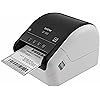
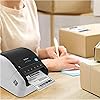
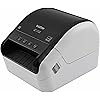
Brother QL-1100 Wide Format, Postage and Barcode Professional Thermal Monochrome Label Printer, Black

  • Based on 727 reviews
Condition: New
Checking for the best price...
$229.99 Why this price?

Buy Now, Pay Later


As low as $38.33 / mo
  • – 6-month term
  • – No impact on credit to apply
  • – Instant approval decision
  • – Secure and straightforward checkout

Ready to go? Add this product to your cart and select a plan during checkout.

Payment plans are offered through our trusted finance partners Klarna, Affirm, Afterpay, Apple Pay, and PayTomorrow. No-credit-needed leasing options through Acima may also be available at checkout.

Learn more about financing & leasing here.

Selected Option

Free shipping on this product

30-day refund/replacement

To qualify for a full refund, items must be returned in their original, unused condition. If an item is returned in a used, damaged, or materially different state, you may be granted a partial refund.

To initiate a return, please visit our Returns Center.

View our full returns policy here.


Availability: In Stock.
Fulfilled by Value Point Supply

Arrives Friday, Jun 26
Order within 8 hours and 15 minutes
Available payment plans shown during checkout

Protection Plan Protect Your Purchase
Checking for protection plans...

Style: New


Pattern Name: QL1100 Has USB Host


Features

  • Prints on wide format labels up to 4 wide: Perfect for printing mailing, address and postage labels for packages along with visitor and name badges
  • Barcode crop function: No more printing sheets of barcodes. Now, easily crop and select barcodes and UPCs for printing from templates (Windows only)
  • USB host interface: Enables use with peripheral devices such as a scanner and is compact enough to sit on any packing station or desk
  • Plug & label feature: Lets you create and print labels without the need to install software on Windows PCs
  • Free software development kits (SDK): Easily integrate using free SDKs for Windows & Android systems. Printer Memory (MB):7.8
  • Maximum Label Length: 9.8 Feet (USB) 3 feet (Serial). Windows, Linux, and Mac compatible

Description

The Brother QL-1100 Wide Format Professional Thermal Label Printer addresses the increasing demand for highly reliable, cost-effective business label printers to consistently and quickly print high-quality up to 4-inch labels - perfect for shipping and postage. The Brother QL-1100 delivers 300 dpi resolution and prints up to 69 labels per minute(1) minimizing the time spent waiting for labels. Its built-in automatic heavy-duty cutter is ideal for handling large print jobs and provides a clean, professional edge when using continuous tapes. The Brother QL-1100 includes a USB cable, label creation software and a starter supply of labels so it’s ready to use right out of the box. The QL-1100 is compatible with Windows and Mac and integrates with Microsoft Word, Excel, and Outlook. It also offers a USB host interface for use with peripheral devices including scanners. The Plug & Play feature enables you to create and print labels without the need to install software on your Windows PC, making it simple to use. The easy-to-use, drop-in DK replacement tape rolls make it a breeze to change supplies; there’s no ink or toner to replace – ever. The QL-1100 also detects the size of the tape in the machine and automatically adjusts the onscreen template. The automatic crop function lets on-line sellers easily print product and other barcode labels from A4/Letter size label sheet templates (Windows only). You can print an entire sheet of labels or a section of labels with virtually no waste. Brother network management tools make it easy to integrate and manage the label printer on any network. The free Software Development Kit (SDK) is available for Windows, iOS and Android for custom application development. Brother provides email and phone support to developers and software integrators. The Brother QL-1100 combines fast and easy professional output with the low- maintenance requirements of direct thermal printing. (1) Based on using standard address labels, text only at 300 x 300 dpi All referenced trademarks and registered trademarks are the property of their respective companies. Android is a trademark of Google Inc. Mac is a registered trademark of Apple Inc. We recommend using genuine Brother DK label supplies for best performance, as they're engineered to print high-quality labels with your Brother QL printer.

Brand: Brother


Connectivity Technology: USB


Printing Technology: Thermal


Special Feature: Compact


Color: Black


Model Name: QL1100


Printer Output: Monochrome


Maximum Print Speed (Color): 1 ppm


Max Printspeed Monochrome: 1 ppm


Item Weight: 3.7 Pounds


Printer Type: Thermal


Other Special Features of the Product: Compact


Printer Output Type: Monochrome


Item Weight: 3.7 Pounds


Item Dimensions D x W x H: 6.7"D x 8.7"W x 5.9"H


Controller Type: Android, iOS


Print media: Labels


Scanner Type: Sheetfed


Maximum Copy Speed Black and White: 1 ppm


Compatible Devices: Laptops, PC


Warranty Type: limited warranty


Maximum Copies Per Run: 9999


Ink Color: Black/White


Additional Printer Functions: Print Only


Control Method: App


Resolution: 300 x 300


Color Pages per Minute: 1 ppm


B&W Pages per Minute: 1 ppm


Color: Black


Color Depth: 1 bpp


Printer Connectivity Type: USB


Hardware Interface: USB


Total USB 2.0 Ports: 1


Total Usb Ports: 1


Brand: Brother


Model Name: QL1100


Model Number: QL1100


Built-In Media: Brother QL-1100 Label Printer P-touch Editor Software & Driver AC Power Cable USB Cable Starter Rolls DK-1247 Diecut Large Shipping Labels (41 labels) DK-2205 Continuous Length Paper Tape – 2.4" (62mm) x 16.4'


Series Number: 1100


Model Series: QL-1100


UPC: 012502648932


Global Trade Identification Number: 32


Manufacturer: Brother Printer


Warranty Description: 2 year limited


Item Type Name: Direct Thermal Printer


Unit Count: 1.00 Count


Maximum Media Size: 4 x 6 inch


Maximum Sheet Capacity: 69


Paper Size: 4 Inches


Output sheet capacity: 69


Maximum Print Resolution Black and White: 300 dpi


Dual-sided printing: No


Duplex: Automatic


Maximum Copy Resolution Black and White: 300 dpi


Frequently asked questions

If you place your order now, the estimated arrival date for this product is: Friday, Jun 26

Yes, absolutely! You may return this product for a full refund within 30 days of receiving it.

To initiate a return, please visit our Returns Center.

View our full returns policy here.

  • Klarna Financing
  • Affirm Pay in 4
  • Affirm Financing
  • Afterpay Financing
  • PayTomorrow Financing
  • Financing through Apple Pay
Leasing options through Acima may also be available during checkout.

Learn more about financing & leasing here.

Top Amazon Reviews


  • High quality printing, affordable generic supplies available & user friendly!
Style: New Pattern Name: QL1100 Has USB Host
This printer has been a lifesaver! I can print multiple shipping labels super quick, all at once, and it cuts between each one automatically. I also use the smaller 2.4” wide label to print product labels. The reason I hated printing labels with my laser printer is because the ink would smear, I would have to tape over the label to protect the barcodes, which defeated the purpose of printing on a label in the first place. I used so much packaging tape (and time!!). Sure the labels from Brother are expensive, just buy the generic ones! All you have to do is look for ones that are compatible with this device (I bought BETCKEY brand and I don’t see a difference). I bought TEN rolls of 4” wide continuous rolls for 4x6” shipping labels, and after 3 months and MANY labels printed, I still have some left on the first roll! Buying 10 rolls at once cut the individual roll price in half, so I figured I could resell some if I wasn’t going through them quickly. I also don’t understand why other customers had issues with printing. I first downloaded the driver directly from Brother’s website. I select the option on eBay and Etsy to print 4x6 labels in PDF form. After I purchase the labels, the PDF opens or downloads, I plug in the usb cord to my laptop, click print and make sure to select the right printer and size of labels (with the Brother sample labels it came with, I had to select something like 4.06” wide, whatever it was it was slightly over the 4x6, because it wouldn’t print with the 4x6 option selected. It would say the size of labels in the printer and what was selected didn't match. When I switched to the generic, it wouldn’t print with the same setting and I found I just had to go back to 4x6. If you get the message that the size doesn't match, but pick some other similar sizes until it does). I’ve even made my own custom labels with Microsoft Word for the 2.4” wide labels. I just set up the size in page setup and plug and print. Super simple. The printing is dark, super clear, excellent quality. And no smearing! And no having to buy ink or toner. Occasionally the blade starts not cutting all the way through, but that's the only problem I've had. This little printer was definitely worth the money and then some. I save so much time buying my labels in bulk, hitting print once, having each print and cut SUPER fast, and just peel & slap them on the envelope. If you do a decent amount of online selling and find yourself spending a lot of time trying to fulfill orders, I recommend you get this printer. You’ll thank me! Update: About one year later and this printer is still going strong with no issues! ... show more
Reviewed in the United States on August 7, 2020 by JW

  • Works with Etsy & Pirateship, and Generic Label (Confirmed & linked)
Style: New Pattern Name: QL1100 Has USB Host
I have always loved Brother products, especially since their monochrome printer 5340D that I bought here on Amazon in 2009 is still going strong! This does not disappoint! It is not plug and play though (always read directions first! lol). Here is a few things I learned to help someone else doing this for the first time. I am so glad I purchased this. saves me so much time from printing, cutting out label and then taping it on for my little craft business! I had troubles feeding the paper this being my first label make. When you open the top and put the paper roll through, you will see on the right hand side a white sticker with a yellow triangle with 2 gears printed on top of a rectangular plastic piece, you need to feed the paper underneath this! I had it going over and when I tried printing it would not work. Hope this helps someone! The other issue I had was which things to download (step #3 below) In the manual is the website to go to install.brother, and do this: Step 1: Product categories click "compact label printer," Step 2: Click your operating system and verison (64 bit etc), Step 3: Here is where I got confused. On this page, there is (4 selections: a. Software/Document Installer b. drivers c. editor tool d. firmware). All you need to do is download the first one a. Software/Document installer. This will install all 4 sections (a, b, c, d) at one time for you. The only scenarios you need the others is if something does not go right and you need to say reinstall drivers then you would download b. drivers only. Or if software is not working right you can reinstall c. editor tool. I am sure most people will not have any issues, as even my issues with minor, I had it up in running in no time. Text is clear, I love that it cuts the labels for you. It comes with labels to start you off, 2 different sizes. I bought these labels (Edit: Confirmed they work, with some instructions below- I have not found any other label yet to work with these) https://www.amazon.com/gp/product/B01H1CGLIE/ref=ppx_yo_dt_b_search_asin_title?ie=UTF8&th=1 You do need to adjust the paper size for these labels for Etsy & Pirateship. Go into control panel --> Hardware & Sound --> Devices And Printers, then right click on Brother QL-1100, then click on printer properties (not just properties), then on General tab, go to bottom and click on preferences, paper size drop down menu click on 4X6 label in the drop down box. Hope this helps :) ... show more
Reviewed in the United States on November 21, 2020 by Laya Rose

  • Lasted 10K Labels
Style: New Pattern Name: QL1100 Has USB Host
This is an above average in quality thermal label printer. There is one major drawback to this QL1100, is that that you are recommended to buy their name brand labels— because they’re different from other labels. So do not think that you can just buy a generic label and use it with this machine, you cannot. So that is the first drawback. The second drawback is that this lasted at me about 10,000 labels. I don’t think that is a good life for this item. The cutter has seem to become misaligned and will not allow the labele to thread, rendering it unusable. I will be contacting Support to see how much they will charge to repair the item. Because you buy this item from Amazon, there seems to be an issue with the warranty being honored if at all. So do you consider that also and investigate. The failure that my printer has seems to be common with this model. I have some zebra printers that were cast offs from UPS, so you could imagine they probably did 10,000 labels in a month and they’re still going. I don’t like it that electronics and plastics are put into the environment at a rapid pace like this as trash. For the amount of money that I paid for this, it should’ve lasted much much longer. When it was performing, it did very well. But the expense of item, along with the cost of the proprietary label it requires. I cannot say that I recommend this item. ... show more
Reviewed in the United States on February 19, 2024 by Madmeedia

Can't find a product?

Find it on Amazon first, then paste the link below.
Checking for best price...