Search  for anything...

Brother Monochrome Laser Printer, HL-L5200DWT, Duplex Printing, Wireless Networking, Dual Paper Trays, Mobile Printing, Amazon Dash Replenishment Ready

  • Based on 998 reviews
Condition: Used - Like New
Checking for the best price...
$849.00 Why this price?

Buy Now, Pay Later


As low as / mo
  • – Up to 36-month term if approved
  • – No impact on credit to apply
  • – Instant approval decision
  • – Secure and straightforward checkout

Ready to go? Add this product to your cart and select a plan during checkout.

Payment plans are offered through our trusted finance partners Klarna, Affirm, Afterpay, Apple Pay, and PayTomorrow. No-credit-needed leasing options through Acima may also be available at checkout.

Learn more about financing & leasing here.

Free shipping on this product

This item is eligible for return within 30 days of receipt

To qualify for a full refund, items must be returned in their original, unused condition. If an item is returned in a used, damaged, or materially different state, you may be granted a partial refund.

To initiate a return, please visit our Returns Center.

View our full returns policy here.


Availability: Only 1 left in stock, order soon!
Fulfilled by Photo Supplies Online(Serial Number Recorded)

Arrives Saturday, Jun 20
Order within 18 hours and 57 minutes
Available payment plans shown during checkout

Protection Plan Protect Your Purchase
Checking for protection plans...

Features

  • FAST, HIGH-QUALITY PRINTING: The HLL5200DWT monochrome laser printer delivers a fast print speed of up to 42ppm and sharp resolution
  • LARGE PAPER CAPACITY, EXPANDABLE: Dual paper trays (250-sheet and 520-sheet capacity) allow busy workgroups to print with fewer interventions. Mobile Device Compatibility - AirPrint, Google Cloud Print 2.0, Brother iPrint&Scan, Mopria, Cortado Workplace, Wi-Fi Direct
  • FLEXIBLE CONNECTIVITY: Easily share the printer on your wireless or Ethernet network and print with ease from a wide range of mobile devices(1)
  • FOR USE WITH BROTHER GENUINE TONERS: TN820 Standard Yield Toner, TN850 High Yield Toner for cost efficient output

Description

The Brother HL-L5200DWT Business Monochrome Laser Printer was designed for busy offices and small workgroups that need a reliable printer with a large paper capacity. Arriving with dual paper trays (250-sheet and 520-sheet capacity) and a 50-sheet-capacity multi-purpose tray, this office laser printer can simultaneously store letter and legal paper. The HL-L5200DWT quickly prints high-quality documents up to 42ppm, and delivers cost- efficient, two-sided output thanks to a high-yield replacement toner cartridge. For additional capacity, users can add an optional tray for a total input capacity of 1,340 sheets. An automatic duplex or two-side printing feature permits offices to print brochures and other professional documents while saving paper and resources.Share the Brother HL-L5200DWT on a wireless or Ethernet network or print with ease from a wide range of mobile devices via AirPrint, Google Cloud Print 2.0, Wi-Fi Direct or Brother iPrint&Scan(2).This Brother monochrome laser printer offers advanced security features to help protect your sensitive documents and device from unauthorized access.Brother is dedicated to superior customer service and stands by our products by offering a 1-year limited warranty on this business laser printer. We also offer free at-your-side support for the life of your product, featuring online, phone, or live chat assistance. The HLL5200DWT is also Amazon Dash Replenishment enabled. When you activate this feature, Amazon Dash Replenishment will continuously measure the toner level and order more from Amazon when it’s low. This unique Brother feature keeps busy office workspaces operating at peak efficiency, ensuring you don’t run out of toner.(1)Requires connection to a wireless network. (2)Requires an Internet connection and an account with desired service.CPU (Processor) Speed (MHz) - 800.

Brand: Brother


Connectivity Technology: Ethernet, USB, Wi-Fi


Printing Technology: Laser


Special Feature: Auto-Duplex/Network-Ready


Color: Black


Model Name: HL


Printer Output: Monochrome


Max Printspeed Monochrome: 42 ppm


Item Weight: 32.1 Pounds


Product Dimensions: 14.7"D x 15.3"W x 15.2"H


Printer Type: Laser


Other Special Features of the Product: Auto-Duplex/Network-Ready


Printer Output Type: Monochrome


Item Weight: 32.1 Pounds


Item Dimensions D x W x H: 14.7"D x 15.3"W x 15.2"H


Controller Type: Android


Print media: Card stock, Envelopes, Labels, Paper (plain)


Scanner Type: Sheetfed


Maximum Copy Speed Black and White: 42 ppm


Compatible Devices: Laptops, PC, Smartphones


Warranty Type: Implied Warranty


Ink Color: Black


Additional Printer Functions: Scan


Control Method: App


Number of Trays: 3


Resolution: 1200 x 1200


B&W Pages per Minute: 42 ppm


Color: Black


Maximum Print Resolution Black and White: 1200 dpi


Power Consumption: 32 Watts


Wattage: 620 watts


Dual-sided printing: Yes


Duplex: Print


Brand: Brother


Model Name: HL


Model Number: HL-L5200dWT


Built-In Media: Multi Function Laser printers


Model Series: L5200


Specific Uses For Product: small business


UPC: 012502641780


Global Trade Identification Number: 80


Manufacturer: Brother Printer


Warranty Description: 1 year


Item Type Name: Laser Printer


Unit Count: 1.00 Count


Maximum Media Size: 8.5 x 14 inch


Maximum Sheet Capacity: 820


Paper Size: 5.83 x 8.25, 8.50 x 14, 8.50 x 11, 8.25 x 11.70, 10.50 x 7.25, 4.13 x 5.83, 3 x 5


Printer Connectivity Type: Ethernet, USB, Wi-Fi


Hardware Interface: Ethernet, USB


Number of Ethernet Ports: 1


Total USB 2.0 Ports: 1


Total Usb Ports: 1


Maximum Copy Resolution Black and White: 1200 dpi


Frequently asked questions

The Duplex Printing feature of the Brother HL-L5200DWT automatically prints on both sides of the paper. This can help to save up to 50% of your paper supply, which is both cost-effective and environmentally friendly.

Yes, the Brother HL-L5200DWT offers Wireless Networking which means you can print from your computer, smartphone or tablet without needing to connect directly to the printer with a cable. You simply have to connect your device to the same network as the printer.

Being Amazon Dash Replenishment Ready means that the Brother HL-L5200DWT is able to automatically reorder ink or toner from Amazon when it's running low. After you enable this feature and set up your preferences, the printer will measure its ink or toner levels and place an order automatically when supplies are low.

The Dual Paper Trays of the Brother HL-L5200DWT increase the printer's paper capacity. This means you won't have to refill it as often, saving you time especially when printing large documents. It also allows you to keep two different types or sizes of paper in the printer at the same time.

Top Amazon Reviews

πŸš€ Abunda's Overview

This is our summary and key points to consider based on customer reviews.


Overall, the printer received highly positive reviews, with many customers stating that it is a perfect fit for business applications such as loan signing. Users praised its speed, reliability, and ease of installation, while also highlighting its exceptional printing quality for both letter and legal sized documents. One setback noted was difficulty with automatically switching between different paper sizes.

Pros

  • πŸ’Ό Ideal for business needs and great for loan signing agents
  • ⚑ Very fast print speed
  • πŸ”§ Easy installation process
  • πŸ“š Can handle large volume of prints

Cons

  • πŸ“ƒ Sometimes struggles to automatically change paper sizes
  • πŸ” Hard to find due to high demand

Should I Buy It?

Given the overwhelmingly positive reviews and clear benefits for business use, particularly loan signing agents, it is a highly recommended purchase. Keep in mind that some users have faced minor difficulties with automatic paper size adjustment, but this issue is not prevalent across all users.

  • Great printer for notary signing agents Great printer for notary signing agents
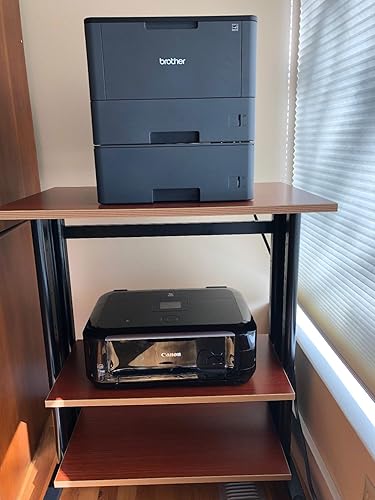
UPDATE: I've now had this printer a little over two years. I've put about 130,000 pages on it and it's still going strong. I did replace the drum a while back, but with this many pages on it, I think that was to be expected. The only problem I've run into is that sometimes I get an out of paper error on the top tray when it's not actually out of paper. But that was solved by not filling the top tray quite all the way to the top; I now leave about 1/4" from the fill line and it works without a problem. I print almost exclusively via WiFi and every now and then from my iPhone. ORIGINAL REVIEW: This printer is working perfectly for my job as a notary signing agent. I frequently print 250 pages at a time, combination of letter and legal, no problem. It prints very quickly and the print is clear. It was easy to set up the two different paper trays in the app so the printer pulls legal or letter size as needed automatically. I did read another review where someone mentioned the printer takes a long time to wake after being in sleep mode, but I haven't found that to be the case with mine; it only takes a few seconds. I also saw a reviewer who said this printer doesn't actually print on legal paper. It DOES print on legal paper. You just have to extend the paper tray manually. When you do this, the tray does extend out the back of the printer a few inches, but that's okay with me because I'd rather have it extend a few inches rather than have the whole printer be that much bigger and heavier (see photo). This is a pretty large printer for a home office. I've shown a picture of it with my Canon Pixma 6200 inkjet below it so you can get an idea of the size. Setup was not bad. I initially had a little trouble getting it to connect to my home wifi, but once that was solved, everyone in the house has easily been able to print to it. It also comes with a cable so you can connect directly to your computer if you want. This is a great feature ... I bought a ScanSnap ix500 at the same time I bought this printer, and although the ScanSnap can also connect directly to the computer, it didn't come with a cable. Had to buy my own. I like having the option of printing directly in case the wifi is out. It also has an option to print from mobile devices, but I haven't tried that yet. ... show more
Reviewed in the United States on April 20, 2018 Reviewed in the United States on April 20, 2018 by EmeraldCity

  • Will work on a Mac
This will work on a Mac! I am a notary signing agent and have used mac for years. I thought I would have to get a different computer so that I could print multi-sized signing packages. I bought three printers and this is the last one I will buy until it dies. If you follow the video instructions that brother provides it will work on a mac. You will need to download a later version (10) or later to be able to have the BR-Script downloaded with the software. If it says Airprint keep going down until you find the one that says "download Software". I love this printer, it does jam sometimes but I do not necessarily blame the printer as I use cheaper paper. Also the toner and drum are two separate units that connect together, which I was unaware of when I purchased the printer; it does not change that it does what I need it to do. ... show more
Reviewed in the United States on August 31, 2025 by Beth C.

  • Great High Spead Dual Tray Printer for Very Reasonable Price
I use this dual paper printer for notarized documents that are 2/3 letter and 1/3 legal sized paper in mixed order. It works incredibly fast and prints well. My documents must be legible and free of marks on either the body or side of paper. This printer is a replacement for a Brother 5150 dual tray printer that gave me well over 500,000 pages. I print 2,500-7,500 pages per month and need a reliable printer. This printer was easy to set-up using my secure wifi network, and I use it on multiple PC and Apple computers as well as iPhones for printing. The dual tray comes with a 500 and 250 page trays. This is perfect for me given the ratio that I print, and the LED screen allows you to very easily assign paper size to the tray. I had it working in about 30 minutes. Brother toner replacements are excellent but expensive at around $100. I use aftermarkets that typically range around $20. HOWEVER, with after markets you have to accept that some of them will either fail or deliver bad quality. So always have a spare if you NEED to print. Brother cartridges have never failed me, but just not worth the money given the volume that I print. On my 5150, the drums would give me 50,000-70,000 prints, but I don't know about this model yet. I will update if there is any problem. ... show more
Reviewed in the United States on August 18, 2016 by J. Colston

  • Great printer with features for the price. Mac users be ware!!
Great value. This is a great printer to do duplex printing with an extra tray for the price. It works, does the job well, is wireless. Again, great value. The biggest problem is getting it to do mixed paper sizes with a mac. People on different forums report different hacks to get this to happen like rotating the PDF 180 degrees, or 360 degrees. I had to uninstall and reinstall the driver, then it stopped printing for a while until I figured out that if I used preview instead of Adobe Acrobat I could get it to print. Unfortunately, using preview, I can't do automatic mixed paper sizes. I have to print all my letter-size first, then all my legal size paper. Brother support has no fix to this, so that is incredibly annoying. I really like brother products, but due to this, I will eventually be upgrading to an HP, which I know will work with Macs seamlessly. It gets 4 stars mostly due to the value. It would be a 5 if not for the lack of Mac support. ... show more
Reviewed in the United States on November 21, 2020 by Michael Mowad

  • Love
Love this machine, although it did take me quite a bit of time to get both of the paper trays to work. You have to make sure you have the correct driver installed, I finally found the correct instructions by googling how to set it up. I think their website is complicated, but I'm just a bit above computer literate. Once I got the correct driver installed we are in business! Prints letter and legal and pretty darn fast to boot. All in all, now that I was able to get past the Driver dilemna, I love this machine! ... show more
Reviewed in the United States on May 26, 2020 by Jason Lynn

  • Love this printer
I could not be happier with my printer! I literally looked everywhere for this thing and when I tell you I had almost given up, I mean I really, really had. I had companies telling me these things were backordered for months on end and I needed this exact printer for the opening of my small business. When I finally found this one - I was already traumatized by several canceled orders that I had previously made with other companies where I submitted the order for the product and either woke up the next morning to a cancellation notice telling me the item was actually out of stock or that there was a delay as the product was on backorder and would likely not ship for 2-3 months (would have been nice to know BEFORE I placed the orders). By the time I went to order this particular one, I knew I had to reach out directly to the seller to confirm it’s immediate availability and I was very pleased that the seller responded to me very promptly to let me know that they did, in fact, have it on hand, ready to ship. They also let me know that they could send pictures to assure me of its new condition and even stayed in communication with me throughout the purchasing process through shipping and even after delivery (I was experiencing some errors on my end of things after originally submitting the order). Once I placed my order, I received it within just a few days which was incredible. It was in perfect, brand new condition just as it was described to be and it prints letter and legal sized mixed documents like a dream. I am so pleased! ... show more
Reviewed in the United States on April 25, 2022 by Vannessa Titcomb

  • Notary Signing Agent!! Each One Teach One. Notary Signing Agent!! Each One Teach One.
First of all, I never really give reviews. However, I am on this product. I am over the moon excited about this printer. I am Notary Signing Agent. I shopped around viewed over 20 videos and listened to so many recommendations of what type of print to have for my notary business and I am very pleased with my choice. I even called Brother's customer service before purchasing it and they were very helpful. So, the only drawback is that this printer can not connect to a mobile hotspot from your phone. Read that line again! So, you have to connect it to a PC or laptop with a floppy drive to use the disk for installation. Oh, and you will need to purchase a 2.0 printer cord (I bought mine from Amazon $6.79) because that cord for not come with it. Also, you can set up your tray selection from the printer, it's really easy. I am a home base business but this printer would be perfect for a small office with multiple users. I hope this review is beneficial. ... show more
Reviewed in the United States on February 25, 2020 Reviewed in the United States on February 25, 2020 by the Braiden Project

  • ALL IN ALL A TERRIBLE PRODUCT
Cant print more than 60 pages without a paper jam. every 8-10 minutes asks me to "slide the green button" on the drum and IT STILL WONT PRINT EVENLY. The pages have 1/2 unable to read or just words missing. Keep asking me to "load the MP tray" of which I have not used and is a BYPASS tray. So when it stops I have to open the bypass tray and add paper JUST TO GET IT TO START printing the document. The drum gets STUCK in the unit and of course you have to be careful when pulling it out to be sure you dont break anything. This can take up to 5 minutes to remove and then 5 more to try to get it back in.. NOT HAPPY AT ALL WITH THIS !!! And customer support? Dont count on any real solutions. Just someone who "pretends to be helping you..and then says Im sorry this doesn't sound like a printer issue its a toner issue!" NOT HAPPY.. ... show more
Reviewed in the United States on May 24, 2020 by A

Can't find a product?

Find it on Amazon first, then paste the link below.
Checking for best price...