
Search  for anything...

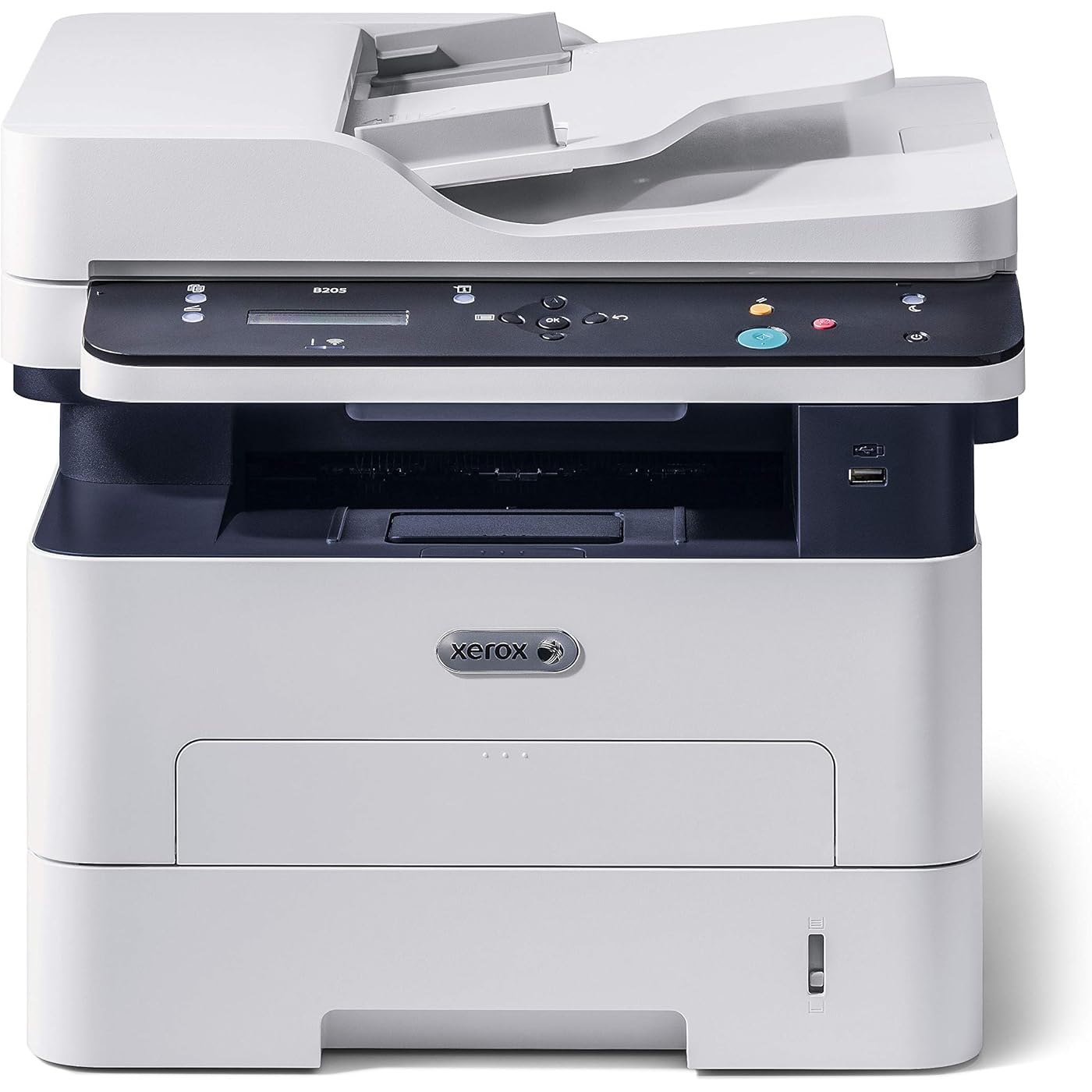
Xerox B205NI Monochrome Multifunction Printer, White

  • Based on 706 reviews
Condition: New
Checking for the best price...
$399.00 Why this price?

Buy Now, Pay Later


As low as / mo
  • – Up to 36-month term if approved
  • – No impact on credit
  • – Instant approval decision
  • – Secure and straightforward checkout

Ready to go? Add this product to your cart and select a plan during checkout.

Payment plans are offered through our trusted finance partners Klarna, Affirm, Afterpay, Apple Pay, and PayTomorrow. No-credit-needed leasing options through Acima may also be available at checkout.

Learn more about financing & leasing here.

Free shipping on this product

This item is eligible for return within 30 days of receipt

To qualify for a full refund, items must be returned in their original, unused condition. If an item is returned in a used, damaged, or materially different state, you may be granted a partial refund.

To initiate a return, please visit our Returns Center.

View our full returns policy here.


Availability: In Stock.
Fulfilled by Photo Supplies Online(Serial Number Recorded)

Arrives Dec 31 – Jan 5
Order within 10 hours and 1 minute
Available payment plans shown during checkout

Protection Plan Protect Your Purchase
Checking for protection plans...

Features

  • Xerox B205NI is a lightweight, compact, quiet black and white multifunction printer offering print/copy/scan and standard wireless connectivity, 2-line LCD user interface, 40-sheet Automatic Document Feeder, Standard Paper Capacity of 250 sheets/1 sheet manual feed slot while printing on a wide assortment of media types plain, thick, thin, cotton, colored, pre-printed, recycled, transparency, label, cardstock, bond and archive
  • Xerox B205NI black and white laser multifunction replaces Xerox Workcentre 3215/NI printer and is ideal for 1 to 5 users in a home office and small and medium business environments
  • With a first page out time as fast as 8.5 seconds; the Xerox B205NI multifunction printer prints up to 31 black and white ppm letter size/30 black and white ppm A4 with print volumes of up to 2,500 pages monthly
  • Xerox ensures protection of sensitive data over the network or on the device with built in secure protocols and features like 802.1X, HTTPS, IPsec, IPv6, IP and Mac address filtering, SNMPv3, Scan to Email with Authentication, Secure Print and Secure Fax Receive
  • Print securely from your mobile device, laptop or desktop with native AirPrint, Google Cloud Print, Mopria and Android support
  • Energy Star qualified, the Xerox B205NI black and white multifunction printer minimizes environmental impacts with features like EPEAT, Green World Alliance, Toner Saver, N-up Printing and N-up Copying
  • Genuine Xerox supplies in your Xerox printer protects the print quality, reliability and performance of your device, and is designed with quality controls to provide the best return on your investment

Description

Next-level productivity in a compact footprint. Perfect for small work teams or the home office, The Xerox B205 multifunction Printer gives you performance and reliability you can count on, day-in and day-out.


Product Dimensions: 14.3 x 15.8 x 14.4 inches


Item Weight: 24.2 pounds


Item model number: B205NI


Is Discontinued By Manufacturer: No


Date First Available: August 6, 2019


Manufacturer: Xerox


Frequently asked questions

If you place your order now, the estimated arrival date for this product is: Dec 31 – Jan 5

Yes, absolutely! You may return this product for a full refund within 30 days of receiving it.

To initiate a return, please visit our Returns Center.

View our full returns policy here.

  • Klarna Financing
  • Affirm Pay in 4
  • Affirm Financing
  • Afterpay Financing
  • PayTomorrow Financing
  • Financing through Apple Pay
Leasing options through Acima may also be available during checkout.

Learn more about financing & leasing here.

Top Amazon Reviews


  • Like the printer, hate the way Xerox does things
Pattern Name: Printer
I wish I could write a good review of this product. The print quality is good, the price is right, and it would serve most people's home office or small office needs well, I think. Unboxing and getting the machine up and running was relatively easy (the videos on the Amazon product page helped), installing the drivers and doing the initial setups went okay (again, the videos helped). But, this blasted machine prints a cover page with the Xerox logo on every print job. I do a lot of one-page and two-page printing and this is flat out annoying. You are supposed to be able to change this by going online and jumping through a lot of hoops. I was willing to do that but I could not get that to work with my setup. I contacted Amazon support and they tried to help but to no avail. So, I spent 10 or 15 minute installing the printer, another 15 minutes or so installing the drivers and doing the initial setup . . . and then four or five HOURS trying to get the thing to stop printing that extra sheet. I just want the option to not print the banner sheet, that's all. The Xerox website(s) weren't much help to me. I took a break from trying to solve this problem but will try, try again. The whole experience was frustrating. Someone else may have a different experience based on how they are connecting the printer. I just know one thing: I will never buy another Xerox product. I've been tempted to trash this printer and just buy another one. ... show more
Reviewed in the United States on November 6, 2019 by alleycat

  • Amazon return policy?? FIRST CLASS - Good thing because this Xerox machine BLOWS!!! Don't buy it!!!
Pattern Name: Printer
This Xerox printer defaults to ALWAYS PRINTS a "BANNER" PAGE. This wastes ink, This wastes paper. The Xerox so-called "ADVANCED TECHNICIANS" HAD ABSOLUTELY NO IDEA in how to turn it off. Should be simple I thought - Banner page on, Banner page off. i SPENT OVER TWO HOURS ON THE PHONE WITH XEROX (I have a timer on my telephone!). Again - the Xerox "advanced techs", no less than 3 of them, had not a clue in how to turn off this ------ everytime I print something the banner page precedes it - function. Just exhausting! After 2 hours of sweat building up in my right ear, I advised the "advanced tech" that he had exactly 2 MORE minutes to get this "Banner page" function disabled - or I was going to box the printer back up and send it back to Amazon/supplier. Anyone want to guess? - Yes, UPS will be here tomorrow with the "return service ticket/label. Kudo's to Amazon - Amazon made the return quite easy. Don't buy this Xerox printer - can you imagine what further complications might be if the "advanced techs", after two + hours still couldn't figure out this on and off problem?? I for one don't want to find out. Off to the next printer. ... show more
Reviewed in the United States on March 4, 2020 by Jim Hall

  • DO NOT BUY!!!!!! XEROX PRODUCT CLAIMS ARE NOT TRUE
Pattern Name: Printer
DO NOT BELIEVE XEROX’S PRODUCT DESCRIPTION (THEY LIE) Call it an exaggeration, overstating, a misstatement”, misinform—but in the end, it’s a flat out LIE. Don’t get sucked into the name XEROX and believe what it claimed their product does. For instance, the product description, and manual claims that the device scans at up 4500dpi. It’s not true. It’s a LIE. After weeks of going back and forth with their, stick to the script, no-nothing tech support the bloody outfit had to FINALLY confess that IT DOESN’T. Their “solution” was to point me to a 3rd party software that would require that I AGREE NOT TO USE IT COMMERCIALLY. ------ “B205 device supports maximum resolution of 600 dpi only from document glass. It is wrongly stated in user Guide and product document page.. (sic)Also the tools provided with the device supports only up to 600dpi and will not support 1200 dpi or higher. 1200 x 1200 dpi resolution can be achieved only by using third party twain software like irfan view etc.” ----- Meanwhile, their manual states: SCAN • Document Glass: Up to 1200 x 1200 dpi optical (LIE) • Effective Output: Up to 4800 x 4800 dpi (LIE) It also claims that it prints at 1200dpi. I wouldn’t believe that either. How would you know? None of the above are misprinted but—straight up aimed at deceiving. PLUS, plus… you can’t apply an upgrade patch without being connected to a network. I’m not a “user” my experience with computers spans over THREE DECADES and has worked as an engineer in some of the top tech companies in the world. You can take it from me—this machine is a big fraud. I am recommending that Amazon and other leading online outlets remove this device from their inventory due to misleading information (LIES) stated in its description   DO NOT BUY ... show more
Reviewed in the United States on May 22, 2020 by Joao-Luiz

Can't find a product?

Find it on Amazon first, then paste the link below.
Checking for best price...