Search  for anything...

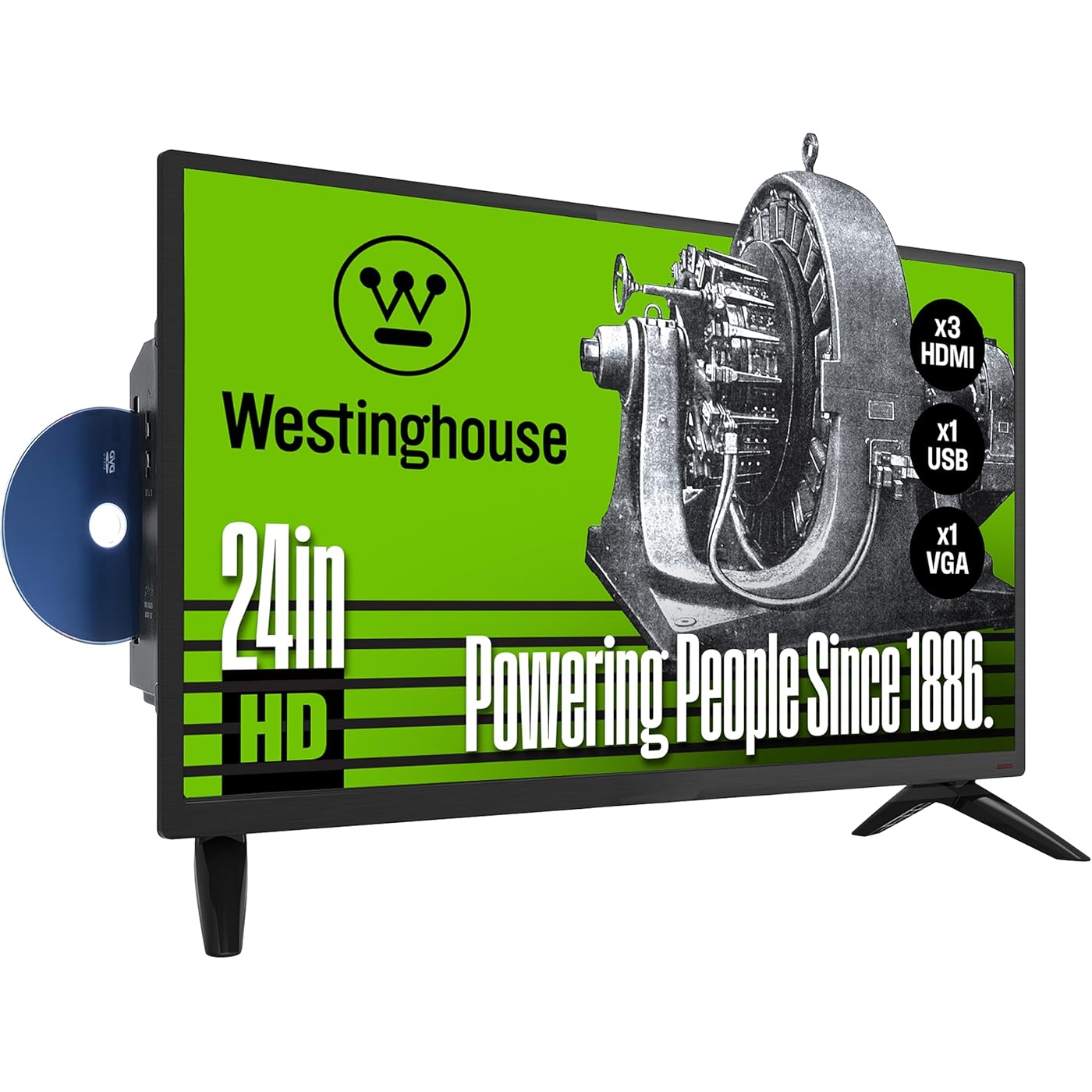
Westinghouse 24 Inch TV with DVD Player Built in, HD LED Small Flat Screen Non-Smart Television DVD Combo, RV Camper, Works with Fire Stick, Roku, Apple TV, TiVo, Xumo, and Streaming Devices.
  • Based on 1,607 reviews
Condition: New
Checking for the best price...
$139.99 Why this price?
Save $10.00 was $149.99

Buy Now, Pay Later


As low as $23.33 / mo
  • – 6-month term
  • – No impact on credit to apply
  • – Instant approval decision
  • – Secure and straightforward checkout

Ready to go? Add this product to your cart and select a plan during checkout.

Payment plans are offered through our trusted finance partners Klarna, Affirm, Afterpay, Apple Pay, and PayTomorrow. No-credit-needed leasing options through Acima may also be available at checkout.

Learn more about financing & leasing here.

Selected Option

Free shipping on this product

FREE 30-day refund/replacement

To qualify for a full refund, items must be returned in their original, unused condition. If an item is returned in a used, damaged, or materially different state, you may be granted a partial refund.

To initiate a return, please visit our Returns Center.

View our full returns policy here.


Availability: In Stock.
Fulfilled by Amazon

Arrives Monday, Mar 30
Order within 17 hours and 16 minutes
Available payment plans shown during checkout

Protection Plan Protect Your Purchase
Checking for protection plans...

Size: 24 Inch


Features

  • High-Definition: Our 24-inch TV-DVD combo offers 720p HD resolution with progressive scan, which reduces flicker and enhances fast-motion action for a seamless viewing experience
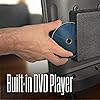
  • Built-In DVD Player: This flat screen TV comes equipped with an integrated DVD player that lets you play your favorite shows and movies on discs without the hassle of extra devices and cords
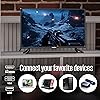
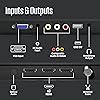
  • Streaming, Gaming & PC: Designed with HDMI and USB inputs to connect to your favorite streaming device, media player, computer, or gaming console. Our HD TV also offers other ports and inputs for greater flexibility
  • Parental Control: Monitor your child's viewing experience with this TV. Built-in V-chip technology allow parents or guardians to block content based on program ratings and check on parental guidelines of unfamiliar shows
  • Space-Saving: This small non-smart TV will fit in any office, kids' bedroom, kitchen, garage, or RV camper (12V inverter required). Can be used as a PC monitor with the HDMI and VGA inputs

Screen Size: 23.6 Inches


Brand: Westinghouse


Display Technology: LED


Resolution: 720p


Refresh Rate: 60


Special Feature: parental controls V-chip, TV, dvd player, portable, lightweight, LED


Included Components: Stand, TV


Connectivity Technology: USB


Aspect Ratio: 1.781


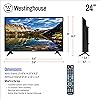
Product Dimensions: 6.3"D x 21.6"W x 14.5"H


Brand Name: ‎Westinghouse


Item Weight: ‎4.4 pounds


Product Dimensions: ‎21.6 x 6.3 x 14.5 inches


Item model number: ‎WD24HX5201


Batteries: ‎2 AAA batteries required. (included)


Color Name: ‎Black


Special Features: ‎parental controls V-chip, TV, dvd player, portable, lightweight, LED


Speaker Type: ‎Built-In


Item Weight: ‎4.4 Pounds


Standing screen display size: ‎23.6 Inches


Aspect Ratio: ‎1.781


Voltage: ‎120 Volts


Wattage: ‎40 watts


Date First Available: January 20, 2022


Frequently asked questions

If you place your order now, the estimated arrival date for this product is: Monday, Mar 30

Yes, absolutely! You may return this product for a full refund within 30 days of receiving it.

To initiate a return, please visit our Returns Center.

View our full returns policy here.

  • Klarna Financing
  • Affirm Pay in 4
  • Affirm Financing
  • Afterpay Financing
  • PayTomorrow Financing
  • Financing through Apple Pay
Leasing options through Acima may also be available during checkout.

Learn more about financing & leasing here.

Top Amazon Reviews


  • So far so good for this old timer.
Size: 24 Inch
I haven't finished installation -- literally just received it. If you accidentally press to reset to factory settings as I did, just put in 4 zeros as the Code it asks for or it stays in lock out and wont let you get to the scan channels step without filling in a code there. When connecting your booster antenna remember to plug the hdmi thing on the side and the circular antenna underneath. That was all easy peasy. I haven't put my amazon fire stick on it yet, but suspect I'll need an extender cord since it's underneath the tv and not on the side like my old tv. I have a question about changing channels without going back to channel 2 and also what specific soundbar people recommend. Wondering if I could plug in some old computer speakers into it. I feel so good about not having a smart tv in my bedroom. I did plug it into one of those on/off plugs because I don't like the red light that glows when it's turned off since it holds just a little power in the circuit. Here's the link (I use these for a lot of things I want off and I light the light on the outside reminds me) : https://www.amazon.com/gp/product/B07QKPBZX1/ref=ox_sc_act_title_1?smid=A1AMUYYA3CT6HJ&th=1 So far all channels scanned and work fine but I haven't finished testing out the DVD player or the firestick and will update with any shortcuts I learn. I wrote this because I hate installing new things like this and manuals don't really help with some of the simpliest of things. Update: A friend picked up a soundbar on sale - makes an incredible difference and worth it. The original sound was noticably low quality, but with the soundbar -- wow awesome upgrade to the tv overall. Simply plugged in the aux into the the side. DVD was so easy and the picture quality is excellent. Just change the input which is the source button (just below the mute button). The eject is the Return button (it's the upper right little angled button above the big OK circle). One mistake I was making was hitting that USB button instead of the on/off button in the dark. I was so annoyed thinking I had to constantly rescan channels because I always turn it completely off as stated above. Now I've stopped accidentally pressing that big AUX button on the top right thinking it was the on off switch in the dark. Not sure what fixed my problem, but I think that was it. Avoid that AUX button like the plague. It must be important for something, but nothing that I've needed to be in such a prominent position. Silly me. Haven't tried the firestick on it yet, but if I encounter a problem when I do plug it in. I'll post it. ... show more
Reviewed in the United States on May 17, 2025 by PS

  • Good item with no problems.
Size: 32 Inch
In spite of some reviews reporting poor sound we took a chance and bought this unit. We've had no problems at all with the sound or with anything else. Picture is good. And our DVDs look better played on the built-in player than on our Toshiba DVD player connected to this new Westinghouse TV. Setup was easy and quick. The price was low so we are happy with this TV. ... show more
Reviewed in the United States on January 1, 2026 by Puzzle Kat

  • Remote Control very intermittent/unreliable to TV
Size: 32 Inch
Update: I just bought a dedicated computer monitor that cost a lot less than this piece of junk, dropped from two ★ rating to ZERO STARS. I needed to rearrange my desk so I went to disconnect the VGA cable, while listening the thumbscrews the TV screen on the entire left side in front of the VGA just cracked and showed vertical black lines down the screen, just by loosening a connector! Are you kidding me? No, not kidding so took off the connector rearranged and just inserted the VGA connector, turned on the TV with a remote that never wanted to properly interface with the dang TV, and now I had thousands of black vertical bars across the entire screen with small sections of working display areas. I got so p.o.rd I just disconnect the entire TV from everything and slammed it screen down on the floor. I will never, ABSOLUTELY NEVER buy anything Westinghouse product no matter what it is! Worst pile of crap I have ever owned. Wish I never wasted my money on this junk heap. ======== End of Update ======== TV and Remote don't get along very well. I just opened this new out of box, but I had purchased it a long while back, so it's return date is long gone. But the TV works, just that for some very odd and peculiar reason you just can't point the remote at the TV and have it work properly. If I want to change the Source to my computer VGA from TV, or go from TV to the built in DVD or back to my computer VGA, I can point the remote at TV, but I have to point at different places BEFORE the TV will respond to the remote. Then I have to find the next spot where the remote will change a channel or change the volume level. When selecting a channel to view can get quite perplexing because before you can get all numbers in, you have to repoint the remote to a different area of the TV for each number pressed, so changing channels gets quite frustrating. Running the DVD has its issues with this too. Even pausing, fast forward, etc. you have to move the remote around the TV before it recognizes the command you want. So there is definitely some kind of flaw in the way the remote sees the TV or the TV sees the remote. This is why I only gave it two stars, there is no off/on or manual controls, only the remote is the only control. Not fond of a TV that has no manual options to control it. And it doesn't come with the ability to connect to the Internet for extended channels via WiFi like my other TV does, so can't watch many of the extended channels I enjoy. If I just leave it on the VGA computer monitor setting it works fairly well, but for being a larger TV and Computer Monitor, the resolution actually sucks, I'm used to 1920x1080 HD, but this TV doesn't go above the old 1024x780 mode, which by today's standard is total garbage. I had expected better resolution than this. So I wasn't happy with that either. But since my old monitor broke and fell apart after many years of use, I had hope this TV would have been a suitable replacement for it, sadly it wasn't and isn't. So all in all, I'd give this TV a very poor rating at best. The sound quality is okay, but volume levels can be quite low. And if you're watching a DVD and want to pause it to check something on TV like the news, if you go to any other source, all you get is a blank screen, you can't have a DVD even inserted in the built in drive, them change over to watch TV for a few minutes or go to VGA computer monitor mode to do something on your computer, not even for a couple of minutes, the TV screen just stays black and is just a void. That's not how I would have expected the TV to work, my other TV doesn't do this. Just this one does. Not impressed at all. Like stated, for use as a computer monitor or perhaps a game console, but TV watching or DVD use, not very great. No I definitely would not recommend this pile of junk. ... show more
Reviewed in the United States on September 9, 2025 by Cataptra

  • overall good, sound quality is poor
Size: 24 Inch
It's nice having just one cord for tv/dvd player for our toddler. Nicely sized and helps us not have a sticky-ipad-kid. We didn't like subscribing to Disney plus when we've invested so much in DVDs over the years. The only drawback we really run into is the sound quality. It's just not good. I tried changing the levels (increasing the Bass specifically) and it didn't do much. Again, it's for the toddler so he doesn't care but that's definitely a disappointment as far as quality. It sounds better on our tablet. ... show more
Reviewed in the United States on January 5, 2026 by Erika meyers

  • Westinghouse TV/DVD
Size: 32 Inch
Great TV/DVD combo. Very easy to use. Great picture quality.
Reviewed in the United States on January 8, 2026 by GratefulGreg🤠

  • 5 stars for our intended purpose.
Size: 24 Inch
We are using it solely for dvd purposes. It’s perfect.
Reviewed in the United States on February 2, 2026 by Kelly S.

Can't find a product?

Find it on Amazon first, then paste the link below.
Checking for best price...