Search  for anything...

NVIDIA Shield Android TV Pro | 4K HDR Streaming Media Player High Performance, Dolby Vision, 3GB RAM, 2X USB, Works with Alexa, Model:945-12897-2500-101

  • Based on 13,394 reviews
Condition: New
Checking for the best price...
$199.00 Why this price?
Save $300.98 was $499.98

Buy Now, Pay Later


As low as $33.17 / mo
  • – 6-month term
  • – No impact on credit to apply
  • – Instant approval decision
  • – Secure and straightforward checkout

Ready to go? Add this product to your cart and select a plan during checkout.

Payment plans are offered through our trusted finance partners Klarna, Affirm, Afterpay, Apple Pay, and PayTomorrow. No-credit-needed leasing options through Acima may also be available at checkout.

Learn more about financing & leasing here.

Free shipping on this product

FREE 30-day refund/replacement

To qualify for a full refund, items must be returned in their original, unused condition. If an item is returned in a used, damaged, or materially different state, you may be granted a partial refund.

To initiate a return, please visit our Returns Center.

View our full returns policy here.


Availability: Only 3 left in stock, order soon!
Fulfilled by Amazon

Arrives Tuesday, Jun 23
Order within 7 hours and 20 minutes
Available payment plans shown during checkout

Protection Plan Protect Your Purchase
Checking for protection plans...

Features

  • The Best of the Best. SHIELD TV delivers an amazing Android TV streaming media player experience, thanks to the new NVIDIA Tegra X1+ chip. Enhance HD video in real-time to 4K for clearer, crisper visuals using next-generation AI upscaling. 2x USB 3.0 ports for storage expansion, USB cameras, keyboards, controllers, and more. Plex Media Server built-in, 3 GB RAM, and 16 GB storage.Connectivity Technology : Bluetooth 5.0
  • Dolby Vision - Atmos. Bring your home theater to life with Dolby Vision HDR, and surround sound with Dolby Atmos and Dolby Digital Plusdelivering ultra-vivid picture quality and immersive audio
  • Best-In-Class Design. Designed for the most demanding users and beautifully designed to be the perfect centerpiece of your entertainment center, SHIELD TV Pro levels you up to more storage space, more RAM, the expandability of 2x USB 3.0 ports, and Plex Media Server. Get the best connectivity with Gigabit Ethernet, dual-band AC Wi-Fi, and Bluetooth 5.0. The all-new remote is more advanced than ever with motion-activated, backlit buttonsincluding a customizable menu button. Plus, with voice control, Bluetooth, IR control for your TV, and a built-in remote control locator, you have the most advanced remote yet
  • Unlimited Entertainment. Enjoy the most 4K HDR content of any streaming media player, and access to thousands of apps and games, including top apps like Netflix,YouTube, Prime Video, Disney + and Hulu. Add a game controller (sold separately) and play todays most popular games like Fortnite and GeForce Now. Even stream from your phone with built-in Chromecast 4K

Description

NVIDIA SHIELD TV Pro is the ultimate streaming media player for the modern living room—packed with features to make even the most demanding users proud. Level up to SHIELD TV Pro for more storage space, two USB 3.0 ports for expandability (storage expansion, usb cameras, usb keyboards, and controllers, TV tuners, and more), Plex Media Server, SmartThings hub-ready (just add a SmartThings Link), AAA Android gaming, Twitch broadcasting, and 3 GB RAM. SHIELD’s versatility and speed set it apart. It’s a streamer, game console, DVR, media server, and smart home hub with voice assistants. Enjoy a cinematic experience with the highest quality 4K HDR entertainment, thousands of apps, thousands of games, and the Google Assistant built in. SHIELD TV is a high- performance streaming media player, now up to 25% faster with the new Tegra X1+ processor. Enjoy Netflix, Prime Video, and Vudu in stunning 4K with Dolby Vision HDR and Dolby Atmos and Dolby Digital Plus surround sound. Upscale HD video to 4K in real-time using the power of AI and the Tegra X1+ processor. Cut the cord with apps like YouTube TV, Hulu Live TV, Sling TV, and PlayStation Vue. Cast your favorite apps to your TV with Chromecast 4K built- in. Use the built-in Google Assistant to see results on your TV, control playback on your favorite shows, share your photos, see your Nest cam, display your calendar, check the traffic, play the latest songs, dim the lights, and so much more, all with your voice. Control SHIELD hands-free with Alexa and Echo or with Google Home. The all-new SHIELD remote is more advanced than ever, with motion-activated backlit buttons, voice control, Bluetooth control, an IR blaster to control your TV, buttons for power, volume, fast-forward, rewind, play/pause, and a user-customizable button. Plus, never lose your remote with a built-in remote locator. Connect a game controller (sold separately) for access to AAA gaming with GeForce NOW, NVIDIA’s engineering breakthrough in cloud gaming. Instantly transform your SHIELD TV into a GeForce-powered PC gaming rig. With hundreds of supported titles and features like cloud saves and cross-play on laptops and desktops, you can pick up a game from wherever you left off. Level up to SHIELD TV and never look back.

Brand: NVIDIA


Connectivity Technology: Ethernet, Wi-Fi


Connector Type: HDMI


Special Feature: Android Phone Control, Microphone Feature


Resolution: 4k


Controller Type: Voice Control


Form Factor: TV Box


Color: Black


Model Name: NVIDIA SHIELD TV Pro


Connectivity Technology: Ethernet, Wi-Fi


Connector Type: HDMI


Other Special Features of the Product: Android Phone Control, Microphone Feature


Resolution: 4k


Controller Type: Voice Control


Form Factor: TV Box


RAM Memory Installed: 3 GB


Compatible Devices: Television


Memory Storage Capacity: 16 GB


Video Output Resolution: 4K (3840x2160)


Video Codec: H.265/HEVC


Smart Home Compatibility: Smart Home Compatible


Color: Black


Item Weight: 2.1 Pounds


Item Dimensions L x W x H: 6.26"L x 1.02"W x 3.58"H


Brand: NVIDIA


Model Number: 945-12897-2500-101


Model Name: NVIDIA SHIELD TV Pro


UPC: 812674023038


Global Trade Identification Number: 38


Mfr Part Number: 945-12897-2500-101


Manufacturer: NVIDIA Corporation


Unit Count: 1.0 Count


Item Type Name: Streaming Media Player


External Testing Certification: Não Aplicável


Built-In Media: Remote Controller


Warranty Description: One (1) year from the date of purchase of your new Warranted Product.


Frequently asked questions

If you place your order now, the estimated arrival date for this product is: Tuesday, Jun 23

Yes, absolutely! You may return this product for a full refund within 30 days of receiving it.

To initiate a return, please visit our Returns Center.

View our full returns policy here.

  • Klarna Financing
  • Affirm Pay in 4
  • Affirm Financing
  • Afterpay Financing
  • PayTomorrow Financing
  • Financing through Apple Pay
Leasing options through Acima may also be available during checkout.

Learn more about financing & leasing here.

Top Amazon Reviews


  • Powerful Streaming Device with Excellent 4K HDR Performance
Style: Player
Powerful Streaming Device with Excellent 4K HDR Performance I purchased the NVIDIA Shield Android TV Pro to upgrade my home entertainment setup, and it has been one of the best streaming devices I’ve used. The first thing I noticed was how fast and responsive the interface feels. Apps launch quickly, navigation is smooth, and the device handles multitasking without any noticeable lag. Setup was straightforward, and it integrated easily with my existing TV and sound system. Picture quality is outstanding. 4K HDR content looks sharp, vibrant, and detailed across streaming services, making movies and shows look fantastic. The AI-enhanced upscaling feature is especially impressive, helping older HD content appear clearer and more refined on a 4K display. One of my favorite features is the versatility of the Shield TV Pro. In addition to streaming, it supports a wide range of apps, media playback options, and gaming features. The built-in Chromecast functionality and Google Assistant integration add convenience, while the powerful hardware ensures reliable performance even during extended use. Pros: • Fast and responsive performance • Excellent 4K HDR picture quality • Impressive AI upscaling for HD content • Wide app compatibility and media support • Built-in Chromecast and Google Assistant • Reliable and powerful hardware Cons: • Higher price compared to basic streaming devices • Remote may take some time to get used to for new users Overall, the NVIDIA Shield Android TV Pro is an outstanding streaming and media device. If you want premium performance, excellent picture quality, and a feature-rich entertainment hub, it is an easy recommendation. ... show more
Reviewed in the United States on June 3, 2026 by Jonny Easling

  • Dolby Atmos! Updated: Media Streamer Comparison Review+ Dolby Atmos! Updated: Media Streamer Comparison Review+
Style: Player
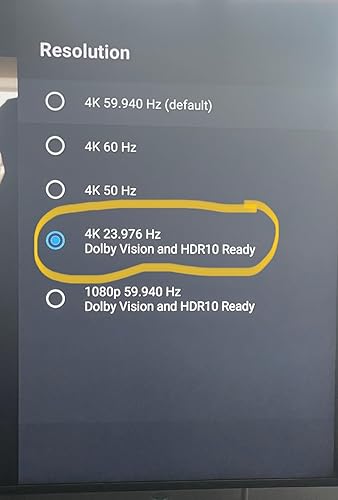
As pictured, the Nvidia shield tv pro NOW supports Dolby Atmos music and Yes it is amazing, and well separated throughout my 7.2.4 setup and much more immersive than stereo music. From what I understand dac’s don’t currently support Dolby Atmos music and right now the only way to listen to Dolby Atmos music is to first have a good streaming device, like the nvidia shield tv pro, and second it has to be connected to your dolby atmos source via an HDMI cable. For example, I can ONLY listen to true Dolby Atmos music through the tidal app of my Nvidia, which is connected to my Dolby Atmos AVR, Denon AVR-x4500h. Dolby Atmos music is honestly brand new to me as I have been using tidal connect which doesn’t support Dolby Atmos at the time of this review. Dolby Atmos music is hands down better than stereo and reminds me of listening to great music that is played on a dolby atmos movie! The sample rate for dolby atmos is currently reading at 48khz but as we all know it’s difficult to tell the difference between 24 bit 192khz and 16bit 44khz because what really matters is how well the track was mastered, something we cannot quantify at this time. I would think Dolby atmos music would be identifiable in a blind listening session since the surround channels are so engaging! This is another example of why the nvidia shield pro is such a great streaming device!!! Update: After having this unit a few years I’ve finally gotten a chance to get an upgraded dac for my system and find the best source to play to my dac. After trying Bluetooth, airplay2, and using the hi res USB Audio function of this shield pro (hardwired to my dac) and found this is this machine that gives you an amazing music experience.. if you like to rock! The biggest improvement in sound is how the shield pro makes your subwoofers work for the money! My subs really come alive in hi res usb while played from the nvidia. I compared playing usb music between my iPhone and the shield which plays to a new hi-res, affordable, 1mii DS -601 dac and the biggest difference between playing hardwired from my iPhone and hardwired from the shield is how well the signal processes in my subwoofers. It’s fun and I highly recommend using this product for hi-res USB music (Tidal is awesome at sound quality and discovering/rediscovering your fav music) as well as a stout dolby atmos/vision machine! This does it all!!! Thank you nvidia🙂 This review compares the Full Nvidia Shield Pro against the newest Apple TV 4k 3rd generation and Roku Ultra on a cheap hiscence 65” TV with an Audiophile grade Dolby Atmos 7.2.4 Home Theater Component Setup. The picture quality of the Nvidia Shield Pro is near equivalent to the Apple TV, but is better at upstreaming and removing that annoying CGI Wavy dark background from your video playback. The Roku Ultra is very unremarkable when compared against the Nvidia Shield Pro and Apple TV and wont be mentioned further. Please keep in mind this is Nvidia, so the fact this product is the best shouldn’t be a surprise based on how well the stock has performed historically. The apple TV doesn’t detect the available video settings like the Nvidia does, which I love. What this means is that you get to find a Dolby Vision and HDR10 setting that eliminates the Wavy CGI dark background and replaces it with rich detail!! I ultimately picked this because I am an audiophile and love Dolby Atmos! This streaming device makes Dolby Atmos really pop! If you already have a great Dolby Atmos system this device is definitely worth considering as it will upgrade your audio experience as well as video experience! You do have to play around with the display settings though to find what works best for your TV, screenshots of possible settings (for my TV available). I found my favorite setting is Dolby Vision, default was Non-Dolby Vision set at 4k 59hz. For my TV Dolby Vision was only available at 4k 29hz but again, this lower refresh rate removed the wavy CGI dark background that interferes with your movie watching experience! I love this Streaming Device and have settings listed below: The default picture and sound is standard, you must first change the default video settings to 4k with Dolby vision and HDR as pictured to achieve the best picture possible (Pro). Also change the Audio settings to manual and select all Dolby and DTS Settings for optimal sound(Pro!). The default is regular 4k which will not appear that different from your budget smart TV. Once the settings are optimized on this device you will find this android device is much better than the Apple TV, which is hard to beat! This device is worth the price as it optimizes the picture and sound. I don’t use this for games, only to enhance the picture and make the surround sound really pop! This truly is A must for anyone who is an audio enthusiast and/or for someone who has bought a budget TV like a Hiscence, as I did. UPDATE: The screensavers are beautiful! Can you please put the locations on them instead of the photographers name, where applicable, it would be greatly appreciated!! ... show more
Reviewed in the United States on March 9, 2024 Reviewed in the United States on March 9, 2024 by Paul

  • THE Streaming Box
Style: Player
This is an excellent box for streaming. It works for all major streaming services and even does phenomonally with side loaded IPTV apps. Its easy to use and provides a clean interface and it's small and cool/futuristic looking with a green light. The control is quirky but comfortable and you can program it in the settings to control your TV's power and volume. It doesn't have the biggest storage capacity, but you can attach your own drive to it and make it into your very own media play/server. One small caveat, if you have a TP-Link mesh network, you will need to disable device isolation network-wide in order for the box to have full network communication with the rest of your network. ... show more
Reviewed in the United States on April 6, 2026 by J. Trevino

  • The best Android TV box I’ve ever used The best Android TV box I’ve ever used
Style: Player
The NVIDIA Shield TV is hands down the best streaming device I’ve owned. Performance is incredibly smooth thanks to the powerful processor—apps open instantly, menus are fast, and there’s no lag at all, even with heavy use. Streaming quality is excellent. It handles 4K HDR, Dolby Vision, and Dolby Atmos without any issues. Whether I’m watching Netflix, YouTube, or Plex, everything looks sharp and runs flawlessly. It’s also great for game streaming and emulation. I really like the Android TV interface—it’s clean, easy to use, and constantly updated. NVIDIA does an amazing job with long-term software support, which is rare for TV boxes. The build quality is solid, the remote works great, and voice control is very responsive. It also integrates perfectly with Google Assistant and smart home devices. Yes, it’s more expensive than other TV boxes, but you truly get what you pay for. If you want speed, reliability, and top-tier performance, this is absolutely worth it. ... show more
Reviewed in the United States on January 4, 2026 Reviewed in the United States on January 4, 2026 by Diego Diaz

  • Viable replacement for WD Media Player. Works well with a DAC with some effort.
Style: Player
A couple of weeks ago, my Western Digital Live TV Media Player (almost 20 years old) gave up the ghost. I had been prepared for this eventuality, and was thinking I could replace it with a customized Raspberry Pi, the Roku Ultra, or the Nvidia Shield TV Pro. When the WD Media Player died, I called a couple of online audiophile dealers to determine what were their options -- and their recommendations were twice or more the price of the Nvidia Shield option. I looked again the helpful Amazon pictures and though the Shield Pro had not optical output for my much higher priced (and very musical) DAC, it did have two USB ports, which would possibly work with the USB port for my DAC. I am not very technical or good with hardware, so instead of taking on what might be a challenging Raspberry PI project, I decided to roll the dice on the Nvidia Shield TV Pro. It was delivered next day, and to my disappointment, no sound came when hooked up to my DAC. This was after going through the settings and enabling the USB out option. Time for additional searching on Google, and eventually I came across a post titled "HOW TO SETUP THE NVIDIA SHIELD PRO AS A BIT PERFECT AUDIO STREAMER/PLAYER." Now there may have been other, and even better or easier options, then what the article recommended, but I did as it said, and searched for the Sony Music Centre in the Google Play Store on my Amazon Fire tablet, installed an app called Side Launcher on the Nvidia Shield Pro as well as the tablet, and then sent the downloaded apk (a term I had not previously heard) from my tablet to the Shield via the Side Launcher App. With the Sony Music Centre/Center installed, I plugged in the DAC chord from DAC to Shield, the Music Center recognized it and gave me the option (as indicated in the article) to allow pass through audio. I then went to play something via the X-Plore file manager I had just installed on the Shield. I was prepared for no sound -- and that is what happened the first couple of seconds -- but, to my delight, the sound went from the Shield to my DAC to my amplifier to my speakers! This worked for files on my attached 4 hard drives (attached via a hub to the other USB port available in the Shield) to my PC, to the streaming on Youtube, Peacock and Plex TV which used the Plex Server on my PC for the files there. Next steps, was to expose those 4 attached drives to the Shield so I could see them in the PC which I was able to do with some trial and error, after watching a youtube video on how to set up a the Shield as a Network Attached Storage Device. (This had taken no effort to do with the WD TV Media Player, but was not so easy for me with the Shield. I did this so I can move files back and forth from PC to those drives attached to the Shield, just like I was able to do with the WD Media Player.) Sound was as good (or better -- I couldn't, to A to B comparisons since the WD player was inoperable) as my old WD Media Player solution but the file manager I was using (X-plore) couldn't work with cue files like the WD Media Player. In addition, though the WD Media Player didn't support .ape files, it could sometimes play them and always see them, but not so with the X-Plore app. After more googling, I found out about Kodi (yes, I was pretty clueless about all this stuff) and installed that. It also has an option for audio pass through, which I enabled, and unlike X-Plore, I could see the individual tracks on single flac files that had associated .cue files. And an improvement over the WD Media Player, it could play not only .flac files, but also .ape files! So at this point I am happy with the sound of the Nvidia, happy with the ability to play my audio files and how well Kodi works, and even find that it has made my old Roku redundant. (I had considered replacing the old Roku and WD Media Player with the Roku Ultra, but didn't after Roku support indicated that it wouldn't work with a USB hub with multiple drives -- maybe it really would have, but not sure it wouldn't have allowed me all the functionality that I have with the Shield.) So at this point very happy with the Shield, particularly the quality of pictures when watching streaming channels (I set the AI video enhancement option -- a great feature) and most importantly happy with the quality of the audio! It was great listening to Gentle Giant's remastered Power and the Glory with the sounds appearing from multiple parts of the room (my setup is traditional stereo but this effect happens with two well placed speakers) and some Haydn Keyboard Trios on original instruments (each note of the fortepiano is so clear, and most importantly the humor in the music, so well interpreted by the musicians, is so effectively conveyed.) At first I had thought I had wasted $200 on the Shield, but after taking the time to learn some of what it is capable of, found it to be a great audiophile-level solution! ... show more
Reviewed in the United States on February 9, 2022 by 88 notes

  • Still one of the best media devices ever made
Style: Player
I bought this November 2019. It's now March 2025 and this thing still is one of the best items I've ever used. Nvidia still updates to patch security, fix bugs, and update features. Content plays super smooth and you have so many apps available to stream or play pretty much anything you would want. I've had minimal issues over the time I had it. Occasionally the remote will disconnect and I need to re-pair it, but that takes like 2 mins. It's super easy to set up and works great with my Samsung Smart TV. The Pro version has a decent amount of storage and I linked a network drive with all my media. ... show more
Reviewed in the United States on March 25, 2026 by JD_reviews

  • Star for great concept/audio/graphics, epic failure execution
Style: Player
The mass appeal for this product for me was the fact it had a built in Plex Server, certified streamer (except Xfinity, attempt to side load did not work), and best in class graphics and Dolby Atmos support. I sat on purchasing this for ages because a promised update in May (2025) was to fix the Plex Server issues of crashing and the Shield's power issues with the remote etc. I cannot tell you the amount of research, inquiring, and effort I put in to find me such a device that was simple and affordable. While I was warned via various platforms such as reddit, I hoped with the age of the posts coupled with the recent updates that enough time had passed for Nvidia to sort the bugs. However, even outside the box with these updates I experienced a very sensitive remote and power issues. In terms of the power issues, after hitting the power button to turn on my tv/device it would immediately turnoff (this was a bug fix explicitly outlined in the May update that apparently did not take). This then progressed to delayed page navigation to just the Plex app (separate from the buried server app) crashing or not loading to then other apps not loading or crashing to then the device working just fine but if left untouched would crash out and act as if it was shutoff. To awaken it again and to fix any of these issues I would have to power cycle the device. It got to the point that I had to power cycle at least once during any usage period, however brief. I checked as often as I could for updates even though I set it up as automatic. I factory reset at least 3 times and reset up my server just as many. Thankfully I used an external drive to house everything so didn't lose that, but was a PITA to have to redo my collections and detections each time and if anything as my library grew the strain only increased on the device. Nvidia was not helpful in the slightest and the replacement didn't last much longer either. Five months of troubleshooting and trying to optimize and nothing ever got better, the issues persisted and grew and in frequency. I travel frequently so I wanted to be able to feel comfortable leaving my server plugged in and unattended without fear of battery issues/overheating/glitching. I almost settled with purchasing an amazon power plug to remotely power cycle the device since truly that was the only solution that temporarily unstuck it, but then I realized for how much I paid for this and yet the amount of effort it is taking to simply keep it operating I should not be complacent just to have those few moments of graphics and audio appeal. Save yourself the headache, invest in NAS (thinking the latest ASUS NUC) and there'd be no issue with keeping it running all the time unattended, just as much of a small footprint and probably a bit more versatility in that the whole automation process is on one device rather than me having to transfer files. ... show more
Reviewed in the United States on November 13, 2025 by Speedy

  • The Ultimate Streaming Device – Powerful, Fast, and Versatile
Style: Player
The NVIDIA SHIELD Android TV Pro Streaming Media Player is hands down the best streaming device I’ve ever owned. It delivers crystal-clear 4K HDR with Dolby Vision and Dolby Atmos, making movies and live sports look and sound incredible. The AI-enhanced upscaling is a game changer — even older HD content looks sharper and more vibrant on my 4K TV. What makes it stand out is how versatile it is. Beyond streaming, it doubles as a GeForce NOW cloud gaming hub, and it handles games impressively well for a compact box. I also love the integration with Google Assistant and Alexa, making it easy to control my smart home, search for content, or pull up information with just my voice. ✅ Pros: 4K HDR with Dolby Vision & Atmos – stunning video and audio quality AI upscaling breathes new life into non-4K content Supports GeForce NOW cloud gaming for casual and serious gamers Google Assistant & Alexa integration for smart home and voice control Smooth, responsive interface with tons of app support ❌ Cons: Higher price than most other streaming devices Some features (like cloud gaming) require a strong internet connection 💡 Tips: Use a wired Ethernet connection for the most stable streaming and gaming. Enable AI upscaling in settings for the best picture quality on HD content. Pair it with a Dolby Atmos soundbar or receiver to unlock its full audio potential. Keep the system updated to get the latest NVIDIA performance tweaks and app support. Bottom Line: The NVIDIA SHIELD TV Pro isn’t just a streaming box — it’s a powerful all-in-one entertainment hub. If you want the best picture quality, advanced features, and gaming capabilities all in one sleek device, this is the one to get. ... show more
Reviewed in the United States on September 6, 2025 by Kenny Campbell

Can't find a product?

Find it on Amazon first, then paste the link below.
Checking for best price...