Search  for anything...

WD 2TB Elements Portable External Hard Drive HDD, USB 3.0, Compatible with PC, Mac, PS4 & Xbox - WDBU6Y0020BBK-WESN

  • Based on 13,088 reviews
Condition: New
Checking for the best price...
$149.94 Why this price?
Labor Day Deal · 14% off was $174.04

Buy Now, Pay Later


As low as $24.99 / mo
  • – 6-month term
  • – No impact on credit to apply
  • – Instant approval decision
  • – Secure and straightforward checkout

Ready to go? Add this product to your cart and select a plan during checkout.

Payment plans are offered through our trusted finance partners Klarna, Affirm, Afterpay, Zip, Apple Pay, and Google Pay. No-credit-needed leasing options through Acima may also be available at checkout.

Learn more about financing & leasing here.

Free shipping on this product

FREE 30-day refund/replacement

To qualify for a full refund, items must be returned in their original, unused condition. If an item is returned in a used, damaged, or materially different state, you may be granted a partial refund.

To initiate a return, please visit our Returns Center.

View our full returns policy here.


Availability: In Stock.
Fulfilled by Amazon

Arrives Sunday, Sep 6
Order within 1 hour and 58 minutes
Available payment plans shown during checkout

Protection Plan Protect Your Purchase
Checking for protection plans...

Features

  • 2TB Storage Capacity
  • USB 3.0 and USB 2.0 compatibility
  • Extra storage for your photos, videos, music and files
  • Formatted for Windows 8, 7, Vista & XP; Easily Reformat Drive for Mac
  • WD quality and reliability
  • Operating Temperature 5 Degrees Celsius to 35 Degrees Celsius

Description

WD Elements portable hard drives offer reliable, high-capacity storage, fast data transfer rates and universal connectivity with USB 3.0 and USB 2.0 devices to back up your photos, videos and files on the go. Operating Temperature 5 Degrees Celsius to 35 Degrees Celsius .

Digital Storage Capacity: 2 TB


Hard Disk Interface: USB 2.0/3.0


Connectivity Technology: USB


Brand: Western Digital


Special Feature: Portable


Hard Disk Form Factor: 2.5 inches


Hard Disk Description: Portable


Compatible Devices: Mac, PC


Installation Type: External Hard Drive


Color: Black


Digital Storage Capacity: 2 TB


Hard Disk Interface: USB 2.0/3.0


Connectivity Technology: USB


Additional Features: Portable


Hard Disk Form Factor: 2.5 inches


Compatible Devices: Mac, PC


Specific Uses For Product: Personal


Read Speed: 5 gigabytes_per_second


Cache Memory Installed Size: 2


Data Transfer Rate: 5 gigabytes_per_second


Form Factor: Portable


Hardware Connectivity: USB 3.0


Compatible Video Game Console Models: Microsoft Xbox One, Sony PlayStation 4


Hardware Platform: PC;Mac


Hard-Drive Size: 2 TB


Item Weight: 4.64 ounces


Number of Items: 1


Unit Count: 1 Count


Customer Package Type: Standard Packaging


Brand: Western Digital


Model Number: 103751


Hard Disk Description: Portable


Built-In Media: A Free Trial Of Wd Smartware Pro Backup Software For Local And Cloud Backup, Wd Elements 2Tb Usb 3.0 Portable Hard Drive (Wdbu6Y0020Bbk-Nesn)


Model Name: WD Elements Portable


Manufacturer: WD


Global Trade Identification Number: 91, 76, 39, 61


UPC: 801049948397 758399111301 647692848406 809393888741 718037807591 809199907769 132018245750 718037814797 797045616944 808112916567 785307932901 914419590376 804067176087


Item Type Name: Wd Elements Portable WDBU6Y0020BBK - Hard drive - 2 TB - USB 3.0 (WDBU6Y0020BBK-WESN)


Mfr Part Number: WDBU6Y0020BBK-EESN


Warranty Description: 2 year manufacturer


Installation Type: External Hard Drive


Color: Black


Enclosure Material: Unspecified


Frequently asked questions

If you place your order now, the estimated arrival date for this product is: Sunday, Sep 6

Yes, absolutely! You may return this product for a full refund within 30 days of receiving it.

To initiate a return, please visit our Returns Center.

View our full returns policy here.

  • Klarna Financing
  • Affirm Pay in 4
  • Affirm Financing
  • Afterpay Financing
  • Zip Pay in 4
  • Financing through Apple Pay
  • Financing through Google Pay
Leasing options through Acima may also be available during checkout.

Learn more about financing & leasing here.

Top Amazon Reviews


  • A nice no-frills USB Powered Portable Drive.
I purchased the 2 TB model, and it's working perfectly in both Windows and Linux. The drive came preformated for NTFS but can easily be reformatted for specialized Mac or Linux file systems using standard operating system utilities. It didn't come with much in the way of a user guide, but it doesn't really need one, it just plugs in and pops right up as a standard storage device like a thumb drive. Physically, this drive is a bit heavier and just a little thicker than some of the lower capacity USB powered drives I have used, but is still incredibly compact at only a little over 3 by 4 inches by just over a half inch thick (about the size of a pack of those larger sized bicycle playing cards). The plastic drive case isn't fancy, and probably won't fend off an attack from an angry bear, but it's adequate given the fact that, like any portable drive, you will want to be careful about severe shocks and drops anyway. Despite the compact size, and lightweight plastic case, the drive weighs in at close to half a pound and feels pretty hefty and substantial. Power consumption, even for the largest 2 TB model, is still low enough to work on a single 500ma USB port (no 2 port Y-Cable or external power needed). Not only that, but even after extended operation, transferring hundreds of gigabytes of data for example, the drives case barely even starts to get warm. Mechanically, my drive is so quite and smooth in operation that you have to really feel carefully to even tell if it is spinning. You can feel very slight jogs internally when the drive is seeking, but it's barely noticeable, and if anything, smoother and quieter than most of my other portable hard drives. I wasn't able to read the RPM with my hard drive utils, but if it is 5400 as some have reported, that doesn't concern me too much, because data transfer rates are still quite reasonable. For example, I can stream 1080 or even 4K HD video direct from the drive to my PC with no hiccups or buffering issues. These days, with the super high data density platers on these compact drives you can get reasonably fast data transfers without spinning at 7200, and if you don't absolutely need the faster RPM, then it's actually better to design the drive to run at a lower RPM, because it allows the drive to run cooler, use less power, and reduces wear, giving higher reliability and longer life. I read a comment here about some kind of pouch being included, but my drive did not come with any accessories other than the required USB cable (but luckily I already had a small neoprene zippered pouch on hand to transport the drive when on-the-road). Because the drive is powered by the USB, I'm extra careful to properly 'remove' the drive in the operating system before pulling the plug, because hard drives don't like to loose DC power while they are still writing, which could happen if you pull the USB plug out before properly removing the device in your O.S. This isn't too difficult, but could be a little confusing given the way the indicator LED works on this drive. The 'Elements' drive has a simple single color white LED which does double duty to indicate both read/write access AND spindown/standby with a potentially confusing flashy-flashy code. Rapid flashing indicates the drive is busy reading or writing, where SLOWER flashing indicates that the drive has spun down and gone into a standby state. So you NEVER want to remove the drive while it's QUICKLY FLASHING (and could be writing), but it's generally OK to remove the drive after it has spun-down and is SLOWLY FLASHING. Expecting the user to be able to make this distinction based only on the flashing rate seems like a dumb idea. It would be better if the LED would change color in spin-down standby, and go out completely after you remove the drive in your O.S. like some other drives, but this is a pretty minor issue once you figure it out, so overall I still rate this drive a solid 5. ... show more
Reviewed in the United States on November 25, 2014 by Another Movie FAN

  • Great Companion for Tablo 2-Tuner System
Recently purchased this along with a 2-tuner Tablo unit (see my separate review) to help us in our cord cutting project. It has performed flawlessly since installation in June. Considered this as the unit to buy as it was listed as a reliable and compatible HDD companion to the Tablo. This truly was a "plug and play" experience, so why mess with success? Because we delete programs right after we watch them, there should be no problem of gradually filling up the drive's capacity. It continues to give us a way to "preserve" the ability to record and time shift some of our TV watching...at least for all our OTA channels. This unit and the Tablo are networked to the Roku devices around our home, so we still can watch programs wherever we wish. Now, if we could find a way to record/time shift some of our favorite programs on TNT (now viewed on the SlingTV app on our Roku's), then all our bases would be covered. With cord cutting, you can't have everything, but one can wish just the same. With our developing alternative TV system, we will be able to watch just about everything we have been viewing on our satellite-based TV service, but at much less than half the monthly cost. This is combined with changes made to our cable internet and telephone package too (we now have an Ooma telo unit [also reviewed separately] and have returned the rented cable modem). Now we're talking about even more money that stays at home each month. The WD Elements 2TB Portable Hard Drive definitely is a valued part of our complete new system. ... show more
Reviewed in the United States on July 31, 2015 by Robert

  • Fast, reliable drive
Bought this drive as a gift. Prompt delivery. Works very well, and Western Digital is very reliable. Tip: For a free backup program, I downloaded Karen's Replicator 3.6.9 from MajorGeeks.com. I like this backup program for a few reasons. (1) It does not encrypt or compress backups, so if your system blows up, you don't have to try to find the same backup program to install on your new or repaired computer in order to restore - you can just copy your files back from the backup drive with Windows File Explorer. (2) The software's author has sadly passed away, but this means you won't be annoyed with offers to update the software. This program does not make disk images, however - it only backs up selected folders, and only to an attached drive. But it works well and is totally free. Anyway, this is a very good USB 3.0 drive (which is backward-compatible with USB 2.0 ports). Fast, reliable, and plenty of space. ... show more
Reviewed in the United States on December 12, 2016 by Ohio user

  • "1.8 TB" actual, but expected.
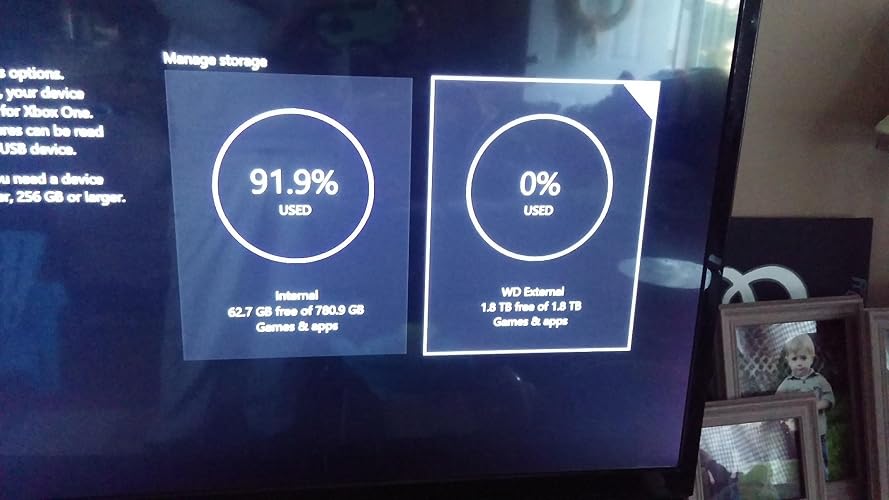
**XBOX ONE OWNERS** This is a nice, compact drive that is lightweight, and can safely be "stacked" on top of a console or PC with no threat of crushing or leaving indents after long periods of sitting. It can easily become inconspicuous, and even in view it is not much of an eye sore. As a matter of fact, it's black coloring goes just fine - sitting on top of my XBox One(top left - DO NOT PLACE THE DRIVE ON THE TOP RIGHT OF THE CONSOLE WHERE THE VENTILATION IS). XBox One owners who have reached their storage limits would appreciate this. It IS practically "PLUG & PLAY". Practically, because you must not plug the drive usb into the console until you have FIRST powered up your console. I plugged - then powered up the first attempt, and the XBox didn't even sense it. Power up the console(give it time to load your home screen), plug in the HD's usb(I plugged it in the "rear" of the console), go to "Settings", then "Storage". **NOTE: It slipped my memory, but either right after plug in, or immediately after choosing the WD drive for future memory(next step), it will ask if the drive's primary use is for "photos and media", whether you have current photos on the drive, and/or is it for your "game saves and downloads". Know that it is about to format the drive, so if you have photos saved prior to moving it to the XBox - keep this in mind...you could lose them.** I provided pictures, but you will notice your consoles built in memory option at first, and the WD Hard Drive option should be showing to it's right. You may immediately notice something seemingly off... "1.8 TB???" You haven't been ripped off. Think of that unprovided(to you) ".2 TB" as the HDrive's functioning brain. The drive needs memory space of its own to be the think tank for services provided to you. A brainless drive is a dead drive. Just click or choose to switch your memory(and future downloads) to the WD drive. Somewhere either right before or right after, it will ask your preferences on what kind of content you want saved. After formatting, IT'S SET. It showed "27.1%" memory used(for me), leaving that 1.8 TB. My explanation will take much longer to read than setting this up yourself. It's quite easy. I have since successfully re-downloaded games that I had to delete to make room for others, and I have also successfully downloaded new ones. We even had a recent power outage flicker - no harm to the drive. So far, so good, and at one of the most reasonable prices on Amazon in it's class. ... show more
Reviewed in the United States on March 3, 2017 by Apparition

  • A solid choice for a backup drive; can be powered by a Raspberry Pi 2
It's early days, but so far my 2 TB Western Digital Elements drive is serving well in my chosen capacity. I've got it hooked up to a Raspberry Pi 2 and am using it as a backup target for rsync. If you were wondering if a RP2 can power this drive, the answer is yes, but you do have to increase the power output of the USB ports, and you'll need a power supply with enough juice (minimum 2A 5V) to run both the Pi and the drive. The former is achieved via a few simple commands, and there are numerous guides for this online if you're interested. As for the Elements drive itself, this is a pretty bare bones package. In the box you'll find the drive, a rather short USB 3.0 Micro cable, and some simple documentation. On the disk is a trial version of some WD backup software, which can be safely ignored if you've got your own plans for the drive. As I understand it, the higher end Passport range contains the same base disks as the Elements range but in prettier cases and with non-trial software included. The case on my Elements drive is unabashedly plastic, though it feels solid enough and is certainly functional. One nice touch is that the status light is a white LED rather than the overused and often overly bright blue; this not only adds a touch of class to an understated design but also means the activity light doesn't shine up the entire room at night. Performance-wise, I saw a steady 105 MB when copying files from a 2 TB WD Red drive in a USB 3.0 enclosure to the Elements, which is plenty quick enough for a backup drive. I would say this drive's performance characteristics are in line with similar 2.5-inch 5,400 RPM designs, which is to say you probably shouldn't be doing anything performance-sensitive with one of these (get an SSD or at least a fast internal HDD), but as a massive data repository it should be perfectly acceptable. Incidentally, the case seems to do a good job of dissipating heat, as during a sustained period of heavy write activity the enclosure was barely warm to the touch. At this point, the only remaining question is reliability. My Elements drive won't be on a particularly strenuous duty cycle--my rsync script runs once per day and most days there won't be any changes to sync--but that's not necessarily a recipe for longevity. HDDs can fail at any time, without warning, hence why I have a backup server in the first place. I'm not overly worried about the only one-year warranty on the Elements range (the Passport drives get three years) since I feel like this was more a product differentiation decision on WD's part than a statement about expected reliability. I've had good luck with WD drives over the years, and I'm optimistic that the Elements drive will continue that trend. I'll be sure to update this review if anything catastrophic occurs. Overall, the Elements is a solid portable drive for those looking for good, no-frills value. If all you need is a bucket to dump data into, or if you're planning on rolling your own backup software, this drive should work well. If you're looking for a one-stop backup solution straight out of the box, however, or if you need more than 2 TB, you might want to look at WD's Passport range or some of the similar competition from Toshiba and Seagate. For my purposes, the WD Elements 2 TB portable drive performs admirably and has exactly met my expectations, so it gets a solid four stars. ... show more
Reviewed in the United States on December 31, 2015 by Squonk06

  • Very happy with the Elements Drive
I've had this for just a few weeks and it is meeting my needs perfectly. I have had no problems, although I did buy the 2-year rescue plan - just in case. It was really simple to hook up and to reconfigure for my Mac and is working perfectly. The connection is a simple USB cable and that's it. I am using it as secondary drive storage. My Mac was filling up so I moved several hundred gigabytes of photos from my Mac to the external drive. (For the record I also have a backup drive that backs up regularly - I do not trust any of these secondary drives to last forever and it would kill me to lose all my photos.) One of the things that concerned me initially was how to get my backup system to backup the Elements drive, but that was a non-issue. The Time Machine backup system I'm using backs up all drives connected with my system, including the Elements drive, so it too is being backed up regularly. Overall I am very happy with this purchase. ... show more
Reviewed in the United States on June 23, 2015 by whtravin

  • Wonderfully compact device, does its job, perfect companion for the Tablo.
Runs super smooth. So small, it makes me laugh to think back to the days of these bigger, chunky, heavier drives that would hold...a whopping 500MB. And that was MASSIVE back in the day! Here comes this little tiny thing, hey, stash 2 TB on here, less than 100 bucks, no problem. I used mine with my Tablo TV, and thus far they have been a perfect fit for each other. If you're a Tablo owner, this is one of the most highly recommended drives for use with your system. If you're thinking of getting a Tablo, I did a lot of research and I can safely say, the 2TB model of this is what you should probably go with (unless you're reading this in 2017, they've upped the max drive to 10TB, and that model is less than $100. Then, well, go with that. Hmm...2017. We're not getting our self-tying shoes, hoverboards, and flying cars this year...maybe 2017 will be different. MAYBE.) ... show more
Reviewed in the United States on August 5, 2015 by Ken B.

  • I have a 500 GB solid-state drive you in a 2 TB drive and a one terabyte drive in a 4 TB drive for an external one terabyte driv
I got the hard drive for extra storage and it is working perfectly. I'm thinking about getting another one for even more storage I now have approximately 12 TB of hard drive space online. I have a 500 GB solid-state drive you in a 2 TB drive and a one terabyte drive in a 4 TB drive for an external one terabyte drive the solid-state drive I recommend is extremely quick for booting up I store windows on your 500 GB solid-state drive get married out one terabyte drive it that's in your system as primary and do a data transfer to the 500 GB drives which runs extremely fast I have a solid-state drive for my primary and do that. My system and no less than eight seconds, Sir. If you wondering about the elements drive I highly recommend it for external backup drive I might be getting one more to answer your question this hard drive will power by the USB port on the computer system and must be USB 3.0 I'm running a 2.0 for USB connection, but it seems to to be extremely fast for running USB 2.0 but I strongly recommend USB 3.0 for faster connection and transfer speed. Sincerely Gregory a very satisfied customer of the Western Digital elements that the only drive I will purchase ... show more
Reviewed in the United States on September 3, 2015 by Gregory A. Vossjjr

Can't find a product?

Find it on Amazon first, then paste the link below.
Checking for best price...