




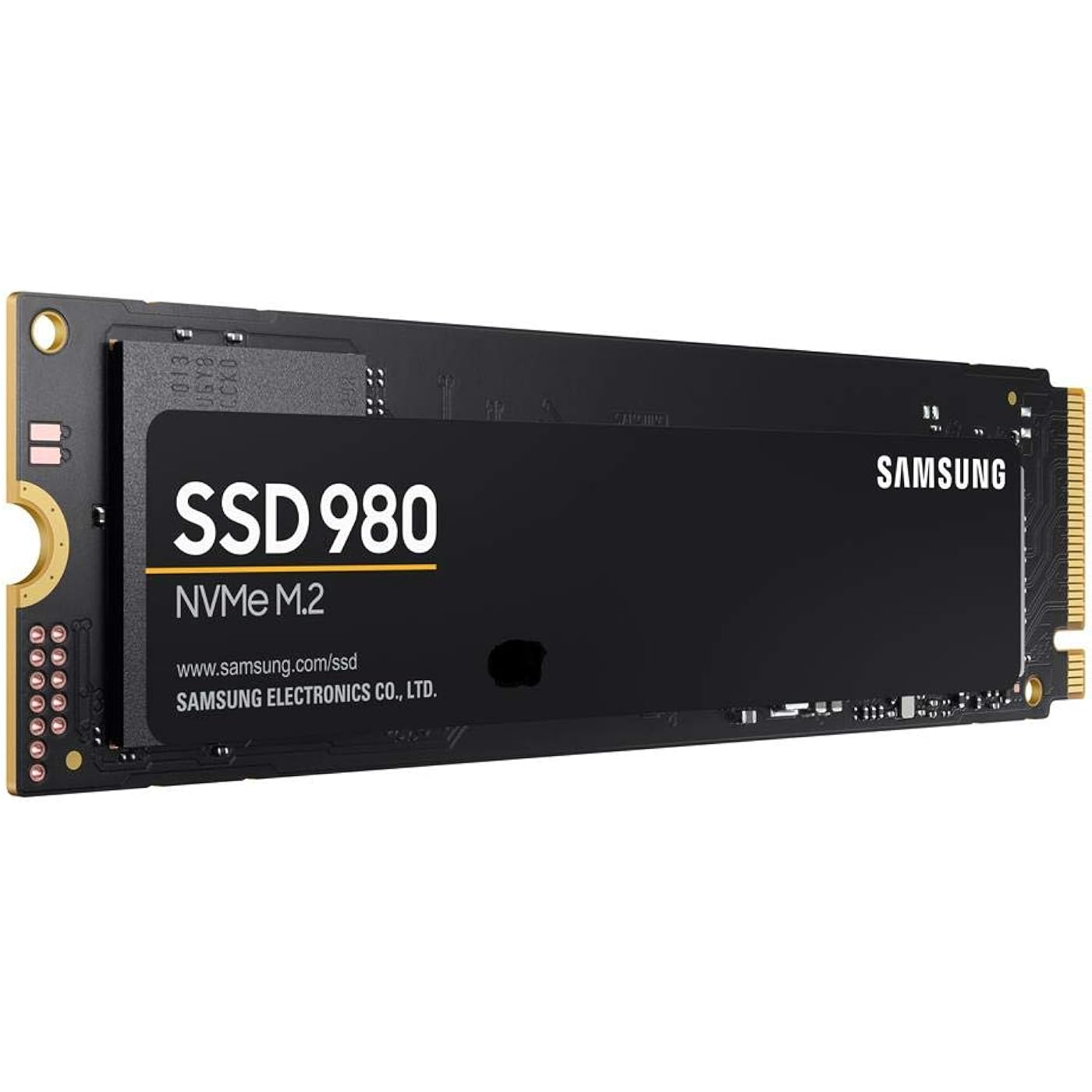
SAMSUNG 980 SSD 250GB PCle 3.0x4, NVMe M.2 2280, Internal Solid State Drive, Storage for PC, Laptops, Gaming and More, HMB Technology, Intelligent Turbowrite, Speeds up-to 3,500MB/s, MZ-V8V250B/AM


Buy Now, Pay Later
- – 6-month term
- – No impact on credit to apply
- – Instant approval decision
- – Secure and straightforward checkout
Ready to go? Add this product to your cart and select a plan during checkout.
Payment plans are offered through our trusted finance partners Klarna, Affirm, Afterpay, Zip, Apple Pay, and Google Pay. No-credit-needed leasing options through Acima may also be available at checkout.
Learn more about financing & leasing here.
Selected Option
This item is eligible for return within 30 days of receipt
To qualify for a full refund, items must be returned in their original, unused condition. If an item is returned in a used, damaged, or materially different state, you may be granted a partial refund.
To initiate a return, please visit our Returns Center.
View our full returns policy here.
Recently Viewed


Memory Storage Capacity: 250 GB
Features
- UPGRADE TO IMPRESSIVE NVMe* SPEED: Whether you need a boost for gaming or heavy graphics, the 980 is a smart choice for outstanding SSD performance with sequential read/write speeds up to 3,500/3,000 MB/s,** over 6.2x the speed of SATA SSDs***
- KEEP MOVING WITH FULL POWER MODE: Keep your SSD running at its peak with Full Power Mode, which drives continuous and consistent high performance; Enable through Samsung Magician software to keep your SSD in active mode with no latency
- BUILT FOR THE LONG RUN: With up to 600 TBW**** and a 5-year limited warranty,***** the 980's optimized endurance comes with trusted reliability thanks to Samsung's in-house solutions, from the advanced controller to V-NAND and the latest firmware
- RELIABLE THERMAL CONTROL: The 980 uses nickel coating to help manage the controller's heat level and a heat spreader label to deliver effective thermal control of the NAND chip
- SMART THERMAL SOLUTION: Embedded with Samsung's cutting-edge thermal control algorithm, the 980 manages heat on its own to deliver durable and reliable performance, while minimizing performance fluctuations during extended usage
- SAMSUNG MAGICIAN SOFTWARE: Monitor drive health, optimize performance, protect valuable data, and receive important updates with Magician to ensure you're always getting the best performance out of your SSD
- WORLD'S #1 FLASH MEMORY BRAND: Experience the performance and reliability from the world's #1 brand for flash memory since 2003;****** All firmware and components, including Samsung's world-renowned DRAM and NAND, are produced in-house, allowing end-to-end integration for quality you can trust
Description
The 980 is a smart choice for outstanding SSD performance. It delivers value, without sacrificing sequential read/write speeds up to 3,500/3,000 MB/s. Keep your SSD running at its peak with Full Power Mode, which drives continuous and consistent high performance. With up to 600 TBW and a 5-year limited warranty, the 980's optimized endurance comes with trusted reliability. It uses nickel coating to help manage the controller's heat level and a heat spreader label to deliver effective thermal control of the NAND chip. Embedded with Samsung's cutting-edge thermal control algorithm, 980 manages heat on its own to deliver durable and reliable performance, while minimizing performance fluctuations during extended usage. Samsung Magician software ensures you're always getting the best performance out of your SSD. The NVM Express® design mark is a registered trademark of NVM Express, Inc. Performance may vary depending on the SSD’s firmware version, system and hardware configuration. Performance measurements are based on IOmeter 1.1.0. The write performances were measured with Intelligent TurboWrite technology activated. The sequential write performances after Intelligent TurboWrite region are: up to 250 MB/s(250GB), 500 MB/s(500GB) and 900 MB/s(1TB). Test system configuration: Intel(R) Core(TM) i7-6700K CPU @ 4.00GHz,DDR4 2133MHz 8GBx2 OS-Windows 10 Pro 64bit Asrock Z-170 Extreme7+. Results are based on a comparison with Samsung SATA SSDs. 1HMB (Host Memory Buffer) technology enables the SSD to use the DRAM of the host system for read/write caching and buffering. TBW: Terabytes written. Warrantied TBW for 980: 150 TBW for 250GB model, 300 TBW for 500GB model, 600 TBW for 1TB model. 5 years or TBW, whichever comes first. For more information on the warranty, please find the enclosed warranty statement in the package. Source: 2003-Q3 2020 IHS Markit data: NAND suppliers' revenue market share.
Digital Storage Capacity: 250 GB
Hard Disk Interface: PCIE x 4
Connectivity Technology: NVMe
Brand: Samsung
Special Feature: Internal
Hard Disk Form Factor: 2280 Inches
Hard Disk Description: Solid State Hard Drive
Compatible Devices: Desktop PC
Installation Type: Internal Hard Drive
Color: Information Not Available
Digital Storage Capacity: 250 GB
Hard Disk Interface: PCIE x 4
Connectivity Technology: NVMe
Additional Features: Internal
Hard Disk Form Factor: 2280 Inches
Compatible Devices: Desktop PC
Specific Uses For Product: Gaming
Read Speed: 2900 Megabytes Per Second
Media Speed: 3000 megabits_per_second
Cache Memory Installed Size: 250
Data Transfer Rate: 2900 Megabits Per Second
Form Factor: M.2 2280
Hardware Connectivity: Solid State Drive
Hard-Drive Size: 250 GB
Item Weight: 0.15 Pounds
Item Dimensions L x W x Thickness: 3.15"L x 0.87"W x 0.1"Th
Number of Items: 1
Customer Package Type: FFP
Brand: Samsung
Model Number: MZ-V8V250B/AM
Hard Disk Description: Solid State Hard Drive
Built-In Media: SSD Drive
Model Name: SAMSUNG 980 SSD
Manufacturer: Samsung
UPC: 887276437217
Mfr Part Number: MZ-V8V250B/AM
Item Type Name: Internal SSD
Warranty Description: 5 year manufacturer
Installation Type: Internal Hard Drive
Color: Information Not Available
Enclosure Material: Information Not Available
Frequently asked questions
To initiate a return, please visit our Returns Center.
View our full returns policy here.
- Klarna Financing
- Affirm Pay in 4
- Affirm Financing
- Afterpay Financing
- Zip Pay in 4
- Financing through Apple Pay
- Financing through Google Pay
Learn more about financing & leasing here.



Top Amazon Reviews


