Search  for anything...

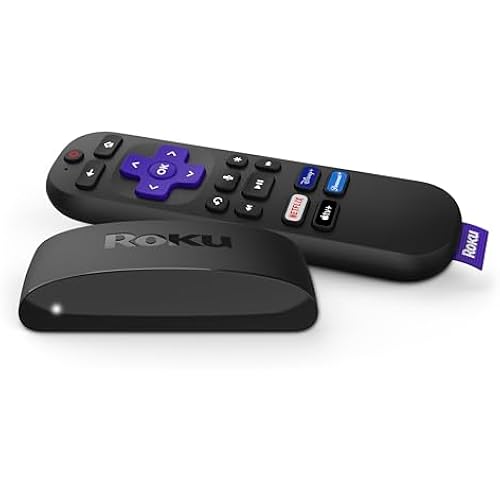
Roku Ultra LT Streaming Media Player 4K/HD/HDR w/ 4K HDMI Cable

  • Based on 1,028 reviews
Condition: New
Checking for the best price...
$68.30 Why this price?
Save $161.19 was $229.49

Buy Now, Pay Later


As low as $11.38 / mo
  • – 6-month term
  • – No impact on credit to apply
  • – Instant approval decision
  • – Secure and straightforward checkout

Ready to go? Add this product to your cart and select a plan during checkout.

Payment plans are offered through our trusted finance partners Klarna, Affirm, Afterpay, Apple Pay, and PayTomorrow. No-credit-needed leasing options through Acima may also be available at checkout.

Learn more about financing & leasing here.

Free shipping on this product

30-day refund/replacement

To qualify for a full refund, items must be returned in their original, unused condition. If an item is returned in a used, damaged, or materially different state, you may be granted a partial refund.

To initiate a return, please visit our Returns Center.

View our full returns policy here.


Availability: Only 5 left in stock, order soon!
Fulfilled by RiteBuy Electronics

Arrives Wednesday, Jul 1
Order within 19 hours and 41 minutes
Available payment plans shown during checkout

Protection Plan Protect Your Purchase
Checking for protection plans...

Features

  • Roku Ultra LTRoku Ultra LT has a quad-core processor and is great for smooth wired and wireless streaming. It's perfect for heavy streaming in HD, 4K, and HDR and delivers the kind of powerful performance you want on your home's main TV.
  • Endless entertainmentstream it all, including free TV, live news, sports, and more; never miss award-winning shows, the latest blockbuster hits, and more; access 500,000+ movies and TV episodes; stream what you love and cut back on cable TV bills.
  • Lots of extrasRoku Ultra LT is packed with features you will love, including microSD for extra channel storage; use the included headphones to pump up the volume on your shows without disturbing the house.
  • No more juggling remotesPower up and adjust the volume on most televisions, control your player, and enjoy private listening with the enhanced voice remote and included headphones; use your voice to search across channels, turn captions on, and more in a touch.
  • Smooth streamingGet a connection that stands up to whatever you want to stream with dual-band wireless or use the Ethernet port for wired streaming.

Description

Brand Roku Resolution 4K UHD Wireless Technology Bluetooth Roku Ultra LT is a powerful 4K streaming player featuring a quad-core processor and smooth wired and wireless streaming. Enjoy a seamless streaming experience no matter what you are watching with dual-band wireless, Ethernet port for wired streaming, and microSD port for extra channel storage. Take control with the enhanced voice remote, featuring headphones for private listening plus TV power, volume, and mute buttons. Whether you are streaming in HD, 4K, or HDR, you will get picture quality that is optimized for your TV with sharp detail and vivid color. Roku Ultra LT is great for heavy streamers, for living rooms and primary TVs, and for home theaters. It comes with 4K HDMI Cable.

Brand: Roku


Connectivity Technology: Bluetooth, Ethernet, HDMI


Connector Type: HDMI


Special Feature: Wireless


Resolution: 4k


Supported Internet Services: Disney Plus, Hulu, Netflix


Controller Type: Remote Control, Voice Control


Form Factor: TV Box


Color: Black


Model Name: ultra lt,ultra lt】roku


Connectivity Technology: Bluetooth, Ethernet, HDMI


Connector Type: HDMI


Other Special Features of the Product: Wireless


Resolution: 4k


Supported Internet Services: Disney Plus, Hulu, Netflix


Controller Type: Remote Control, Voice Control


Form Factor: TV Box


RAM Memory Installed: 1 GB


Compatible Devices: Television


Memory Storage Capacity: 256 GB


Video Output Resolution: 3840x2160


Video Codec: H.264/AVC


Smart Home Compatibility: Not Smart Home Compatible


Item Weight: 1.5 Pounds


Item Dimensions L x W x H: 4"L x 4"W x 0.8"H


Brand: Roku


Model Number: yun-dong-164


Model Name: ultra lt,ultra lt】roku


UPC: 829610203409


Mfr Part Number: yun-dong-164


Manufacturer: Roku


Unit Count: 1.0 Count


External Testing Certification: Não Aplicável


Color: Black


Frequently asked questions

If you place your order now, the estimated arrival date for this product is: Wednesday, Jul 1

Yes, absolutely! You may return this product for a full refund within 30 days of receiving it.

To initiate a return, please visit our Returns Center.

View our full returns policy here.

  • Klarna Financing
  • Affirm Pay in 4
  • Affirm Financing
  • Afterpay Financing
  • PayTomorrow Financing
  • Financing through Apple Pay
Leasing options through Acima may also be available during checkout.

Learn more about financing & leasing here.

Top Amazon Reviews


  • NOW INCLUDES DOLBY VISION - WATCH OUT!!! NOW INCLUDES DOLBY VISION - WATCH OUT!!!
I read a review here [ *** Hate Dolby Vision? This is for YOU! ] on april 2022 that stated this model DOES NOT include Dolby vision but the one I just received does have Dolby Vision. I wanted the one "without" Dolby vision BUT.... the picture seems vary bright. Strange, on my new LG TV setting up the Roku made the TV change to Dolby vision. Says it when ever I switch to HDMI number 1 that this Roku is plugged into. I had to switch it from home cinema to standard, both "cinema" settings on my LG TV makes the picture yellow-ish, yuk. I do wonder if Dolby vision updated and got rid of the problem where the picture is way to dark? Mine looks great on the standard setting on my LG TV. So choosing this Roku ultra LT got me nothing over the regular Roku ultra except a lower price, good! and not having to deal with the dreaded rechargeable remote, good!, Rechargeable remotes and other rechargeable stuff is the worst idea ever. Would you like having your remote go "dead" in your hand just when you wanted to watch something important? On the regular more expensive Roku ultra your in for a treat because that is exactly what it will do, meanwhile, next door, I have the old dinosaur Roku ultra LT version that has replaceable battery remote. My Remote batteries go dead I switch them out for new ones in 30 seconds and I am back in action. This Roku Seems to work well, with the usual circus maximus mind numbing insanity session setting up the LG remote to control the Roku, but I persevered and finally got it working. Hint make sure you have both the TV and the Roku setup on the same wireless on the same router and IP block. After you get the TV remote to control the Roku you can switch back to wired on the connection for the TV and the Roku. On my LG TV I went to the connections and chose remote settings then chose OTT, next chose Roku as the brand. Keep the Roku out and visible so the TV remote IR can directly see the Roku unit line of sight. Why is my LG remote RF [Bluetooth] and my Roku remote RF [Bluetooth] and then when I set the LG remote up to control the Roku it only works via line of site IR from my remote. WTF? Hide the Roku and no LG remote control possible. Who is the genius that decided this? --- 4K picture is bright and clear though you may have to make adjustments to your smart TV if the thing thinks it is smarter then you and mucks up the settings like my LG TV did for me. The bottom line: Knowing this Roku now has Dolby vision, see my photo, I do recommend this Roku if this is what you want, then get it. ~ ... show more
Reviewed in the United States on January 11, 2023 Reviewed in the United States on January 11, 2023 by Amazon Customer Robert

  • Easy to use
I am very happy with this Roku Streamer. I like the Roku platform because it’s very easy to use. The package has everything you need to hook it up to your tv. All the cables are included. I would recommend this streamer to anyone who wants a good platform for streaming.
Reviewed in the United States on January 2, 2026 by Blaine Gordon

  • Works as Expected
I was having trouble watching my UHD movies on a 65” Sony Bravia TV because for some reason it was not compatible with the Xfinity VUDU app so I bought this for about $30. It works perfectly and resolved my compatibility problem. It’s easy to use and now I can stream the 400+ UHD movies I own using its VUDU app. It also has myriad* (a lot of) other apps that can be used for streaming in 4k. * many people misuse the word myriad by saying something like “my new TV can display a myriad of colors.” The “a” before it and the “of” after it should no be used. Use the word myriad as you would use “countless” or “numerous.” And, I know I’m a pompous ass for giving a lesson in proper word usage. I ain’t that smart. ... show more
Reviewed in the United States on August 26, 2022 by Anon E Muss

  • Great Unit
This is a real good unit to replace the older units.
Reviewed in the United States on March 19, 2026 by Charles A Hjortness

  • *** Hate Dolby Vision? This is for YOU!
This is the perfect answer for those of us who bought expensive televisions which promised their Dolby Vision feature would make movies look brighter and more colorful, only to discover that in reality, the exact opposite was true. In my case, I have a Sony Bravia A9S 48” OLED 4K tv, which was made in 2021, and is one of their top-of-the-line “Master Series” sets. And in every other aspect, it truly is the finest picture I’ve ever seen - EXCEPT for it’s insistence upon forcing me to watch 4K movies in Dolby Vision! And if it offered me the option of turning it “off”, we wouldn’t be having this conversation - but unfortunately, it doesn’t. To be clear, I’m talking about this Dolby Vision problem when using the Sony tv’s built-in apps for the major movie-watching sites, like VUDU, Amazon’s “Prime”, Disney+, NetFlix, Movies Anywhere, Apple TV, and the like; I don’t have a 4K capable blu-ray player (don’t need one, since the apps mentioned above all play 4K movies in crystal-clear sharpness), so whether or not Dolby Vision can be turned off when watching a movie via a 4K blu-ray player, I don’t know. So, here I was with this “Sony’s best” tv, and because Dolby Vision doesn’t work as promised (and by the way, this isn’t just “my” problem; just do some Google searching, and you’ll see that it’s a very common complaint, among virtually every brand of tv out there), i was NOT a happy camper. And then, out of the blue, I found this Roku Ultra LT on Amazon! It solved my Dolby Vision problem, because it doesn’t offer the Dolby Vision feature! Now, be sure you get the “LT” edition of the Roku Ultra, because the model simply called Ultra _does_ have Dolby Vision built in, and I don’t think (not positive) you can turn it off there, either. It’s a genuinely simple solution, too: 1) attach and plug in its power cord; 2) attach the included high-speed HDMI cable between your TV and the Roku; and 3) follow the easy (honest!) step-by-step on-screen directions (they show up automatically on your TV screen)...and viola! You are freed from the tyranny of your set’s built-in Dolby Vision, and can now watch 4K fare in the GLORIOUSLY bright and vivid colors you were always meant to see! And if HDR also, like Dolby Vision, makes movies look too dark on your tv (for e.g., if you have a TCL tv), you can turn the HDR off by going to the Roku device’s Home Page/Settings/Display Type, and select either “4K 30Hz TV”, or, if your high speed HDMI cable is plugged into your tv via a port on the tv that supports “eARC”, then select the “4K 60Hz TV” option…and now you’re free from both of those annoying formats, Dolby Vision -and- HDR, and you’ll see the movie in 4K, only brighter and with more vibrant color than those two competing “enhancement” formats can produce! Folks, for around $68 (as of 4-19-22), I urge you to try this - and if for some reason (I can’t imagine what that could be) it doesn’t work for you, well, just return it to the good folks at Amazon within a few weeks of receiving it, and you’ve lost nothing but a little time. Peace! MFF in Honolulu ... show more
Reviewed in the United States on April 19, 2022 by Mike

  • New Roku user here and it's been alright
Just a note. The Roku model on this is #4662RW released in August 14, 2020. At least this is the one shipped to me so it's the same as another listed Amazon page for Roku that one baring the model number and release date while this one doesn't have it. Another note is the box shows that it does not come with a HDMI cable despite the image showing the HDMI. This is confirmed in the instructions but when my family received this package the HDMI was provided in a separate package thankfully. I am also using a straight connection via ethernet port which is more stable plus you may wanna get a cheap microsd card to load channels faster. I chose Samsung PRO Endurance 32GB 100MB/s (U1) MicroSDXC Memory Card with Adapter (MB-MJ32GA/AM). Make sure the "teeth" on the microsd card during installation on the back of the Roku is facing upwards and not downwards. Make sure the HDMI cable isn't connected or else the installing it will be a annoying. Thus far the Roku has been decent. I got this for my mom but having her use it more than her antenna TV has been drastically slow even when I put shows she is into. Her TV is an oldie from 2007, a Panasonic TH-42PX75U. The HDMI really shows how sharp the picture is compared to the antenna. My gripes with it so far is a limited amount of decent wallpapers. Some bait you view them for a couple seconds (literally) before pushing you to their store to buy it for 99 cents (get lost!). The best savescreen has to be the fish aquarium. I dunno if its real or not but it really looks cool when Roku is not in use and you have savescreen setup under the settings options. You may also want to fiddle around and check mark the box that says "limit advertisement" under privacy otherwise be ready to be spammed the same ads over and over again per episode (or movie). There's also another method which I suggest for those with smart TV's if you do a web search with the following "dns server ad blocking" for those who know what to do with that info. Another bit that I've read is concerning the battery life in the Roky control. Well, on Roku you can view the status of this in real time and the bug (I think I read around the net) about it draining your battery life within 2-4 days does not seem to be so on this model at least. I believe you can turn off voice recognition I'm not 100% positive on this as it was kinda confusing what the message said. Regardless we don't want it. To add channels you can either do it thru the Roku itself via searching key words like "anime" or "news" or better going to the official Roku website and adding them there. Just note that once you add them via web browser the only way to delete them is within the Roku device itself. Another note too that I just found out with the search function within roku is there are some questionable channels that are not what they seem to be or are intentional troll channels. For example, doing a key word search for "anime" brought up a number of apps. However, some using the word "anime" weren't anime whatsoever. Do also note if you have children there is adult adult content if you know what I mean by that. May wanna add parental control and such. Organizing the channels can only be done via the device which sucks if you have a lot of channels. Also, seems you can't make the tiles change sizes like one would on the Desktop of a PC, Mac, Linux. The channels I been able to find to replace those lost from cable has been decent. The other channels are behind pay walls. However, note that some of these channels with a pay wall may have free shows and movies to watch so keep that in mind. Another thing to also know for you new Roku users like me is that Roku will overtime no longer support old models but that seems to be around 8-12 years in time. Thus is the life cycle of technology like this. So by then you'll have your money's worth out of the device instead of having to pay $10 rent on a cable box per month for years which adds up to whole lot more. That beats paying $170 altogether with cable and internet and that's without phone per freaking month. I despise Spectrum aka Charter Communications. They are indeed one of the worst cable providers in the country with Comcast and Cox. ... show more
Reviewed in the United States on February 7, 2022 by akiha

  • I love my Roku
Excellent
Reviewed in the United States on April 27, 2026 by Amazon Customer

  • Roku Ultra LT Very Impressive
The Roku Ultra LT streaming device was easy to set up. As a matter of fact, it did most of the work itself. It checked for a software update, auto detected my older LG TV and set the included remote up for it. I am using the ethernet version to my home router. It comes with an array of streaming apps from the Roku online store. Easy to download and setup. I needed to stream from the YouTube TV app, and it was also easy to setup. I am very pleased with the device so far. Roku seemed to think of everything the at home user will need to get going in streaming. ... show more
Reviewed in the United States on January 16, 2023 by T Mogan

Can't find a product?

Find it on Amazon first, then paste the link below.
Checking for best price...