




Phomemo Portable Printers Wireless for Travel, M832 Inkless Thermal Printer Support 8.5" X 11" & Multi Sizes, Bluetooth Mobile Printer for Home Office Car, Compatible with iPhone Android Laptop


Buy Now, Pay Later
- – 6-month term
- – No impact on credit to apply
- – Instant approval decision
- – Secure and straightforward checkout
Ready to go? Add this product to your cart and select a plan during checkout.
Payment plans are offered through our trusted finance partners Klarna, Affirm, Afterpay, Zip, Apple Pay, and Google Pay. No-credit-needed leasing options through Acima may also be available at checkout.
Learn more about financing & leasing here.
Selected Option
This item is eligible for return within 30 days of receipt
To qualify for a full refund, items must be returned in their original, unused condition. If an item is returned in a used, damaged, or materially different state, you may be granted a partial refund.
To initiate a return, please visit our Returns Center.
View our full returns policy here.
Recently Viewed


Color: Black
Features
- Wireless Freedom for Travel - Experience seamless printing on-the-go with this portable printer wireless for travel, featuring instant Bluetooth connectivity to smartphones and tablets. Its ultra-compact design (1.5lb/1.7in) slips effortlessly into backpacks or briefcases, making it ideal for business trips, outdoor work, or campus lifeno ink, toner, or cables required
- Inkless Thermal Efficiency - Say goodbye to messy ink costs! As an inkless printer using advanced thermal technology, the M832 delivers crisp, smudge-free prints while saving 90% on traditional printing expenses. Includes multiple thermal paper rolls for receipts, contracts, or creative projectsperfect for eco-conscious users.
- Dual Connectivity Versatility - Pair via Wireless Bluetooth with Phomemo app for phone and tablet or connect to laptop and computer via USB. Print documents, images, or PDFs directly from your phone, tablet, or laptop. (Note: PC devices only work with USB connection, need to download the driver first: m832.phomemo.com)
- Marathon Battery & Space-Saving Design - Powered by a 2600mAh rechargeable battery, this portable thermal printer delivers up to 3 hours of non-stop printing (360+ sheets). Its built-in paper tray and slim profile keep your workspace clutter-free, whether in a car, office, or cramped dorm room.
- Crisp Clarity, Anywhere Precision - Engineered for sharp, professional results, the M832 wireless portable printer ensures high-definition text and graphics. The thermal print head adapts to multiple paper sizes: 8.5 X 11 US Letter, A4, 4.33'' (110mm), 3.15'' (80mm), 2.08'' (53mm), great for invoices, travel itineraries, or DIY designs. (Note: Only Support thermal paper, Not support regular copy paper.)
- Thermal Printer with a Strong Case - The printer comes with a protective case that can store the printer, thermal paper, USB cable, adapter, etc. Never worry about the portable printer getting damaged or losing the USB data cable.
- How to Clean the Print Head - Wipe the cut parts of the printer, especially the black lines, with alcohol cotton to ensure that there is no adhesive or foreign object on the print head. Note: Do not scratch the print head with any hard objects
Description
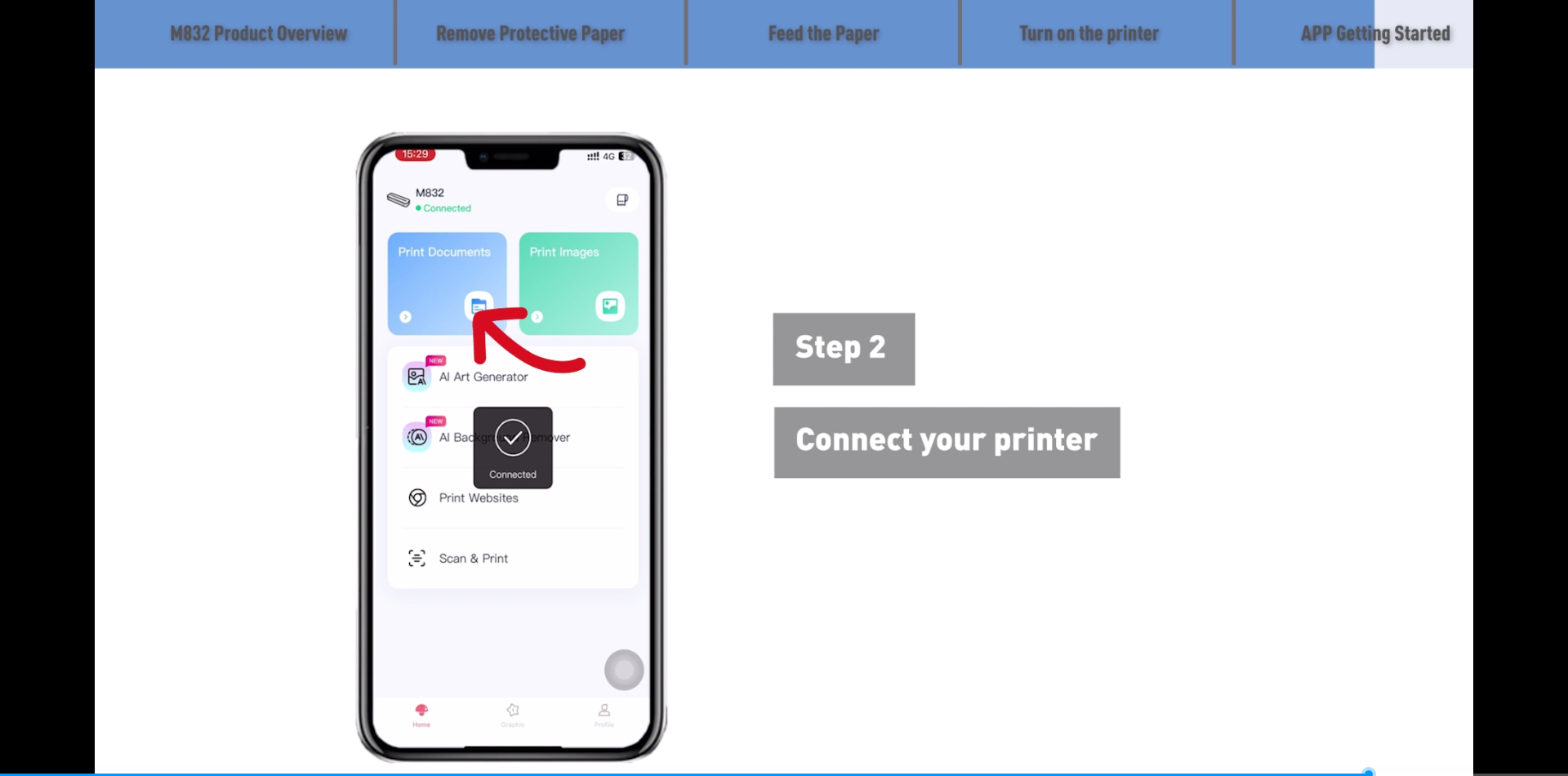
Phomemo is a printer manufacturer who is focus on portable thermal printer wireless Bluetooth. The portable printers and thermal papers are popular all over the world. Support 5 sizes thermal paper - 8.5'' x 11'' US Letter size, A4, 4.33'', 3.14'' and 2.08'' width thermal paper, support print roll, folded and single thermal paper. Only Support thermal paper, Not support regular copy paper. Download the App "Phomemo" from App store or Google play Turn on the portable printer and App Click the "printer" icon on the App's uper right to search the Bluetooth printer and connect,Then start your Phomemo M832 portable printer printing travel Attention: M832 inkless printer Bluetooth can't support pair with Phone or tablet directly now,must be pair on the App"Phomemo". Download the driver from Phomemo official website (Please check your laptop or computer's operation system before download the printer driver to maker sure the driver is correct) After install the driver well, turn on the m832 portable printer and using the data cable come with the printer to connect Phomemo m832 thermal printer and your laptop, and start your m832 printer printing travel. Attention: Phomemo M832 portable printer compatible with Windows7 and above operation syetem Download the driver from Phomemo official website (Please check your laptop or computer's operation system before download the printer driver to maker sure the driver is correct) After install the driver well, turn on the m832 portable printer and using the data cable come with the printer to connect Phomemo m832 thermal printer and your laptop, and start your m832 printer printing travel. Attention: Phomemo M832 portable printer compatible with macOS10 and above operation syetem Business travel, office, home, school, on the car or truck vehicles, the mobile printer is done well What You Get with The M832 Set 1 x M832 portable thermal printer, 1 x 8.5'' x 11'' US Letter size thermal roll paper, 1 x 4.33'' width thermal roll paper, 1 x 3.14'' width thermal roll paper, 1 x 2.08'' width thermal roll paper 1 x USB-Type-c data cable (about 80cm) , 1 x adapter , 1 x user mamual Thermal Paper 8.5" x 11" M832 Portable Printer M832 Portable Printer M08E Portable Printer M832 Portable Printer M832 Portable Printer Kit M832 Portable Printer Kit
Brand: Phomemo
Connectivity Technology: Bluetooth, USB-Type-C
Printing Technology: Thermal
Special Feature: 2600mAh Rechargeable Battery, Portable, Easy to Use, No Ink/Toner Required, Support Bluetooth Connection with Phone & Tablet, USB Connection with Laptop, Small and Compact Size, Handle Portable Printer See more
Color: Black
Model Name: M832
Printer Output: Monochrome
Max Printspeed Monochrome: 15 pages_per_minute
Item Weight: 700 g
Product Dimensions: 4.17"D x 13.7"W x 3.11"H
Printer Type: Thermal
Other Special Features of the Product: 2600mAh Rechargeable Battery, Portable, Easy to Use, No Ink/Toner Required, Support Bluetooth Connection with Phone & Tablet, USB Connection with Laptop, Small and Compact Size, Handle Portable Printer
Printer Output Type: Monochrome
Item Weight: 700 g
Item Dimensions D x W x H: 4.17"D x 13.7"W x 3.11"H
Controller Type: Android, iOS
Print media: Thermal Paper
Scanner Type: Portable
Maximum Copy Speed Black and White: 15 pages_per_minute
Compatible Devices: Laptops, PC, Smartphones, Tablets
Warranty Type: Limited
Ink Color: black
Additional Printer Functions: Print Only
Control Method: App
Compatible Cartridge: No Toner Required
Processor Count: 1
Resolution: 304dpi
Maximum Media Size: Letter (8.5 x 11 inches)
Maximum Sheet Capacity: 15
Paper Size: 8.5'' x 11'', A4, 4.33'', 3.14'', 2.08'' inches
Output sheet capacity: 150
Printer Connectivity Type: Bluetooth, USB-Type-C
Hardware Interface: USB
Total Usb Ports: 1
Brand: Phomemo
Model Name: M832
Model Number: M832
Built-In Media: 1 X M832 User Manual, 1 X Phomemo M832 Printer Case, 1 X Usb Data Cable (80cm), 1 x 8.5'' x 11'' US Letter Size Thermal Roll Paper/ 1 x 4.33'' Width Thermal Roll Paper/1 X 3.14'' Width Thermal Roll Paper/ 1 X 2.08'' Width Thermal Roll Paper, 1 x Phomemo M832 Portable Printer Black
Series Number: 832
Model Series: M832 portable printer
Specific Uses For Product: for Business Travel, Home, School,Truck,Car etc Printing Document for Clients, Invoice,Receipt and more
Unit Count: 1 Count
Global Trade Identification Number: 02
Item Type Name: M832 Portable Thermal Printer
Manufacturer: Phomemo
Warranty Description: 1 Year
B&W Pages per Minute: 15 pages_per_minute
Color: Black
Maximum print Resolution Color: 304dpi
Maximum Print Resolution Black and White: 300 dpi
Duplex: Simplex
Maximum Copy Resolution Black and White: 300 dpi
Frequently asked questions
To initiate a return, please visit our Returns Center.
View our full returns policy here.
- Klarna Financing
- Affirm Pay in 4
- Affirm Financing
- Afterpay Financing
- Zip Pay in 4
- Financing through Apple Pay
- Financing through Google Pay
Learn more about financing & leasing here.
Similar Products


Top Amazon Reviews


