




$28.99
Save $8.00
was $36.99
Buy Now, Pay Later
As low as
$7
/ mo
Learn more
- – 4-month term
- – No impact on credit to apply
- – Instant approval decision
- – Secure and straightforward checkout
Ready to go? Add this product to your cart and select a plan during checkout.
Payment plans are offered through our trusted finance partners Klarna, Affirm, Afterpay, Zip, Apple Pay, and Google Pay. No-credit-needed leasing options through Acima may also be available at checkout.
Learn more about financing & leasing here.
Selected Option
Free shipping on this product
Extended holiday returns
FREE refund/replacement until Jan 31, 2027 Learn more
FREE refund/replacement until Jan 31, 2027 Learn more
This item's return window has been extended for the holiday season: FREE refund/replacement until Jan 31, 2027
To qualify for a full refund, items must be returned in their original, unused condition. If an item is returned in a used, damaged, or materially different state, you may be granted a partial refund.
To initiate a return, please visit our Returns Center.
View our full returns policy here.
Availability:
20 left in stock
Arrives
Friday, Nov 6


At a glance
- Condition
- New
- Color
- Cyan
- Set
- 203 DPI (Standard HD)
- Model
- P2S
- Dimensions
- 3.4"D x 3.3"W x 1.7"H
- Printing Technology
- Thermal
- Special Feature
- Portable
- Warranty
- 1 Year
- Works with
- Smartphones
Features 5
- Phomemo Sticker Printer M02 features wireless and inkless use. Bluetooth 4.0 enables smooth connection to Android 7.0 and iOS 13.0 or later devices. No ink or toner is needed for this thermal printer, avoiding messy use. The portable design optimizes usage and cuts down printing time
- Intelligence to power your mind! The Phomemo M02 mini printer boasts a sleek 3.3"x3.2"x1.6" build. Just scan textbooks or notes to print sharp graphics, transforming complex ideas into easy-to-review visual aids that ignite creativity and boost learning
- Unleash creativity instantly with the Phomemo M02 sticker printer and its dedicated app! One tap lets you print any photo, text or pattern, while the built-in AI function streamlines smart design and oneclick creation. Dive into a creative library with 1,000+ fonts and templates, and access more premium designs with a membership
- This inkless mini sticker portable printer turns photos and notes into stickers, ideal for journaling, displays, and organizing. A perfect gift for Children's Day or Thanksgiving, sparking creativity for kids, students, teachers, and DIY enthusiasts
- To help your printer's battery stay healthy, please plug it in to charge whenever you see the red indicator light. Also, if you'll be storing it away without use for a while, remember to charge it regularly
Specs 48
| Brand | Phomemo |
|---|---|
| Connectivity Technology | Bluetooth |
| Printing Technology | Thermal |
| Special Feature | Portable |
| Color | Cyan |
| Model Name | M02 |
| Printer Output | Monochrome |
| Max Printspeed Monochrome | 15 pages per second |
| Product Dimensions | 3.4"D x 3.3"W x 1.7"H |
| Controller Type | iOS |
| Printer Type | Thermal |
| Other Special Features of the Product | Portable |
| Printer Output Type | Monochrome |
| Item Dimensions D x W x H | 3.4"D x 3.3"W x 1.7"H |
| Print media | Thermal Paper |
| Scanner Type | Portable |
| Maximum Copy Speed Black and White | 1 ppm |
| Warranty Type | Limited |
| Maximum Copies Per Run | 200 |
| Ink Color | Black, Blue |
| Additional Printer Functions | Print Only |
| Control Method | App |
| Number of Trays | 1 |
| Processor Count | 1 |
| Display Type | LCD or LED |
| Resolution | 203 x 203 DPI |
| Color Depth | 1 bpp |
| Maximum print Resolution Color | 304dpi |
| Maximum Print Resolution Black and White | 203dpi |
| Wattage | 1000 mAh |
| Maximum Copy Resolution Color | 304dpi |
| Maximum Copy Resolution Black and White | 203dpi |
| Model Number | P2S |
| Built-In Media | Phomemo pocket printer, USB cable, Thermal printing paper, User manual, Packing box |
| Series Number | 2 |
| Model Series | M02 |
| Specific Uses For Product | DIY Printing |
| Unit Count | 1 Count |
| Item Type Name | stricker printer |
| Manufacturer | Phomemo |
| B&W Pages per Minute | 15 pages per second |
| Maximum Media Size | 4 x 6 inches |
| Maximum Sheet Capacity | 50 |
| Paper Size | 53 centimeters |
| Printer Connectivity Type | Bluetooth |
| Hardware Interface | Bluetooth |
| Total USB 2.0 Ports | 1 |
| Duplex | Automatic |
No specs match.
Frequently asked questions
If you place your order now, the estimated arrival date for this product is:
Friday, Nov 6
Yes, absolutely! You may return this product for a full refund within 30 days of receiving it.
To initiate a return, please visit our Returns Center.
View our full returns policy here.
To initiate a return, please visit our Returns Center.
View our full returns policy here.
- Klarna Financing
- Affirm Pay in 4
- Affirm Financing
- Afterpay Financing
- Zip Pay in 4
- Financing through Apple Pay
- Financing through Google Pay
Learn more about financing & leasing here.
Similar Products





Top Amazon Reviews
Perfect for junk journaling
Bought this since it had a ton of recommendations from junk journalers and I and not disappointed. The app is a little clunky but took very little time to get used to. Didn’t have any issues connecting it with my phone. The box came with two transparent rolls and one roll of normal white paper. Both work well and are easy to use. When it’s loaded up it’s pretty easy to store or carry with on the go and it prints quickly.
...
show more
Reviewed in the United States on October 6, 2026 by Breanna
Great gift. Easy to get started
Color: Purple
Set name: 203 DPI (Standard HD)


So cute and easy to use. Prints pretty good stickers. I was impressed by how well they turned out. My daughter picked this up and was printing in minutes. Fun was to get the kids creative brains working! Lightweight and we can take it anywhere. Linked up to her phone photos quickly. Great gift.
Reviewed in the United States on August 19, 2026 by Lilleypad20
Nice but overpriced & app needs work.
Color: Cyan
Set name: 300 DPI (Ultra HD)
I like this little printer. It is very useful & prints as expected for 300dpi, but I have some issues with the app. First off, I wish there were more and/or different templates & (especially) fonts. I was actually shocked there weren't more fonts. I was really looking forward to seeing what frames they had because I bought it mainly for that, but they don't have ANY plain square, round or rectangle frames. They only have a few baroque style ones and some that look like a tv, phone or some other graphic. The "label" section only has sizes that will fit on their tiny mini label roll, so they are way too small. Journalers use these all the time so I don't understand why they didn't put any in the templates. Maybe I'm missing something, I don't get it. The rest of the templates are great but probably about half or more of them are cartoony or cutesy, which I like but there are too many & I won't be able to use most of them for the type of projects I do. I realize they market towards a specific client but they should have made it a little bit more universal. Also, the choice for thin, medium & thick print... is actually light, medium & dark. In no way does it make the line thicker. The "label" section didn't make any sense to me because they have labels by catagory (journaling, medicine bottles,etc) but they all do the same thing, just with different presets. They also don't explain anywhere that it is to be used with the rolls of mini labels. I also think it is way over-priced. If it didn't have the $22-off coupon I wouldn't have bought it. I bought a new, full-size Canon printer/scanner with archival ink a couple years ago for $50. I'm not comparing the printers, I'm comparing the price for what you get. But probably the thing that bothers me the most is that what you see on the screen is not how it prints. First, what you have on the screen is much larger than how it prints. There should be some sort of scaling set up in the app for this. Secondly, contrast is off with photos. Even if you make them b&w, the contrast is completely different when it's printed I realize the latter is harder with a laser printer but it should be close to what a medium "thickeness" (aka darkness) print would be. I'm sure I'll get better at guessing the more I use it but for now I'm wasting a bunch of paper, which is not cheap. With all that aside, it is handy and you can come up with some pretty creative stuff. So I really do like it. It's nice for $60, but not for $82 & the app needs some work. Update: The printer is still going strong as of 6/11/23. Mainly I'm updating this review to let people know that they did put a button for true scaling. No more guessing what size it will print at. So they are listening to their customers. They also made it so you know which sections are for the mini labels. The more you learn how to use it, the more freedom you have. This sounds obvious but there is a bit of a learning curve if you are changing or adding anything to the preset images. They seem to update it every so often, which is nice. I still wound like some preset simple frames that I can add text to. For instance, frames the size for labelingthe front of greating cards with "Happy Birthday", etc. It would be nice to change the size of the frame like the graphics but be able to add text on the inside. From time to time the app has issues and can't be used. It's not very often, but nevertheless frustrating. Overall I'm still pleased with it but my previous review still stands.
...
show more
Reviewed in the United States on February 4, 2021 by Kiwikat
compact, fast, fun and functional
Color: Green
Set name: 203 DPI (HD & Assorted Rolls)

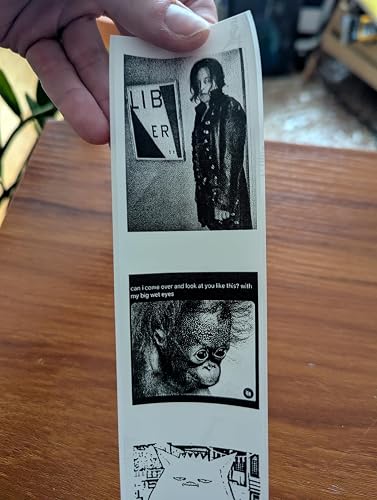


i love this thing. it's cute, fast, quiet, and super easy. the app is simple and easy to use and free - although i suspect some extra features are behinda paywall. based on the reviews, i was worried about the tearing capability but it's actually fine as long as you're using a standard black/white roll. see attached photos for different types of print qualities. only cons: - it does waste some of the roll between images. - not super hi res but will get the job done - have to cut anything printed on the transparent material i would buy this again! if you're on the fence - go for this one.
...
show more
Reviewed in the United States on May 9, 2025 by Sarah
Easy to use
Color: Cyan
Set name: 203 DPI (Standard HD)

Compact, Ink-Free, and Incredibly Handy! I recently purchased the Phomemo M02 Mini Sticker Printer, and it's been a delightful addition to my daily routine. This pocket-sized thermal printer is perfect for creating labels, planner decorations, and quick notes without the hassle of ink cartridges. Key Features: Portability: Measuring just 3.3 x 3.3 x 1.6 inches and weighing 190g, it's easy to carry around, making on-the-go printing a breeze. Inkless Printing: Utilizing thermal technology, it prints on specially treated paper, eliminating the need for ink or toner. User-Friendly App: The Phomemo app offers a variety of templates and fonts, allowing for creative customization of your prints. Battery Life: Equipped with a 1000mAh battery, it can print up to 8 rolls of paper on a single charge, ensuring longevity during use. Whether you're a student needing to print study notes, a planner enthusiast decorating your journal, or someone who loves organizing with labels, this mini printer is a versatile tool. Its ease of use and portability make it a must-have for anyone looking to add a personal touch to their projects. Overall, the Phomemo M02 Mini Sticker Printer delivers on its promise of convenience and quality. Highly recommended! The printer performance does great
...
show more
Reviewed in the United States on April 25, 2025 by Elizabeth Woldridge
Maybe not..
Color: Cyan
Set name: 203 DPI (Standard HD)


It’s really cute! The prints are nice! I wouldn’t say amazing but they get the job done. It definitely takes a minute to get the hang of the Phomemo app, you have to set up the image or text to come out perfectly. If the picture your printing has really small text it will not show up clearly. I would say choose bigger images if possible and if not, just rotate the image in the app so it can come printed out horizontally and it’ll become a little bigger and more visible. Edit: I ended up trying to return it but the return time was up. The paper roll ran out really quick for me, it lasted LESS than a month and you end up misprinting things a lot because of the size and quality. It only comes with one roll and you have to constantly buy more.
...
show more
Reviewed in the United States on October 19, 2025 by Amanda
Excellent printer - use the enclosed charging cable
Color: Cyan
Set name: 300 DPI (Ultra HD)
What a fun and practical gadget! It's good for making cute stickers using the templates on the Phomemo app, which look great on the inexpensive plain white adhesive paper. Black and white photos turn out well; the contrast/white balance and filter adjustments are basic but they do the trick. I am looking forward to trying the transparent and semi-transparent stickers. Also, Phomemo customer service was excellent. I emailed them with questions and they responded promptly with clear instructions. The written documentation wasn't comprehensive and there's not many videos online for the M02 Pro, so I wanted to pass along a few pieces of advice: - Use the enclosed charging cable. I first tried using a fast-charging USB-C to USB-C cable. The printer battery would not go above 10%, so I was convinced that the battery was defective. Turns out that if you use the enclosed non-fast-charging cable, it works - When it's charging, the power button blinks on and off (white button on top of printer). When that button blinks quickly, it is out of paper. - There are two ways to check the charge level of the printer. 1) press the power button twice and it will print out a status update, or 2) connect to the printer using the Phomemo app, and then view the printer in the app I have not used the printer long enough to test the battery life, but the manufacturer claims that it can print four rolls of labels on a single charge.
...
show more
Reviewed in the United States on December 16, 2023 by 2376148
Have to pay extra for EVERYTHING
Color: Green
Set name: 203 DPI (HD & Assorted Rolls)
This would be a great little printer, but I HATE it. After I bought it, the company blocked everything behind a subscription paywall. Now EVERYTHING requires a subscription, even the most basic label with a basic font. To me, this is extremely deceptive sales practices and the company is despicable. There are other printers that are equally good quality with different software that has truly free options (in addition to paid options).
...
show more
Reviewed in the United States on September 25, 2026 by Samantha C