Search  for anything...

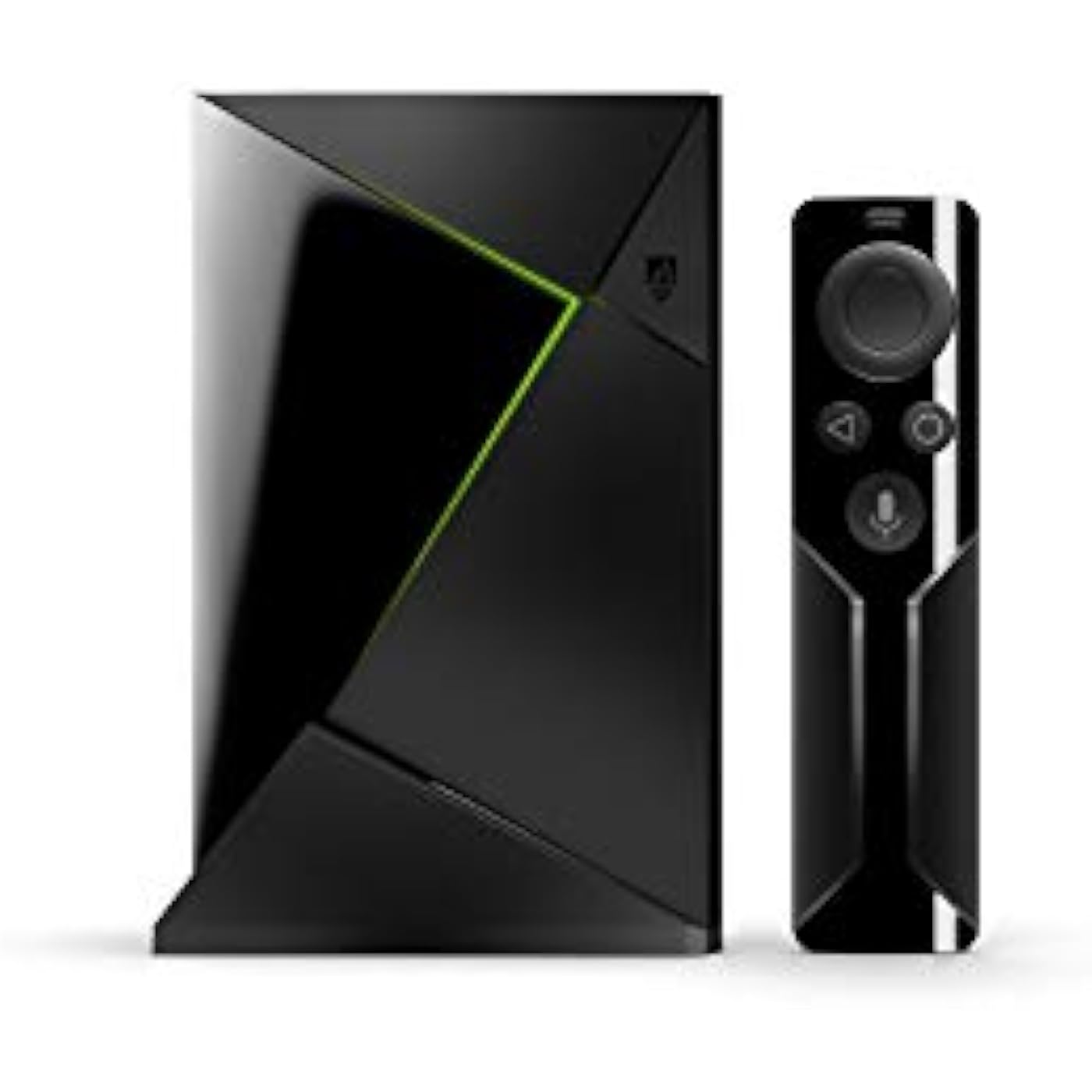
NVIDIA 945-12897 Shield Streaming Media Player

  • Based on 9,502 reviews
Condition: Used - Good
Checking for the best price...
$184.99 Why this price?
Save $1,814.01 was $1,999.00

Buy Now, Pay Later


As low as $30.83 / mo
  • – 6-month term
  • – No impact on credit to apply
  • – Instant approval decision
  • – Secure and straightforward checkout

Ready to go? Add this product to your cart and select a plan during checkout.

Payment plans are offered through our trusted finance partners Klarna, Affirm, Afterpay, Apple Pay, and PayTomorrow. No-credit-needed leasing options through Acima may also be available at checkout.

Learn more about financing & leasing here.

Selected Option

Free shipping on this product

This item is eligible for return within 30 days of receipt

To qualify for a full refund, items must be returned in their original, unused condition. If an item is returned in a used, damaged, or materially different state, you may be granted a partial refund.

To initiate a return, please visit our Returns Center.

View our full returns policy here.


Availability: Only 3 left in stock, order soon!
Fulfilled by Best Products Prime

Arrives Saturday, Jul 18
Order within 16 hours and 57 minutes
Available payment plans shown during checkout

Protection Plan Protect Your Purchase
Checking for protection plans...

Edition: SHIELD with remote


Configuration: Streaming Media Player


Features

  • Access all your Google content and smart home features with the Google Assistant, share your Google photos in 4K, and cast your favorite apps to your display with Chromecast 4K
  • Pascal GPUs in the cloud are designed to power fast gameplay. Using GeForce NOW, you can enjoy single- and multiplayer gaming and access online leaderboards from anywhere there's a Shield
  • Stream your games library from a GTX-equipped computer to your display in up to 4K HDR with NVIDIA Gamestream

Description

Stream all of your favorite media and play computer games with the NVIDIA Shield TV Streaming Media Player. It supports playback at up to UHD 4K resolution with HDR for an enhanced viewing experience. The Shield TV features 3GB of RAM with 16GB of storage, which is expandable using compatible USB 3.0 drives through its two USB ports. It connects to your local network via Wi-Fi or its Ethernet port. The Shield TV includes a conventional TV-style remote control, which will control your display's volume and power.

Brand: NVIDIA


Connectivity Technology: Ethernet, Wi-Fi


Connector Type: HDMI


Special Feature: Chromecast


Resolution: 4k


Supported Internet Services: vudu


Form Factor: TV Box


Color: Black


Model Name: Shield


Connectivity Technology: Ethernet, Wi-Fi


Connector Type: HDMI


Other Special Features of the Product: Chromecast


Resolution: 4k


Supported Internet Services: vudu


Form Factor: TV Box


RAM Memory Installed: 12 GB


Compatible Devices: Television


Memory Storage Capacity: 16 GB


Video Output Resolution: 3840x2160


Video Codec: H.264, H.265/HEVC


Color: Black


Brand: NVIDIA


Model Number: 945-12897


Model Name: Shield


UPC: 812674021867


Global Trade Identification Number: 67


Mfr Part Number: 945-12897-2500-100


Manufacturer: NVIDIA


Built-In Media: Power Adapter, SHIELD, SHIELD Remote


Warranty Description: One (1) year from the date of purchase of your new Warranted Product based on product specific warranty, except 2 years from date of purchase in Europe, Mid East, Africa and India.


Item Weight: 0.55 Pounds


Item Dimensions L x W x H: 6"L x 1"W x 4"H


Frequently asked questions

If you place your order now, the estimated arrival date for this product is: Saturday, Jul 18

Yes, absolutely! You may return this product for a full refund within 30 days of receiving it.

To initiate a return, please visit our Returns Center.

View our full returns policy here.

  • Klarna Financing
  • Affirm Pay in 4
  • Affirm Financing
  • Afterpay Financing
  • PayTomorrow Financing
  • Financing through Apple Pay
Leasing options through Acima may also be available during checkout.

Learn more about financing & leasing here.

Top Amazon Reviews


  • I really don’t understand all of the negative reviews.
Edition: SHIELD with remote Configuration: Streaming Media Player
Why you SHOULD get it: This is hands-down the best tv streaming device out there. You just need to know (or google in about 5 minutes) how to use it. Most apps you need are in the included Google Play store, but you can side-load any android apps that aren’t (google it). You can put third party apps on the home screen by adding shortcuts to them (google that too). It has Netflix and Amazon streaming apps pre-installed (you need to have an account for those respective services to use them). It can play any audio or video file type with the right app. You can plug-and-play an external hard drive, and transfer files to and from other computers and drives on your network. You can stream from any device on your network. The interface is better than Fire TV, and the new Fire TV doesn’t have USB input for extra storage. You can use any programmable or learning (aka “universal”) IR remote. You can use any Bluetooth controller. You can stream live TV with the right apps if you’re a subscriber to that live TV service. It’s fast. It’s small. It looks pretty cool. Not only does it work, but there is absolutely nothing I can think of that anyone would want to do with it as a video streaming device, that this device can’t do. It is far and away the absolute best device for that purpose. If it’s defective or faulty or DOA, return it and get another one. Now, having said all of that, a caveat regarding gaming: The pocessing power is there. You can stream games from PC with the right setup, and it will work for that. In the long-run though, it’s an android device. If your main intention for getting the Shield is gaming, I would recommend going with a PC, or a console instead. Retro games are flawless on the Shield, but for hardcore gamers of current games, I don’t think it’s the best choice. As a TV, Movie, Video, and retro-games media center though, the Shield TV and an external hard drive are the best possible option out there. As for the price. It’s a little more expensive than some other options. It was massively on sale during the Thanksgiving and “cyber” sales period. If you want the best video media center, it’s worth it. Why you SHOULDN’T get it: Maybe you don’t need all of that. If you just want to stream Amazon and Netflix, a Fire TV is much cheaper and performs those functions just fine. The Shield is for people who want a lot more options in their media and more control over what, where, and how to play it. You just have to know or learn how to use it. If you don’t need those extra perks, or the time and energy required to learn how to get it to do what you want isn’t worth it to you, look elsewhere. As far as giving it one star because it was defective or DOA: return it for a replacement. As far as giving it one star because you don’t like the remote: use a different remote. As far as giving it a bad review because it’s too expensive: you knew how much it cost and paid for it. While I can appreciate that these issues might be frustrating, none of them is a fault of the product. If it doesn’t do what you thought it would, you didn’t do the research first to see what the device is capable of. I did a ton of research before purchasing the Shield TV. For me, it’s not only the best option, but far surpasses the capabilities of any other choice on the market right now. I just don’t understand all of the negative reviews. ... show more
Reviewed in the United States on December 1, 2017 by DW

  • BUY THIS AND SAVE YOURSELF THE HEADACHE BUY THIS AND SAVE YOURSELF THE HEADACHE
Edition: SHIELD with remote and controller Configuration: Streaming Media Player
Ok so this review should help a lot of people that's on the fence or that's planning to buy a higher end box first off let me say that I am very into technology have built computers done programming etc and I have also owned probably around 10 (most likely more) streaming products First I want to say this was bought with my own money I'm not being paid by anyone this is a true review. So recently I have purchased the t95z octacore android box 3/32gb model also just purchased the H96 max android box which is one of the top of the line products with the hexacore processor from rockchip 4/32gb model I'll start with t95z all I can say is don't bother I won't say no more since they gave me a full refund onto the H96 max now keep in mind both of these boxes have more memory H96 max has more RAM again with the H96 max don't bother so this goes from around $100 for t95z to $150 for H96 max both have bigger processor at least more cores. Now I have just bought the nvidia sheild tv (base model) not pro so 16gb version going from the H96 max to this would be like going from dial up to high speed internet thru Ethernet ya 16gb is a little low for memory but that's an easy fix with a $20 3.0 USB flash drive (64gb) or as big as you want the nvidia shield is by far the best media box on the market it's at least 10x faster than ANY android box I have used (10+) plays 4k movies brilliantly I put large heavy kodi builds on my streaming boxes when I've tried with others it bogs them down horribly at the end on most boxes I just switched to lighter (firestick) builds not to slow it down. When I received my nvidia shield I started with set-up which was a breeze updated everything and made a few personal tweaks under devolver menu which if you don't know what your doing I don't recommend or go one YouTube I have a video on there of a walkthru how to beat setup the box and so does others I also downloaded all my apps along with my own custom build which is well over 1gb which is a very large build I had high expectations since I own lots of nvidia products and also had just bought a gaming/editing laptop with nvidia GeForce 1080 gpu 8gb the speed ease of use setup configuration and everything about the shield has completely blew me away it's way faster even with the high expectations I had. The boxes I have used in the past was all top end boxes and most had more RAM and more memory the shield leaves them in the dust I hadn't bought one cause I figured I didn't need it I mostly just stream on it and have so many other devices for gaming but that was a huge mistake that kept me from buying this and was stupid I was of course expecting this to be much better for gaming than the android boxes I had used but I wasn't concerned about gaming so I figured the H96 max with more Ram hexacore processor and 32gb of memory would suit me better and it had rave reviews about fluidity and speed from friends in the tech world when I tested it I hated it honestly I thought it was sluggish slow and wasn't quite polished enough maybe after a year or two and a better firmware update but even with that it could never stand toe to toe with the shield. Now as far as gaming if your buying the shield for gaming first streaming second great I have played games streaming from my computer and it works wonderfully fast responsive and the games you can download onto the system work flawless and play perfect I have never had one bit of lag zero loading time and great gpu performance which is expected coming from the gpu king the GeForce now gaming platform is amazing and I highly recommend shelling out the $7.00-$8.00 a month for it great value with all the free games you get not only games that would cost $60+ for a console but they have games specifically made for this system only the shield is perfect they have no need to improve nothing imo ya it sucks that they took out the micro sd on base model and no IR now but those are both easy fixes and for the money $199.99 it's an amazing value the new control is amazing feels great in your hand and works perfectly the media controller is so so but hey it's free used to be a $50-60 upgrade in short if you don't play games and want by far the best streaming media player on the market buy this. If you do play games want awesome content and want to stream your pc onto big screen AND have a great streaming engine BUY THIS!!!!! I have never tested a machine that I have liked BETTER than this or that does the job it's made for so well DO NOT EVEN BOTHER WITH ANDROID BOXES give the extra money get yourself a shield then once you do you can thank me for saving you a lot of frustrating loading freezing and you'll get a great gaming machine as well imo this box is better than PS4 Xbox1 etc and better than any kodi box you could buy so as far as value goes this is amazing I truly do not know how anyone on here has not given this machine 5* for $199.99 what more could they expect LOVE LOVE LOVE my shield and could never go back to another box ... show more
Reviewed in the United States on July 29, 2017 Reviewed in the United States on July 29, 2017 by Mickey H

  • Best streaming device currently on the market
Edition: SHIELD with remote and controller Configuration: Streaming Media Player
I've used streaming devices for some time now. First it was the Roku LT, which at the time (before smart speakers and such were common)...I loved. It played everything, and did so fairly well. Then the Chromecast came out, and it was neat because I could control everything from my phone, and I could set it up so guests could as well...but was limited to the fact that I HAD to have my phone for it to do anything. Ended up eventually getting a Roku 3 to replace this. Some time after getting the above, smart speakers came out, and we ended up going the Alexa route...so we got FireTVs to replace the above devices. Now I could talk to my house to control my TV, yay! Of course, this came at the severe downside of not being able to stream YouTube or anything from the Play store, because Amazon and Google can't manage to get along (big companies can be stupid sometimes). Experimenting with this, I purchased one of these to combine the features I was looking for in all of the above...the 'play everything' from the Roku, the 'cast from your phone' from the Chromecast, and the 'tell my house to play the show' from the FireTV...and this device did all of the above...as well as replacing my Steam Link...and while adding a source for cloud game streaming as well. (In short, I got one of these to replace a streaming device, and instead replaced two devices and added functionality I didn't realize I was missing.) On top of that, this plays everything faster (no waiting ages for the CW app to load like on the FireTV or Roku, for example), and easily links up to other remotes for extra control options (for example, I hooked up the controller for my Steam Link to this, as well as the remote for the FireTV it replaced, so both my wife and I could have our own remotes). After using it for a short while...I loved it so much that I bought another (for the other room). Now, some details: The Good: This thing streams like a champ. Every streaming app loads and runs faster than on any other device I've owned. Casts like a charm. Gets around the Amazon/Google fight (because they can't just get along) Both the remote and controller have this neat little trick in putting volume control on via a smart slider. The Neutral: Hulu app for this is shitty (but that's really on Hulu, so I can't hold it against NVidia). Hulu casting from your phone works great, however. Controller needs to be charged fairly often (like once every 3-4 days) The Bad: Remote, while very cool in what it does, has garbage battery life. Now, all that said, if you're looking at buying one of these....I'd weigh that against how quickly you want one. If you need one in the next month or six months...absolutely get one. It's worth every penny. If you can wait a bit, I'd hold off for now...there's a possibility that they're going to announce a 2019 version soon, which might be better still (or at least should make this one cost less). ... show more
Reviewed in the United States on April 6, 2019 by Joshua

  • Great and easy to use!
Edition: SHIELD with remote and controller Configuration: Streaming Media Player
Where to start...honestly I had my doubts about such devices, but time has changed, and now you get enough power to actually make such normal living room activities, pretty natural. This thing is small; just look at the remote size :) but pack quite a punch, both as gaming platform and as multimedia center. Get a 128 GB memory stick to use as storage (the unit has just 16 GB which are basically useless unless you put few apps on it, and be done with it), or plug an external HD, wireless keyboard and mouse, and you have everything you need to enjoy your living room. Games: this device play most of the android games; the downside is that it is running Android TV, not the regular Android, so the app store has very few apps on it. But you can still load other games, and use keyboard and mouse to simulate touch. So far I did play few of the ones available , and between 3d racing and FPS, it did run flawlessly. Then you have the advantage of the streaming service, if you decide to pay the monthly fee. This give you access to a ton of games, withouth the need to own a powerful pc; everything is streamed to your Shield, and the latency is pretty good, if you have a good wired connection. Do you have a pc at home with Nvidia card and Steam running on it? You can play on the shield, basically all your games (No man sky, Battlefield one, Mass Effect Andromeda, GTA5 and so on...almost all games tried does work flawlessly; as long as you have a good connection). Do you like emulators? Well, you are in luck because you can get few applications that let you play old nintendo/Sega games, and much more. You can even simulate computers like the Atari ST, Amiga, Sinclair Spectrum, C64; all while using your remote or game controller; on your big tv in the living room. Can't ask for more,to be honest. Gaming is not your thing? No worries, you have a ton of applications; from educational to more well known streaming services like Youtube, Hulu, Amazon, Netflix and so on; the video is crisp clean on 1080p TV; no matter what you use. The only thing that I miss is a decent browser, but you can side load Firefox or Chrome, and you are good to go. Andif you are in love with music and videos, you can install either plex server or Kodi, and have your awesome entertainment system in your living room, to watch your own video and listen to your music (configure a NAS or your pc as external device is fast and easy). Lots of positives; but what about negatives: There are some. First of all, the remote require button batteries; they last long time, but was better the previous remote, where you could recharge it via USB. Memory is also another limitation here; the main unit has 3 GB of ram, which is good for the time being, but can't expard it so you are stuck with a device that may be obsolete in the long run. Being the second gen of the Shield, I was expecting either more memory or a way to upgrade it. Also the main CPU is the same as the old shield; so if you have the 1st gen, you don't need this one for sure (the only difference is the size, which is smaller in the second gen, although you loose rechargeable remote and SD card slot on the unit, in favor of a game controller included though). Another issue is the software; not much software for Android TV, if you want to stick with the official software; you can load other apps, but they may not work, since they are designed for touch screen, and not for interaction with gamepad and remote. Storage space is a joke; 16 GB is really not that much (11 GB available, the rest is reserved for the OS); you are forced to add external storage space; using one of the 2 USB plugs. Not sure why the SD card slot is gone, but it was not a great move, since you have only 2 usb 3.0 ports. Last but not least, the onboard software has some issues if you use an external USB storage device (usb stick for example), formatted as internal storage, and want to use a wireless receiver for keyboard and mouse: it works for a while, then the keyboard and mouse stop working; until you unplug the power cable and plug it again. There is a problem with the firmware or the Android OS that cause this problem with the memory storage mode of the USB ports; if you do not use the USB stick as internal memory storage, it works fine. Although if you do not do so; you can't copy applications on the USB stick, so you are stuck using the internal memory only, which will not allow you to put much on it. Overall, this device is perfect if you play games, emulators, and use streaming services. Has limitations that can be overcome, but having an old CPU, will make you wonder if it is worth to buy it or wait for the next gen of Shield, and get a used Shield MK1 in the meantime. Up to you... ... show more
Reviewed in the United States on April 27, 2017 by CF

  • This thing lives up to Nvidia's claim: the best 4K streaming box
Edition: SHIELD with remote Configuration: Streaming Media Player
A couple months ago when I was first looking at Chromecast vs. Fire Stick vs. everything else on the market I had dismissed the Shield because of its cost. Instead I got a Fire Stick for my TV in the living room and a Chromecast for the TV in my bedroom. After using both for a while and switching from Hulu TV to Youtube TV, I gave the Shield a harder look because I wanted something that I could get both YouTube TV on and get Amazon Prime Video, and eventually pulled the trigger. Neither my Chromecast nor Fire Stick are 4K, but that doesn't really factor into why I think the Shield is better. Picture is better, but the real selling features are all the other things about the Shield. Here's the gyst of what makes the Shield awesome: the on-screen interface, the fact that they give you the best of Chromecast and Fire Stick, and being able to get both Amazon and Google services (Amazon Video is highly underrated and YouTube TV is the best streaming service imo, if you're curious I lay that out at the very end here). Also don't forget the Shield does more than just let you stream. You can play your own video and game with it too. You can cast from devices, which is nice sometimes, and you get a remote like the Fire Stick and an interface similar to the Fire Stick's, but both are better imo. The Fire Stick's interface is jaded towards Amazon, it acts like Amazon Prime Video is your default video service and everything else is second to it. The Fire Stick home screen is full of Amazon content and advertisement with little squares for the apps you probably use the most (Netflix, Hulu, YouTube, etc.). On the Shield, you pick which apps you see the most from. Nvidia calls app content on the home screen Channels (it also gives you a customizable favorites bar). Each channel spans your screen horizontally, tells you what the content is and has videos you can scroll through left and right. Some things like YouTube have 3+ channels you can choose from like 'trending', 'my subscriptions', 'my recommendations', others like have just one like Netflix. The only notable app that's missing a Channel is YouTube TV, but I hear its coming (Nvidia if you're listening, really hope that's coming 'cause I'm a YouTube TV user; my most-viewed live channels, trending-live, trending content, recommended for me, and my stuff would be 5 awesome channels ( ; ). From all of those channels, you get to pick which apps have channels and how many channels each app gets and the order you scroll through the channels in. The remote in a word: slick. The thing is fantastic. It weighs basically nothing, is slimmer than your pinky, has all the buttons the Amazon remote does (Google Assistant instead of Alexa though) AND has a pretty intuitive volume volume slider on it just beneath the Google Assistant button. Pretty sure it's capacitive like a phone screen which makes it even easier to use. Want to increase volume, slide your thumb up on it a little bit. Want to increase the volume a lot, slide your thumb up kind of far. Want to mute the TV, slide your thumb down a lot. I don't game, so I can't speak to that functionality, but it has Twitch and Steam plus the remotes look pretty dope and I think you can link your own to it too. Not sure how applicable this is to everybody, but I keep hard-copies and box-sets of the movies/shows I love and with the Shield I can download and play that content straight from my Shield and on storage drives hooked to my Shield. If I remember right, you can even access that content from a network drive if you want to keep all of that content in a central location/be able to share it across Shields or other devices. If you made it this far, hope everything I've said was helpful. I will be getting another Nvidia Shield for my bedroom TV in the near future to replace the Chromecast-Fire Stick combo on it right now because I think the viewing experience is that much better. Bonus round: If you read THIS far, chances are you might be pretty serious about streaming and getting the best experience, the following might help you beyond the hardware with the streaming services themselves. In addition to streaming devices, I also shopped around a little bit on streaming services too. It also puts some legitimacy behind why you would want a device that can stream both Amazon and Google services other than for novelty's sake. YouTube TV > Hulu TV, better app (phone/mobile and on streaming devices), unlimited DVR, no buffering issues (had a fair amount of those with Hulu), 1 extra stream. I never tried Sling TV because of the lack of ABC (I've since learned you can get ABC as an add, I think you have to call to get the add-on and that pushes you above $40 for comparable coverage to Hulu TV and YouTube TV), never tried PS Vue, don't really have a good reason for not trying it other than I'm happy with YouTube TV and I had a hunch that Google would have a better service than Sony, just on brand-name. Amazon Prime Video is highly underrated, they have a lot of USA/TNT (Psych, Suits, Burn Notice, Animal Kingdom and more) shows plus some good originals, 100% worth a look (if you have Prime you get it free anyways). I sometimes use Amazon Prime Video more than Netflix. Netflix has a lot of relevant content even with a TV streaming service. Hulu fills a narrow gap beyond the TV streaming service Amazon Video and Netflix but doesn't have enough content to justify Hulu over Netflix imo. I know that last bit isn't 100% about the Shield, but it's info I wish I would've known when I was a new cord-cutter, and it speaks to why you might want Amazon and Google streaming services, so hopefully somebody finds it useful and I don't look dumb for putting it in here. ... show more
Reviewed in the United States on October 7, 2018 by Placeholder

  • Best streaming box hands down, now let's talk about emulation!
Edition: SHIELD with remote Configuration: Streaming Media Player
This is by far the best streaming box on the market. Not only does it support every app ever and stream 4k, it runs on android so you can side load any android app and plug a USB or bluetooth mouse up and have at it even if it isn't optimised for the shield. However, that is all just a nice bonus because the real star here is the retro console emulation power and compatibility. Along with the nvidia shield now service which is free and comes with tons of games you can stream. And it streams the PC version with every maxed out so things like tomb raider looks better than the ps4 and xbone versions. Not too mention you can even connect it to you steam account for christ sake. This thing is the best 4k streaming box, best mini/classic console (any bluetooth controller works even Wii remotes and you can get a Wii remote sensor bar made for the shield for 15 bucks here on amazon) and is among the best current gen consoles as far as it plays the games at higher resolutions and higher graphics on all the games that are included. There is the only con actually, it has a ton of very current games you can stream for free just for buying your shield (it runs on the same or similar chip set as the Nintendo switch and where as the switch is optimised for what they want and in turn almost underclocked the shield is overclocked and beastly) and they have plenty of the latest games for purchase and there are more every day. However most are stream only (even though the shield also let's you integrate external USB drives and emulate them as the internal memory so in theory should never have a lack of space to down load these games. But maybe the fact they are streaming the games from the nvidia servers and running them far beyond the shields specs maybe that would cause too many variables having to have low powered versions of the games in case you had them installed and lost connection? Who knows but maybe that is why they are stream only) but none the less stream only all the same. And there just simply isn't nearly as many games as say the ps4 or switch. That said the ability to link it to your steam account and stream games you already own on steam may just mitigate that as they add support for more and more steam titles as of right now not all of them are on supported by the shield yet. Keep in mind I didn't dig too deep in the steam stuff as I have a PC and a ps4 pro so I was all about the emulation and all have to say about that is this thing runs retroarch like a dream, and runs consoles all the way up to the gamecube and Wii. And some ps2 games. But PSP and earlier all run better than I've seen any emulation box run them. Absolutely one of my favorite purchases this year. I have a hacked SNES classic and a hacked ps classic and I love them both very much (much more after I unlocked the ability to add my own games) but the shield has relegated those consoles to very awesome look shelf decorations. And when I'm done playing my old games, I can always stream anything I wanna watch in 4k. ... show more
Reviewed in the United States on March 3, 2019 by K-Lubb64

  • Plays ATMOS audio from .MKV files, Fast and Smooth Interface but duplicates Android TV.
Edition: SHIELD with remote Configuration: Streaming Media Player
The NVIDIA Shield TV | 4K HDR Streaming Media Player as it turns out duplicates much of the streaming capability already have on my Sony Android TV but otherwise it was a nice unit if you want streaming and game playing. Read on for my evaluation. THE GOOD: -- PLAYS ALL .MKV FILES: I got the Shield device as I heard from forums that it will play .MKV files with ATMOS audio over its USB interface. My Sony Blueray player will often not play audio and especially ATMOS audio when embedded in .MKV format. It took some configuration of the Shield, primarily to set it to pass through audio data and when I did that and played the same files on the Shield, I got high speed ATMOS audio so it definitely worked for the reason I got it. Also I should mention this was over HDMI with the Shield connected to the AVR and the AVR ARC HDMI port connected to the TV. Every .mkv file that did not work over USB on the pathetic Sony X700 Blueray player worked great on the Shield. -- SOME DUPLICATION OF ANDROID on the TV: I have a Sony x900F android TV and the interface and streaming capability look identical to whats provided on the Nvdia device. So really what sets it apart is the gaming capability. This is something I had no interest in. -- FAST AND SMOOTH: The Shield interface was fast and smooth. Very nicely done. Again the GUI was identical to other Android devices but this one was faster and smoother then the Android on my Sony x900F 2018 TV. -- GREAT 4K VIDEO: The Shield was connected to the HDMI port of my Denon x4500h AVR and it connected to the TV via the HDMI ARC port. The video when seen as a movie in 4K was great. Same as the TV itself when streaming 4K direct over the TV app. THE BAD: -- It uses a Bluetooth remote. So your expense Harmony infrared only remote will not work with the Shield. ... show more
Reviewed in the United States on June 27, 2019 by rkruz

  • Great product. Love it
Edition: SHIELD with remote and controller Configuration: Streaming Media Player
Overall, I love it. My main objective was to get a updated device, that runs Kodi flawless (Stream and local videos), download torrents and stream from services like Netflix and Youtube. And with the Nvidia Shield I get all of that and more (gaming possibilities). When I saw it at first, I had my doubts. Its a 2015 hardware for Android, A new version came up on 2017 and now in 2019 it would make sense to see a new version or even with a newer hardware. I looked for other reviews, I saw tons of videos, I read tons of comments in the Nvidia forum, waited for the Nvidia CES 2019 and no new version was announced. To my surprise, even with a 2015 hardware for Android, this device is in the top of the line. The reason, is the chipset. It is not only one of the most powerful as of now, but it is owned by Nvidia. One of the main reason that the Android boxes are getting obsolete is because the chipset manufacturer only release SDKs for 2 or max 3 Android versions (and I will not even start with the support they provide for those SDKs), so the manufactures are stuck with how many updates they can provide, if they provide any at all. I had other devices like a raspberry pi, Windows PC, Minix android box. The raspberry was cheap and great for Kodi only. It can't handle download torrents and watch a regular 720p video at the same time. Hey! you can't expect too much from a $39 dollar box. The windows PC was great, but it is expensive and not too good when it comes to usage with a TV and simplicity. I also had Minix android box, it was great, the support of the device in it's life cycle was superb, but they stopped providing updates and stable releases after 1.5 years from the launch date and box became obsolete. On the other hand, we have the Nvidia Shield. It can take torrents, playing videos and running game emulators at the same time. No lag that I can notice. It plays flawless every single video I throw to it regardless format or resolution (up to 4K). It has an update ready for Andorid Oreo out of the box! Most of the new boxes out there are on Lollipop or Marshmallow. Some of them are struggling to update to Nougat. The games from Geforce Now looks and run amazing! The system is so powerful that it can emulate from arcade, NES, SNES to PSP and GameCube. I even tried some Wii games that didn't require the motion sensor and it is running them! I also tried a PS2 emulator and it was not playable (I know, My expectations were too ambitious). I know the emulator is under development, so I'm not sure if the problem is the horsepower or the emulator itself. PROS: * Plays every single video I throw at it. * Gaming experience * It runs a great variety of emulated games, including PSP and GameCube * It is a box that you can show off in your living room * It supports a big list of formats such as 4K HDR, Dolby Atmos and DTS-X surround sound * Support * Updates * Chromecast integration * It plays Netflix and Amazon at full HD resolution. * USB 3.0 and Gigabit Ethernet * You can expand the storage with a USB stick or an SSD external HDD CONS: * The ports design. The USBs are so closed that you will struggle to have 2 USB devices connected at the same time. * Limited Play Store library * The volume design in the remote control * The storage. 16GBs in these days is nothing. But this can be easily fix with a USB stick or an external drive. So, after 3 weeks of usage, I think this is a great device and I would definitely buy it again ... show more
Reviewed in the United States on January 18, 2019 by Edgar

Can't find a product?

Find it on Amazon first, then paste the link below.
Checking for best price...