


Search  for anything...

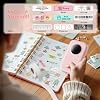
Phomemo Label Maker, Bluetooth Mini Portable Label Printer for Home School

  • Based on 27,487 reviews
Condition: New
Checking for the best price...
$16.82 Why this price?
Save $9.17 was $25.99

Buy Now, Pay Later


As low as $4 / mo
  • – 4-month term
  • – No impact on credit to apply
  • – Instant approval decision
  • – Secure and straightforward checkout

Ready to go? Add this product to your cart and select a plan during checkout.

Payment plans are offered through our trusted finance partners Klarna, Affirm, Afterpay, Zip, Apple Pay, and Google Pay. No-credit-needed leasing options through Acima may also be available at checkout.

Learn more about financing & leasing here.

Selected Option

Free shipping on this product

FREE 30-day refund/replacement

To qualify for a full refund, items must be returned in their original, unused condition. If an item is returned in a used, damaged, or materially different state, you may be granted a partial refund.

To initiate a return, please visit our Returns Center.

View our full returns policy here.


Availability: Only 5 left in stock, order soon!
Fulfilled by Amazon

Arrives Sunday, Sep 20
Order within 6 hours and 51 minutes
Available payment plans shown during checkout

Protection Plan Protect Your Purchase
Checking for protection plans...

Color: Pink


Set name: Machine + 1 Label Tape


Features

  • 2026 Upgrade Version & Superior Printing Performance - Phomemo D30 Portable Thermal Printer works with both continuous tapes and gap label tapes for full consumable compatibility. 50% smaller and lighter than traditional label makers, it features a premium German thermal print head for 25% clearer printing. Enjoy smooth feeding, fast output and consistent clean labeling for all your daily needs.
  • Rich Assorted Label Tapes & Multiple Printing Effects - This mini label maker supports a huge variety of compatible label consumables: cable labels, index tabs, note tags, round stickers, continuous and gap tapes, bubble shape, animal shape, solid color, starry sky pattern, cartoon and luminous labels. It also fits holographic laser, clear transparent, gold, blue and pink font printing on transparent labels. Massive label styles meet all home, school and small business DIY & organization needs.
  • Smart Template Library | BPA-Free Safe Labeling - D30 Samll Label Makers with Print Master app offers 4000+ icons, 800+ borders, 6500+ materials, 880+ templates and 29 languages for global users. Support barcode, QR code, Excel import, OCR and voice input. All matching label tapes are BPA-Free, safe for kitchen, food contact and daily family use.
  • Classroom Must Have and Back to School Supplies to tidy up messy storage spaces. Create custom name stickers for Students/kids stuff daycare, water bottles, stationery, alongside elegant decorative stickers for journal decor, scrapbooking and photo tagging. TEACHER MUST HAVE: This school essentials label maker prints sharp, tailored labels that fit storage bins, bookcases, cubbies, reading baskets, supply cabinets, toy containers, craft bins and stationery drawers. Clear, consistent labels cut down clutter and save time spent searching for items, keeping your classroom neatly organized all year long.
  • Bluetooth Wireless & Ultra-Portable Design - This Small Bluetooth label printer connects seamlessly to your mobile devices for quick, on-the-go printing. Its compact size and lightweight build fit easily in pockets or bags, while the long-lasting rechargeable battery supports extended use. Take it anywhere for instant labeling at home, in the office, or outdoors.
  • All-Purpose Label Maker for Home, School & Business - Phomemo D30 sticker maker is perfect for pantry labels, food date tags, classroom organization, teacher supplies, office files and small business price tags. Great for name tags, cable labels and storage markers, keeping your home, study and workspace neat and well organized

Description

Black on White 0.47 inch D30 Continuous Long Tape Colorful Starry Pattern D30 Label Marker Case Case with 6 rolls tapes Cats Shape Vertical Label Black on White Are there any free materials available? What special services can members enjoy? Yes! You can use thousands of patterns, borders and templates free. After becoming an exclusive member, you can also unlock a richer collection of exclusive hand-drawn patterns, enjoy AI-powered intelligent generation of more creative content Is This a Color-label Printer? This label maker is capable of monochrome printing output, meaning it prints black text only. However, you can create colorful label artwork by using color-patterned label tapes for printing. What is included in the package? The package includes one D30 labeling machine, 80 pieces of 12x40mm pre-cut white label tapes, one manual, and one cable. If the Label Does Not Print Clearly 1. Please Fully Charge the Label Maker Printer 2. Please Clean the Print Head and Platen Roller with the Alcohol Pads If Your Label Prints Offset? Before printing, please choose the right size for the paper on the app, the size of the sample paper is 12x40mm which comes with the label maker. If you are using a 12x40mm paper roll, you will need to select a template that is 12x40mm Phomemo D30 Name Labels Maker for School Supplies Phomemo is a powerhouse in the development and manufacturing of label printers and consumables Our unwavering commitment is to provide customers with an exciting and convenient printing experience. Focused on innovation, we strive to revolutionize the way you print. Phomemo offers a wide range of cutting-edge products designed to make printing fun, hassle-free, and accessible to everyone. Phomemo P15 Ribbon Printer for Gift Wrapping

Brand: Phomemo


Connectivity Technology: wireless


Printing Technology: Thermal


Special Feature: Cable identification, Home supplies organization, Name tags, Personal item identification, School and office files classification See more


Color: Pink


Model Name: D30


Printer Output: Monochrome


Max Printspeed Monochrome: 40 pages_per_minute


Item Weight: 160 g


Product Dimensions: 1.14"D x 2.95"W x 5.17"H


Printer Type: Thermal


Other Special Features of the Product: Cable identification, Home supplies organization, Name tags, Personal item identification, School and office files classification


Printer Output Type: Monochrome


Item Weight: 160 g


Item Dimensions D x W x H: 1.14"D x 2.95"W x 5.17"H


Controller Type: Android, iOS


Print media: Labels


Scanner Type: Portable


Maximum Copy Speed Black and White: 40 pages_per_second


Compatible Devices: Smartphones, Tablet


Warranty Type: Limited


Ink Color: Black


Additional Printer Functions: Scan


Control Method: App


Number of Trays: 1


Processor Count: 1


Display Type: LCD or LED


Number of Drivers: 1


Resolution: 203 x 203 DPI


Color: Pink


Color Depth: 1 bits_per_pixel


Maximum print Resolution Color: 203x203 dots_per_inch


Maximum Print Resolution Black and White: 203dpi


Power Consumption: 7 watts


Wattage: 1200 milliamp_hours


Maximum Copy Resolution Color: 203x203


Maximum Copy Resolution Black and White: 203dpi


Brand: Phomemo


Model Name: D30


Model Number: D30


Built-In Media: Charging Cord, D30 Label Maker Machine, User Manual


Model Series: D30


Specific Uses For Product: Home supplies organization, School and office files classification, Cable identification, Personal item identification, Name tags, Small business price and jewelry tags


UPC: 788703522509


Unit Count: 72 Count


Item Type Name: Mini Bluetooth Label Maker


Manufacturer: Phomemo


Warranty Description: 2


B&W Pages per Minute: 40 pages_per_minute


Initial Page Print Time: 0.69 seconds


Maximum Media Size: 1.57 x 5.9 inches (40 x 150 mm)


Maximum Sheet Capacity: 80


Paper Size: 0.59 inches


Output sheet capacity: 80


Printer Connectivity Type: wireless


Hardware Interface: Bluetooth


Duplex: simplex


Frequently asked questions

If you place your order now, the estimated arrival date for this product is: Sunday, Sep 20

Yes, absolutely! You may return this product for a full refund within 30 days of receiving it.

To initiate a return, please visit our Returns Center.

View our full returns policy here.

  • Klarna Financing
  • Affirm Pay in 4
  • Affirm Financing
  • Afterpay Financing
  • Zip Pay in 4
  • Financing through Apple Pay
  • Financing through Google Pay
Leasing options through Acima may also be available during checkout.

Learn more about financing & leasing here.

Top Amazon Reviews


  • No more lost stuff in camp!
Color: Green Set name: Machine + 1 Label Tape
Sending kids to camp is always an adventure. Usually we’re lucky if they come home with someone else’s stuff, never mind their own. This year I decided to get ahead of the problem and label everything in advance—even their toothbrushes. After looking around Amazon, I was overwhelmed by the number of label makers available. After comparing them back and forth for a while, I narrowed it down to the Phomemo label maker. First, I liked the look of it—it just stood out from the rest. At the same time, I was a little nervous because of the price. Compared to some of the much more expensive models, I wondered if it would be missing features or feel cheap. Boy, was I wrong. From the moment I opened the box, it was clear this was a quality product. Setup with my iPad was quick and easy, and the app connected without any issues. The app seems to have a million options—far more than I’ll probably ever use—but there’s also a simple print option that lets you get started right away. The label maker feels solid, doesn’t have that made-in-China smell that some products have, and the print quality is better than I expected. There also seem to be more fonts available than Microsoft Word offers, which is pretty impressive. Since it’s thermal, there’s no ink to buy or replace. Overall, I’m really happy with it. It looks great, works well, and offers plenty of features without the higher price tag. Now I’m just hoping all this labeling means my kids come home from camp this year with at least some of their own stuff. If that happens, the Phomemo may end up paying for itself. ... show more
Reviewed in the United States on June 16, 2026 by Aaron Y.

  • Great Product and some info about QR codes and some easy help to Label Refill woes and confusion.
Color: Green Set name: Machine + 1 Label Tape
This product is just great. I have been using it for several weeks now and am constantly in the app thinking up new label ideas. D30 Printer - The product itself is well made, put simply it just works as intended. The printing is fast even if you print a solid black label and DPI is the highest and same as any of the other competitors available. When printing super small there may be some issues with text and legibility. I prefer to keep things simple with 1 or 2 line of big text. At 3 lines it is 100% readable as well. When you start putting super tiny text on there the letters begin to not print as intended due to problems with DPI if I am not mistaken. Letters may not print as they are supposed look thus making it hard to read. We are talking super small at this point though and it is unreasonable to expect to get micro text out of this thing that most people would need magnification to read anyways. Icons still look pretty good even at fairly small sizes. Just buy this one, it is the best one because it has the best ecosystem, the printer is easily equal or best... don't buy it based on just looks but it looks/is decent, app which is super important is complete meaning all it's features work unlike many other printers and it has the most label refill options. The APP - The app you need to download can be downloaded and tested before you even buy. I did just that with this and other best sellers and found this app had more icons and the competing apps actually had a similar app always but lacked icons, had usability issues, and some features that did not work yet because the app was not done yet but they still promote the app features as if they worked. This app seems to me like the best app thus making this the best printer IMHO because the app is the most important part of this whole printer label thing. If you are like me you will be spending most of the time with your phone and the app not holding the printer itself obviously until you need to grab your label(s). It may seem trivial but the app is super fun because you get to create things there then ultimately print them out on labels. The app lets you save all your labels and also manage them by deleting some if you want to get rid of some. The app has two modes, a basic simple mode and a more comprehensive mode. Tbh they are both modes are fine and comprehensive mode is very easy to use and has many features to help you create with great tiny precision so I just use that by default. The comprehensive mode is very intuitive and easy to learn to use. I have been in the app a ton since I got the printer and am always creating something new or saving labels I will print or that are or will be handy or fun to use now or later. Again saving everything is huge, because if you print the same things often you can simply select it before you enter creation mode and just print it. QR Code feature in the app - Short version is it works for sure, but filling it to the 200 character limit seems unprintable no matter what. There are two small problems. 1) First, in the app if you increase the size of the of the QR code via dragging the corner it can sometimes distort the shape. This is doesn't happen every time and I would call it a bug. You want to keep it Square. I suggest two things if resizing the QR code. Copy your text to clipboard before finishing the QR code. Hit the check mark to place it. Don't move it from where it initially appears on the app, resize it in baby steps and remember there is an undo button if the QR code distorts. If trying for max size move it to the top left corner, then finish resizing it to the max. A max size QR code code does work, so does a smaller default size smaller QR code but the number of characters used may make a difference. Also alternately, instead of undo if you distort the QR code, if you have trouble just delete it and make a new one, paste the clipboard, and try again. The real problem is it seems you cannot use the full 200/200 character limit as I am about to explain. 2) Second links and info work fine in the QR code depending on error correction and size, but you can only use so many characters. I tried using the maximum and it could not be read with it set to either LOW or SUPER as the error correction level. I took a only minutes and printed a few tests and I can print 100/200 characters of text at LOW error correction but not at SUPER error correction. At SUPER, 100 characters, the corners were distorted enough where I could tell directly from the app it was unprintable because the corner blocks were too small to be printed due to DPI limitations. I am sure I can go higher than 100 on LOW for example, but I didn't want to do a super comprehensive definitive test just for my review. I suggest you guys play around with both character limit and error correction and don't distort your QR codes! Label refills - Some people and reviewers have had trouble with refills. I came across the same issue as another reviewer yet his solution was drastically different and complicated but the actual issue is trivial but an understandable mistake. The D30 Printer comes pre-loaded with a roll of labels. The labels face outward and you are supposed to put the label side facing the printer head thus it feeds through the left of the circular chamber when you use that first roll. However the refills I purchased came wound up differently so the label faced the inward. I believe this may have been a change in the way they were wound up by the manufacturer and that is all. This means that to get the labels on the printer head you need to feed them through the right side of the circular chamber instead(see my image, that is a refill roll fed through right side). That is all. To me it was obvious but I understand the confusion as the product didn't comer out of the box that way and I too initially fed the refill roll to the left and was confused. Again to recap the D30 comes with a roll with labels on the outside/up and the refills seem to be wound now with the label facing inside/down so need to be fed through the right. Just remember label has to face the printer head or it will obviously try and print on the back of the label paper that you throw away. Customer Support - Top notch 5 Star customer support that responded pretty fast. I genuinely believe they are trying hard to support their products and will continue well into the future and meet their customers expectations and are responsive to feedback and actually try to fix issues that arise. At times I am so bored but since getting the D30 printer I have been so distracted and immersed for weeks in the app creating and thinking of new labels. I have even seen some mental health benefits, my anxiety and stress I suffer from have gone down some because I am in the app so often. Who knew a simple label maker could be so fun! ... show more
Reviewed in the United States on June 30, 2023 by DC

  • Great, compact label maker!
Color: Black Set name: Machine + 1 Label Tape
Makes great labels. Fun to use. Easy to follow instructions. Just what I needed. Compact in size. Very affordable. Many fonts to choose from.
Reviewed in the United States on August 24, 2026 by Cynthia R King

  • Well
Color: Green Set name: Machine + 1 Label Tape
I’m only giving it 4 stars because you have to purchase a subscription just to utilize all of the fonts , borders , etc , it’s only 7.99 a month or the deal I was offered was 35 for a year which isn’t bad but still wish I would haven’t know that first , it’s super easy to connect to your phone just scan the back QR code , it’s light as heck , it is dead when you first get it but so far it’s charging really well and fast , also works when plugged in , for what I wanted it’s great so far will update once I learn more ... show more
Reviewed in the United States on June 29, 2026 by Ash salas

  • Easy to use with plenty of feee options.
Color: Green Set name: Machine + 3 Label Tapes
I love this little label maker! It’s compact and portable, and the app makes designing and customizing labels easy. I was able to figure everything out right away without needing instructions. The app offers both free and paid design options, which I didn’t realize before buying. While some of the paid designs may be a little more fun/detailed or offer more variety, there are still plenty of free fonts, templates, and design options to create cute, functional labels without spending anything extra. The battery has held up well especially for quick label printing, and it connects wirelessly to your phone easily. Printing is quick and simple, and it’s perfect for organizing drawers, bins, school supplies, pantry items, and pretty much anything else you suddenly decide needs a label…like your charging cords so your family doesn’t steal them! Definitely recommend. ... show more
Reviewed in the United States on August 22, 2026 by Mish

  • Works well dislike app
Color: Purple Set name: Machine + 1 Label Tape
I already own a full-size label printer with a keyboard, but I decided to try this smaller portable version, and overall I’m glad I did. It works pretty much as advertised and is very compact — small enough to easily fit in my purse, which makes it convenient to take anywhere. There are many different types, colors, and styles of labels available separately, which gives you a lot of flexibility for organizing and labeling things around the house, office, or classroom. The printer itself does a very nice job, and the labels print clearly and look great. My main complaint is the app. Getting everything connected initially was more confusing than I expected, and every time I start printing, I have to click past promotions trying to get me to subscribe to the monthly premium service. I also ran into several situations where I designed a label with a nice border or decoration, only to get a pop-up at print time saying I needed a premium subscription to use those features. It took me a while to figure out which design options were free and which were premium. That said, once I got used to the app, the printer itself worked very well and has been useful. I like the printer a lot — I just wish the app experience was simpler and less focused on subscriptions. ... show more
Reviewed in the United States on May 24, 2026 by GoffyNana

  • Great labels maker.
Color: Green Set name: Machine + 3 Label Tapes
Love this little machine. It makes creating labels for my plants so easy. Battery life is great, I've only charged it once and have printed tons of labels. Very reliable, highly recommend.
Reviewed in the United States on August 9, 2026 by Kelly Jones

  • So cute, compact, and easy to use!
Color: Green Set name: Machine + 1 Label Tape
I absolutely love this label maker! It’s small, lightweight, and very convenient to carry around. The Bluetooth connection was easy to set up, and I love that there are so many fonts, icons, and templates to choose from. The labels print clearly and look really nice. The rechargeable design is also a big plus. Great little label maker for organizing things at home, especially for kids’ items, storage, and everyday organization. Definitely recommend! ... show more
Reviewed in the United States on August 10, 2026 by Divya Choudhary

Can't find a product?

Find it on Amazon first, then paste the link below.
Checking for best price...