Search  for anything...
HP

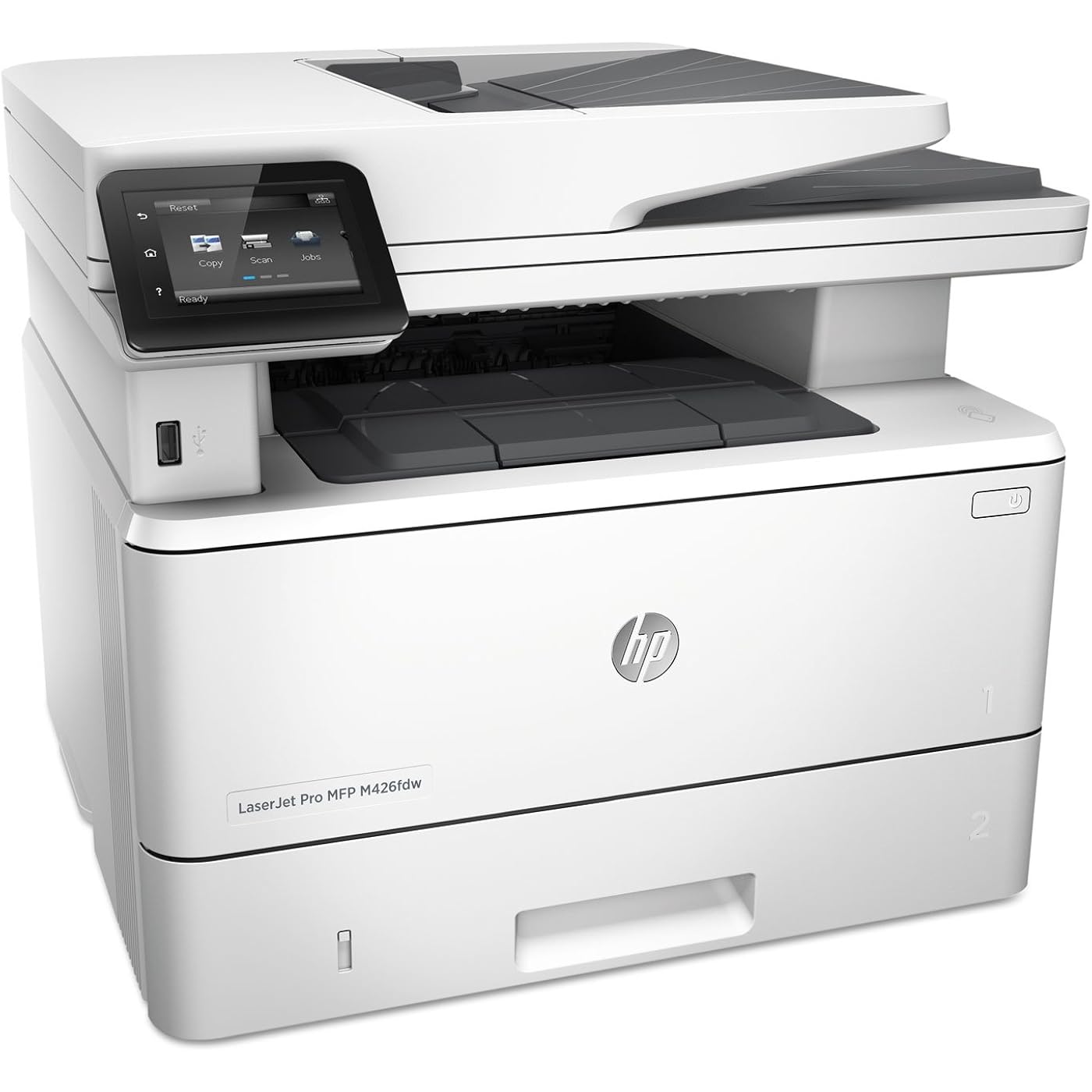
HP LaserJet Pro M426fdw All-in-One Wireless Laser Printer with Double-Sided Printing, Amazon Dash Replenishment Ready (F6W15A)
  • Based on 676 reviews
Condition: Used - Like New
Checking for the best price...
$424.00 Why this price?

Buy Now, Pay Later


As low as / mo
  • – Up to 36-month term if approved
  • – No impact on credit to apply
  • – Instant approval decision
  • – Secure and straightforward checkout

Ready to go? Add this product to your cart and select a plan during checkout.

Payment plans are offered through our trusted finance partners Klarna, Affirm, Afterpay, Zip, Apple Pay, and Google Pay. No-credit-needed leasing options through Acima may also be available at checkout.

Learn more about financing & leasing here.

Free shipping on this product

This item is eligible for return within 30 days of receipt

To qualify for a full refund, items must be returned in their original, unused condition. If an item is returned in a used, damaged, or materially different state, you may be granted a partial refund.

To initiate a return, please visit our Returns Center.

View our full returns policy here.


Availability: In Stock.
Fulfilled by FuserNow

Arrives Sep 5 – Sep 7
Order within 6 hours and 46 minutes
Available payment plans shown during checkout

Protection Plan Protect Your Purchase
Checking for protection plans...

Features

  • Speed through more tasks. Keep data protected.

Description

Fast print, scan, copy, and fax performance Plus robust, comprehensive security built for how you work. This MFP finishes key tasks faster and guards against threats. Original HP toner cartridges with JetIntelligence give you more pages.

Brand: HP


Connectivity Technology: Ethernet, NFC, USB, Wi-Fi


Printing Technology: Laser


Special Feature: Auto-Duplex, Ethernet Networking, Management Features, NFC Touch-to-Print, Network-Ready, Optional HP High-Yield Cartridges, Print from USB Drive, Scan To Email, Single-Pass, 2-Sided Auto Document Feeder, Touch Screen See more


Color: Grey


Model Name: F6W15A#BGJ


Printer Output: Monochrome


Max Printspeed Monochrome: 40 ppm


Item Weight: 28.35 Pounds


Product Dimensions: 15.35"D x 16.54"W x 12.72"H


Printer Type: Laser


Other Special Features of the Product: Auto-Duplex, Ethernet Networking, Management Features, NFC Touch-to-Print, Network-Ready, Optional HP High-Yield Cartridges, Print from USB Drive, Scan To Email, Single-Pass, 2-Sided Auto Document Feeder, Touch Screen


Printer Output Type: Monochrome


Item Weight: 28.35 Pounds


Item Dimensions D x W x H: 15.35"D x 16.54"W x 12.72"H


Controller Type: Android


Print media: Card stock, Envelopes, Glossy photo paper, High-resolution paper, Labels, Paper (plain), Transparencies


Scanner Type: Flatbed


Maximum Copy Speed Black and White: 40 ppm


Compatible Devices: Laptops, PC


Warranty Type: One-Year Warranty


EU Spare Part Availability Duration: 1 Years


Maximum Copies Per Run: 100


Ink Color: black


Additional Printer Functions: Copy


Control Method: Voice


Compatible Cartridge: Arthur Imaging compatible HP LaserJet Pro MFP M426fdw Toner Cartridges


Number of Trays: 1


Resolution: 1200 x 1200


Display Type: LCD


Color: Grey


Maximum print Resolution Color: 600x600 dpi


Maximum Print Resolution Black and White: 600 dpi


Dual-sided printing: Yes


Duplex: Automatic


Maximum Copy Resolution Black and White: 1200 dpi


Brand: HP


Model Name: F6W15A#BGJ


Model Number: M426fdw


Built-In Media: Getting started guide, HP LaserJet Pro M426fdw, Phone cord, Preinstalled HP 26A Black LaserJet Toner Cartridge (~3100 pages), Printer documentation and software on CD-ROM, Setup poster, Support flyer, USB Cable, Warranty guide


Model Series: M426


Specific Uses For Product: Small businesses, offices, study rooms, home environments


UPC: 782386508966 888793697511


Global Trade Identification Number: 66, 11


Manufacturer: HP


Warranty Description: One-year limited hardware warranty


Item Type Name: Wireless Laser Printer


Unit Count: 302.4 Ounce


B&W Pages per Minute: 40 ppm


Initial Page Print Time: 5.4 Seconds


Maximum Media Size: 8.5 x 14 inch


Maximum Sheet Capacity: 350


Paper Size: 3 x 5 to 8.5 x 14, Letter, Legal, Envelope


Printer Connectivity Type: Ethernet, NFC, USB, Wi-Fi


Hardware Interface: USB 2.0


Total USB 2.0 Ports: 2


Total Usb Ports: 2


Frequently asked questions

If you place your order now, the estimated arrival date for this product is: Sep 5 – Sep 7

Yes, absolutely! You may return this product for a full refund within 30 days of receiving it.

To initiate a return, please visit our Returns Center.

View our full returns policy here.

  • Klarna Financing
  • Affirm Pay in 4
  • Affirm Financing
  • Afterpay Financing
  • Zip Pay in 4
  • Financing through Apple Pay
  • Financing through Google Pay
Leasing options through Acima may also be available during checkout.

Learn more about financing & leasing here.

Top Amazon Reviews


  • Pretty much perfect all-in-one device (with only one missing ability/feature)
Great, great, great device! Okay, now the nitty gritty... GOOD: - Printing is fast and can do duplex. Good tray capacity. - Scanning is good too, including using the feeder, and can do duplex. - Can fax (but no duplex... why not??). - Compact. - Nice design. - Wireless works great and very reliable from all my computers (Win 7 PC, Lenovo Win 7 laptop, two MacBook Airs). - Easy to use HP Scan to scan documents to my computer. Can also set up a network folder to scan to. - Many other options that I haven't really tried yet. - Prints from my iPhone (with apps that support Air Print)! - I rarely use it but it is nice to have copying available. - Price was pretty decent. NOT SO GOOD: - Inability to fax both sides (duplex) is very inconvenient. Total bummer in an otherwise super device! - Only supports 2.4ghz for wireless... would have been great to support 5ghz also. Maybe in a future iteration. - Expected, but you don't want to scan old photos with this device, even with the flatbed scanner. NEUTRAL: - Obviously, these companies make most of the money off these printers/all-in-ones by selling expensive toner cartridges. Mine is still on the first one with modest use at home and in my home office (I work full time from home). - No color printing, but I guess they have a model that does do it, but the toner cost will increase too I would imagine. Overall: Awesome device, best printer I've ever bought/owned, and going strong without any issues after one year of use. ... show more
Reviewed in the United States on July 3, 2017 by Impetigo

  • Great printer -expensive ink!
This printer is great, it print and scans really fast. You have the option of printing on both sides of the paper. You can send documents directly tot he printer from any device on your network. You can set up direct printing, and email the printer (documents are printed directly, even when you are away from home) I haven't set up the fax yet (i use fax-so i probably will never set it up). There are two Cons (both with the scan feature) -- 1. It does not scan double sided (making a copy of he back page defeats the purpose of the duplex print) 2. Setting up scan-to-email has proved an impossible task for me (at some point I will call Customer service to see if they can assist with the setup) ... show more
Reviewed in the United States on February 16, 2019 by RAIN ROD

  • Longevity of ink!
Fast, Reliable, and Professional-Grade Printer I’ve been using the HP LaserJet Pro M426fdw All-in-One Wireless Printer for several months in my home office, and it has been a fantastic addition for everyday printing, scanning, copying, and faxing. Setup was straightforward, and the wireless connectivity works seamlessly with my laptop and mobile devices — printing from my phone is quick and easy thanks to Wi-Fi and mobile-print support like Apple AirPrint and HP ePrint. 📄 Speed & Quality This printer is impressively fast, with print speeds up to 40 pages per minute, so large jobs go out without long waits. The text print quality is sharp and professional-looking, perfect for reports, contracts, and everyday documents. The automatic duplex printing saves on paper, and the 50-sheet automatic document feeder makes scanning or copying multi-page documents much easier. 🖨️ All-in-One Convenience Having print, scan, copy, and fax in one unit is great if you need a versatile machine without cluttering your workspace. The 3” color touchscreen adds intuitive control for quick tasks right from the printer itself. 👍 Pros: • Fast and reliable printing — ideal for home offices or small business workloads. • Excellent wireless connectivity and mobile printing support. • Automatic duplexing and ADF save time and paper. • Compact footprint for versatile placement. 👎 Cons: • Toner cartridges can be pricey — factor this into long-term cost. • Setup and advanced software features may be tricky for less tech-savvy users. Overall: ⭐⭐⭐⭐☆ — A solid, high-performance monochrome laser all-in-one that delivers professional results with excellent speed and connectivity. Great choice for busy workspaces that need dependable printing and multi-tasking functionality. ... show more
Reviewed in the United States on October 21, 2024 by Mike Davis

  • great all-in-one
This has all the features I was looking for including automatic double sided printing (no need to manually do anything). Basic printing and scanning are easy to set up. Some of the specialized features took a little time to set up so I'll share my experience... 1. Email to print: This is a cool feature for guests who don't want to set up their laptop with the printer or if they don't connect their phone to the wifi (otherwise they'd just use airprint). They just email the specific email address you [email protected] and it prints both the body of the email (if present) and the attachment (if present). I put a label on my printer with the email address so I don't have to remember. 2. Airprint: this was easy to set up and any phone connected to the wifi finds it immediately. 3. Scan to email: This was the trickiest feature to set up. The printer needs an email address for the scan to come from. I was hoping I could use the hpeprint email address I created for the email to print feature, but it won't allow that because it's not a fully functioning email account. Then I thought I will just use my gmail, however this requires disabling many gmail account security features. So I decided to just use a throwaway hotmail.com address and it worked well. So now if I scan to email, the scan comes as a PDF from that hotmail account and is emailed to whatever address I designate. ... show more
Reviewed in the United States on August 8, 2019 by jasaroony

  • Very Fast - Perfect for Home Office
As an update, the printer has worked flawlessly for close to 2 years. If I want to print a couple of pages, I can power it up, print, and shut it down in less than 30 seconds total time using a USB cable. That has made it my favorite printer ever. I have owned 3 top rated inkjet printer over the last 10 years. After my last one stopped printing, I decide to really think through what I want in a home office printer. I concluded: 1) Don't really need color - the color on a home printer not really good enough for professional use. Most of the time I presented on a screen with B&W handouts. 2) Didn't want to screw around with ink or paper - which always seem to happen when I wanted to print 3) Wanted fast, the old injet seemed to take 5 minutes of head cleaning before it would print. Right out of the box, my toner cartridge is good for about 2,500 pages which is probably 2-3 years of my usage. I can buy one for this printer that could last me for 10 years. I can also load 250 pages, which is small for a shared business printer but huge for a home. The speed is what I love. I can turn it on and in less than a minute I have my first page printed. The text quality is far better than anything my old inkjet could produce. Hopefully, this printer will last me 10 years. ... show more
Reviewed in the United States on November 8, 2016 by Flashy

  • I Hate This Printer
It must be embarrassing to work for HP. Their printers are such junk. Every time I have ever bought one, I swore I would never buy one again. Unfortunately, I didn't keep my promise to myself and I bought this hunk of junk. Half of the time when I try to print, something goes wrong with it. So what do I do? I go through the routine of trying to restart it. If that doesn't work, I uninstall it and then reinstall it. Usually, that means going out to HP and getting a new copy of the driver. Now I could understand this happening occasionally. But I have only had this printer for one year and I bet I have had to do this a dozen times. Join me in my promise to myself never to by another HP printer for as long as I live. I have never had one wear out on me because I cannot stand it long enough to give it a chance. I get tired of having to deal with the stupid thing's issues. If I sound frustrated, it is because I am. I don't review products. But I am so frustrated that this is the only thing I know to do. If I weren't afraid I would hurt myself, I would go out and buy a bunch of firecrackers and try to blow this piece of junk up. ... show more
Reviewed in the United States on July 6, 2018 by Jim

  • Excellent printer at great price!
I use 2 laptops and was tired of swapping USB cables from each to my older HP laser. The M426fdw arrived faster than the ETA. Used the supplied HP set up disk. Set up for wireless was a breeze (have two O/S- Windows 10 and Windows 7 Pro). Printing was extremely faint, almost invisible. Chatted with HP support. She was excellent. Determined that the toner cartridge was defective. Received replacement toner next day, 10AM. Wow! This laser is a real upgrade from my previous HP laser, which died after 7 years of daily printing. Having 2 input trays is great - one for the back side of previously printed paper (saving trees) and one for new paper. This printer is very fast with all 3 tasks - printing, copying and scanning. Really, really fast. The HP scanning SW is as poor and cludgy as ever. I recommend third party scanning software. Still cannot believe the price I paid for this laser via Amazon. A full hundred bucks cheaper than from any other source. Unbelievable. Thank you Amazon. ... show more
Reviewed in the United States on October 8, 2016 by RJC

  • !!Great Product!! UNTIL I WORKED WITH IT FOR THREE MONTHS...
I returned the Canon Imageclass 414 copier (supposedly the equivalent to HP) after it failed to print high quality bond paper envelopes without smearing. I have had HP forever and I am back and happy to say that this machine is great! The instructions, if followed, are superb! It installed to my Windows 10 machine perfectly and I didn't have to pay for tech support as I did for that other piece of c**p. The HP can print high quality bond paper envelopes without smearing. Professional looking. And, it is so great to have a wireless printer available anywhere in the house. Now, I have worked with the new printer. 1) When trying to print a document from my Dell computer, the printer throws an error message: a. “load tray 1 Plain, Letter” error and I have to manually load paper OR b. “load tray 1 Plain, Letter OR press [OK] to use available media” error rather than just printing from tray 2 c. If you just try to photocopy a page, it gives the same error message in 1b. 2) When trying to scan a page to send via email yields an error “username/password is incorrect.” a. Says it is scanning to smtp.att.yahoo.com 3) Downloading APP –Access Denied It's possible that the tray 2 sensor has failed.... ... show more
Reviewed in the United States on September 3, 2017 by DocR

Can't find a product?

Find it on Amazon first, then paste the link below.
Checking for best price...