




$126.60
Buy Now, Pay Later
As low as
$21.10
/ mo
Learn more
- – 6-month term
- – No impact on credit to apply
- – Instant approval decision
- – Secure and straightforward checkout
Ready to go? Add this product to your cart and select a plan during checkout.
Payment plans are offered through our trusted finance partners Klarna, Affirm, Afterpay, Zip, Apple Pay, and Google Pay. No-credit-needed leasing options through Acima may also be available at checkout.
Learn more about financing & leasing here.
Selected Option
Free shipping on this product
30-day returns
Learn more
This item is eligible for return within 30 days of receipt
To qualify for a full refund, items must be returned in their original, unused condition. If an item is returned in a used, damaged, or materially different state, you may be granted a partial refund.
To initiate a return, please visit our Returns Center.
View our full returns policy here.
Availability:
In Stock.
Arrives
Thursday, Nov 5



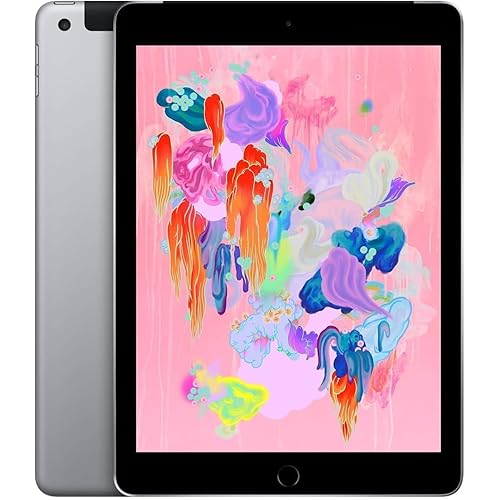
At a glance
- Condition
- Used - Very Good
- Style
- Wi-Fi
- Size
- 32GB
- Color
- Space Gray
- Model
- MW742LL/A
- Storage
- 32 GB
- Screen size
- 10 in
Features 9
- 10.2-inch Retina display
- A10 Fusion chip
- Touch ID fingerprint sensor
- 8MP back camera, 1.2MP FaceTime HD front camera
- Stereo speakers
- 802.11ac Wi-Fi
- Up to 10 hours of battery life
- Lightning connector for charging and accessories
- Support for Smart Keyboard and Apple Pencil
Specs 10
| Brand | Apple |
|---|---|
| Model Name | Apple iPad |
| Memory Storage Capacity | 32 GB |
| Screen Size | 10 inches |
| Display Resolution Maximum | 1620x2160 |
| Product Dimensions | 10.35 x 7.28 x 1.93 inches |
| Item Weight | 1.1 pounds |
| Manufacturer | Apple |
| Item model number | MW742LL/A |
| Batteries | 1 Lithium Polymer batteries required. (included) |
No specs match.
Frequently asked questions
If you place your order now, the estimated arrival date for this product is:
Thursday, Nov 5
Yes, absolutely! You may return this product for a full refund within 30 days of receiving it.
To initiate a return, please visit our Returns Center.
View our full returns policy here.
To initiate a return, please visit our Returns Center.
View our full returns policy here.
- Klarna Financing
- Affirm Pay in 4
- Affirm Financing
- Afterpay Financing
- Zip Pay in 4
- Financing through Apple Pay
- Financing through Google Pay
Learn more about financing & leasing here.
Similar Products





Top Amazon Reviews
Great recipe book!
Style: Wi-Fi
Size: 32GB
Color: Space Gray
Believe it or not I bought this to use in the kitchen for my recipes. I bought a stand for it as well. My old free Google Fiber Nexus 7 tablet finally died due to battery issues (it blew up like a balloon). This is the first substantial Apple product I've ever owned (unless you count the first ever iPod made) and I am pleasantly surprised. I use Android exclusively in my life but I saw what a great price and size this iPad was and couldn't pass it up (especially because it was going to be a glorified recipe book). Besides I thought that if I didn't like the Apple experience it still wouldn't be a loss because a $50 tablet can be a kitchen recipe finder - this iPad just has a few extra perks so I could use elsewhere if need be. Setup was extremely easy even though I haven't logged into my @me.com address in literal years (nope I'm not that good, I had to reset my password haha). I like the big crisp display which is a huge change from my 8 year old Nexus tablet. I feel a little dumb at times not knowing the quirks of Apple products but I'm getting there. Everything is lightning fast to open and very smooth. I used the tablet for about 3 hours almost non-stop and the battery went from 92% to 82% which was an awesome surprise. I have all of my recipe bookmarks in Chrome and logging in/getting my bookmarks was not a painful process at all (I thought it would be). I'm just a little bit bummed that I can't make Chrome the default browser but considering I don't do my day-to-day in the iPad it's not a big problem. As long as I was able to use install and use Chrome. I installed some basic apps that I thought would look better in a bigger screen but still be mobile like WebToon, Discord, Duolingo, reddit, Facebook, Amazon, Netflix, and YouTube. They all work and look great. I can't compare this price point iPad with one that is more expensive but I can only imagine that a more expensive iPad is 10 times as smoother/nicer looking than this. I don't think I'll ever be able to find a flaw with it, especially with the way in which I use it. For my purposes I would recommend this iPad to anyone that asked. As always with everything in life, you get what you pay for. If you want better graphics pay more money.
...
show more
Reviewed in the United States on May 5, 2020 by Paulina
Great iPad for Everyday Use, with Minor Drawbacks
Style: Wi-Fi
Size: 32GB
Color: Space Gray
I’ve been using the Apple iPad 10.2-inch (32GB, Wi-Fi) in Space Gray for a few weeks now, and overall, I’m very satisfied with it. The Retina display is sharp and vibrant, making it perfect for streaming videos, browsing, and even some light drawing. Performance-wise, it handles apps smoothly without noticeable lag, which is great for my daily tasks like note-taking and reading. Battery life is solid — I get about 8-10 hours of typical use, which easily lasts through a workday or a few long study sessions. The iPad’s interface is intuitive and easy to navigate, making it user-friendly even for less tech-savvy people. The only issue I encountered was with the charger — the one that came with my unit was faulty and didn’t charge consistently. I had to get a replacement, but once that was sorted, everything else worked perfectly. If you’re looking for a reliable, budget-friendly tablet mainly for media consumption, school, or light productivity, this iPad is a great choice. Just double-check the charger condition when you buy!
...
show more
Reviewed in the United States on September 30, 2025 by Stephanie J.
New to Apple
Style: Wi-Fi
Size: 128GB
Color: Space Gray
I received this a day before promised, so that was great. Set up is very easy. This is my first Apple product and so far I am loving it. I have always purchased Lenovo before and those are great as well, I have always been satisfied with them, but thought I would try Apple this time. Right now I am saying I will never go back. It had an IOS update already and that went quick and smooth. I have downloaded several apps already, again, quick and smooth. The battery seems to drain pretty guickly and I want to purchase an Apple 30w charger and the 2m cord that is better for it, but it wants an Apple sign in, which I did not do, I opted for finger print recognition or it says I can enter the code I signed in on tablet with if I can't remember what the password is, which I don't because I never set one up, I can change the password that way, but it tells me that the sign in code that I just signed in to the tablet with is incorrect. I'll figure it out because I want to use actual Apple chargers and cords for my tablet. ****UPDATE May 10, 2020**** Okay the password thing was my own ignorance, anybody else will probably not have the same issue. One thing I do recommend is getting a charger that has more power than what this one comes with, a 12 watt charger, especially if you are going to use this for games, the battery drains very quickly and seems to take forever to charge. I updated to a 30 watt charger, which if you do that, you will have to order the C charger cord. I chose the longer one, so that was an extra $75 right off the bat, but then I paid $90 less than list price for this IPad than I would have if I had bought it at Walmart or anywhere else. Big difference in the amount of time that it takes to charge and if I leave it hooked up while playing games on it, especially PUBG, it does not lose its charge near as quickly. ***************1/23/2025 update************ Apparently not quite a 5 year life span on these things. Mine won't even turn on now. But I love the iPad and bought me a new one, only at a national chain electronics store. They had them with 256Gb of memory for $70 less than retail. The old iPad, Apple was still updating it to the latest iOS. Even though my old iPad does not even turn on, I have everything on my new iPad that I had on my old and it took less than an hour for that transfer, which I did myself.
...
show more
Reviewed in the United States on April 18, 2020 by timturk
Wow, From a Graphic Designer Perspective
Style: Wi-Fi
Size: 128GB
Color: Space Gray
Let’s put everything in perspective. I’m a graphic designer and illustrator, when I decided to buy this iPad, I really wanted to fail my expectations. I had a 2-in-1 Laptop with pencil support, which I have to give to my wife for her studies, so my expectation was very high, I needed a product I could use on the go draw and do some graphic design on the fly, which I could finish back in the office. I’ve been a non-Apple user for many years and I heard many people telling me how awesome the iPad was so I give it a shot, but keep in focus what my expectations were. Well, I didn’t want to spend too much money, Christmas was getting closer, so I wanted to be on a very tight budget, and I saw all the reviews about the new iPad 7th Generation, where each reviewer stated that for the price was perfect on the budget solutions for young artists. I’m not a young artist, but I also heard that the pencil supported angle detection which my laptop didn’t do at that time, later on, was added with an update, but still was an upgrade at the moment. So I received the iPad with my new Apple Pencil and I set it up, installed Sketchbook, Affinity Photo, and Affinity Designer right away. I have been using those last two applications for about 2 years now and I heard as well that they had all the capacity of the desktop counterpart in the iPad, and I said to myself: “let see about that”. Well, after all, that I started to draw, hated the clicking noise, but the smoothness of the strokes, the responsiveness of the experience, and the fluidity of the pen captivated me. This is a $400 to $500 set up and so far so good. Then I started to work on Affinity Designer, had a couple of projects on my OneDrive, with was easy to set up to work with the iPad File System, from 128 Gb went to 1Tb unit, just like that. The project opened without any issue on my iPad, every element, and every layer was there, I was able to work on that project without any lag, it was then that I said... “No way!” This cheap set up works great, better than expected. If you are a new designer trying to get by, let me tell you, the iPad 7th Generation, and whatever comes next is more than enough to get you started. Now if you come from another platform and you have a bunch of Apple Sheep telling you how great the system is and how the apps are optimized better for the iPad, let me put it in perspective, that’s a bunch of bolognas. The Instagram app is junk in the iPad if you have your iPad in a case with a keyboard be ready to have to get the iPad out of the case constantly because many, probably, too many apps force portrait, which is a pain. iPad OS is not bug-free. Apps do freezes and there’s no way to close all the apps at once. The iPad is a very capable device, don’t get me wrong, but do not set your mind that’s a perfect experience, because it is not, is good and in some cases better because the Apple ecosystem, AirDrop has no match for sure. But is far from perfect. It is a very long learning curve, that once you come through it you will love the experience. The screen quality is not the best if you are wanting to enjoy your YouTube videos in 4K, “No way José”, you are out of luck with this iPad, color accuracy is good, the touchscreen is the best experience you could have. If you are buying this iPad for drawing as your primary function, buy silicone tips, the clacking and clicking of the pen get to you after a while, no you don’t get used to it, you just tolerate it, with $5 dollars you can make it all go away. Don’t buy paper-like screen protectors, they will make the screen looking worst, and is LCD, no deep blacks. But man, with less than $500 you can have a very powerful drawing and design device for on-the-go experience, no i3 or i5 4Gb of RAM unoptimized crap that you can get at this price with other brands, this is a great bargain, if you are not planning to do 4K video editing. In that case, I think I would go with the iPad Pro. One big CON... takes forever to charge, Oh My Gosh, why did you do this Apple, give me a break. At least battery life is not that bad, it will take you through the day for sure. If you are 10% and want to charge for a meeting, forget about it if you are 10 minutes away it will only charge 2% or 3%. Yeah, the Turtle would beat yours for sure. Well, but seriously, for the price, all Cons are outlasted by the Pros. If you need a design device at a low budget, you cannot get better than the iPad, and you get 1 year of Apple TV for free. Not much to see there but at least entertain.
...
show more
Reviewed in the United States on April 25, 2020 by Rafael Vila
I love this more than my kindle fire, worth the extra $$
Style: Wi-Fi
Size: 32GB
Color: Space Gray
I love this iPad so much that I've barely used my windows computers at all since I've got it, it does almost everything they do. My Samsung S9 smartphone is now being used primarily for phone calls. I've been grabbing the iPad to use apps on wifi whenever I'm home, and use the phone on mobile data when I'm out. I have two Kindle Fire tablets, the original first one they came out with from 2011(?), plus a fire 10 from a few years ago. The fire 10 has become extremely sluggish. Even factory resetting it hasn't helped. Apps take forever to load and do anything. The iPad blows it away. Yeah, it costs way more than a Kindle Fire, but if you can afford it, it's worth it. I would still recommend the fire for budget users or young children that you don't want to entrust with an expensive iPad. There are some apps for the iPad that you can't get for a Kindle Fire or droid phones, but for the most part almost every app I have for Kindle Fire or S9, I can also get on the iPad. At the moment I'm only giving it 4-stars for ease-of-use because I've actually had to download and read the user manual. It's 90% user-friendly, but not everything is easy to figure out without the manual. There is a little bit of learning curve if you're not familiar with the Apple operating system and you're switching over from Windows and droids. The more I use this though the more I'm falling in love with the Apple operating system. My next new computer is probably going to be an iMac because this is so much easier than Windows 10 (which I despise with all my soul, despite being a loyal windows pc user since it first came out decades ago).
...
show more
Reviewed in the United States on January 12, 2020 by L.B.
Amazing for students and everyone else!
Style: Wi-Fi
Size: 32GB
Color: Space Gray
I finally caved and bought an iPad for classes instead of using my MacBook since I have now transitioned into my higher level classes that have both regular notes and equations that require me to switch between typing and writing all the time. I paid the extra $9 to get the app Noteability to transition better between typing and writing. I was able to find an amazing off-brand Apple Pencil that has the palm rejection so I can write without hurting my wrists. As a student, I prefer to type my notes since I can type a heck of a lot faster than I can write and I have carpal tunnel so writing for more than 15ish minutes makes half of my hand go numb anyways. So I have been in love with this iPad. The battery life is great. I can use it for a couple hours and only use like 10% or less of the battery. I also have recently tried out drawing digitally since I found a nice free drawing app (Adobe Sketchbook). It's a free version of Adobe Photoshop. So obviously it's not that fancy but for being free it has a lot of amazing features. I am able to draw with a bunch of different layers and styles and colors! Even drawing for a few hours has very little drain on the battery life. I think maybe a couple hours will drain maybe 15% but I haven't noticed too much. I can go almost the whole week of class and drawing and still have more than 50% of my battery life left. I haven't noticed any issues with the screen, it's super responsive and it seems like it has great definition. Colors pop and are very distinct from one another. Although the screen itself isn't glass, I always buy glass screen protectors. I currently have a matte screen protector that I like more over my usual glass screen protectors. This allows for less glare and a little more friction between the screen and my stylus to allow drawing to be easier and not slippery.
...
show more
Reviewed in the United States on March 2, 2020 by Rebecca Hilbert
Perfect device for young and old to stay occupied
Style: Wi-Fi
Size: 32GB
Color: Space Gray
he Apple iPad is an absolute game-changer and has become an integral part of my daily life. From the moment I started using it, I was impressed by its sleek design, impressive performance, and user-friendly interface. The display quality is outstanding, delivering crisp and vibrant visuals that enhance my multimedia experience. Whether I'm browsing the web, watching videos, or reading e-books, the iPad's performance is smooth and lag-free. The battery life is exceptional, allowing me to use it for extended periods without worrying about running out of power. The wide range of apps available in the App Store offers endless possibilities, making it a versatile device for both productivity and entertainment. The iPad's seamless integration with other Apple devices, such as iCloud and AirDrop, adds to its convenience and functionality. Overall, the Apple iPad is a premium device that delivers on all fronts, combining style, performance, and versatility into one remarkable package. It's definitely worth the investment for anyone seeking a top-notch tablet experience.
...
show more
Reviewed in the United States on June 5, 2023 by kyle
Great value at a very reasonable price. Highly recommend.
Style: Wi-Fi
Size: 128GB
Color: Space Gray
This iPad is hands down the best tablet that you can buy at this price point. While the iPad Pro does offer more power and functionality, I think most people don’t necessarily need all of that. Personally, I use this for every day tasks (browsing, writing, shopping, streaming etc) and this iPad can handle all of those functions with zero problems. I especially like that Apple has given the base model iPad keyboard, pen, and even mouse functionality, thus making the tablet that much more useful. A word of caution though: it might be tempting to go for the ~$329 32gb model, but I would highly recommend going with the slightly more expensive 128gb model. The operating system, apps, and anything else you store on there will make the 32gb model fill up really quickly. Plus, from what I’ve seen, both the 32gb and the 128gb versions go on sale pretty regularly, so it’s definitely possible to get a great deal on this device. Downsides: if you want to use it as a daily laptop/computer replacement you’ll probably want to buy either the magic keyboard (pricey, but awesome) or a Bluetooth keyboard (Logitech has some good options) to boost its usability. Neutral: the touch interface has given me no problems, and as a result I very rarely use the Apple Pencil. I mostly use it if I draw or want to quickly hand write notes. Unless you want to use the pencil for those types of tasks, I’d recommend just sticking with the regular touchscreen or using a Bluetooth mouse instead.
...
show more
Reviewed in the United States on December 17, 2019 by Matt