Search  for anything...

Anycubic Kobra Max 3D Printer, Large 3D Printer with Auto Leveling Pre-Installed, Stronger Construction and Higher Precision, Filament Run-Out Detection Easy to Use, Big Size 17.7" x 15.7" x 15.7"

  • Based on 661 reviews
Condition: Used - Like New
Checking for inventory...

Notify me when this product is back in stock

$392.28 Why this price?
Save $377.70 was $769.98

Buy Now, Pay Later


As low as / mo
  • – Up to 36-month term if approved
  • – No impact on credit to apply
  • – Instant approval decision
  • – Secure and straightforward checkout

Payment plans are offered through our trusted finance partners Klarna, Affirm, Afterpay, Apple Pay, and PayTomorrow. No-credit-needed leasing options through Acima may also be available at checkout.

Learn more about financing & leasing here.

Selected Option

Free shipping on this product

This item is eligible for return within 30 days of receipt

To qualify for a full refund, items must be returned in their original, unused condition. If an item is returned in a used, damaged, or materially different state, you may be granted a partial refund.

To initiate a return, please visit our Returns Center.

View our full returns policy here.


Availability: Unavailable
Fulfilled by Amazon
Available payment plans shown during checkout

Size: ANYCUBIC KOBRA MAX


Features

  • Large Build Size ANYCUBIC KOBRA MAX 3D Printer comes with a large build volume of 17.7 x 15.7 x 15.7 in. / 450 x 400 x 400mm, which is enough for daily and household using, providing you larger printing space and more choices of creation.
  • Self-developed Anycubic LeviQ Leveling Function Anycubic upgrade auto leveling function with a 25-point smart and precise calibration. It can compensate the heated bed unevenness automatically. Leveling and printing can be completed with one button, simple operation and brings you greater printing experience.
  • Needless to waitThe maximum printing speed is 180mm/s (Average speed is 80mm/s, 167% faster than industry standard). Faster speed enables you to enjoy more joy of 3d printing.
  • Stronger Construction & Higher Precision ANYCUBIC KOBRA MAX 3D Printer is equipped with double thread Z-axis moving construction. It can minimize the shaking, does not lose steps and more model details can be restored. The modular design allows the printer to be assembled only in 10 minutes.
  • Filament Runout Detection Equipped with a filament runout sensor, it can monitor the supply of filament intelligently. If your printer runs out of filament, it will stop automatically without losing your printing progress.
  • Smarter Printing ExperienceThe 4.3-inch full-colored and sensitive LCD Touchscreen with comprehensive functions and settings offers a better printing experience.
  • 100% Satisfaction Service ANYCUBIC is one of the best 3d printer brands, which provide the best 3d printers for every customer. We also provide the lifetime technical support and 24 hours professional customer service.

Brand: ANYCUBIC


Material: Pla


Color: Anycubic Kobra Max


Product Dimensions: 15"D x 20"W x 20"H


Item Weight: 42.6 Pounds


Product Dimensions: 28.35 x 28.15 x 26.18 inches


Item Weight: 42.6 pounds


Item model number: Anycubic Kobra Max


Date First Available: January 14, 2022


Manufacturer: ANYCUBIC


Frequently asked questions

This product is currently out of stock. Please check back later for shipping info.

Yes, absolutely! You may return this product for a full refund within 30 days of receiving it.

To initiate a return, please visit our Returns Center.

View our full returns policy here.

  • Klarna Financing
  • Affirm Pay in 4
  • Affirm Financing
  • Afterpay Financing
  • PayTomorrow Financing
  • Financing through Apple Pay
Leasing options through Acima may also be available during checkout.

Learn more about financing & leasing here.

Top Amazon Reviews

🚀 Abunda's Overview

This is our summary and key points to consider based on customer reviews.


The Anycubic 3D Printer delivers high-quality, detailed prints along with some very impressive features such as auto-leveling bed, removable print bed, and a touchscreen. Setup and assembly can be challenging, however, it is praised as an excellent printer for those focusing on detail rather than speed or beginner-friendliness. Despite some users experiencing technical issues, the customer response is generally positive as the printer performs exceptionally well right out of the box.

Pros

  • 👍 Provides highly detailed and precise prints
  • 👍 Includes auto leveling bed, a touchscreen, and easy to remove print bed
  • 👍 Overall impressive performance right out of the box

Cons

  • 👎 Installation and assembly can be complicated, particularly for beginners
  • 👎 The printer runs slower than average
  • 👎 Some users experienced consistent technical issues

Should I Buy It?

If you value high-quality, detailed prints and are ready to handle a challenging setup process, this could be a great choice. With its advanced features and overall functionality, it's ideal for those with some 3D printing experience. However, for beginners or those seeking faster speeds, you might want to consider other options.


  • Good unit, but no manual options for leveling.
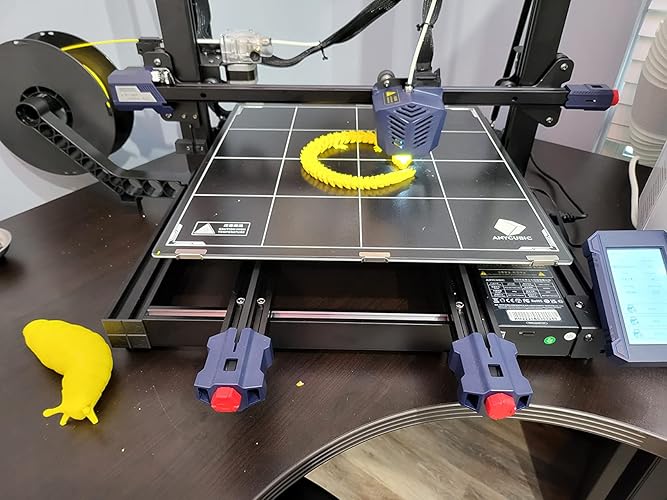
It prints quite well, and was up and running in under 10 minutes. There are no bed leveling screws, but so long as you make sure the gantry is leveled AND squared, this isn't a problem. ABL is done via pressing the nozzle itself against the bed to detect strain across a 25 point grid. Heating is plenty fast, and the unit comes with a PEI-on-glass bed. For an extra 35 dollars, you can get the flex plate (which i suggest). Cons: does not handle z-hop commands well. This results in pills all over the side of the print, and it WILL cause an aligned z seam to swell up and ruin your print. E-steps are usually off on the extruder alone. Typically, it is 6mm short. The filament runout sensor is on a flimsy mount, and not only flexes during retracions, but will squeak with fast retraction settings. Some oil solves the squeak for a moment, but it would benefit the sensor if it had a teflon coating, this would help. You have to heat the unit to 220c minimum in order to auto feed or remove filament, and that cannot be changed. Why? No manual leveling options. If the nozzle is dragging on one side, you may likely need to force the gantry to max Z height in order to level out the Z screws. Pros: decent cooling, great temperature control, and easy setup in pronterface. Stepper drivers are digitally programmed, and you can check settings with m500 Offers PLA and ABS preheating options. Rapidly heats up to print temp and doesnt vary much at all, even with full cooling. Rock solid. Capable of printing at 120mm/s with accuracy of +/- 0.45mm in x and y using stock parts. Super quiet. Unless you're speed printing, it's silent. Notes: Advised jerk is 8-15mm/s. 10 is what mine is set for in all respects. Max moving acceleration should be 5000 or less Max acceleration on any other setting shouldnt exceed 3700, as it has no appreciable benefit above this, but the suggested acceleration is 800 to 2000 for most prints. 225c at 15mm/s is perfect for the first bridging layer. Tends to do a small deceleration across exact center in the bed. I dont know why, but it does this for anything printed within 25mm of the center. It isnt a problem, but can produce noticeable effects on the print along outer walls when going at 80mm/s or higher. Do not insert the SD card into the touch screen. This port is for bios upgrades only. Overall, totally worth the price, and a blast to operate. You wont be disappointed. ... show more
Reviewed in the United States on March 26, 2023 by EDWARD MCGUIRE

  • First 3D printer I’ve owned First 3D printer I’ve owned
The instructions for assembly are not detailed enough, and leave one searching YouTube for how-to videos. Product had a malfunction and a piece broke immediately after turning on, so contacted manufacturer tech support. They were very responsive, having a new part shipped the next day, it took 15 days to come from China, so normal shipping speeds for international delivery. My only other issue was the provided SD card lost its formatting after two prints. I had to reformat it and lost all of the text files and print files I had stored on it (hoping the text files that came on it weren’t important, I never looked at them!). Anycubic reached out after delivery to ensure my printer was working, and to offer a 2kg roll of filament for my wait. Again, amazing customer service! I would also like to add that I have tried out several filaments from other manufacturers, but Anycubic’s filament has produced my best results. I would recommend their printer and filament to anyone looking to get into 3D printing. This is my first 3D printer, but very easy to get up and running. ... show more
Reviewed in the United States on January 26, 2024 Reviewed in the United States on January 26, 2024 by Nathaniel Johnson

  • Plagued by errors and issues Plagued by errors and issues
UPDATE: I bought this printer in October 2022. Since that time, I have been plagued by hotend errors. I've replaced the hotbed, hotend, printhead gantry and printhead cable. Intermittently between repairs it has worked - not perfect, but at least it wasn't a brick. Currently, I am not able to get past the hotend error. Everything except the motherboard is new by replacement from Anycubic. Why did I buy a printer so that I could basically rebuild it? Don't get me wrong, when this was working, it was fantastic - I have zero issues with quality of print, speed, etc. The only issue I am having right now is that it doesn't work. At all. In my personal opinion, the printhead is poorly designed - with no stability for the printhead cable, the constant movement will eventually wear out the wires and the flimsy fabric tape will not protect that. So - that's one replacement heavy printers will need to plan on doing in the future. Changing the printhead itself is not that hard - except for the melted wax on the connectors that makes it near impossible (for people who do not regularly mess with electronics) to unplug the connectors. The same goes for any of the connections on the motherboard. To replace the printhead cable, you have to unplug it from the motherboard and plug the new one in - however, there is melted wax that keeps anyone from doing that easily. I spent a considerable amount of time working the wax off carefully - so as not to damage the board or nearby wires. Inside the printhead gantry, the wires are smooshed so tightly together - to fit once it's back on. When you replace the printhead, you have to re-smoosh the wiring to fit and if you're not careful, the way in which they are smooshed will eventually wear out those wires and/or connections. I've never been so involved in a 3D printer before. Most are plug and play for me and work well. This one, while I love the size and quality, has not been worth the headache - especially considering the price. One thing I can say is that customer service has been great and as fast as China to US via email can possibly be. On initial contact, they replaced the cable and printhead gantry and provided instructions on how to do it. The only thing tho, is that they ask for you to print an Owl g-code as a default and if you're printer is not working to be able to do so, you're going to have to reply to that request even if you mentioned that in the first service ticket. For service, I give Anycubic 5 stars. But for product, I can't give it more than one right now. The level of issues I have with this printer are more in line with a printer that is either a few years old or is used to print non-stop - neither of which applies to the one I own. I have since contacted anycubic again and hopefully we can resolve this since my return window is closed. :) I am by no means a 3D Printer guru, but I know how to operate 3D printers. This printer is HUGE. It's kind of intimidating to set up. However, right out of the box, it seemed to print fine. But not for long. I have been plagued with hot bed errors, hot end errors and bed leveling issues. I've literally spent hours and rolls of filament trying to get the settings right. I even replaced the hot end - or tried to. The connections had melted wax or red filament over them, and it took me a long time to carefully scrape off whatever it was enough to remove the connections so that I could replace the hot end. And still getting hot end abnormal errors. So, right now, this is a brick sitting on my table. I've contacted anycubic for support, sent pics of earlier issues, including a warped hot bed, they told me to print their Owl gcode and send more pics. The hot bed is warped, I figured that's a defect. There is NO voice tech support. NO voice customer service. Just email, which takes a while - something I don't understand as they have a hub here in the US. At this point, I'd just like to exchange it for one that works out of the box like it seems to for all the YouTube 'unboxers.' My solid advice is to wait a while before purchasing this one - it's too new, not enough support tech or otherwise (unless you are looking for curaprofiles) and there are easier to use printers out there, like the Anycubic Vyper - which was my second choice. I was able to get a few prints out - some prototypes before all the issues started - and I will say that those did turn out decent enough. If you have this printer and it works for you, awesome. However, mine is not and has not consistently worked for me. ... show more
Reviewed in the United States on December 18, 2022 Reviewed in the United States on December 18, 2022 by That Girl

  • New to 3D Printing? Read this post! Kobra Max
The Kobra Max is one of the largest 3D printers you will find for under $1000 currently, and it freakin rules! Most 3D printers need to be leveled using "the paper method", of which you'll find lots of videos about on youtube. But I've never once had to do that with this printer, because this 3D printer has a more high tech way of auto leveling than your average printer. Instead of adjusting knobs manually at the bottom or on the computer screen, the computer auto levels by pressing down on multiple points on the board and fixing all the kinks by itself in the computer. If you don't know what auto leveling is, look it up on youtube with other printers, imagine all the suffering you'll have to go through, really try to visualize it, and then realize this printer will cause you no such grief, and take a big sigh of relief. Of the few problems I've ever had with this printer, auto leveling has never been one of them. I actually haven't had to level it in quite some time. The quality of the prints is also really quite good. Once you've got all the settings on your slicer set up properly on it, the thing'll knock out practically anything you throw at it. I wouldn't say it's "silent", but it's pretty dang close. I'm the kinda guy that will take the batteries out of a clock because the ticking annoys me when I'm trying to sleeping, but the humming of this printer on the outside of my door isn't bad. It's quiet, and has a good low frequency instead of high. When I was having trouble at the beginning (being my first 3d printer), I emailed the company, and they always got back to me pretty fast, and helped solve the issues I was having. They were very very helpful. If you are a complete beginner, but you want a LARGE printer, this is a very good printer, and I would highly recommend it. It takes up a ton of space (obviously), but the printer just works. The engineers that designed this really put in the extra work to make a good product. Five stars all around. ... show more
Reviewed in the United States on July 6, 2022 by Amazon Customer

  • Great printer with a huge print area and a problematic filament sensor
I have multiple 3D printers, including a Bambu X1C, but this one still gets used regularly. It is super easy to set up - no bed leveling to worry about at all (not even an initial adjustment) and it prints great right out of the gate. It's quite a bit faster than most entry-level printers, though not as fast as the premium printers. In many kilograms of filament printed, I have only had one problem with this printer: the print will stop with a message saying (as closely as I can remember) "Filament out/broke or problem with sensor". Well, it's always been a problem with the sensor. Normally these errors are recoverable by pressing 'continue', but it got to the point where it was happening again as soon as I tried to continue. I ended up unplugging the filament sensor and shorting the two leads going back to the controller. (That is, placing a jumper connecting one wire to the other.) That effectively removes the filament sensor from the system, and the printer now runs trouble free. Aside from that issue, this printer continues to be a real workhorse for me. ... show more
Reviewed in the United States on July 7, 2024 by GeneT

  • I'm in love with this printer I'm in love with this printer
I've had an ender 3 for roughly 4 years. Things kept breaking on it and I kept replacing with "upgraded" parts. It seemed as if I was always tinkering with it. I just want to print, not have to be a printer mechanic. It took the joy and desire out of 3d printing. I knew I wanted larger print volume and faster speed. I did a lot of research, considered more expensive models, including the snapmaker a350t at three times the price of this printer. I was willing to spend the money if I was trading off for quality and ease of use. I settled on this printer. Assembly was easy and straight forward. It took about an hour and I was up and printing. That was 4 days ago and the machine has been kicking out perfect prints non-stop since then. It advertises speed up to 120mm/s. Honestly, I thought I'll believe it when I see it. Well, I've printed at nothing but 120 and the prints have been flawless. In fact, the quality is exponentially better than I ever got out of my Ender 3, even at the higher speed. And, this thing is so quiet, you can't barely hear it. I could hear my Ender in other rooms when it was running. Not this thing. I use Cura as my slicer. As of 5.0, settings for this printer aren't incorporated in the app. However, they are posted (by anycubic) on GitHub. You can download them from there and put in the appropriate folder. Someone posted instructions how to do it in the comments on GitHub. Just follow those. I read in Cura's feature request they'll likely be officially supported in 5.1, so sounds like coming soon. All that said, I couldn't be happier. I never thought I could be in love with a machine, but I am. This brought the joy of 3d printing and creating back for me. Highly, highly recommend. ... show more
Reviewed in the United States on June 25, 2022 Reviewed in the United States on June 25, 2022 by IceMan

  • A Game-Changer for Large-Scale 3D Printing
As a hobbyist venturing into larger 3D printing projects, the Anycubic Kobra Max has been a revelation. With a generous build volume of 400 x 400 x 450 mm, it accommodates substantial prints like cosplay helmets and detailed models without the need for segmentation. The assembly process was straightforward, and the printer's robust frame ensures stability during operation. One standout feature is the self-developed LeviQ auto-leveling system, which simplifies bed calibration and enhances print reliability. Additionally, the filament run-out detection adds a layer of convenience, alerting users to filament shortages before print failures occur. The printer's versatility is evident, handling materials such as PLA, PETG, ABS, and TPU with ease. Its Volcano-style hotend reaches temperatures up to 260°C, accommodating a wide range of filament types. While the printer's size requires ample workspace, its performance justifies the space it occupies. In summary, the Anycubic Kobra Max offers exceptional value for those seeking a reliable, large-format 3D printer. Its user-friendly features and impressive build capacity make it a top choice for both enthusiasts and professionals. ... show more
Reviewed in the United States on May 5, 2025 by TechReviewMAX

  • Shoddy quality
UPDATE 12/15: Auto-Leveling sensor has broken in under one month and maybe a dozen auto-level sequences. I can build a 3D printer, but I bought a commercial one because I didn't want to have to do as much maintenance. Good in theory, not in practice. Guess I'll be building my own from now on, because the components on this don't measure up. I'll rip it apart for the frame, motors, and belts and build a new one out of it, because everything else is bargain-basement and of alarmingly low quality. Shame to spend $500 on about $50 worth of aluminum extrusions and cheap steppers, but that's about all I can see on this thing that's worth salvaging. What a disappointment. Really impressed with the print quality - this nailed the 0.3mm clearance test, one of the only printers I've seen do that. Bridging, stringing, delamination - this performs well on all torture tests, with no real problems. It's quiet, the frame is solid, and it's resistant to bumps, jostles, and movements of the floor. Bed adhesion is great - perhaps too great. I haven't had any prints fail because of common hardware problems. I have not, however, tested ABS or other filaments that require an enclosure because, well, I don't have one. Yet. However, the published Mac driver is not supported under OS 12 Monterey, so direct USB connection to my computer (M1 Mac Mini) is impossible. Frankly, that sucks, and is something of a deal-breaker that keeps me from looking at this as a serious candidate for follow-up purchase. I'll look into the possibility of alternative firmware, but come on. A $600 printer that doesn't have driver support... Monterey is not that new, and this printer model is not that old. Also, print head, extruder, etc. are all quite basic, no-frills options. This seems like it should be easy to upgrade, but I am not optimistic about its capability to print flexible filaments out of the box. With the cost of upgrades, I probably should have just sprung for a Prusa or gone for an FLSun delta unit. Also, the LED light on the print head burned out after about 3 days. WTH? Not a great sign for longevity. As it is, I can't rate this machine as usable for anyone looking to do serious production. It's good for prototyping and as an excellent larger-format unit for hobbyists, designers, engineers, etc. who want to print one thing with good detail, then turn the machine off. I do not believe that this would last long in a 24x7 environment. I'll keep it because I do musical instruments and a lot of other stuff for which the extra bed space is essential, but I won't buy another. ... show more
Reviewed in the United States on December 7, 2022 by Jonathan Hendrix

Can't find a product?

Find it on Amazon first, then paste the link below.
Checking for inventory...