Search  for anything...

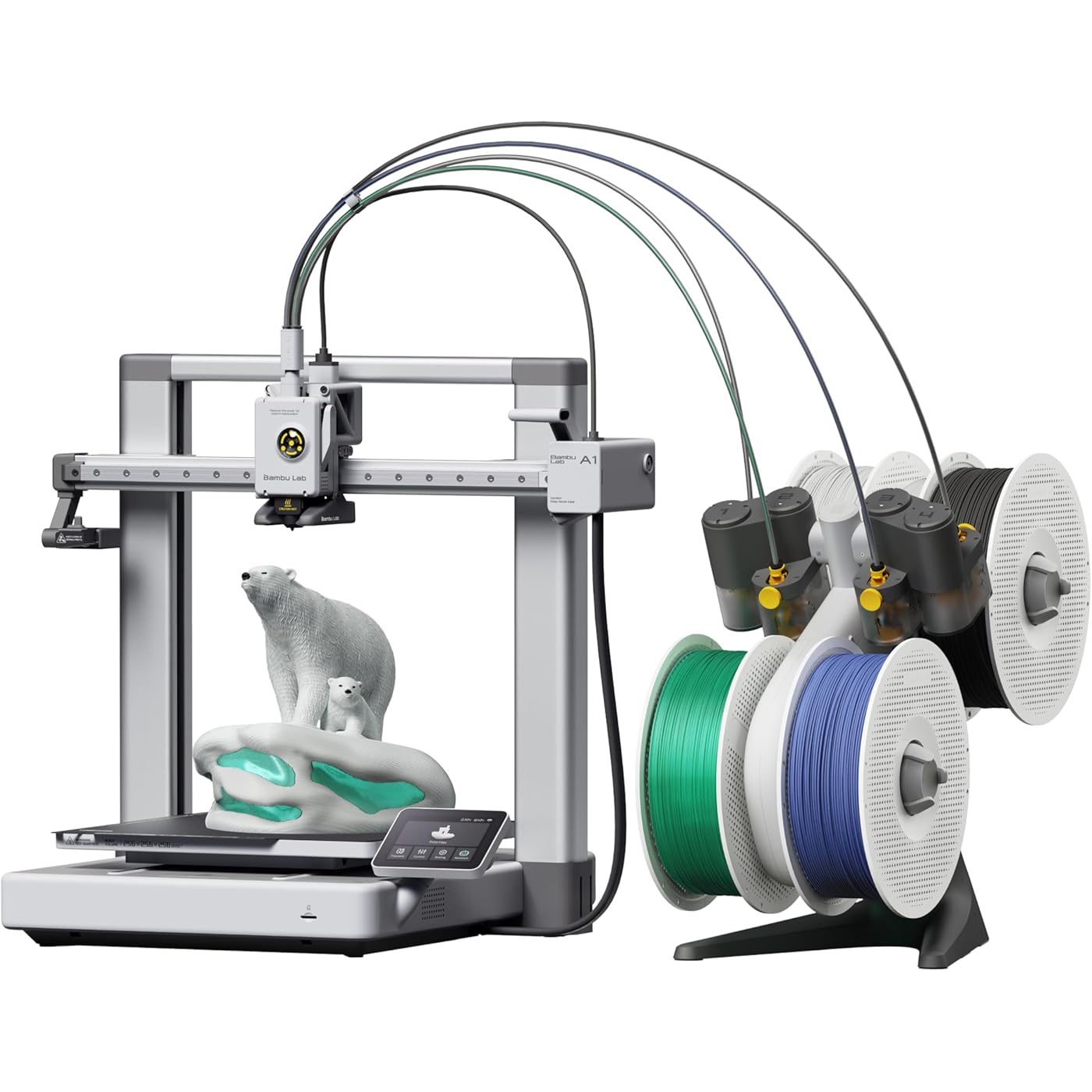
Bambu Lab A1 Combo, A1 3D Printer & AMS lite, Support Multi-Color Printing | Beginner-Friendly Ecosystem with MakerWorld Model Library, Multi-Color 3D Printing, High Speed & Precision,Read to Use, Quiet
  • Based on 733 reviews
Condition: New
Product info up-to-date
$399.00 Why this price?
Save $10.00 was $409.00

Buy Now, Pay Later


As low as / mo
  • – Up to 36-month term if approved
  • – No impact on credit to apply
  • – Instant approval decision
  • – Secure and straightforward checkout

Ready to go? Add this product to your cart and select a plan during checkout.

Payment plans are offered through our trusted finance partners Klarna, Affirm, Afterpay, Zip, Apple Pay, and Google Pay. No-credit-needed leasing options through Acima may also be available at checkout.

Learn more about financing & leasing here.

Selected Option

Free shipping on this product

This item is eligible for return within 30 days of receipt

To qualify for a full refund, items must be returned in their original, unused condition. If an item is returned in a used, damaged, or materially different state, you may be granted a partial refund.

To initiate a return, please visit our Returns Center.

View our full returns policy here.


Availability: Only 1 left in stock, order soon!
Fulfilled by Amazon

Arrives Aug 28 – Aug 30
Order within 9 hours and 44 minutes
Available payment plans shown during checkout

Protection Plan Protect Your Purchase
Checking for protection plans...

Size: A1 Combo (with AMS lite)


Features

  • High-Speed Precision: Experience unparalleled speed and precision with the Bambu Lab A1 3D Printer. With an impressive acceleration of 10,000 mm/s2, the A1 delivers blazing-fast printing while maintaining exceptional accuracy and detail in your prints.
  • Multi-Color Printing with AMS lite: Unlock your creativity with vibrant and multi-colored 3D prints. The Bambu Lab A1 3D printers make multi-color printing accessible and reliable for everyone, bringing your designs to life in stunning detail. Note: AMS lite required, get A1 Combo or buy AMS lite seperately.
  • Full-Auto Calibration: Say goodbye to manual calibration hassles. The A1 3D printer takes care of all the calibration processes automatically, ensuring optimal performance for every print. Enjoy a seamless printing experience with precise Z-offset, bed-leveling, and more.
  • Active Flow Rate Compensation: Achieve consistently smooth prints with active flow rate compensation. The algorithm actively compensates the flow rate according to the readings to extrude with accuracy, ensuring flawless prints.
  • Easy and Quiet 3D Printing: Experience effortless printing with the Bambu Lab A1 FDM 3D printer. Its user-friendly interface and simplified touchscreen make it easy to use. The 1-Clip quick swap nozzle ensures convenient maintenance and provides versatile printing options. Enjoy a quiet printing environment with active motor noise canceling, allowing you to focus on your work while the A1 FDM 3D printer brings your ideas to life.

Description

Multi-color Printing - The most reliable multi-color system Full-auto Calibration - You don't have to do ANY manual tuning Large Print Volume - Print a helmet in 1-piece 1-click to Print - As easy as your copier A1 handles various calibrations all by itself. It meticulously calibrates the Z-offset, bed-level, vibration resonance and nozzle pressure for EVERY print job, automatically. The AMS lite has been recognized as the most reliable multi-color 3D printing solution. It also features RFID-sync to automatically match the best print settings for your Bambu filaments, delivering perfect print quality without manual tuning of the filament profile. A1 is equipped with low-drag linear rails, a powerful MCU, accelerometers, a nozzle pressure sensor, and an advanced motion control system that maximizes their potential. Its high-speed performance is built on a solid foundation, ensuring consistent reliability with stable and uniform output for every print. A1 features 256mm*256mm*256mm build volume, bigger than most of the entry-level printers. Print a helmet in one go, we got you. 3D printing is a complex task where many things can go wrong. The A1 is equipped with a comprehensive print status monitoring system to help keep the print job in check. Not only can you connect your A1 to any device you prefer through Bambu Cloud Service, but you can also do so through LAN-only mode. We offer fully customizable connection options to match your privacy preferences. A1 Combo A1 Mini Combo P1S Combo A1 3D Printer

Brand: BAMBULAB


Material: Metal


Color: Silver


Product Dimensions: 23.46"D x 16.73"W x 21.1"H


Compatible Devices: Laptop, Personal Computer, Smartphone


Product Dimensions: 23.46 x 16.73 x 21.1 inches


Item Weight: 28.6 pounds


Item model number: PF002-A


Date First Available: May 4, 2024


Manufacturer: Shenzhen Tuozhu Technology Co., Ltd


Frequently asked questions

If you place your order now, the estimated arrival date for this product is: Aug 28 – Aug 30

Yes, absolutely! You may return this product for a full refund within 30 days of receiving it.

To initiate a return, please visit our Returns Center.

View our full returns policy here.

  • Klarna Financing
  • Affirm Pay in 4
  • Affirm Financing
  • Afterpay Financing
  • Zip Pay in 4
  • Financing through Apple Pay
  • Financing through Google Pay
Leasing options through Acima may also be available during checkout.

Learn more about financing & leasing here.

Top Amazon Reviews


  • Good first printer
Size: A1 Combo (with AMS lite)
Super impressed. This model has had some safety upgrades since its been reviewed by some of the big youtube 3d print folks. The set up took about 30 minutes and was relatively easy. Remove some screws, plug in some wires and set up the filament. The AMS section is huge and not listed in the dimensions of the printer. Sounds obvious, but I bought a table based on the listed dimensions and obviously they dont both fit. This also doesnt come with filament and the printer is kind of picky about what it would prefer to interact with. I bought some filament that would come quickly and it just didnt work right - the filament had a knot in it, it broke inside the tube and it took about an hour of fiddling to clear everything. This has been the only problem so far. here is what I like - bear in mind I had a creatly CR10s that was a lot more difficult to set up and I am still not sure that it properly leveled. I cant say that the CR10 had one good print out of it that I really loved. The leveling is done automatically - takes about 20 minutes on the first boot then is an optional thing for every print at the beginning. The printer has four modes of printing - stealth, standard, sport and ludacrous. Standard is fine, but I will say that I run most of my prints on stealth mode as it reduces the amount of wobble and vibration put out by the machine. Another recommendation here is to find a surface that you can secure to a wall. The 3d printer table I have was not stable enough to provide a good base for this and prints can lose quality with the amount of movement this printer is capable of. Lets talk about finding things to print. Normally I would scour the internet, download somethings, pay for some items and figure out how to create the settings. Not so here. The bambu community has made some great files and found the best settings for things you might want to print. There is a lot there and most of those things are coming out looking premium. The community has things they recommend printing as essential add ons, which I will describe next. I did the get AMS combo, but ended up not using it yet because of space and the previously mentioned jam. One of the essential add ons is a top mounted system for this which I will be printing shortly. Also the machine likes to fling filament across the room as part of its constant cleaning process. I recommend making a waste catcher as the very second thing you print after the benchy. The slicer this uses is really cool. I havent gone deep into the settings fully but one of the problems I used to come across was printing a file that had multiple parts that didnt fit on the plate. In this slicer, you can set up multiple plates, choose which one to slice first, send that to the printer - this all works wirelessly and seamlessly - and watch it go. For some items i have printed, I first tried to print something with multiple pieces, decided not to try and run the machine for 16 hours and opted instead to add a new plate, clone one of the items and go one at a time. The plate is also cool. On the CR10, it was a glass plate that never felt like it was as clean as the first time it came out of the box. Here we have a metal, textured plate that has enough bend in it to pop off a print and has great adhesion. It magnetises to the machine and is easy to pop off and then requires a bit of lining up to get back on. The build plate is a little small, but so far everythign i have found on the app has been for my printer. I will start looking into bigger cosplay prints soon and am thrilled to see that the slicer also has a feature for cutting prints into smaller pieces. no 3rd party apps required. There is nothing beginner about this hobby, but if you are looking for a first printer and am budget conscious this is a good option. The CR10s made me 3d printer engineer and repair guy... the A1 combo has allowed me to print and enjoy making. ... show more
Reviewed in the United States on March 25, 2026 by Michael D. Bruce

  • Bambu Lab A1 Combo Just Works... Durable and Fast!
Size: A1 Combo (with AMS lite)
own two Bambu Lab A1 Combos, and they’ve quickly become my favorite tools in the shop. Out of the box, assembly is straightforward (took me maybe 30-45 minutes). The auto-calibration is fantastic—it handles bed leveling, Z-offset, vibration compensation, and more with almost zero fuss, just follow the prompts. These printers deliver consistently excellent prints right out of the gate. They’re fast, quiet enough for me, and produce smooth, detailed results with no post-processing. I’ve printed everything from functional parts to detailed models, and the quality has been rock-solid. The real star is the AMS Lite. It holds four filaments and handles multi-color printing pretty easily, although it does create quite a bit of “poop” when printing multi-color. It automates filament loading/unloading perfectly, and multi-color prints come out looking professional. Having two units means I can run bigger jobs or different projects simultaneously without downtime. Bambu Studio on my Mac Mini is incredibly easy and intuitive. The interface is clean, slicing is fast, and everything just works. I also use the Bambu Handy app on my iPhone for starting and monitoring, I don’t like the cameras on these due to they’re being slow so I added some different cameras for monitoring. After months of heavy use across both printers, they’ve been incredibly reliable. Minimal tinkering needed compared to other machines I’ve tried. I have had to change out the head on one of the machines due to a blockage, but it was easy and the repair was fast. It’s an open-frame design, so not ideal for high-temp engineering filaments like ABS. I mainly use PLA and PETG. Multi-color does create some waste, but that’s the trade-off for the convenience. Overall, the A1 Combo punches way above its weight. Beginner-friendly yet powerful enough for serious hobbyists. ... show more
Reviewed in the United States on June 29, 2026 by Ron Phillips

  • Don't let on with the Haterade!!!
Size: A1 Combo (with AMS lite)
Don't let the 3d Print Snobs tell you otherwise. Yes its an entry level printer, yes its easy to set up within 10-15 minutes, printing begins around 25-30 mins after unboxing. Its a simple setup, great guide to put together and all around great printer if you want a "Bed-Slinger" so go ahead, take the plunge and don't let the community water down or saturate your decision to go with this printer---Yes, there is some controversy with the Company, but overall its a great printer for a great price as well. ... show more
Reviewed in the United States on June 14, 2026 by troy pound

  • Easy to use, reliable, great first 3D printer
Size: A1 Combo (with AMS lite)
Great 3D printer for someone starting out or just a hobbyist. Easy to use and quiet. My wife set it up herself and used it first. I bought this for my wife for Christmas and we've printed gifts for people, containers for fruits and vegetables, and light switches. I've also printed shelves and holders for the network gear and hubs on the office desk. It's compatible with many filament types - you can even print your own shoes similar Crocs. Recommend any first timer for any 3D printer watch a few videos about protecting filament from moisture in the air and you'll have great success with print jobs. I've found the Bambu filaments the most reliable and easiest to use - especially since their spools are tagged so the printer automatically knows what kind and color filament is on the roll. The AMS lets you keep four different spools loaded which is great for multi-color prints ... show more
Reviewed in the United States on February 3, 2026 by John Wessell

  • The best 3D printer for multi-color and ease of use!
Size: A1 Combo (with AMS lite)
The Bambu Lab A1 with the AMS lite has completely changed my 3D printing workflow. The multi-color capability is seamless—it handles the filament swaps automatically, allowing me to create complex, multi-colored figures and custom projects without any manual work. The setup was incredibly fast, and the auto-calibration (bed leveling, vibration compensation, and flow rate) works perfectly every time. I’ve run over 400 prints on this machine and it is still as reliable as the first day. Whether I’m printing SUNLU PLA+ 2.0 or flexible TPU, the direct-drive extruder handles it all. If you want a "pro" experience without the constant tinkering, the A1 Combo is the ultimate choice. ... show more
Reviewed in the United States on April 23, 2026 by Alex

  • Not reliable
Size: A1 Combo (with AMS lite)
I loved it when it was working, but there are Many failures. I’m very disappointed, unfortunately i have already purchased 100’s dollars worth of filament. I’ve done everything recommended: washing the plate; even bought a new one and bought new tool heads. And unfortunately now I had a major tool head failure: the filament didn’t come out correctly and totally ingulfed the tool head and wrapped around it - it’s totally stuck. I created a ticket but Bambu Lab responded with an automated email how to to fix it -not useful. It’s totally stuck and unusable. I’m so frustrated. Do not recommend it. I can’t believe I have to spend more money to fix it. ... show more
Reviewed in the United States on June 11, 2026 by Brick

  • Wow ... Just wow
Size: A1 Combo (with AMS lite)
I was given a 5 year old printer as the owner wasn't using it. I really struggled trying to get it to work, and then it just wouldn't print right. Not so with this, it's about as plug and play as you can get. It did help to be a little familiar with CNC terminology, but I had it assembled and running in less than an hour without any issues. Over only had one model fail and I'm pretty sure it was a design flaw and not a printer issue. I love getting notifications on my phone and being able to monitor the builds. I had one issue with a tangle in a spool but the printer detected it, paused the print, sent me a notification, and I was able to correct and restart without any problems. I love the AMS and being able to print in multiple colors. It can generate a lot of waste of one isn't careful, but I tend to create functional parts where colors can be done in layers, it's not that bad if one understands the process and uses colors wisely. I've already designed my own builds, specifically a vent adapter and a dust collector adapter. I saved over 20 dollars just for the dust adapter, and there were no vent adapters that I could find. I will probably save the cost of the machine in a year or less creating my own parts instead of buying them. Plus the adapters were spot on with the accuracy of the dimensions I specified. Prototyping is important though, I created partial pices for testing before building the full sized finished products to avoid eating time and material. There are some areas I would like to see improved. The first is lighting for the camera, it's terrible. I had to keep the overhead lights on until I found an LED accessory. Another is a basic maintenance manual, what to clean, when to lubricate and with what, and other general routine maintenance. It would also have been nice to include some information on how the AMS and manual feed work. Overall, I love this machine and think it was money well spent. ... show more
Reviewed in the United States on September 23, 2025 by J. Fox

  • Best printer
Size: A1 Combo (with AMS lite)
I love bamboo lab printers, they are easy for beginners and the app makes it very easy. You don't even need to have a computer, you can do everything through the app on your phone
Reviewed in the United States on July 7, 2026 by Bruno

Can't find a product?

Find it on Amazon first, then paste the link below.