Search  for anything...

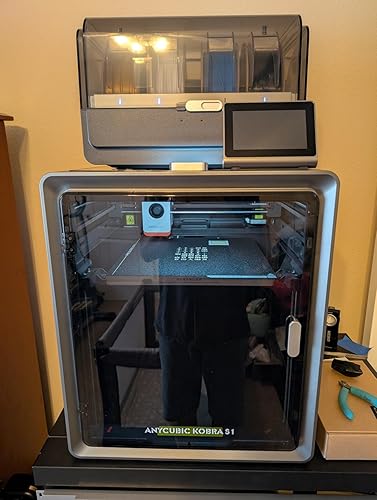
Anycubic Kobra S1 Combo 3D Printer, 4 Stunning Multicolor with Anycubic ACE PRO, 600mm/s High Speed and 320℃ Hotend Free-Clog Extruder, Intelligent Drying While Printing, Built-in Camera 250*250*250mm

  • Based on 124 reviews
Condition: New
Checking for the best price...
$459.99 Why this price?
Holiday Deal · 15% off was $541.48

Buy Now, Pay Later


As low as / mo
  • – Up to 36-month term if approved
  • – No impact on credit
  • – Instant approval decision
  • – Secure and straightforward checkout

Ready to go? Add this product to your cart and select a plan during checkout.

Payment plans are offered through our trusted finance partners Klarna, Affirm, Afterpay, Apple Pay, and PayTomorrow. No-credit-needed leasing options through Acima may also be available at checkout.

Learn more about financing & leasing here.

Free shipping on this product
This item's return window has been extended for the holiday season: Returnable until Jan 31, 2026

To qualify for a full refund, items must be returned in their original, unused condition. If an item is returned in a used, damaged, or materially different state, you may be granted a partial refund.

To initiate a return, please visit our Returns Center.

View our full returns policy here.

Availability: In Stock.
Fulfilled by Amazon

Arrives Sunday, Dec 7
Order within 3 hours and 31 minutes
Available payment plans shown during checkout

Protection Plan Protect Your Purchase
Checking for protection plans...

Features

  • Up to 8 Color Printing1 Anycubic Ace Pro can effortlessly tack basic 4-color printing. When 2 Anycubic Ace Pros are combined, you can then unleash 8-color printing to bring you even more unimaginable possibilities
  • Ace Pro, Perfect for Every TaskDual PTC heating module and 360 hot air circulation drying technology ensures perfect model. And also supports drying filament during printinganti-tangling system and automatic feeding function to boost efficiency to another level
  • More Detailed with 600mm/s SpeedFully enclosed coreXY construction with printing size of 250*250*250mm and 600mm/s ultra fast speed. Resonance compensation and flow correction eliminate resonance patterns in all models and enhance printing accuracy
  • 320C Hotend & Silcent & Camera The Kobra S1 printer features a full metal hotend capable of reaching a peak temperature of 320C. It hotend enables effortless printing of filaments such as ABS, ASA, and other materials. Quiet mode is as low as 44dB while printing. And be equipped with built-in camera to View the printing process
  • Anycubic Intelligent EcosystemAnycubic Slicer Next is equipped with different specifications and filaments parameter sets. And Anycubic App supports remote control and elapse-time recording. Makeronline offers many free model resources

Brand: ANYCUBIC


Material: Metal


Color: Black


Product Dimensions: 19.69"D x 20.08"W x 21.26"H


Item Weight: 57.2 Pounds


Product Dimensions: 19.69 x 20.08 x 21.26 inches


Item Weight: 57.2 pounds


Item model number: Anycubic Kobra S1 Combo


Date First Available: July 27, 2024


Manufacturer: ANYCUBIC


Frequently asked questions

If you place your order now, the estimated arrival date for this product is: Sunday, Dec 7

Yes, absolutely! You may return this product for a full refund within 30 days of receiving it.

To initiate a return, please visit our Returns Center.

View our full returns policy here.

  • Klarna Financing
  • Affirm Pay in 4
  • Affirm Financing
  • Afterpay Financing
  • PayTomorrow Financing
  • Financing through Apple Pay
Leasing options through Acima may also be available during checkout.

Learn more about financing & leasing here.

Top Amazon Reviews


  • A very capable color 3D printer - love the ACE Pro with drying
Model: Anycubic Kobra S1 Combo
Prior to this purchase, I have been using my Creality CR6-SE for 4-5 years with great success, but I wanted to start doing multi-color printing. Like many of you, I read some worrisome reviews and held off buying the Anycubic Kobra S1 Combo until just recently. Now that I've used it for a few weeks, including doing multi-color printing of my own (Openscad-based) designs, I thought I'd write a review and let you know I find this printer to work wonderfully with PETG (which is what I always use). Mine was delivered by Amazon's "heavy item" team and arrived in great shape. No dents or other issues. Assembly was easy and I took my time to make sure I did it all correctly. I felt the instructions were clear and adequate. My first prints of the Benchy failed due to poor bed adhesion, but I then washed the bed with Dawn detergent and hot water and haven't had any issues since. I do wash the bed now and then, just to be safe. I've printed some pretty challenging, small, multi-color keycaps that really came out great. See photo. These have very fine text lines that need good bed adhesion and I'm very impressed with the results. I've also printed some large items (adapters for small 250g reels) and didn't have any warping or lifting (with brims turned off). The ACE Pro has worked well with cardboard reels so far, but I do intend to print the thin plastic "rims" to avoid the potential of cardboard dust creating some issue down-the-road. Some people have complained about this or that, but I think it's easy to configure the ACE Pro with generic filaments and you can also set the order the colors are printed in the slicer and adjust the purge waste. There are two places you set the bed type. The first one seems stuck on "Smooth Plate", but scrolling down there is another place to select "Textured PEI". I adjust PETG to print at 240C rather than their default 230C which seems a bit too cool in my experience. I have found the bed-levelling to work well almost every time. Strangely, a couple times it somehow started with "zero" Z so that the nozzle basically scraped the build plate, but did no harm. I can't explain how/why this can happen, but it did. I just aborted the print and restarted and the auto-leveling worked fine on the second try. I certainly suggest you monitor your print jobs as they start and see that all is well. When you gain more experience with your machine then you might launch print jobs remotely with your phone, but that's not my workflow. BTW, I don't use Anycubic cloud service to print. The Anycubic Next slicer is able to connect to my home Wi-Fi network and I can submit print jobs directly from the slicer. So, this is a great printer and seems really well built to me. I'm fine with the clear/lexan/lucite door and top cover. Glass would have just made the machine even heavier. Also, I've directly compared prints from the Kobra S1 Pro and a Bambu Labs and I'd say they're equivalent. ... show more
Reviewed in the United States on June 28, 2025 by J. McVey J. McVey

  • Ace pro biggest let down for a good printer
Model: Anycubic Kobra S1 Combo
I am very disappointed with this purchase. I am not new to anycubic products. I have 3 photon mono x resin printers that still go strong to this day. I have the M3 resin printer which is even better, and i have the Kobra plus which i loving call my beast. I have never regretted any anycubic product tell i got the S1 combo. I bought it cause i was interested in its capability to print up to 8 colors. I purchased the combo 1st the purchased an additional ace pro so i could upgrade it to 8 colors. However out of the box was non stop issues. The printer itself is great. Anycubic excels with its printers. However where this falls short and the reason for the 1 star is the ace pro. Out of the box it had issues reading filament. I got it working but that was only temporary then the “broken” or “abnormal filament” errors kept happening on one of the ports no matter what filament was used. Tech support tried to help but nothing they suggested seemed to work. They aggreed to replace the ace pro (which im still waiting on a return label since they wont replace it tell they recieve the original one back). In the mean time my second ace pro arrived. Out of the box it seemed great. I didnt have the same issues but 11 percent into the print the filament jammed in the buffer. The machine did not stop it just started grinding. I shut it off manually and agter all i went through with the 1st unit quickly found the problem. The buffer was practically exploded from 1 jam. So that is 2 ace pros and not a single full print on this machine. The small parts of the main print that you could see looked awesome. But, 2 ace pros have not lasted long enough to complete 1 job. So, if you are looking for a 4 color printer i cant recommend anything that uses the ace pro. To me that thing is garbage. Im hoping i get a replacement for the first and get the buffers to repair the second and get this running and maybe it will get a better review later. But as of now unless the ace pro gets serious revamping it’s not worth the aggravation to buy this machine. ... show more
Reviewed in the United States on May 16, 2025 by Bentley H.

  • Excellent Printer with Pro Features, Minor Multi-Color Trade-offs
Model: Anycubic Kobra S1 Combo
The Anycubic Kobra S1 has been a big step up for me coming from older machines. Unboxing took some time — most of the instructions are actually about carefully removing and unlocking everything packed inside. I also bought the version with the 4-color add-on, which was secured inside the machine. It’s impressive how well they fit everything in one box, but expect setup to take a few hours rather than the quick start the manual suggests. Build quality is outstanding and a huge improvement over my older XYZ and Monoprice printers. Once assembled and you get familiar with a few small nuances, it’s very easy to use. The phone and PC apps make it simple to browse thousands of premade models and start prints quickly. Print quality is top notch. I’ve logged about 300 hours without a failed print yet. Speed is solid as well, though multi-color printing slows things down since each color switch adds time and waste. If your project allows layers of a single color in sequence, it helps minimize both. The printer is quiet, reliable, and large enough to handle up to ~11" objects on the diagonal — plenty of room for most projects. Maintenance is minimal, usually just wiping the plate with an alcohol wipe before each run. One quirk: the machine “poops” a bit of filament out the back each time it primes. Luckily, a free “poop chute” design is available in the app to redirect the scraps. Overall, the Anycubic Kobra S1 is well worth the price. The combination of build quality, print reliability, and ease of use make it an excellent choice for anyone looking to step up from older entry-level printers, though keep in mind that multi-color printing trades efficiency for aesthetics. Strongly recommended. ... show more
Reviewed in the United States on August 27, 2025 by Will

Can't find a product?

Find it on Amazon first, then paste the link below.
Checking for best price...