Search  for anything...

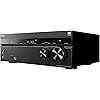
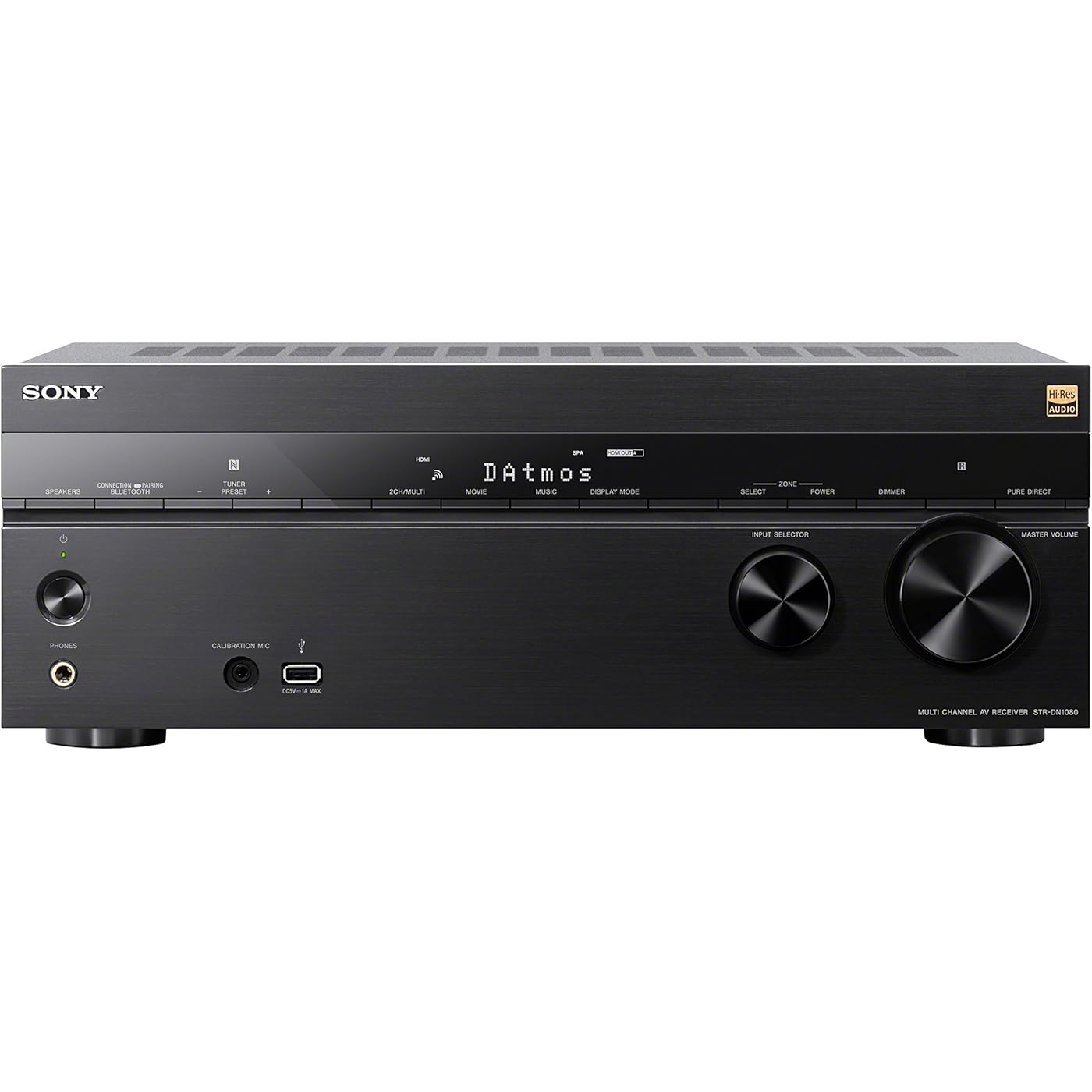
Sony STR-DN1080 7.2-ch Surround Sound Home Theater AV Receiver: 4K HDR, Dolby Atmos, Bluetooth, WiFi, Google Chromecast Black
  • Based on 1,352 reviews
Condition: Used - Very Good
Checking for the best price...
$679.99 Why this price?
Save $918.01 was $1,598.00

Buy Now, Pay Later


As low as / mo
  • – Up to 36-month term if approved
  • – No impact on credit to apply
  • – Instant approval decision
  • – Secure and straightforward checkout

Ready to go? Add this product to your cart and select a plan during checkout.

Payment plans are offered through our trusted finance partners Klarna, Affirm, Afterpay, Zip, Apple Pay, and Google Pay. No-credit-needed leasing options through Acima may also be available at checkout.

Learn more about financing & leasing here.

Selected Option

Free shipping on this product

This item is eligible for return within 30 days of receipt

To qualify for a full refund, items must be returned in their original, unused condition. If an item is returned in a used, damaged, or materially different state, you may be granted a partial refund.

To initiate a return, please visit our Returns Center.

View our full returns policy here.


Availability: Only 1 left in stock, order soon!
Fulfilled by Retail Connection LLC

Arrives Saturday, Aug 29
Order within 3 hours and 25 minutes
Available payment plans shown during checkout

Protection Plan Protect Your Purchase
Checking for protection plans...

Configuration: Receiver


Features

  • CINEMATIC SOUND AT HOME: Enjoy your favorite TV shows & movies, stream your favorite music and more with theater like sound in the comfort of your home
  • PHANTOM SURROUND SETTING: Experience 7 channel surround sound with only a 5 channel speaker setup. Chrome cast built in is present
  • ADVANCED AUDIO: DTS: X object based surrounds sound adapts to your speaker configuration in real time
  • 4K PASS THROUGH: 4K HDR compatible with HDCP 2.2 support for sharper source to screen image quality
  • MULTIFUNCTIONAL SYSTEM: Enjoy a multi channel stereo setup and preset channel FM / AM radio tuner
  • EASY LISTENING: The STRDN1080 has Chromecast and is AirPlay, Multi Room and Google Home compatible
  • DYNAMIC SETUP: 6 in/2 out HDMI flexibility, front USB port and optical digital, analog AV connections
  • SPECS: 1155 Watts, 6 ohm, 1 kilo Hertz, THD 0.9% A/V receiver with 2nd zone and available 3rd zone connectivity
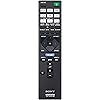
  • IN THE BOX: Receivers include a calibration microphone, FM wire antenna, remote control, batteries

Description

Experience true home theater without limitations with this 7.2 channel receiver with Dolby Atmos 3D and DTS:X object-based surround sound, plus 4K HDR and HDCP 2.2 compatibility. Enjoy the flexibility of 6-in/2-out HDMI2 and multi-room listening, plus voice control powered by Google Home. All in a smaller chassis that fits more places. Input Output Terminals: Audio Input Opt (1)Audio Input Coax (1)Analog Audio Input (4)Pre Out Subwoofer (2)Composite Monitor Out (1)Headphone Output (1)USB (1 Front)Ethernet Port (1). Power Requirement: 120V 60Hz. Spotify Connect : Yes. Network features: Bluetooth Receiver, Bluetooth Transmitter, NFC, Wi-Fi, AirPlay, Mobile Control Application, Wireless Multi-Room. Chromecast built-in: Yes. Works with Google Assistant: Yes

Brand: Sony


Connectivity Technology: Wi-Fi


Controller Type: Google Assistant


Special Feature: Equalizer, Pandora, Spotify


Compatible Devices: Speaker


Total HDMI Ports: 6


Connector Type: HDMI, USB


Audio Encoding: Surround


Audio Output Mode: Surround


Surround Sound Channel Configuration: 7.2


Connectivity Technology: Wi-Fi


Controller Type: Google Assistant


Other Special Features of the Product: Equalizer, Pandora, Spotify


Compatible Devices: Speaker


Total Number of HDMI Ports: 6


Connector Type: HDMI, USB


Audio Encoding: Surround


Audio Output Mode: Surround


Surround Sound Channel Configuration: 7.2


Video Encoding: HEVC (H.265)


Output Power: 1155 watts


Wattage: 1155 watts


Number of Channels: 2


Output Wattage: 165 watts


Supported Internet Services: Spotify


Control Method: Remote


Audio Output Type: Headphones, Speakers


Format: 4K


Wireless Technology: BluetoothWi-Fi


Brand: Sony


Model Number: STRDN1080


Manufacturer: Sony


Unit Count: 1 Count


Number of Items: 1


UPC: 027242901896


Global Trade Identification Number: 96


Built-In Media: Receiver


Item Type Name: SONY STRDN1080 multi Audio Component Receiver Black


Mfr Part Number: STRDN1080


Warranty Description: B06XKRWWSG


Color: Black


Item Dimensions D x W x H: 19"D x 15"W x 8.38"H


Item Weight: 23 pounds


Frequently asked questions

If you place your order now, the estimated arrival date for this product is: Saturday, Aug 29

Yes, absolutely! You may return this product for a full refund within 30 days of receiving it.

To initiate a return, please visit our Returns Center.

View our full returns policy here.

  • Klarna Financing
  • Affirm Pay in 4
  • Affirm Financing
  • Afterpay Financing
  • Zip Pay in 4
  • Financing through Apple Pay
  • Financing through Google Pay
Leasing options through Acima may also be available during checkout.

Learn more about financing & leasing here.

Top Amazon Reviews


  • Finally! An AV Reciever (mid range price) that has excellent crisp sound and not just booming lows.
I will try and make this short, but I want to give you a brief of my last year searching for a solid sound setup for movie and tv/streaming watching, hoping that you will not go through my harrowing experiences. Mid last year, I went on an Amazon hunt for a solid 7.1 Surround system to match my new 4k tv. After much research (and a major lack of knowledge back then) i finally settled on the mid range priced Nakamichi 7.1 sound bar with rear surrounds and a sub. Let me tell you, it was nothing but trouble from the get go. Its sound was muffled, its low frequencies were so loud, and its treble was lost in the bass. Dialogue was lost constantly in the mix. Now, I don’t know about you, but when I watch a movie I wanna be able to hear the dialogue. The Only way I could do this with the Nakamichi sound bar was to constantly ride the remote control (which sucked ballz by the way) it was always too loud or too soft. Well, i returned the device after a few months because it became defective and kept shutting off. This was a saving grace. Ultimately, their tech support was the best thing about the product, but i was forced to change my 1 star review to a 5 star before any refund was issued... hmmm.... Next, i went for the Onkyo NR575. Now after a lot of reviews, It sounded like I had finally found a mid priced reciever that was up to scratch. Along with the receiver, I bought the Onkyo 7.1 surround speaker pack (which i am pleasantly surprised with). Now, the Onkyo did sound pretty great, and the user interface was excellent and speedy. However, again, the same problem arose... No matter what settings I tweaked, the bass was way too loud and the treble was way too low. If i raised the treble too high it literally gave me a headache dealing with the lows as well. It was way too much. The Onkyo had great raw power, but just because something says THX certified, does not mean it is better at handling sound, that is just a buzz word/saying to get you to buy. Along with that, the center channel of the device constantly buzzed with white noise everytime dialogue was spoken (dunno if this was a fault of my device, or a fault of the entire line) This was quickly returned and refunded. Finally, after sooooo much more research (and now I was becoming an adept with av receivers and capabilities/limitations) I finally settled on the Sony STrDN1080. My old 2.1 sound bar was Sony and I loved it, so I decided that going with a trusted company was the best bet. Let me tell you, it was the best choice. Now, I kept the Onkyo surround speakers because they are excellent. After a 10 minute setup, the Sony immediately proved its trademark value. The sound is excellent. After I tweaked the sound optimizer and turned on the Dynamic Range Filter, i was getting all the highs and lows within a similar Db, which is ideal. Unless you have a cinema size room and are partially deaf, dynamic range control is key to an optimum surround sound experience. I cannot say enough great things about the sound quality. I am a cinephile and film/tv is my job also, so finally finding a suitable av receiver at an affordable price was such a relief. The interface is a little slower than some, but i am totally happy to accept that along with the great quality and user controls to match the audio perfectly to my viewing needs. I recommend this to anyone who simply wants a surround receiver that can decode all current sound formats (including DD+ which netflix and Amazon use now) and play sound in a true 7.1 experience with matching highs and lows - Not having to constantly ride the remote all the time has allowed me to enjoy film and tv much more again too. I hope this helps someone not make my mistake, and get it right the first time off. Peace. ... show more
Reviewed in the United States on March 26, 2018 by Nodonn

  • Set-up and First-day-of-use impressions - Updated again
9-24-18 Update - I am putting my christmas shopping list together and think I might a 3rd unit for another room in my house. I see many negative reviews and I am shocked, as I have had flawless performance from both of my receivers since I installed them almost 1 year ago. In fact, I upgraded the apple TV that was connected to them to the apple 4K TV and that is now my primary TV source. Apple 4K supports Atmos and 4K and I just talk into the remote to start my video. I do see that most of the complaints are about zone2 features. I do not use that, as I am just buying a receiver for each theater in the house. I will offer this advice.. I updated every HDMI cable with 4K compliant HDMI cables, which was expensive. I did have to call sony to know how to configure the dolby atmos setting, but it was a setting on the sony hurray player, and not on the receiver that was complicating things. I also had a difficult install on the 2nd receiver when connected to a Samsung TV 8500 that uses the smart hub, the HDMI ARC was not and is not compatible (need to use the TV and receiver remotes). All that aside, the sound is amazing. This unit is about half to 75% less expensive than comparable receivers. If you wait for black friday, then the price is truly amazing. 12-30-17 Update - I like the receiver so much that I purchased another one for a different room. Set up was much harder. The HDMI A with ARC was not operational and I was about to return the receiver But I did not want to give up yet so I connected the TV to the HDMI B port. The receiver's menu was now displayed. I promptly performed a software update. Took an hour. I then switched the TV back to the HDMI A port and it worked. I finished the auto set-up and all is great. This unit connects to a samsung 8500 series 4K Tv with the external smart hub, it is not compatible with the HDMI control and it seems to be the reason why the HDMI A port did not work from out of the box. The sound is amazing, as this is primarily used for x Box 1 X gaming. Owned it for 1 day, here's the scoop. It replaces an Onkyo TXNR757 that cost over $1,000 from 6 years ago. The onkyo, after 1 year, would no longer support 1080 video through the receiver, the image was blurred and pixelated. My samsung HDTV supported many HDMI outputs, so I bypassed the HDMI ports on the Onkyo and simply used it for the surround sound by using the optical input from the TV. This was a great fix for the next 5 years, but also a disappointment since the onkyo was broken but out of warrantee. Technology has advanced with 4k and Atmos that I decided to upgrade the receiver. In doing my research, for the money, the Onkyo provided a lot more features than the Sony but I do not trust this brand anymore. CNET, WIKI, and Everyone else put their reputations on this Sony model. Connecting the old wires from the Onkyo receiver to the Sony was a breeze. I repurposed the 7.1 system into a 5.1.2 for Atmos. very simple. The 4K Samsung DVD player does not support atmos!! I returned it for the Sony 4K blue ray player - glad that I did as the sony has a ton more features at the same price. The sony 4k blue ray player, Apple HD TV, and the Optimum Cable Set-top box are all connected to the Sony Receiver with 4K compliant HDMI cables. The receiver is connected to the Samsung 6500 series 4K TV with 4K HDMI cable and a fiber optic audio connection. The fiber optic cable is to support the amazon prime video streaming that is controlled by the samsung tv. However, I might start streaming through the blue ray player because it supports the dobly atmos decoding technology. In setting up the receiver, I needed to tell the Receiver that I have a 5.1 system with 2 dolby (FD) ceiling bounce speakers. Then I ran the easy-set-up calibration. The sony "learned" about the AV connections, and did an excellent job with the speaker location and such. The sound is as rich and full as the 5 year old Onkyo that cost twice as much and has 15 watts more power per channel. The sony adds 4k and Atmos. The Samsung's TV remote will control the Sony Receiver for sound, on/off, and "up/down/left/right/enter" functions. It pretty much removes the need to keep the Receiver's remote on the coffee table - very nice. The image quality that goes through the receiver is as good as when I have the AV components connected directly to the Samsung TV (The TV supports 4K up conversion). By having all of the connections going through the receiver, the day-to-day operation of watching TV is less complicated than when the AV was split between the old Onkyo and the TV - its easier to use. I do not need to continueally change the "source" setting on the TV. This was a multi-year complaint from my family with regard to the older Onkyo system. To get the Atmos to work, I had to call Sony Tech Support. There is a setting in the Sony Blue Ray Player that must be disabled. Once it is "off", you simply press the "movie" button until dobly surround is on the display. By pushing the "display" button, it will show DAtmos. I watched San AnDreas. In 5.2.1, the sounds were strong and room filling. When I enabled the Atmos, the clearity of each item on the screen was distinct. The boat that went crashing through the waves created a sound where I could hear the motor, waves, and the spray - crystal clear - is just one example. It was very noticeable how Atmos is different than 7.1. I watched John Wick Part 1. Having watched the movie many times with the older Onkyo system, there were only 3 differences in the sound based on previous viewings. 1) In the scenes where it rains, the sound is clearly louder, crisper, and coming from the atmos height speakers. 2) The bass was much more powerful - it made the house shake. I ended up lowering the volume on the subwoofer as I was concerened that the pictures would bounce off the walls. 3) Everything sounded crisper, like the high-notes / glass breakage sounds were much more distinct. Compared to the Onkyo, there are a few features that I miss - 1) The sony has only 1 optical input 2) The sony does not allow you to push a front panel button to select the source, you turn a knob and it scrolls through the choices 3) the sony does not offer a front panel button to select the exact sound decoder, instead you must scroll through the choices Bottom Line: My first day was very positive. Settup was super easy. To get ATMOS to work, I had to call sony about the sony 4K blue ray player (not about the receiver). The sound quality is better than a system that cost me twice as much while also bringing in all of the latest features such as 4K and Atmos. In most cases, the Receiver's remote is not needed, as it works with the Samsung 6500 series TV's remote and this reduces the clutter on my coffee table. The Black Friday sale was a wonderful savings from Amazon. I just purchased another unit for a different room in the house. ... show more
Reviewed in the United States on December 16, 2017 by The Key Master

  • Seems like a good AV receiver. Found a few bugs already
Update: I've now had this receiver for about a week and really like it. I'm tempted to move this to a 5-star rating, but not quite yet. There seems to be some quirky things going on with the eARC HDMI handshake, but I'm not sure if it's the receiver or my Bravia TV. So far it's just the TV shutting off sporadically (which I believe is a TV issue). The only real problem I'm having is getting it to work with my Bose QC II bluetooth headphones (I've also used my apple air pods and the same thing happens). It's a really odd thing going on. I can listen to music (from Apple TV) just fine, but whenever I look at video (either a movie from Apple TV or my cable box) the volume gets very low and you cannot make it any louder. The bluetooth on this set is pretty weird in my opinion and they have several defaults that occur when you go to bluetooth that cannot be controlled such as surround mode. It's been quite frustrating and I've been spending time with Sony tech support trying to resolve the issue. A google search has shown other people have experienced the same thing, so it's not just me. I'm going to spend another hour or so with tech support trying to fix this and then probably forget it. My headphones work fine using the headphone jack and a wire, so I can still use my headphones for late night viewing. There are so many things I like about this receiver I'm not going to let this one issue ruin the whole experience. I've thought about returning the unit and getting something else, but when you read reviews of just about every receiver there always seems to be some problem of flaw like this and since the BT issue has a workaround I'm not going to sweat it. Besides, I've also noticed some lip sync issues with the bluetooth which would bug me too although I think you can make an adjustment to sync things up. First of all, I am not an audiophile. I try to buy mid priced components that are well rated. Since I am not a sound quality diva, ease of operation and features are important to me. I had a older Onkyo receiver that has served me will for about 9 years. But I bought an new Sony XBR-77A9G OLED tv and wanted a wifi enabled receiver with 4K HDR HDMI passthru (I can see the degraded 4K picture when passing the video thru my old Onkyo as opposed directly inputing my 4K Apple TV directly to the television. My old set did not have Dolby Atmos which is relatively new. I also wanted to take advantage of the eARC HDMI feature where you send all your sources thru the tv (hook up cable receiver, game console, Apple TV directly to the HDMI ports to the TV and then send the audio to the receiver via an eARC (enhanced Audio Return Channel). So the DN1080 seemed like a decent choice. Remember this is an older revceiver model and does not support 8K and HDMI-2. Neither of these are that important to me right now and if it does become important replacing this receiver would not be a huge cost hit. Set up was very easy. I don't have all my speakers attached yet, so I set up a 3.1 configuration (Center speaker, 2 front speakers and a subwoofer). The auto set up for sound was very simple. You get this tiny, spidery looking microphone that you place where your ears would be during normal iistening. The system sends a series of tones thru the speakers to determine level and position. Auto set up failed the first time because I accidentally had the microphone upside down and the left and right channels were reversed. It only took a few minutes to set up on the next try and the sound was very good. It was late, so I could not crank it up high. I also don't have my new Polk front speakers yet, which I think will sound better than my old Boston fronts. I checked out the performance with a few scenes from Apocalypse Now on my 4K Apple TV. It did a decent job of Atmos considering I only have the 3.1 set up right now. I did notice that during the helicopter attack scene some of the music appeared to be a bit distorted (like the horns in Flight of the Valkyries). I'll have to check that further with the new speakers when I get the 5.1 set up going. I found my first "bug" also when I tried to set up my Bose Q35ii bluetooth headphones. The bluetooth setup on this receiver seems pretty goofy to me. You have to make sure you get it set to bluetooth Transmit before you try to pair headphones. Somehow I had it in the receive mode (like for pairing your receiver to your phone) and could not get it out of that mode. I finally figured out you had change the input mode on the receiver to something else (like USB), then push the Bluetooth transmit/receive button on the remote. You can then pair the headphones as normal. This was a pain to figure out and ended up finding the solution on reddit pages and one of the Bose support forums. I wasted about 45 minutes trying to figure this out. Anyway, I get the headphones connected and then they sound like crap. Audio is all distorted. Another google search and I find you have to go to the bluetooth setup menu in the receiver and turn the AAC coding off. I mean really, does it have to be this difficult? And of course once I get the sound working correctly, I find there seems to be a secret volume limit and could not set the volume as loud as I wanted. Not sure if this is a Sony thing or a Bose thing, possibly intended to keep you from hurting your ears. One last thing (so far). After I had ordered this receiver, I found a review on YouTube that highly recommended it (check out Andrew Robinson's channel. Its very good info). He really liked this receiver until he got to the eARC part. (read up on eARC online since it appears to be one of the buggiest features in AV home theaters these days). He said the eARC on this receiver had some of the best handshaking with TVs he's ever seen... unless you are using it with a Sony TV! Imagine that, Sony won't talk to Sony. Anyway, I have not tried this yet, and hopefully they've fixed this problem with software updates (both the receiver and my TV immediately needed updates when turning them on). I'm not condemning this receiver for these problems (yet). If you read reviews of just about any modern receiver you see complaints about usability, set up, and buggy software. My Onkyo was primitive by today's standards, and I never really figured out how to set up all the features correctly. So far, the Sony seems a bit better (with the exception of that bluetooth issue I talked about. I have a month to play with this receiver to decide if I'm going to keep it or return it. So I'll keep updating this review as I go. ... show more
Reviewed in the United States on February 3, 2021 by bob

  • Plug-n-Play with surprise options
This review is for the Sony STR-DN1080 7.2 CH Receiver. 11/11/20 In short: This unit is great. I've had it for a month now. A new User Interface and easy set-up as well as advanced options available should you choose. 4K input/output is flawless and 7.1 sound has brought a new dimension to my 'lil theater room. A smaller easier to use remote is included. Bluetooth headphones were a little challenging at first, user issue, Best bet for the money. There's also a mobile App! The long: I upgraded from my older 5.1 CH Sony Receiver when I transitioned to a 4K setup. It turned out my old receiver was the bottle-neck that prevented any 4K transmission. Satisfied with my older Sony brand receiver, it's still kicking! I set out to purchase Sony's STR-DN1080 7.2 CH Receiver because it was in my price range and had great reviews and would solve all my 4K passthrough woes. I was a little concerned because the STR-DN1080 model has been available in the market retail for a while now, in fact for years. I read and watched all the reviews online and was not willing to jump monetarily to the next 9.2 channel setup, its another bracket. It's just more than I wish to spend. I've tried Yamaha's and other brands in the past and they were not as intuitive as Sony's receivers for me. I'm also not willing to wait for the next round of Sony receivers to come out/ Rumors jump from this holiday up to 2 years. Updating to 4K has been challenging as every facet has to be upgraded or replaced in order to utilize 4K technology. Cable box, gaming consoles, TV wiring all have to be updated in order to take full advantage of 4K. HD still looks good but 4K looks and sounds great. I was Leary of the receivers user interface. The older Sony receiver' interface was very busy with too many options for me. It looks like Sony worked on this and made it a lot simpler to use. You use the receivers' remote on your TV and calibration microphone to help set up your receiver to work with your speaker layout. One negative is that the visual depiction on the interface did not have my particular speaker set-up with my surround rear and back speakers in the wall and ceiling. I was still able to use the UI and microphone to set my speakers up correctly distance wise from where we sit and sounds outstanding. Set-up of my Blue tooth headphones took a bit to get used to. The set-up language for Blue-tooth gets confusing depending what type of blue tooth device set up you would like to use. It took me a while to get the hang of my headphone connection. (they are cheap blue-tooth headphones.) There is a TX button on the Sony receiver and on the remote to "transmit" and RX to get back to receiver audio. I've had to keep the Receiver's remote close by to use this TX option and I cannot find it anywhere on the "SongPal/ Music Center" App on my cell phone. Once I got educated on how to use this TX with my headphones I love it, watching TV while not bothering other remote learners/Educators in the house, during our Covid era. Speaking of the Cell phone app, Sony calls it SongPal and that's how I found it on Google play, but on my Cell the application is named Music Center (weird) once you download it. Other than looking for the elusive TX icon on the App (couldn't find it, need the remote), I haven't used it much yet, except to turn it from game back to cable tv and volume up/down works quickly. I still haven't played my music from my cell phone's audio tracks yet but I did hook up our CD player easily, (also sounds great). There is another 3rd party App available specifically for this model number on Google Play, however I still could not find the transmit button in my research in all the pictures, so I did not download this other version. It would be nice if the remote was back-lit, but really there's not a lot to complain about here. I am still learning more after 30 days of having this unit. One advanced option I found that I love is the "Pure Direct" option which temporarily turns off the receivers Display until you use it again (audio up or down temporarily turns on the display) then goes black to give you even better sound. This Pure Direct option will turn off any audio noise/ white noise in the background from the electronic circuits in this unit, such as humming you didn't even know was there before. I stumbled on this in the Sound Field menu. Try it out, turn it on. By default, Pure Direct is turned off. Pure Direct on is bliss. Movies and video games now have a new-replay life and another level of emotional dimension due to the 7.1 audio format. ... show more
Reviewed in the United States on November 12, 2020 by Bendt

  • This receiver is amazing from many different perspective
This receiver is amazing from many different perspective! I've been around long enough to have had three, top of the line receivers. Obviously technology improves, but this receiver is not an upgrade, it's more like I acquired a receiver from Back to the Future. Setup 5+ with simple to advanced settings, sound quality 5+ best I've ever heard (I have above average hearing and discrimination and have an advanced degree with audiology). The clarity was amazing. High frequencies sounds were real, balanced and enjoyable to hear in music, and not just louder or disharmonious. I heard new and more discrete sounds in old songs I've listened to for years. I'd compare it to hearing a remake or remastered song you know well. You can easily tell the difference between the two and I typically prefer the nuances in original version. In this case you realize there is more in the original music than you heard before and what you hear sounds much richer. Advanced features 5+. I've only had it set up one day and I'm total blown away causing me to stay up way too late. Atmos is awesome and worked great with my existing 7.1 older speakers. However, I need to find and see and hear a movie enhanced with Atmos. It appears it not the number of speakers you have, but the placement. With my limited understanding of Atmos, it's interesting it's a software technology that controls what is being sent to each speaker, not just left or right. BTW. Here's a geek thing about all those wires coming out the back of your receiver. To change a speaking hookup is to drag your fingernails down a chalkboard. I often wondered why you couldn't change the speaker connections via software if you accidentally wired a speaker to the wrong output location (remember that would translate to TWO wrong hookups) on the back of the receiver - YOU CAN change it without clanging the physical wired hookup on the back. This is easily verified when you use the speaker calibration, it shows which speaker is firing the test tones so you know if you got it all right! It even has equalizer settings for some of the individual speakers - unbelievable! I've away played with equalizers so I could color the sounds to what I LIKE but it was always a global setting. The equalizers in the other receivers were more like handy global presets (Which this receiver also has). I also like how you can change from different settings such as Atmos and DTX, etc. from the remote. I've also wanted to shoot and edit some family history home videos. I now have the perfect platform to share these with my family and grandchildren right in my own engineered home theater that should appeal to some of my millennial grandchildren. I now do not have any limitation (except money and brains), to create truly multimedia video, audio, and photos - maybe a poor man's Back to the Future sequel with my family as the movie stars! I wondered if TWO HDMI outs would be helpful. We have also have a nice projector in the same room with the big screen. So that gives me another option to make the projector accessible just the same as the TV. Yes, I can also use the other HDMI inputs. A word about ONECALL, the Amazon reseller I used. I posted an e-mail to them about the delivery date of 2nd day UPS Prime. Kind of surprised me when I received an unanticipated phone call within 20 minutes from them to answer my question. Now that's a proactive company who wants my business and for me to use them again, and I will. Right now I'm listening an FM talk radio program and I don't have to have the TV turned on. Con. One of my few negatives is I wish the built-in Chromecast also did video. It would be awesome it When you recommend your son-in-law and a son buy this you know I would recommend you do the same. ... show more
Reviewed in the United States on January 5, 2018 by Mossback

  • Works great. Simple setup. Stunning sound. Recommended!!
This is an outstanding receiver. I live in Florida and Hurricane Irma finally blew my 7-year old Denon AVR1910 after so many power surges. So... I bought this to replace it. I have a 5:1 system with second zone for the patio and other living areas. Setup is brain-dead simple, and the calibration routine is fantastic. Compared to the hell of the Denon user interface and documentation, this thing is a DREAM. Sound quality - major upgrade from the Denon. Also, I can finally get the 2-zone system working, which was always a pain with the Denon. My only complaint, and it's minor, is that Zone 2 will not work with HDMI input. In this case, I have an Apple TV that plays my music, and this cannot be heard in Zone2 (Zone 2 only works with non-HDMI input, like FM radio, Bluetooth, etc.). That's fine, I downloaded the SongPal app on my iPhone and stream all the music to Zone 2 using my iPhone. (It's better than what I went through with Denon's baffling user interface - one basically keeps pushing buttons until something magical happens.) The connection to Chromecast and Spotify is awesome, although I haven't played with it yet. Bluetooth connectivity is not that impressive (although my iPhone on iOS 11 is a bit finicky). I did find myself having to keep trying to pair. So Sony, if you're reading this, you need to improve your BT connectivity. But it's working fine now and that's all that matters. I would highly recommend this receiver. ... show more
Reviewed in the United States on October 29, 2017 by Florida FTW!

  • Weird issues since new, now right side is dead after only 5 years
I bought this unit a bit over 5 years ago to replace a 15 y.o. Pioneer receiver that dropped a rear surround channel. This Sony unit sounded awesome but has some peculiarities getting along with my Samsung TV, DISH receiver, and Panasonic Blu-ray player, like randomly turning itself, the TV, and random components back on after I turn everything off, and renaming all of the connected components occasionally then switching them back again after a day or two. However, it sounded phenomenal so I learned to hang out for a minute or two after turning it off to ensure it stayed turned off, and wait for it to properly rename the components when it would wig out. Now both right channels (front and rear surround) have dropped out after only 5 years and 2 months of mostly mid-volume use, perhaps because it also runs crazy-hot at any volume (do NOT stack other components on it and keep the sides clear as well). This is my second Sony component out of three owned that failed in less than half the time of competitive brands’ products and there are no repair facilities anywhere near me. I bought this unit based upon the high reviews for its sound quality and features, but my experience with Sony reliability has been dismal and this unit did weird crap since Day 1 that none of the others did. A software update downloaded yesterday didn't help anything, so this is probably the last Sony product for me. ... show more
Reviewed in the United States on April 18, 2023 by NPmatt

  • Worth a look
Was looking for a mid range receiver with 7.1 surround that supported remote room speakers. This fit the bill. Sounds great. Remote room speaker operation is a little clunky as it has to be ran from the app or a special on screen page. Very customizable as far as setup but not as much preloaded settings as I’ve had with higher end units. In the end I am very happy with it at the price point. It was truly one of the only (if not the only) receivers that did what I wanted at at the price I was looking for. Could be stronger in some area of operation but is really a pretty good unit. On a side note, the first unit I had failed from running a sound generator app through at a high level on accident. The failure left one of the channel outputs sounding distorted. Tried to contact Sony for repairs but due to COVID, tech support was non existent. I guess the moral of the story is be careful with free apps and your expensive stereo system. Sticking to my previous budget, shopped again and still was the only unit that marked all the boxes. Very happy with this unit. ... show more
Reviewed in the United States on March 29, 2021 by Coe_driver

Can't find a product?

Find it on Amazon first, then paste the link below.
Checking for best price...