Search  for anything...

Phomemo Sticker Printer, Inkless Mini Thermal Sticker Printer Machine

  • Based on 9,278 reviews
Condition: New
Checking for the best price...
$43.88 Why this price?
Labor Day Deal · 29% off was $61.99

Buy Now, Pay Later


As low as $10 / mo
  • – 4-month term
  • – No impact on credit to apply
  • – Instant approval decision
  • – Secure and straightforward checkout

Ready to go? Add this product to your cart and select a plan during checkout.

Payment plans are offered through our trusted finance partners Klarna, Affirm, Afterpay, Zip, Apple Pay, and Google Pay. No-credit-needed leasing options through Acima may also be available at checkout.

Learn more about financing & leasing here.

Selected Option

Free shipping on this product

FREE 30-day refund/replacement

To qualify for a full refund, items must be returned in their original, unused condition. If an item is returned in a used, damaged, or materially different state, you may be granted a partial refund.

To initiate a return, please visit our Returns Center.

View our full returns policy here.


Availability: Only 5 left in stock, order soon!
Fulfilled by Amazon

Arrives Monday, Sep 7
Order within 1 hour and 41 minutes
Available payment plans shown during checkout

Protection Plan Protect Your Purchase
Checking for protection plans...

Color: Black


Set name: 203 DPI + 3 Paper Rolls


Features

  • Bluetooth Mini Thermal Printer- for cell phones and tablets with Bluetooth connectivity, compatible with Android 7.0 and iOS 13.0 or above.The Phomemo M02 sticker printer machine is an inkless wireless printer, you don't need any ink or toner. Not only is it suitable for white self-adhesive and thermal paper (only black and white colors can be printed), but it can also print patterns and text on colored and transparent paper rolls (special paper rolls can be printed in a single color)
  • Phomemo Sticker Printer for Students of All Ages- can be used to print study notes, anatomy cards, chemistry, geography, physics, math and excerpt charts. The mini sticker printer can also be used to help students learn by using the 'scan' feature to clearly print study graphics
  • Portable Size and Fashion Design- M02 pocket printer simple and stylish shape with mini size (3.39 x 3.31 x 1.65 inches) slips neatly into your pocket. This sticker printer shares joy with family and friends during leisure moments, holiday moments
  • Mini Mobile Printer with Powerful APP - One-touch printing saves time and effort, phomemo M02 sticker maker machine can print text patterns and photos instantly after connecting to the APP via Bluetooth, Phomemo APP provides thousands of patterns, fonts, filter effects and themes, which brings more fun to your creative printing
  • Multi-Purpose Mini Printer- Phomemo M02 mini sticker printer is suitable for company business, work planner, office assistant, memo, study notes, shopping list, receipts, bookmarks, greeting cards, alphabet learning, coloring and so on. You can use it for DIY, study, fun, labels and create more
  • Custom Label Maker- creative ideas ready to print, just a pair of scissors can cut the printout into any shape and size of labels, meet all your labeling needs in school, home, office

Description

300DPI M02Pro Printer M03C Flashcards Printer P3M AI Printer Silver Laser Sticker Transparent Color Sticker 3 Colourful Sticker 3 Colourful Sticker Phomemo is all about making printing fun! We turn every print into a moment of joy where you can enjoy the process as much as the result. Loved by 50+ million users in 137 countries, we make it our brand vision to make printing effortless and an essential part of everyday life — everyone can print anything, anywhere, anytime.

Brand: Phomemo


Connectivity Technology: Bluetooth


Printing Technology: Thermal


Special Feature: Portable


Color: Black


Model Name: M02


Printer Output: Monochrome


Maximum Print Speed (Color): 1 pages_per_second


Max Printspeed Monochrome: 15 pages_per_second


Item Weight: 12.64 ounces


Printer Type: Thermal


Other Special Features of the Product: Portable


Printer Output Type: Monochrome


Item Weight: 12.64 ounces


Item Dimensions D x W x H: 1.65"D x 3.39"W x 1.65"H


Controller Type: iOS


Print media: Thermal Paper


Scanner Type: Photo


Maximum Copy Speed Black and White: 4 pages_per_minute


Compatible Devices: Smartphones


Warranty Type: limited warranty


Ink Color: Black


Additional Printer Functions: Print Only


Control Method: App


Number of Trays: 1


Processor Count: 1


Resolution: 203 dpi


Color: Black


Maximum print Resolution Color: 203 dpi


Maximum Print Resolution Black and White: 203 dpi


Duplex: Simplex


Maximum Copy Resolution Black and White: 203 dpi


Brand: Phomemo


Model Name: M02


Model Number: M02


Built-In Media: 100 Pieces


Model Series: M02


Specific Uses For Product: Home, Office


Unit Count: 1 Count


Manufacturer: Phomemo


Warranty Description: 1 Year


Color Pages per Minute: 1 pages_per_second


B&W Pages per Minute: 15 pages_per_second


Maximum Media Size: 3.386 x 3.228 inches


Maximum Sheet Capacity: 10


Paper Size: 2.087 inches


Output sheet capacity: 10


Printer Connectivity Type: Bluetooth


Hardware Interface: Bluetooth


Total USB 2.0 Ports: 1


Total Usb Ports: 1


Frequently asked questions

If you place your order now, the estimated arrival date for this product is: Monday, Sep 7

Yes, absolutely! You may return this product for a full refund within 30 days of receiving it.

To initiate a return, please visit our Returns Center.

View our full returns policy here.

  • Klarna Financing
  • Affirm Pay in 4
  • Affirm Financing
  • Afterpay Financing
  • Zip Pay in 4
  • Financing through Apple Pay
  • Financing through Google Pay
Leasing options through Acima may also be available during checkout.

Learn more about financing & leasing here.

Top Amazon Reviews


  • Compact and easy to use.
Color: Cyan Set name: 203 DPI + 1 Roll Paper
Title: Cute mini sticker printer with good value I got this because I wanted a small sticker printer for labels, notes, crafts, and quick little prints. Bottom line: The item is fun, compact, useful, and a good value for the money. It is easy to keep nearby, and it works well for making small stickers, labels, reminders, journaling pieces, and craft decorations. What I liked: Small and portable. Fun for stickers, labels, and journaling. Easy to use for quick prints. Good for organizing, scrapbooking, planners, and crafts. Makes cute little custom designs without needing a full-size printer. Good value if you enjoy crafts or organizing. What could be better: The print size is small, so it is best for simple designs or labels. Since it is a mini printer, it is not meant for large or high-detail photo printing. Details that may help other buyers: This is best for quick black-and-white sticker prints, small notes, labels, and decorative planner items. For the price, it feels worthwhile if you will use it for crafts, school, planners, or organization. Final verdict: Overall, it is a cute, convenient, and useful mini sticker printer with good value for the money. ... show more
Reviewed in the United States on May 9, 2026 by Cesare Wright

  • Great gift. Easy to get started
Color: Purple Set name: 203 DPI + 1 Roll Paper
So cute and easy to use. Prints pretty good stickers. I was impressed by how well they turned out. My daughter picked this up and was printing in minutes. Fun was to get the kids creative brains working! Lightweight and we can take it anywhere. Linked up to her phone photos quickly. Great gift.
Reviewed in the United States on August 19, 2026 by Lilleypad20

  • Nice but overpriced & app needs work.
Color: Cyan Set name: 300 DPI + 1 Roll Paper
I like this little printer. It is very useful & prints as expected for 300dpi, but I have some issues with the app. First off, I wish there were more and/or different templates & (especially) fonts. I was actually shocked there weren't more fonts. I was really looking forward to seeing what frames they had because I bought it mainly for that, but they don't have ANY plain square, round or rectangle frames. They only have a few baroque style ones and some that look like a tv, phone or some other graphic. The "label" section only has sizes that will fit on their tiny mini label roll, so they are way too small. Journalers use these all the time so I don't understand why they didn't put any in the templates. Maybe I'm missing something, I don't get it. The rest of the templates are great but probably about half or more of them are cartoony or cutesy, which I like but there are too many & I won't be able to use most of them for the type of projects I do. I realize they market towards a specific client but they should have made it a little bit more universal. Also, the choice for thin, medium & thick print... is actually light, medium & dark. In no way does it make the line thicker. The "label" section didn't make any sense to me because they have labels by catagory (journaling, medicine bottles,etc) but they all do the same thing, just with different presets. They also don't explain anywhere that it is to be used with the rolls of mini labels. I also think it is way over-priced. If it didn't have the $22-off coupon I wouldn't have bought it. I bought a new, full-size Canon printer/scanner with archival ink a couple years ago for $50. I'm not comparing the printers, I'm comparing the price for what you get. But probably the thing that bothers me the most is that what you see on the screen is not how it prints. First, what you have on the screen is much larger than how it prints. There should be some sort of scaling set up in the app for this. Secondly, contrast is off with photos. Even if you make them b&w, the contrast is completely different when it's printed I realize the latter is harder with a laser printer but it should be close to what a medium "thickeness" (aka darkness) print would be. I'm sure I'll get better at guessing the more I use it but for now I'm wasting a bunch of paper, which is not cheap. With all that aside, it is handy and you can come up with some pretty creative stuff. So I really do like it. It's nice for $60, but not for $82 & the app needs some work. Update: The printer is still going strong as of 6/11/23. Mainly I'm updating this review to let people know that they did put a button for true scaling. No more guessing what size it will print at. So they are listening to their customers. They also made it so you know which sections are for the mini labels. The more you learn how to use it, the more freedom you have. This sounds obvious but there is a bit of a learning curve if you are changing or adding anything to the preset images. They seem to update it every so often, which is nice. I still wound like some preset simple frames that I can add text to. For instance, frames the size for labelingthe front of greating cards with "Happy Birthday", etc. It would be nice to change the size of the frame like the graphics but be able to add text on the inside. From time to time the app has issues and can't be used. It's not very often, but nevertheless frustrating. Overall I'm still pleased with it but my previous review still stands. ... show more
Reviewed in the United States on February 4, 2021 by Kiwikat

  • Easy to use
Color: Cyan Set name: 203 DPI + 1 Roll Paper
Compact, Ink-Free, and Incredibly Handy! I recently purchased the Phomemo M02 Mini Sticker Printer, and it's been a delightful addition to my daily routine. This pocket-sized thermal printer is perfect for creating labels, planner decorations, and quick notes without the hassle of ink cartridges. Key Features: Portability: Measuring just 3.3 x 3.3 x 1.6 inches and weighing 190g, it's easy to carry around, making on-the-go printing a breeze. Inkless Printing: Utilizing thermal technology, it prints on specially treated paper, eliminating the need for ink or toner. User-Friendly App: The Phomemo app offers a variety of templates and fonts, allowing for creative customization of your prints. Battery Life: Equipped with a 1000mAh battery, it can print up to 8 rolls of paper on a single charge, ensuring longevity during use. Whether you're a student needing to print study notes, a planner enthusiast decorating your journal, or someone who loves organizing with labels, this mini printer is a versatile tool. Its ease of use and portability make it a must-have for anyone looking to add a personal touch to their projects. Overall, the Phomemo M02 Mini Sticker Printer delivers on its promise of convenience and quality. Highly recommended! The printer performance does great ... show more
Reviewed in the United States on April 25, 2025 by Elizabeth Woldridge

  • compact, fast, fun and functional
Color: Cyan Set name: 203 DPI + 3 Paper Rolls
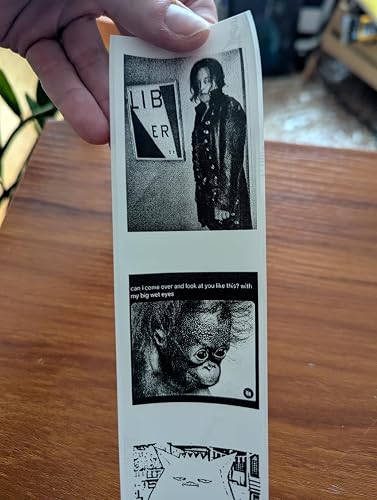
i love this thing. it's cute, fast, quiet, and super easy. the app is simple and easy to use and free - although i suspect some extra features are behinda paywall. based on the reviews, i was worried about the tearing capability but it's actually fine as long as you're using a standard black/white roll. see attached photos for different types of print qualities. only cons: - it does waste some of the roll between images. - not super hi res but will get the job done - have to cut anything printed on the transparent material i would buy this again! if you're on the fence - go for this one. ... show more
Reviewed in the United States on May 9, 2025 by Sarah

  • Cute useful little thermal printer... with some caveats!
Color: Cyan Set name: 300 DPI + 1 Roll Paper
I saw these printers for a few years now and thought it would be very useful for various things around my house. I have used this printer already to make copies of my medicine labels that I put on a storage unit for my pills so I have accurate information on my supplements and pills as I store them outside of the original bottles for organizational /declutter purposes. (if you have a ton of supplements I used the MONSTER FIT pill/supplement dispenser) I take copies of the labels so the ACCURATE information is present on my pills/supplements (very very important to do this) so this printer is extremely useful for that purpose alone!. It also helps to see and identify things better than if i had just hand wrote them . HOWEVER, NOTE, that this is a THERMAL printer and is NOT Archival, meaning the paper/image will fade over time, especially if not kept in proper conditions. Also, something I failed to note is if the PHOMEMO printer label paper is BPA free!. I am 55 and honestly less concerned about this as I probably have enough forever chemicals to kill a horse in me.... BUT it is important to investigate this and take precautions about thermal paper. All that being said... it is a very useful printer for short term labeling. (Again NOT archival safe for most applications). As for the APP...... It's OK.. not great. It isn't what I am used to in terms of editing and functionality. I can't easily change font sizes and there is limited FONT styles in the app. It is just fussy and isn't really designed that well with their templates. A workaround is to design your label in another application and just do a screen shot of it and then put it in as an image . I can't even easily copy paste text into the app which is frustrating. I hope that the app will improve on this. Overall, it is ok.. I went with the MO2 PRO because it reviewed it as having a better printing quality. Images are a bit on the darker side and the ability to tweak that is not terrific. Also the FILTERS offered for various photos isn't the greatest selection. I like the line drawing filter though.. but some of the other filters are not useful for this printer so I don't know why they would include them. Again, hopefully the APP will continue to improve and offer more functionality and variety. ... show more
Reviewed in the United States on April 2, 2024 by CMG

  • Like it! Comes with an easy-to-use app.
Color: Black Set name: 203 DPI + 3 Paper Rolls
Very quick, very useful. Frequently use it at work to label educational displays on the fly. Also good for adding figures to my notebooks. Holds a charge surprisingly well. Very compact, given its functionality. Easy to use, although the corresponding app has been advertising excessive AI use that I have to x-out of. I just wanna write "don't touch the lobster claw," not make colorful AI art to print in black-and-white. However, this is a very quick and easy to use item. ... show more
Reviewed in the United States on April 19, 2026 by Cam

  • Junk
Color: Cyan Set name: 203 DPI + 3 Paper Rolls
I was excited to receive this. The instructions were very small print and very minimal, but I got the paper installed with the glossy side down. Plugged it in and the light blinked either fast or slow, no explanation why in the instructions. While charging, I downloaded the app with no problem. I decided to just do my name first: Nick. I typed it in the box and hit print. The phomemo made noise and paper came out. I tried to tear it off on the sharp, serrated edge to no avail. I had to hold the phomemo in one hand, and pull with the other. No luck, it wouldn't tear. So, I got a scissors, pulled the paper out a little and cut it. Okay, no big deal - surely the print would look good. I turned the paper over - nothing. I thought I'll separate the paper and it will show up - nope, nothing, nada. I tried again and again and again. I tried one of the funny faces and tried again and again. Each time, the paper would come out like a normal printer, but each time, there was nothing on the paper. Invisible ink? Do I have to add lemon juice or vinegar to get it to show up? And the serrated knife for tearing the paper is worthless. So, after a couple of hours fiddling with it, I put back in box, and got a return label. Cost was about $64 with shipping and tax. Interestingly I could not get a refund to my credit card, but has to go to an Amazon gift card! That hasn't happened to me before. I bought this thing to label jelly jars for my wife. I can't understand all the good reviews on Amazon. Usually, lots of good reviews bodes well for a product. But, not this time. Caveat Emptor, but thanks to Amazon for easy return. It will be to UPS before the New Year. I will have had it for less than 24 hours. Glad I decided to try it immediately. ... show more
Reviewed in the United States on December 27, 2023 by Ni2JG

Can't find a product?

Find it on Amazon first, then paste the link below.
Checking for best price...