Search  for anything...

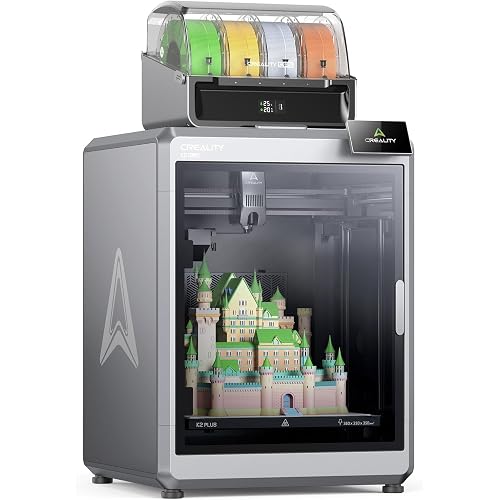
Official Creality K2 Pro Combo 3D Printer, Multicolor 3D Printers with CFS, 600mm/s Printing Speed 300℃ Direct Drive Extruder Chamber Heating Dual AI Cameras, Printing Size 11.81x11.81x11.81 inch

  • Based on 0 reviews
Condition: New
Checking for the best price...
$944.00 Why this price?
Save $105.00 was $1,049.00

Buy Now, Pay Later


As low as / mo
  • – Up to 36-month term if approved
  • – No impact on credit to apply
  • – Instant approval decision
  • – Secure and straightforward checkout

Ready to go? Add this product to your cart and select a plan during checkout.

Payment plans are offered through our trusted finance partners Klarna, Affirm, Afterpay, Apple Pay, and PayTomorrow. No-credit-needed leasing options through Acima may also be available at checkout.

Learn more about financing & leasing here.

Selected Option

Free shipping on this product

30-day refund / replacement

To qualify for a full refund, items must be returned in their original, unused condition. If an item is returned in a used, damaged, or materially different state, you may be granted a partial refund.

To initiate a return, please visit our Returns Center.

View our full returns policy here.


Availability: Only 4 left in stock, order soon!
Fulfilled by Amazon

Arrives Tuesday, Jun 16
Order within 9 hours and 16 minutes
Available payment plans shown during checkout

Protection Plan Protect Your Purchase
Checking for protection plans...

Set name: K2 Pro Combo


Features

  • Efficient Printing: Creality K2 Pro Combo, adopting industry-grade 3 step-servo motors-located in the extruder and on the X/Y axis -work together to take extrusion consistency and printing accuracy to the next level. Smart auto leveling speeds up the bed leveling process by probing only where your model will be printed
  • Dual AI Cameras: Nozzle Al camera for adjusting nozzle flow rate in real-time, preventing under- or over-extrusion. Chamber Al camera for watching over printing failure such as spaghetti, foreign objects, idling, etc. and notify users to take action; Reminding users if the heatbed is empty without a build plate; Capturing 3d printing for sharing
  • Heating Design: Active chamber heating on the Creality K2 Pro and K2 Plus maintains a stable chamber temperature (up to 60 C) helping prevent corner warping when printing with filaments like ASA and PPA. An actively heated chamber pairs with a steel-tipped nozzle up to 350C. No sweat to deal with high-end materials such as PA-CF, ASA and PPA. The nozzle, capable of reaching up to 300C and featuring a hardened steel tip, is built for abrasive engineering filaments.
  • Durable Direct Drive Extrusion: Creality K2 Pro Combo equips hardened steel gears for better durability No issue coping with the repeated filament ingress and egress. 40mm3/s high-flow hotend powered by an 80W powerful heater, the flow rate of ABS at 280C can reach 40mm3/s, quick-swap hotend modularly designed for higher repairability and the nozzle cover is magnetic for easy removal

Brand: Comgrow


Material: Aluminum


Color: K2 Pro Combo


Product Dimensions: 19.29"D x 18.11"W x 33.46"H


Item Weight: 52.25 Pounds


Product Dimensions: 23 x 23 x 24 inches


Item Weight: 52.2 pounds


Item model number: K2 Pro Combo


Date First Available: May 28, 2025


Manufacturer: Creality 3D


Frequently asked questions

If you place your order now, the estimated arrival date for this product is: Tuesday, Jun 16

Yes, absolutely! You may return this product for a full refund within 30 days of receiving it.

To initiate a return, please visit our Returns Center.

View our full returns policy here.

  • Klarna Financing
  • Affirm Pay in 4
  • Affirm Financing
  • Afterpay Financing
  • PayTomorrow Financing
  • Financing through Apple Pay
Leasing options through Acima may also be available during checkout.

Learn more about financing & leasing here.

Top Amazon Reviews


  • This thing is amazing (updated)
Updated, back to 5 stars. Initially this thing was awesome. Then I discovered my bed was slightly warped after the initial test print. The seller responded almost immediately and made everything right with a replacement part. My prints are coming out near perfect now. One thing I would recommend that holds true to for the Ender 3 and the 5 as well - buy the glass bed for it. No more warping issues and the bottoms of your prints will be super smooth (assuming you don't print with a raft). Bump the temp up 5-10 degrees and wait a little longer after the preheat... Assembly took a little more than an hour and that was with me doing it casually and doing a few other things at the same time. Two of the four side bolts that hold the pre-assembled top on didn't want to go in straight. The top was assembled slightly out of square. Only had to slightly loosen one of the corner bolts and re-tighten it and it went together perfectly. It comes with a 200g (1/5th of a normal) roll of filament for a test print. Here's the deal. The test-dog.gcode file on the sd card must have been sliced at .00000000000001 mm and about 3x the original size. Yes, that's an exaggeration, it was done at .15mm and I don't know how many times the original size but the base is probably 5" wide. I don't know for sure because I can't measure it because it's not done. It's just now finishing the BASE after 7.5 hours. I'm not even 100% sure that there is going to be enough filament to finish the sample print as they sliced it. What has printed so far looks amazing. No issues out of the box. My bed is perfectly flat. The one ding I'd give them is that the manual is out of date for one section and that's when attaching the bed and the wiring. The one on the SD card is also out of date. This is apparently a slightly newer version of the printer as the bed no long attaches with just four screws. It now has two additional screws offset (and even two more unused holes if the plate on the printer frame was a little longer) for more support. This is not pictured in the manual and the screw counts are wrong. As for the wiring it's really easy as each wire has a little cuff that indicates what it's for. They are all color coded and different *except* for the two thermistors - they're both black/white wires with the same plug. However, they are labeled on the harness and it's easy to tell which is which so it's near impossible to get them backward unless you just aren't paying attention. There is a Ender 5 profile on the SD card for Cura if you you that. You can copy the json file into the cura definitions folder and it'll be there to select when you start cura. On windows that's in C:\Program Files\Ultimaker Cura 3.6\resources\definitions if you use the default location and version 3.6. I haven't done anything beyond that since I think this print won't finish until sometime in the year 2052. :) This is my first 3D printer and I love it so far. Update: There was a bit less than half the filament left after the test print from the SD card. That test-dog print took 11 hours 22 minutes. The manufacturer, in the future, might want to leave out the base which took almost seven and a half hours alone. ... show more
Reviewed in the United States on January 11, 2019 by A. Barnes

  • Incredible!
I don't have a lot of experience with 3D printers. I have done a lot of research and decided to purchase a larger non-branded printer that turned out to be terrible. I couldn't keep the bed level, the z-axis kept getting misaligned, and it just lacked the overall features and quality that I expected in a machine. I returned it, and did some more digging and decided that the Ender was worth a try. I've had it for 24 hours, and the results are phenomenal. I experienced some slight issues as I was setting it up for a first print. As I was heating the extruder and bed, the machine would suddenly reset. I found that the voltage switch on the back was set to 230v instead to 115v. As soon as I switched it, my problem went away. Unlike my previous machine, this was a breeze to get level. I like how the z-axis is zeroed at the top of the gantry. It makes it very easy to access the knobs to level the bed. Another problem I had with my other machine was adhesion. It was a glass bed that required glue and it was always a mess. After getting the machine level, it printed beautifully on the magnetic board and had no problem going at 100% speed. I started out in the big leagues with the preassembled secret heart box on Thingiverse by emmet. It completed in about 90 minutes, and had only one flaw with the top 5 layers. The rest of it was perfect. The hinges were free and my daughter loves it. I then went through the "Benchy" boat and it printed in 80 minutes at full speed and was practically flawless. We have a new maker space at work that has a couple TAZ 6 $2500 printers. I tried printing one of my designs and decided to give up after 4 failures. I printed the design today on my Ender and it printed perfectly the first time. This thing is amazing. I connected it to one of my Raspberry Pis with OctoPrint installed, and now I can print wirelessly and keep tabs on printing progress on my phone. I have yet to make any adjustments to my Cura Ender 5 profile--it prints perfectly as is. After my previous purchase, I was very frustrated and ready to give up 3D printing for good. Now, I really enjoy what I can do with this Ender 5. I would recommend this printer to ANYONE. So worth the $345. ... show more
Reviewed in the United States on February 15, 2019 by N8

  • Ender 5 Pro: 20 day review
I've had the ender 5 pro for nearly a month now. Assembly was pretty straight forward...taking care and being careful, it took me about 40min. This printer puts out some very impressive PLA/PLA+ prints. I haven't tried ABS yet. The PLA+ has some minor stringing, but I probably just need to tune it out better or maybe the filament is old. Pros: 1) high quality PLA/PLA* prints. 2) very straight forward and easy to use. The menu is very nice and overall build quality is impressive for the price. 3) bed leveling, once you get the hang of it, takes maybe a few minutes and only needs to be rechecked maybe every half dozen prints (if you have a glass bed). The magnetic bed pad needs to be checked after every print. 4) the latest version of Cura is fantastic. The Creality Slicer is excellent as well. 5) community help and general information is abundant for this printer. 6) I have heard that Creality support is very good, but can't confirm as I haven't used them yet. Cons: 1) There are mixed feelings about the magnetic bed and flexible build pad. For me, once I replaced it with a glass build plate, I've only had one failed print out of maybe twenty. Previous to this, every other print was lifting off and failed. If you can get the magnetic pad to work for you, it would probably be awesome. I just got too frustrated...not to mention I think this is the primary cause of having to level the bed after every print. 2) Large or complex prints can take a while...this is not much different from other 3d printers though. 3) out of the box it comes set to 220v input, the instructions don't mention that you should switch this to whatever you are using. 115v in my case. 4) out of the box, the printer didn't work until I upgraded the firmware from the Creality website. I guess this batch shipped with buggy firmware. Not a big deal as long as you know, and you know how to flash the new firmware. Notes: Two recommendations I can make are to get a $12 borocilicate glass bed and if your printing environment is cooler than room temperature, get or make an enclosure. If you are trying to decide between one of these and the next step up. I think if you buy this printer and invest the extra money you were going to pay for a more expensive printer into some upgrades for this one, you will still be happier overall with this printer in the long run. People call this an entry level printer, but with the out-of-box quality combined with room to upgrade you can't beat the price. ... show more
Reviewed in the United States on November 6, 2020 by CMG

  • Ender 5 is an awesome 3D printer for the money. Ender 5 is an awesome 3D printer for the money.
The ender 5 is my first foray into 3D printing. I had a few recommendations from friends to get an ender 3 and did some research on the 3 and 3 pro and the 5. I settled on the 5 and was able to get it at a significant discount off of the retail price which made the decision to get the ender 5 instead of the 3 pro. Out of the box the bowden coupler on the cold end was shifting up and down. The plastic retaining assembly itself was shifting out of the brass body. I replaced them with good quality metal toothed connections which seems to have mostly solved the bowden tube slop. Very good instructions and easy to assemble. I did have to rotate one of the upper frame pieces as the factory assembled it upside down with the countersunk holes facing down instead of up. I also had to loosen all of the frame corners as they were way out of wack from the factory to square up the upper frame. two screws were stripped from the factory and needed to have a slot cut in them to loosen them. I was able to start printing a benchy out of the box within a few hours of receiving the printer. First print was a benchy out of some black PLA from comgrow and it printed out fairly well with only a few minor defects likely relating to retraction settings etc. It has the 1.1.4 board(the loud version) with no thermal runaway protection from factory. I ordered a 32 bit drop in replacement board (Fysetc Cheetah, also look at the skr mini e3) which has the silent stepper drivers and now the loudest thing on the printer are the fans with a BLtouch for autobed leveling Highly recommended! This has helped with the salmon skin issues without the TLsmoothers. Some of the required mods: heated bed wire support as they are unsupported except for the solder joints. Bed stabilizer bars as well stiffened up the bed substantially. print a knob for the factory extruder would be helpful as well. Might want to look at replacing this with an ezr struder or at the minimum the aluminum one offered by creality since the plastic has a tenancy to break easily. Overall a fantastic printer and I'm still working on tweaking and dialing in some of the settings to get better and better prints, but out of the box this thing is fantastic for the price. Highly recommended. ... show more
Reviewed in the United States on July 24, 2019 Reviewed in the United States on July 24, 2019 by Matthew Koloski

  • Very well built printer
I think this printer offers an amazing value among resin printers. The hardware is extremely solid for a machine in this price range and it has some very important upgrades over many similarly priced resin printers on the market today. This is my first resin printer, but I have been printing with FDM printers for a few years now. Most of the things I print I sell so good print quality and reliability are both very important to me, as is value. I have been happy with Creality for my other printer so when they came out with the LD-002R it deserved to be considered. I realize there are printers out there with fancier features such as a monochrome screen or LED lens array lighting. The LED lens arrays seem like an upgrade but can be problematic and cause uneven curing so I didn't value them especially high when comparing machines. The monochrome LCD's are an improvement over color LCD's but at the time the machines available with monochrome LCD's were either cheaply built or much more expensive than the LD-002R. The build quality of the LD-002R is phenomenal for the price. The extrusion holding the linear rail is solid and well anchored to the all-metal frame. The linear rail used is large and of good quality so there is no chance of Z wobble or unwanted flexing as the print is peeled from the vat. If you are not familiar with resin printing what happens is the build plate comes very close to a clear-bottomed vat of resin and a single layer of your print is cured at a time. Between each layer the printer peels the print from the plastic at the bottom of the vat by raising the print up and then lowering it back down almost as far as the previous layer and begins curing another layer. I wanted a machine that had a very well built mechanism for raising and lowering the vat, as well as holding the build platform, and Creality really delivered here when compared to the competition. The build platform is another great upgrade with the LD-002R. It is angled at the top so the excess resin drains off after your print finishes so cleanup is easier and you waste less resin. The way the platform mounts to the Z axis means you pretty much don't have to level it. I did, just to verify that it came leveled correctly from the factory, but I haven't had to bother with it since. The 4 point system used to level and secure the build plate is very sturdy once tightened but still allows you to precisely level the build plate. The rest of the build quality of the LD-002R is great. The frame is solid and made of metal, the orange plastic cover is thick and well built, not like the glorified trash bin covers on some machines. The screen is clear and the electronics are fast. I have had no problems with even the most complex designs that nearly fill the build volume. Oh yeah, and the build volume is often misquoted online. I am able to print up to 68x 121x160mm. Creality didn't do any hokey things either with mounting the LCD like using electrical tape to hold it in like you see on some machines. I am hopeful that at some point Creality offers a monochrome upgrade for the LD-002R like they have supported their other FDM printers in the past by offering upgrade kits, but even then the monochrome screens only cut maybe 30% off your print time because the reduced cure time doesn't take into consideration that each layer needs to be lifted and lowered between curing each layer. The 40W LED's allow me to print pretty quickly already and I prioritize the better print quality that comes from having a more sturdily built machine than shaving a few minutes off my print times. ... show more
Reviewed in the United States on July 8, 2020 by brockb

  • Will be a returning Customer to Comgrow. Perfect Support. Perfect Printer Will be a returning Customer to Comgrow. Perfect Support. Perfect Printer
I rarely make reviews. Customer Support and a Fantastic product (when it works) is important. Receiving a defective product is annoying. But when you have a company who backs it to working condition its worth it. My first experience with 3D printing was on the Makerbot replicator+ in my school lab. My first print was a small bit underwhelming experience. It was novel though. I held off on researching a 3d printer due to the time consuming process slicing and decimating my models in Zbrush. The Bad: Out of the box, I had trouble getting this to print. BAD. I had a 'return' trigger finger so I was itching. But after doing a #1 ('Auto Home'), then a #2 (printing the Dog on the SD card), roughly 2 hours later...bam. A wonderful looking printed dog. Pleased is an understatement. I never got this kind of quality from the Makerbot at school. (Perhaps I have to consider that printer was used many times?) Nonetheless.. perfect 3d printed dog at 1/4 the price. Then BAD, I would get random restarts...sometimes I would get a print..other times no. I contacted Amazon and Comgrow customer support, and they sent me a motherboard very fast. But no luck. I Grew Frustrated. I figured it had to be the battery, so I was going to leave this product 2/5 stars (the extra star for the support) and just purchase some parts...but saved by the bell..Comgrow sent me a new battery. Shipping was also fast. I swapped the battery, and now everything worked. The (VERY) good: The print quality is OUTSTANDING. I have no problems with the printer (so far) and I have printed many items and a few figurine parts. Comgrow shipped replacement units FAST. Comgrow+Amazon Support = 5/5 stars. Outstanding. If you have problems, notify Amazon. If it cannot be resolved, they will refer you to Comgrow who is just as good. The printer quality is excellent. The build quality is sturdy. The Adhesion (with my Hatchbox and the creality Sample PLA) is perfect. The Magnetic bed is very useful. Advice to You: Learn more about your printer. This is a DIY setup, and when you tinker around, you will be glad you purchased this. Head to youtube, type Ender 5, and find 'Nexi Tech', 'Tomb of 3d printed horrors' and 'Teaching tech' (a bit more advanced). Advice to Comgrow: Quality Control. If you can do this...you get 6/5 stars. If Creality can develop a THOROUGHLY tested DLP printer, I will buy theirs in a heartbeat. I am searching for one. ... show more
Reviewed in the United States on May 18, 2019 Reviewed in the United States on May 18, 2019 by Chris P

  • Pray you don't need Customer Support! With Update!
Set name: K2 Plus Combo
I returned the K2 Plus—and it wasn’t easy, especially physically. For context, I own three Bambu Labs printers and have had zero issues. They’re truly plug-and-play, like a 3D printing appliance. I needed a larger format printer, and despite prior frustrations with Creality, I decided to give the K2 Plus a chance. Initially, it was promising: great print quality, impressive fit and finish—it looked like Creality had turned a corner. But after just one week, the printer stopped working. A catastrophic nozzle/extruder clog ended the honeymoon. These things happen, so I replaced the hotend at my own expense and ordered a nozzle kit. Unfortunately, it never printed reliably again. I tried multiple nozzles (.4 and .6), but the printer would repeatedly stop extruding mid-print. That’s when the real frustration began—support from ComGro to whom Creality delegated their Customer Service, was painfully slow and unhelpful. Despite providing detailed explanations and photos, the response cadence was one email per day, with no urgency or real troubleshooting. They insisted all I needed was a new nozzle—something I had already tried multiple times. Worse, they said shipping a new one would take 10 to 15 business days. This experience with customer support sealed the deal. I’ve returned the printer and won’t be making the mistake of buying from Creality again. Update: 6/19/25 My wife convinced me it must have been a bad printer so I order a second one. What a mistake. It is always something. I have replaced nozzles, hot-ends, and had countless little annoyances. Now I have an "Intrusion Detection Error" that won't go away and it will not maintain nozzle temp after trying 3 hot ends. Meanwhile the three Bambu Labs printers A1, X1C and H2D just keep on printing and printing. I just ordered a second H2D. I have no idea what to do with this printer, I avoid using it and just hate it. Meanwhile crickets from Creality. Never again. ... show more
Reviewed in the United States on March 21, 2025 by Herman M.

  • Great Printer Great Printer
The Ender 5 3D Printer is one of the coolest pieces of tech I've purchased lately. This printer wasn't very hard to setup and only took about an hour. The hardest part of the assembly was running the wires (finding a route to run them actually) All the wires are labeled and color coded; all you have to do is plug them in. As for assemble of the frame, it's just a matter of screwing in a few screws (be careful here they are metal screws going into aluminum). Once assembled you have to adjust the "Z" stop screw and level the printer bed. I was worried about the bed leveling but after watching a few youtube videos it was fairly easy. Once your bed is level you load the included PLA filament, insert the included micro SD card and print one of the sample prints from it (I did the little white dog pictured above). It took about 4 hours to complete but came out great. After the test dog I printed some upgrade parts for the printer that I found on thingiverse.com. Once I had the printer tuned in and printing great I did the "Baby Groot" pictured above. No problems and printed well in about 6 hours. I printed him in PLA white and painted him. Since I purchased this printer I've run 4 spools of PLA through it with well over 50 prints without any issues. On the software front you will need; 1. 3D modeling program (Blender (free), TinkerCad (free online), Simply 3d). These will allow you to create your own models you can print. Without one of these you will have to just download models others have created (still great fun). 2. 3D Slicer program, CURA which comes with your printer (there are others out there but this is what I stated with). Slicers convert your 3d models to G-Code which converts your models into code that your printer will understand and use to print your model. 3. A way to monitor your printer since prints take hours at best and days at worst to finish. You can use security camera's, web cams, etc... But What I did was use a Raspberry Pi, a web cam, and a program called Octoprint. With Octoprint your printer becomes part of your network and you can print to it from any computer in your network. You can also view and monitor the web cam you hook up to the pi. The Ender 5 Printer is a great starter printer and a definite buy. ... show more
Reviewed in the United States on August 22, 2019 Reviewed in the United States on August 22, 2019 by Jeffrey

Can't find a product?

Find it on Amazon first, then paste the link below.
Checking for best price...