Search  for anything...

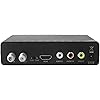
Mediasonic ATSC Digital Converter Box with Recording / Media Player / TV Tuner Function (HW130STB)

  • Based on 9,569 reviews
Condition: Used - Like New
Checking for the best price...
$22.99 Why this price?
Save $11.91 was $34.90

Buy Now, Pay Later


As low as $5 / mo
  • – 4-month term
  • – No impact on credit to apply
  • – Instant approval decision
  • – Secure and straightforward checkout

Ready to go? Add this product to your cart and select a plan during checkout.

Payment plans are offered through our trusted finance partners Klarna, Affirm, Afterpay, Zip, Apple Pay, and Google Pay. No-credit-needed leasing options through Acima may also be available at checkout.

Learn more about financing & leasing here.

Free shipping on this product

This item is eligible for return within 30 days of receipt

To qualify for a full refund, items must be returned in their original, unused condition. If an item is returned in a used, damaged, or materially different state, you may be granted a partial refund.

To initiate a return, please visit our Returns Center.

View our full returns policy here.


Availability: In Stock.
Fulfilled by Amazon

Arrives Tuesday, Sep 29
Order within 5 hours and 49 minutes
Available payment plans shown during checkout

Protection Plan Protect Your Purchase
Checking for protection plans...

Features

  • Receive Over-The-Air Digital Broadcast to your Analog and Digital TV, Projector, and Computer Monitor. Antenna Out Analog Pass Through, Favorite Channel List, Parental Control Function
  • HDMI 1080P Output / Composite Out / Coaxial Output, Closed Caption, Auto Tuning, Timing Start Up & Shut Down.
  • Real-Time Recording & Programmed Time Recording, recording require user to connect a USB 2.0 or 3.0 2.5" / 3.5" External Hard Drive via USB (Up to 2TB, MBR format) (USB Flash Drive Not recommended)
  • USB Multimedia function play back Video, Music, Photo from USB Drive
  • The latest Firmware is V4.1
  • **PLEASE NOTE**:This converter box is designed to receive Over-The-Air signal, and it is not a replacement of cable box. External Antenna is required to connect to this converter box in order to receive signal. This product does NOT Work with TIVO and cable company such as Comcast, DirecTV, DISH Network, Time Warner Cable, etc. In general, this product does NOT work with encrypted cable signal

Description

Enjoy crystal-clear digital TV with the ATSC Digital Converter Box. Record your favorite shows, play multimedia files, and access unscrambled cable channels with ease. Enhance your viewing experience today. HW130STB HW250STB HW135STB HW-150PVR-Y22 Open Box HW-150PVR Open Box TV Antenna 50 Miles + What is the latest Firmware Version? V4.2 Contact Mediasonic Store if you need to update firmware Where can I download th User Manual and Quick Installation Guide? You can download from Mediasonic Store official website or Contact Mediasonic Store via Amazon message to Seller. (Please Search Online. Cannot display here due to Restriction) Can I watch one Channel and Record another channel at the same time? This Box can ONLY do ONE task at a time How do I determin if the Power Adapter is working or not? You can use Multi Meter to check if the power adapter is working or not. If not, pelase contact Medisonic for replacement Mediasonic is a trusted manufacturer of high-quality ATSC Digital Converter Box, hard drive enclosures and consumer electronics. We are committed to delivering reliable, innovative solutions that combine cutting-edge technology with ease of use. Our products are designed to offer durability and value, making them the ideal choice for professionals and everyday users alike. With a focus on innovation, and integrity.

Brand: Mediasonic


Maximum Supply Voltage: 5 volts


Minimum Supply Voltage: 5 volts


Mounting Type: Coaxial,Surface Mount


Number of Pins: 25


Maximum Supply Voltage: 5 volts


Minimum Supply Voltage: 5 volts


Mounting Type: Coaxial,Surface Mount


Number of Pins: 25


Interface: Coaxial, HDMI, RCA, USB


Number of Channels: 1


Item Dimensions L x W: 5"L x 4"W


Material Type: ABS


Brand Name: Mediasonic


UPC: 629329006762


Compatible Devices: Analog and Digital TV, Projector, Computer Monitor, VIZIO TV, USB 2.0 or 3.0 external hard drives (not encrypted cable signals or cable boxes)


Unit Count: 1 Count


Manufacturer: Mediasonic


Warranty Description: 1 Year Warranty from Mediasonic Store


Number of Items: 1


Item Weight: 4.64 ounces


Model: HW130STB


Part Number: HW130STB


Frequently asked questions

If you place your order now, the estimated arrival date for this product is: Tuesday, Sep 29

Yes, absolutely! You may return this product for a full refund within 30 days of receiving it.

To initiate a return, please visit our Returns Center.

View our full returns policy here.

  • Klarna Financing
  • Affirm Pay in 4
  • Affirm Financing
  • Afterpay Financing
  • Zip Pay in 4
  • Financing through Apple Pay
  • Financing through Google Pay
Leasing options through Acima may also be available during checkout.

Learn more about financing & leasing here.

Top Amazon Reviews


  • Can't go wrong for $30 if you want a HDTV recorder (off the air recording)
This unit, while has a cheap feel to it due to the light weight plastic used for the case, along with a cheap feeling power adapter & remote, is solid in terms of functionality! After the basic setup; it was able to tune in more channels than my LCD TV's built-in tuner. The output allows you to display it to RCA out (analog like quality); back out through the Coaxial out (analog like quality on Ch3 or Ch4); or HDMI (HD quality).. So if you have HDMI input on the TV use it! The quality can be adjusted too... from 480, 720, to 1080 (via HDMI). Now for recording, plug in a USB pen drive (128GB for me)... and it records in HD the channels that come in HD. The remote is a bit tricky to figure out only because the buttons are small and it isn't one of those huge remotes that is 8-10" long. So they had to cram a lot of buttons in but it has all the features needed. There's a "goto" button that you can type in how many hours you want to skip forward (or backwards to)... this is a nice feature when you record 3-4 hours in one file and want to jump to certain parts of the show... One thing that wasn't possible was recording in lower quality. It seems to only record in the native quality of the broadcast so if it's 720HD then it records in that format... you cannot pick a lower quality. So for regular HD it appears to use about 1GB per hour.. with a 64GB USB stick you can get up to 60 hours and if you have say a 500GB drive... much more. I have not tried a spinning 2.5" USB drive yet... so I can't say if the USB port can power that. But for $30... I can now retire my VCR from recording duties (running through a Digital to Analog Tuner...) Wife can't make fun of my Luddite ways anymore... :) ... show more
Reviewed in the United States on January 10, 2017 by William K.

  • Charming and quirky
First off, this thing is for geeks only. Keep in mind that this small box only costs $30.00. Having said that, if you remember what VCRs were 40 years ago, you will have an idea of this device’s capabilities. You will also have a good idea about the bronze age graphics package. This is a stand alone OTA single tuner video decoder that can be set up as a DVR. It doesn’t need a computer, the internet or a cell phone network. But it will interface with that 25 inch color console TV that grandma still has in the basement. For those of you who just want the executive summary, skip to the last paragraph, for everybody else…. Lets start with the user’s manual. They really did print a comprehensive one, but the typeface is microscopic. On to the remote, there are plenty of tiny buttons, with even tinier lettering that may or may not let you know what the buttons actually do. Also, the placement of the buttons is strange. Additionally the remote must be pointed directly at the box to function. The software is also easily confused, making you wonder if the remote is working. By the way, the red standby LED is bright enough to light up the entire room. To scan the channels go to MENU/CHANNEL SEARCH/AUTO SEARCH. In less than 2 minutes it will be done. There is also a manual search function. I used it because one of the stations in my market (WTAE 4) transmits on 2 frequencies from 2 different antennas and the auto search only picked out the lower of the 2 channels. I wanted to compare the two to see which had the stronger signal. By the way, while the software allowed me to add a channel, there are no provisions to delete a channel. The tuner sensitivity is very good and the picture quality is surprisingly good using the HDMI output. It even upscales those 480 subchannels to 1080 with better picture quality than my 5 year old 4K Sony produces. You can adjust the audio output volume with the left and right arrow keys. It also decodes the EPG signal that the stations embed into their signal, letting you see what is on. Also, there is a signal strength meter built into hardware. A stand alone signal strength meter will set you back by more than this device costs. To access it, just press the INFO button twice, the meter stays on until you hit the INFO button again, making it easy to adjust your antenna for the best signal on each channel. But, I have noticed that when the video pixelates, it throws the audio out of sync. The more the video pixelates, the larger the delay. It also seems that this device is slightly more susceptible to pixelation than my TV is. The only way to correct that is to reboot the machine. Also, the tuner is affected by windy conditions, you will get periodic blank screens during storms. The time setting is easy enough MENU/TIME, the box picks up it’s base time from the broadcast channels. You pick your time zone and standard or daylight savings time. But the software is too dumb to change the clock when daylight savings time happens. To set this up as a DVR you will need to acquire an external 2.5 SSD or a self powered external 2.5 or 3.5 mechanical drive, apparently the power supply for this box isn’t strong enough to power a mechanical drive. Or you can buy an internal 2.5 SSD and a case for it (which is what I did for less than $30.00 total). The case must have a USB 2.0 or 3.0 interface. Then go to MENU/USB/FORMAT, the only option is FAT32 which limits the file sizes to 4 GB. After that you are ready to go, you do not need a computer or a smart phone to get this running. In fact, there is no way to connect this to either of them anyway. You could also purchase a USB A flash drive. You will have to format the flash driver as NTFS format on a computer for it to work properly. Most flash drives come formatted in exFAT, which this unit will not recognize. Either way, the recorded files are stored as unencrypted MPEG2.ts files, which will play on any computer. The fact that the USB port is on the front of this device, instead of the rear, means that you will have the flash drive or a cable sticking out of the front of the box. Note to product planners, a more elegant solution would be to use a class 10 Micro SD card instead. Personally, I formatted my 120GB SSD in NTFS format on my computer. Either way will work, but the FAT32 format is a dinosaur. When you want to record something that you are currently watching, hit the REC button. To stop recording, find the stop button below. You can also hit the EPG button and get list of programs on the channel that you are watching. There are no fancy thumbnail clips, just a list. Scroll down to the show you want and enter it. This will pre populate the fields in the timer function. If you want to record that channel weekly or daily, scroll down to that line, there is no M-F option. Press OK and you are set. Remember the EPG information is from the stations and only goes for 24 hours, at best. The third way to program a recording is to hit the TIMER button at the top of the remote. Hit it and then hit 1 to enter the record settings screen. You can then change the current info that self populates into the record fields. I noticed that it would not let me scroll upward past channel 4 (the duplicate station WTAE), I had to scroll the other way. It also will not record on the higher WTAE channel, instead it defaults to the lower one. To find and play your recordings hit the USB key and scroll over to PVR, then down to the HBPVR folder. The unencrypted recordings are listed by station call letters, date, and time. The fact that the software can read the EPG information, but won’t use that to name the file is another one of those quirks. You can rename them, but that process is cumbersome. When you open the video it will play in the small window. To get to full screen mode press the HOLD key twice. Keep in mind that this is a cheap device, in every sense of the word, good and bad, from the flimsy plastic case and the half baked software. However, for a list price of $30.00 the picture quality is very good and it does some really neat things, just don’t expect your spouse to ever figure out how to use it. You will also need to keep the user’s manual handy. This product is nowhere near ready for prime time, but it does work. Personally I like the little gizmo, despite it’s flaws. ... show more
Reviewed in the United States on April 13, 2024 by Chris M

  • Outstanding solution to over the air broadcast TV recording. Fantastic for the money.
So far, I love it. It is a lot smaller then I thought and the build quality is a little on the cheap side as far as the plastic case and buttons....BUT it does exactly what I need it to do and it is simple to hook up and use. I have an antenna in my house because I don't care to pay $100 for cable, so the ONLY thing I could not do was record the Browns games. I couldn't hook up an old VCR because of the digital signal so I thought I would try and find a cheap digital recorded. I know that there are expensive ones out there, but honestly, I don't have much interest in anything on TV except the Browns. So I thought I'd give this a try. Honestly...this thing was simple to hook up, ran the antenna into the co-axe in, ran a HDMI out to my 55" LG, did the channel scan and plugged in a thumb drive to record onto. It all worked flawless! The picture is better than Cable and I didn't spend much money on this. It picks up the broadcast schedule so you choose the channel. it shows the upcoming shows, you highlight and click. The only issue I had was that I only had a 16GB thumb drive and it ran out of memory about 2 hours into the game which was ok since the Browns Played Horrible :) So I would HIGHLY recommend this thing if you want a cheap solution to record over the air stuff with out paying for a subscription. As stated, it is very delicately made with cheap plastic, but does do what it says with flying colors. I even took the thumb drive out and played plugged it directly into my TV and it played back perfect, so you can set it up in another room and watch it back on another TV with a USB input. ... show more
Reviewed in the United States on August 27, 2016 by Vinny V

  • Other than recording, most TV with coaxial can give you the same thing this provides
First off I would say about this is that it does not exactly last very long. It burned out from just being on stand by alone. I am not sure why this is. The next thing is that it does not come with an HDMI cable only RCA cable. That being said, this does what it is suppose to which is to get some channels. Other than recording though, most TV with coaxial can do what this box does. It does not give you any additional channels. Sometimes the TV gives you more but honestly everything depends on your antenna. The device is not perfect. The quality can be choppy as times but you can get the news and some random channels. It is definitely not a sport channel getting device. It does have a USB port that had limited movie playing experience. You can watch avi or mpeg formats. The device can be a bit buggy and actually crash during play or have sound lag. It does get a bit hot which makes me wonder if that was the issue for the device breaking down. The remote had to be in direct line of sight to register. It does takes two AAA batteries that are not provided. The connection is stable for the most part. I would recommend doing a few video scans. The video quality you can pretty decent video but there can be a bit of static here and there. The device does come with component cables. It CAN be hooked up via HDMI but the cable will need to be purchase separately. There are also a place for antenna in and out (antenna is recommended and needs to be purchased separately.) It runs on a traditional power brick. Overall I think this box is not really needed and it burns out super fast. You can get the same amount of channels on most televisions with a coaxial port built in. The only thing you get from this is recording. The user interface is pretty simple I am just concerned that this thing burns out way too soon on just stand by. ... show more
Reviewed in the United States on April 28, 2022 by RedAkuma82

  • Good for live watching; horrible for programmed recording.
Buyer beware. tl;dr: If all you need is a box to watch live programming on, this is a pretty good unit to purchase. If, however, you program weekly programs to record, LOOK ELSEWHERE. This unit will do nothing but disappoint you. If you have a decent antenna, preferably with some kind of signal gain attachment, and there are not a lot of trees in your general area, this does a fine job of getting that signal and giving a decent picture/sound experience. That's where the pros end, and the cons begin. If you attach any kind of USB storage (in my case, a 1TB external hard drive) and plan on using the PVR (Personal Video Recorder), you need to be aware of a few things. 1. There is only one receiver source. You can record only one show at a time. 2. The shows that you program to record on a weekly/daily basis will occasionally (about once a month) erase themselves, so you have to re-program the shows to record, over and over. 3. If you, for any reason, turn on the box to watch something shortly before a scheduled program records (about an hour, maybe more), even if you shut it all down half an hour before said scheduled program records, IT WILL NOT RECORD THAT PROGRAM. That program will not record; the box will turn itself on, but that's it, the recording will not happen. I am now looking for a replacement digital box. Something that will not occasionally erase my programmed recordings; something that will record a program, even if I turn the box on to watch something before the scheduled recording is set to start; something that doesn't just "flake out" whenever it feels overwhelmed. ... show more
Reviewed in the United States on March 4, 2025 by Jack D.

  • Replaced old model ATSC box with Mediasonic
My new Mediasonic Homeworx replaced an older version of ATSC box that I bought directly from Shenzen on eBay several years ago. I really liked the old box until the flash memory stopped working. When new, the old box would let me create up to about nine DVR schedules. Then after about three years it went to zero. All the functions of the old box are still good, except for the DVR schedule. I am still using a second old version ATSC box where the DVR schedule capacity has gone from about 14 entries to four. I replaced the ATSC box with zero DVR schedule with a new Shenzen model. I expected it to be like the one it replaced. Instead the DVR schedule has an eleven day week and zero working flash memory to hold schedules. I am really hoping that the new Mediasonic will have better quality flash memory. Ask me in three years how the flash memory is holding up. Right now it looks very good. I have been using old model USB 1 Western Digital disk drives for DVR storage. They worked great on the old model ATSC box and work just as well on the new Mediasonic box. I assume that the new box will support USB 2, but have not tried it. The old boxes do not support USB 2. The old model Western Digital units arrived formatted as fat32. To use them for DVR storage I had to reformat them to NTFS. I suspect the reason thumb drives do not work is that they are formatted as fat32. I bet that after reformatting to NTFS, they would work. I noticed that the Mediasonic has a disk format feature in the menu. I did not need to use this, the USB 1 Western Digital drives transferred to the new box without a hitch. I had two boxes because I had two outdoor antenna. I’ve been experimenting. The first antenna has stopped working. I suspect it is because it is now pointing to the sky rather toward the horizon. I have it clamped to a plumbing vent that is now bent over after the last wind storm. I wanted two working ATSC boxes, one to watch while the other records or record different channels at the same time. I tried using the RF output on one box to the second box. That works, but there is significant signal attenuation especially when the first box in the series is working. I installed a Channel Master signal-splitter amplifier. Now both boxes get the same signal strength. I have two antenna on the roof on the same mount with a Wineguard signal combiner feeding a Channel Master antenna preamp. That feeds into the signal-splitter amplifier inside the house. All this gets me about 40-60 over the air channels depending on atmospheric conditions. The antenna mount once held a Direct TV satellite antenna. I’m thinking of another type of antenna to try. I might replace the antenna on the bent plumbing vent with something on a tower next to the house. We will see how much ambition I have. Some things to note. The Mediasonic menus are identical to the old ATSC box. The remote controllers have the same functions, but they are arranged very differently. With the two old model ATSC boxes, when I clicked the controller on/off button, one box would turn on and the other would turn off. That, I found, was a useful feature. I now have two separate controllers. I suspect, if I get another Mediasonic that this feature would return. I set my Mediasonic to the 24 hour clock. Please remember that it does not automatically switch between standard and day light time. I seem to get caught twice each year. The DVR scheduler assumes that a digit placed in one of the two hour slots means that a zero should be in the other. Why? The old model didn’t do this. I like that the Mediasonic DVR scheduler starts with the working channel. The old model did not do this. The old ATSC box DVR scheduler has an annoying bug. When more than two shows are scheduled to record where each starts on the same hour that the previous show ended, there is about a 20-30 second additional delay that adds up. This delay pushes the start time and end time forward by that amount. This means that after several iterations the start and stop times are out of sync with the shows being recorded. This is a real issue when recording one of those marathons where 10+ episodes are broadcast back to back. Making the stop time a minute earlier than the next start time seems to help. Except when the scheduler is turning on the unit before starting to record, then it turns off on the ending minute and back on at the starting minute. Fortunately there tends to be a lot of advertising between each iteration to absorb the slop in the time. I haven’t used the Mediasonic enough yet to check this on the new model. I noticed that the Mediasonic initial boot goes a lot faster than the old ATSC boxes. Otherwise there is no difference. -- It is now official: The bug described above is present in the Mediasonic. Here is instructions to reformat a thumb or disk drive to NTFS: Put the following in a Windows Shortcut Target: %windir%\system32\cmd.exe Start in: %HOMEDRIVE%%HOMEPATH% Use the following commands in the Microsoft Command Prompt Type "DiskPart" in the command prompt. Type "List Disk” (make note of the disk number of the target USB drive). Type "Select Disk X”, where X is the target USB drive noted above. Type "Clean”. Type "Create Partition Primary”. Type "format FS=NTFS”. Type "Active”. Type "Assign". Type "list volume". Type "Exit" Be real careful with this. As soon as you type “clean” the target disk is wiped clean. If you want to get rid of a disk drive and hide your data, use the above procedure. I suspect a well-equipped forensic lab can still get at your data, but not easily. The format can take a long time. A 1TB disk drive can take 8+ hours to format. Like those Western Digital disks noted above. ... show more
Reviewed in the United States on July 28, 2021 by Stephen D McLeod

  • Excellent TV Recorder !
The quality of the Mediasonic ATSC Digital Converter Box is excellent and even better if you consider the price it costs. The original unit lasted almost a year, and when it didnt work, the warranty had not expired and the seller sent me a replacement box, which still works...
Reviewed in the United States on July 28, 2026 by Disappointed

  • Worth the price
I have quite a bit of experience with the Homeworx model. I'll mention the good, the bad, and the ugly. First of all, the device has most important features you would want from a digital converter. The device is easy to use and straightforward to learn. A+ on this from me. The bad is that the device has a short life. You will know that the device is starting to be long in tooth when the sound does not quite match the video. It will seem like a poorly dubbed movie. This seems to start happening around the three to four month mark if you have it plugged in during that entire period. The ugly is that there just is not a market for a digital converter device that will last a long time (i.e. several years). I cannot blame Mediasonic for this or other manufacturers as the market supports what it supports. You will not (likely) find another device that lasts longer even with its 4 month life. For this reason, I tend to buy two at a time and then have the new one ready when it starts the audio issue (usually around superbowl time). Good value for the price, but I cannot give 5 stars to a device that ends its useful life after four months of active use. ... show more
Reviewed in the United States on April 21, 2026 by Neil Conway

Can't find a product?

Find it on Amazon first, then paste the link below.
Checking for best price...