






Buy Now, Pay Later
- – Up to 36-month term if approved
- – No impact on credit to apply
- – Instant approval decision
- – Secure and straightforward checkout
Ready to go? Add this product to your cart and select a plan during checkout.
Payment plans are offered through our trusted finance partners Klarna, Affirm, Afterpay, Zip, Apple Pay, and Google Pay. No-credit-needed leasing options through Acima may also be available at checkout.
Learn more about financing & leasing here.
Selected Option
FREE 30-day refund/replacement
To qualify for a full refund, items must be returned in their original, unused condition. If an item is returned in a used, damaged, or materially different state, you may be granted a partial refund.
To initiate a return, please visit our Returns Center.
View our full returns policy here.


Color: Black Red
Features
- Great Present Idea: LAUNCH Scanner X431 Pro3 (V+) V5.0 is a top present choice for your father, husband, brother or boyfriend if they own a repair shop, or they are an auto technician. We provide 2 years no-fee update. This is a 2026 NEW Elite 5.0 Version high-end professional diagnostic scanner.
- [OE-Level ECU Coding] Say goodbye to complicated car fixes! With LAUNCH X431 PRO3 (V+) V5.0, tweak your cars brain like a pro, no fancy ECU Coding skills needed! 1) Online/Offline operation of your choice; 2) Backup/restore coding data; 3) Detailed coding guidance. 4) Extensive database for 200+ brands (compatible with V.A.G, BMW, Ford, GM, etc.) >> Fix ECU issues fast, open secret settings for upgrades, replace parts hassle-free, or even make a personalized ride (e.g. seatbelt warning off, headlights flash when alarm, dashboard brightness change, moving pointer self-check). Enjoy 2 years of free updates to stay compatible and lifetime tech support to overcome any obstacle.
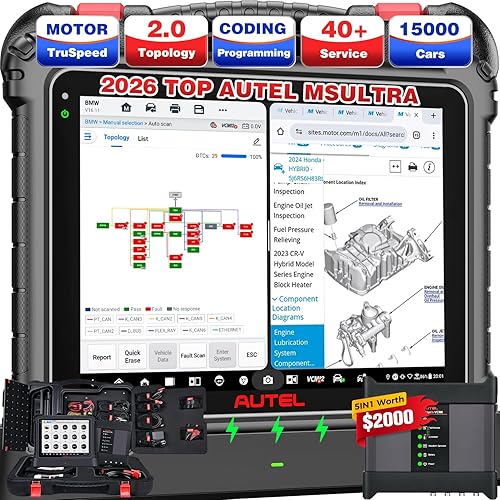
- [Topology Mapping + All Systems Scan] After connecting to the vehicle, you can enter the Topology Mapping to perform a deep scan of all on-board systems like CEM, ECM, TCM, ABS/BCM, DIM, ASDM, BBS, IMS, SWM, HUD, SCL, TACM, AUD, etc., to quickly understand interconnections and data flow between ECUs. LAUNCH PRO3 (V+) V5.0 professional escaner automotriz features intuitive color-coded topology showing all structures between vehicle modules, and coupled with 8000+ DTCs and step-by-step guidance to help you cut 70% diagnostic time. See results at a glance, simply click to check faults!
- [Experience Advanced Bi-directional Control in LAUNCH Scanner X431 PRO3 (V+) V5.0 60 seconds fault detection! This bidirectional scan tool will use 4000+ Active Tests to transform complex issues into simple and clear result. Just pick the test you need and follow the on-screen instructions. This LAUNCH scanner will automatically send commands to the ECU, get the actuators working, and show you the results. >> It covers all system-related actuators, be it fans, lights, horn, doors, windows, brakes, throttle, A/C, clutches, mirrors, cameras, pumps, valves, or anything else. And its all very straightforward, so even if youre new to this, youll have no trouble getting the job done.
- [55+ Hot Reset Services] LAUNCH X431 PRO3 (V+) V5.0 car scanner empowers technicians with 55+ reset services, saving significant time and cost while ensuring vehicle systems operate at peak specification. It can calibrate complex systems like Steering Angle Sensor (SAS), Electronic Parking Brake (EPB), Battery Management System (BMS), and throttle adaptations. Perform oil resets, sunroof initializations, and injector coding, ensuring accurate system relearns and enhanced repair reliability for modern vehicles. Maximize workshop productivity and first-time fix rates.
- [V.A.G Guided Function + Repair Tips Database] This LAUNCH diagnostic scanner for car gathers every basic step into a single click, shows plain-English tips right on the screen, and leads you through the entire procedure to diagnose V.A.G group vehicles: auto-login, coding, matching, all done. You can skip the steps of looking up the login codes and the channel numbers. It tells you what to test next, and keeps your job stress-free. The built-in Repair Database organized massive repair tips: TECH handbooks, Repair Cases, Operating Skills, DTC help, etc. into one solution, allowing you to fix cars others cant.
- [Intelligent Diagnostics: AutoVIN + AutoScan + Cloud Report] STEP 1: AutoVIN + Scan VIN/License can effortlessly read and record your vehicles VIN number by scanning license plates or barcode in just 10s: fast, accurate, and no more human data input errors. STEP 2: AutoScan. Then the scan tool will automatically scan and analyze the various systems / components, run a full health check, and instantly spot underlying problems. STEP 3: After the diagnostics, this LAUNCH x431 scanner can save diagnostic reports in cloud server for your easy access whenever need them.
- [Suppport Extension Modules & Wireless Diagnostics] This launch scanner can pair with x431 extension modules to expand your service: 1) Battery Tester BST360: test 12V battery SOC/SOH/health status; 2) i-TPMS Tool: a0tivate, relearn, pr0gram tire sensors; 3) Endoscope VSP600: in-depth inspection in engine, undercarriage, electrical, interior, etc. 4) ScopeBox O2-1: rapidly capture circuit signals; 5) SensorBox S2-2: mimic vehicle sensor malfunctions; 6) Multimeter S2-2: measures voltage, current, resistance; 7) ADAS Pro/Mobile: adjust driver assistance systems and more. >> All-new DBSCAR VCI allows you to scan, diagnose, and fix without being attached to the vehicle (max 33ft. / 10M range).
Description
Highly Rated (50K+ ratings). KNOWN & TRUSTED LAUNCH SINCE 1992 Why LAUNCH: Create & Change, Faster & Smarter, All Into One Why LAUNCH PRO3 (V+) V5.0: Diagnose Whatever You Need Superior Specifications: Zero-Delay Operation at PRO3 (V+) V5.0 STEP 1: “Access” - AutoVIN Instant ID STEP 2: “Locate” – One-Touch Full System Scan (AutoScan) + Topology Map STEP 3: “Analyze” – Freeze Frame + Live Data + Active Tests STEP 4: “Report & Fix” – Automatic Report + Clear DTCs Topology Mapping: Rapid Fault Isolation at a Glance ECU Coding: Customizing Your Vehicle’s Brain Like a Pro ECU coding is the process of changing software parameters within a vehicle’s Electronic Control Unit (ECU) using a diagnostic tool. This allows customization of vehicle behavior without hardware changes. Online & Offline ECU Coding: Suit Your Specific Repair Needs ECU Coding Backup/Recovery, Securely Backed Up in 3 Easy Steps Pr0grammable Module Installation (PMI): Rematch Module After Replacement This is a routine that lets you copy the “personality” of an old module onto a brand-new one. Instead of manually coding dozens of parameters one by one, you can use PRO3 (V+) V5.0 to: Industry-Leading 55+ Special Functions & 100% Efficiency The Independent “Special Function Module” acts as a centralized shortcut hub, replacing fragmented menus with direct access to critical services. Unmatched OEM Coverage vs. Competitors While diagnostic tools like the XT**L D8 skip brand-specific protocols or lack depth in essential systems (ENG/ABS/AB), the PRO3 (V+) V5.0) delivers 99%+ coverage for Hyundai/Kia and near-total compatibility across 150+ brands. See examples: And more: How to Explore 100+ More Maintenance Services Upon your initial glimpse of the PRO3 (V+) V5.0’s main page, you may be surprised to find that it only displays of 55+ HOT services menus. However, this is merely a hint of what lies beneath. JUST select your vehicle’s diagnostic software → navigate through the diagnostic system → tap on the module’s service function menu. This LAUNCH scanner will unveil 100+ HOT Services, all accessible at your fingertips. Operating 3000+ Active Tests on the PRO3 (V+) V5.0 Is A Breeze Once in the system diagnostics interface → choose the “Action Test” option → you’ll see a list of available tests on the screen → pick the Active Test you need and follow the prompts → this LAUNCH scanner will then send commands to the ECU to operate the actuators and show you the test results. Ditch clunky menus and wasted time. It’s a simple, user-friendly process that anyone can handle. Complete Test Menus for Effective Bi-directional Control Works on: Radiator Fan, Lights, Windows, Mirrors, Cycle A/C, Sound Horn, Injector Buz, Camera/Throttle, Inlet & Outlet Valve, Left Clutch Elec. Coil, Acceleration Device, Oi-l Pressure Control, Calibrate Vehicle Level Position, Pump Br*ke Vacuum, Supply Wheel Speed Sensor, Accel. Pedal Mod., Engine Compartment Fan, Map Controlled Thermostat, Radiator Shutter, Aux. Water Pump, Battery Coolant Change-Over Valve, Br*ke System Vacuum Pump, Catalytic Converter Heater, Charge Air Cooler Flap, Charge Air Cooler Water Mix. Valve, Cold Start Inj., Compressor Magnetic Clutch, Control Valve For Piston-Cooling Jet, Coolant (Pump) Change-Over Valve, Coolant Circulation Pump, Crankcase Ventilation Heater, EGR Cooler Pump, EVAP Canister Purge Regulator Valve, Engine Compartment Fan, Engine Sound Generator Actuator, Generator Switch, Glow Time Control Module, High Heat Output Relay, Idle RPM Correction, Intake Camshaft Adjustment, Intake Manifold Runner Bank, Intake Manifold Runner Control, Leak Detection Pump, Limiting Speed, Low Heat Output Relay, Two-Path Intake Manifold, Turbocharger Start-Up Valve, Turbocharger Recirculation Valve, Water Mixing Valve, Open Converter Clutch, ABS Return Flow Pump, Yellow Warning Lamp, Belt Height Adjustment, Display Unit Adjustment, Headrest Height, Ambient Lighting, and more. How Active Tests Benefit Auto Technicians FCA SGW Diagnostic Access, Need Registered “AutoAuth” You can register “AutoAuth” service, or make in-app purchase to open diagnostic access for FCA SGW & V.AG SFD vehicles. The steps are as follow: The supported vehicles: Compatible with 2018+ Chrysler 300, Pacifica; Dodge Challenger, Charger, Durango, Journey, Ram (1000, 1500(DS), 1500(DT), 2500, 3500 Cab Chassis, 3500 Cab Chassis 10K, 3500 Pickup, 4500, 5500, Mexico), ProMaster City; J**p Cherokee, Compass (Brazil, China, India, Italy, Mexico), Gladiator, Grand Cherokee (W2, WK), Grand Commander, Renegade (B1, BQ-China, BU, BV), Wrangler (JL); Alfa R0meo Giulia, Giulietta/Stelvio; Fiat 500X, 500L, 500BEV, Toro, Doblo, Ducato, Novo Strada, and Mobi. VA.G Guided Function: No More Channel-ID & Login-Code Tailored for Volks-wagen, Au-di, Skoda, and Seat vehicles, this integrated feature automates critical diagnostics, saving your manual input of channel-ID and login-code. Example Scenario: For steering-angle calibration on V-A-G models, diagnostic scanners lacking Guided Functions would force you to: This process is frustrating and you may not be unaware of these specific codes. But with PRO3 (V+) V5.0, the above procedures would no longer exist. Remote Expert: Offer Immediate Help Even Miles Away: Stumped by a weird car issue? No worries! The Remote Expert can help you get connected with instant pro advice right on the spot. It’s like having a car expert remotely, cutting down on guesswork and efforts. Plus, it saves you from extra training or Googling when you’re stumped. Just jump online and get wisdom from car experts around the globe, no matter where you are. Repair Data Online: Massive Materials at Your Fingertips: In response to the pain points of a wide range of users, LAUNCH thoughtfully provides “repair data” database online. Here, you can access a wealth of valuable repair information such as “Operating Skills, DTC Help, Tech Handbook, Repair Cases, and even Maintenance Tips”. Your diagnostics will be more efficient than ever. Just check on: repairdata, x431 , com / newmain/. DoIP (Need Adapter) & CAN-FD Compliant This LAUNCH scanner supports these 2 new protocols for diagnosing the vehicles of today and tomorrow: [ADAS Tool Kit] to assist ADAS calibration; [BTS360 Battery Tester] to get a thorough battery test; [VSP-600 VideoScope] to check unseen parts of engine, braking system, etc.; [S2-2 SensorBox] to mimic vehicle sensor faults; [O2-1 ScopeBox Oscilloscope] to quickly acquire circuit signals; [X431 i-TPMS] to act*vate all 315/433MHz sensors, relearn & pr0gram LAUNCH sensors, etc. All is sold separately to meet your various needs. No more “Sorry, we can’t diagnose this” moments. This LAUNCH X431 tool upgrades weekly / monthly. Mechanics using it fix 95% of vehicles on first try, slashing guesswork and comebacks. [Wireless Diagnostics] It uses a Blu.tooth connector (DBSCAR VII) instead of a cable. You can walk around the vehicle while running diagnostics. [25 Languages Menu] EN, FR, ES, DE, RU, KO, JA, TH, SR, PT, IT, PL, NL, HU, FI, TR, SV, CS, EL, AR, DA, FA, RO, ZH. You’re getting 100% original LAUNCH X431 diagnostic scanners. [2-Year Upgrades Included] You’ll get diagnostic access to the latest car models. Save thousands on future upgrades and future-proof your investment. [One-on-One Tech Assist] stuck on a tricky diagnosis? Our experts will walk you through solutions, turning complex problems into simple fixes. We offer 24/7 instant replies --- midnight or noon, always ready to help.
Specs & Other Info
| Specification | Details |
|---|---|
| Brand | LAUNCH |
| Dimensions | 35.05cm L x 15.00cm W x 24.99cm H |
| Display | 10.1-inch Touch Screen, 1920x1200 resolution |
| Operating System | Android 9.0, No IP constraints, 32GB internal storage (expandable), 2024 Global Version, 2 Years of updates |
| Compatibility | Supports HD Trucks with optional HD3 Module |
| Languages | English, Spanish, French, German, Italian |
| Weight | 13.2 lbs (5.99 kg) |
| Origin | USA |
| Model Number | LAUNCH X431 V+ |
| Battery | 1 Lithium Polymer battery (included) |
| Release Status | Currently available |
| Manufacturer Part Number | LAUNCH X431 V+ |
| Special Features | Multi-function Scan Tool with 35+ Reset Functions, Compatibility with Optional Heavy Duty Truck Module, Bluetooth/Wi-Fi Connectivity, AutoVIN Scan, Online Updates |
| Tool Type | Professional Code Reader and Scan Tool |
| Availability | Since April 18, 2014 |
Frequently asked questions
Similar Products




Top Amazon Reviews


