Search  for anything...

Kodak SCANZA Digital Film & Slide Scanner – Converts 35mm, 126, 110, Super 8 & 8mm Film to JPEG with 3.5" LCD, Easy-Load Inserts & Adapters

  • Based on 11,448 reviews
Condition: New
Checking for the best price...
$159.99 Why this price?

Buy Now, Pay Later


As low as $26.67 / mo
  • – 6-month term
  • – No impact on credit to apply
  • – Instant approval decision
  • – Secure and straightforward checkout

Ready to go? Add this product to your cart and select a plan during checkout.

Payment plans are offered through our trusted finance partners Klarna, Affirm, Afterpay, Zip, Apple Pay, and Google Pay. No-credit-needed leasing options through Acima may also be available at checkout.

Learn more about financing & leasing here.
Free shipping on this product

30-day refund/replacement

To qualify for a full refund, items must be returned in their original, unused condition. If an item is returned in a used, damaged, or materially different state, you may be granted a partial refund.

To initiate a return, please visit our Returns Center.

View our full returns policy here.


Availability: In Stock.
Fulfilled by Amazon

Arrives Thursday, Aug 6
Order within 14 hours and 4 minutes
Available payment plans shown during checkout

Protection Plan Protect Your Purchase
Checking for protection plans...

Features

  • FILM TO JPEG IN SECONDS Powerful 14/22MP KODAK Film Scanner Converts Old 35mm, 126, 110, Super 8 & 8mm Negatives & Slides to JPEG Digital Files - NOTE; THE SCANZA WILL NOT CONVERT FILMS OTHER THEN 35mm, 126, 110, Super 8 & 8mm Negatives
  • LARGE, BRIGHT 3.5 TFT LCD High Definition Built-In Color Display Features Adjustable Brightness & Convenient Tilt for Easy Operation & Image Viewing
  • AN ADAPTER FOR EVERYTHING Unit Arrives w/Multiple Film Inserts & Adapters for Fast, Flexible Operation; Big One-Touch Buttons Allow for One-Step Scan & Save
  • INTUITIVE USER INTERFACE Includes Helpful Tray & Insert Directory; Easily Edit Image RGB & Resolution, Browse Gallery [SD Card NOT Included, supports up to 128GB] & More
  • CABLES & EXTRAS INCLUDED Mac & PC Compatible Converter Comes w/USB Power Cable, HDMI Cable, AC Adapter, Video Cable & FREE Film Cleaning Brush. Use the included brush to also clean the light box of dust and speckles, to avoid marks on the scanned images.

Description

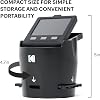
NOTE: Press The power Button for 3 seconds for the device to poer on NOTE: The Device will automaticly shut off after 10 minutes in not in use. NOTE: this is not a flatbed scanner, there is a 14mp camera built into the device that takes a snapshot of the film, if you are looking for HIGH quality scans please look for a flatbed scanner, this device is designed to quickly scan through old memories with good quality. This Device only Scans Negative’s and film not Photos Please note the scanner can only scan film that has previously been developed, it CANNOT develop or scan raw film. Also note super 8 converts to still images not video. also note that quality will be less than an image taken with a 22mp Digital Camera Use the included brush to clean the light box of dust and speckles, to avoid marks on the scanned images. Features: - Large 3.5” LCD Screen: helps you operate the scanner, view slideshows and edit images with handy tilt and adjustable brightness features. - 14 Megapixel Sensor: captures images in stunning HD clarity. - Integrated Interpolation: optional setting enhances images up to 22 megapixels. - 3 Numbered Slide Inserts: easily adapt to your old films for safe, convenient loading. - 3 Numbered Adapter Trays: hold the inserts and click into the unit for speedy scanning. - Home Button: lets you navigate back to the interface’s main page. - Capture Button: saves the current image or returns to the capture view screen. - 3 Function Keys: correspond with various prompts on the screen for effortless interface navigation.

Scanner Type: Film


Brand: KODAK


Model Name: SCANZA


Connectivity Technology: HDMI, USB


Product Dimensions: 4.7"D x 4.7"W x 5"H


Resolution: 7200


Item Weight: 16 ounces


Wattage: 250 watts


Color Depth: 24 bpp


Standard Sheet Capacity: 35


Product Dimensions: 4.72 x 4.72 x 5 inches


Item Weight: 1 pounds


Item model number: RODFS35


Is Discontinued By Manufacturer: No


Date First Available: November 28, 2017


Manufacturer: Kodak


Frequently asked questions

If you place your order now, the estimated arrival date for this product is: Thursday, Aug 6

Yes, absolutely! You may return this product for a full refund within 30 days of receiving it.

To initiate a return, please visit our Returns Center.

View our full returns policy here.

  • Klarna Financing
  • Affirm Pay in 4
  • Affirm Financing
  • Afterpay Financing
  • Zip Pay in 4
  • Financing through Apple Pay
  • Financing through Google Pay
Leasing options through Acima may also be available during checkout.

Learn more about financing & leasing here.

Top Amazon Reviews


  • Easy to use
This is a great way to scan 135mm negatives & save pix digitally. It works with slides and 110 negatives, but it’s slightly cumbersome if you have a ton of them. My issue was getting the pictures from the SD card to my laptop, but I just bought a USB card reader which was so much faster. Great gadget for the price. ... show more
Reviewed in the United States on August 7, 2024 by AE

  • Good value for the dollar. Fast. Sharp images, Color balance needs work. Too much compression!
I purchased this about two months ago. I own two other high end film scanners that I use to get quality scans of some of my slides for various projects. I have always wanted to scan all of my slides and negatives, but the scanners I own take two (2) to four (4) minutes to scan each slide, in addition to the time it takes to clean the slides prior to scanning. This scanner takes about four (4) seconds per scan. I read a lot of the reviews about this scanner with interest. I was concerned with reviews expressing concerns about: 1) Image quality. 2) Ease of use. I decided I would try this scanner and in the worst case scenario it would let me quickly see the approximately 4000 slides in my collection that I have not seen in 40 plus years and allow me to determine which of my slides I would need to re-scan with one of my high end scanners if any. This review only address how this scanner handles slides. The one thing I liked most about it is that the lens in the camera offers a good depth of field and the images are sharp corner to corner even if the film is warped. If your slides are well exposed it produces good scans and the scanner allows coarse exposure and color corrections for poorly exposed slides. Many reviewers complained that these adjustments were too coarse, I found that they allowed rough corrections for old faded and discolored film which makes further adjustments in software editing packages easier. I found that I was able to scan most rolls of film without tinkering with these adjustments once I had corrected my first slide on that roll of film. You will need a can of compressed air or a little blower to keep the flat light source free of dust which if not cleaned will make spots on your scans. An anti-static brush is also helpful. Below I will address the three areas of concerns I was worried about: 1) Image quality. The one area that I wish Kodak would change is the file compression setting that the scanner uses on it’s files. This unit uses a 14 mega-pixel camera with the option to up sample to 22 MB Using the 14 MB setting the image files are only about 1.5 MB, using the 22 MB setting produces files about 4.3 MB. This indicates a very high degree of compression! I wish they offered options to adjust it. This is too much compression! I was fairly certain that my images would need some post-scan color correction. After a short period of testing I felt I saw a slight improvement in image quality from the 22 MB images vs the 14 MB images after post-scan color correction. I set the unit to the 22MB setting and I have ran all of my files through a batch file color correction in Photoshop Elements. To get files from this scanner to approach the output from my high end scanners I have to spend time in Photoshop manually correcting the output from this scanner. But 4 minutes vs 4 seconds and in the end I will most likely only need to re-scan maybe 1% to 2% of my slides, so yes this scanner offers a lot of bang for the buck! 2) Ease of use. It comes with two slide adapters. One for thick plastic mounts and one for the thin cardboard mounts. Both of these adapters are designed so you can quickly push the slides through the scanner. I used the adapter for the thick on just a few of my slides, it work good for plastic mounted slides. The adapter for the thin cardboard mounts has a problem in that if the slide mounts are bent they will catch on the plastic frame on the discharge side of the slide exposure opening where the light passes through the slides so they can be scanned. To fix this I took a small jewelers file and tapered the top and bottom edges of the plastic frame on that side of adapter enabling me to push many of my bent slides through the adapter without catching. I had to bevel a little less than 1/16" of the plastic to get it to work and I still had a just few slides that hung up on this edge. However it is fairly easy to slide the adapter out of the scanner and then push the offending slide mount up or down while pushing the next side into the adapter which will push the offending slide past the catch point. Once the offending slide is no longer caught on the frame you can re-insert the adapter into the scanner and finish pushing your slides through the scanner. Thankfully the adapter is plastic and filing it down was easy. ... show more
Reviewed in the United States on March 24, 2020 by Steven D.

  • Film and Slide Scanner
I used this to Digitize my Library of Slides and Negatives. It is easy to use and worked out well.
Reviewed in the United States on November 4, 2024 by Bob M. Swanson

  • Excellent slide scanner for casual archiving. Easy to use.
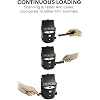
I had trouble finding a good, inexpensive scanner to archive thousands of slides dating back to the 1970s. I finally came across this product, and it was the perfect purchase for my needs. Mind you, yes, this is not a *professional* slide archiver. However, unless your parents / grandparents were photographer pros themselves, you'll just be capturing mediocre slides in higher detail. You may be able to use some fancy post-processing photo-doctoring software to fix the bad lighting, bad color, etc, but honestly... being able to see and share photos that have eluded viewing for decades, without taking up countless hours of your time -- isn't that what you are really after? The sensor is 14MP, which means each photo comes out to about 1.4MB. There is a 22MP option, but it is *software interpolation* only, so I don't even bother. Again, what is the point of upgrading something that isn't high-quality to begin with? It's like putting VHS onto Blu-Ray. The setup is very easy. There are menu-driven buttons to select slide type (it won't auto-detect), and a couple of other options. Mostly, you'll be spending your time scanning on to a standard SD Card. It seems to handle almost any type SD Card, from UHS-II speeds to 256GB capacities. You insert the guide tray into the bottom of the unit, and then start feeding it slides. The *ONLY* drawback here is that you end up one behind in terms of finishing a group of slides. I ended up having to create two "dummy" slides so that I could clear the queue. You'll see what I mean when you use it. I wish there were a less clumsy way, but it's very minor. Simply put, I've scanned thousands of slides in a short amount of time. If the shot was good when originally taken, it is captured quite well by this unit and is now digitized for enjoyment by family and friends. For the price, I don't think you'll find a better product out there that combines simplicity, quality, and just-enough functionality. P.S. This scans some types of camera film as well. I never used the feature, but it is a whole added layer of capabilities to the slide scanner component! ... show more
Reviewed in the United States on March 28, 2022 by Matthew Doebler

Can't find a product?

Find it on Amazon first, then paste the link below.
Checking for best price...