Search  for anything...
HP

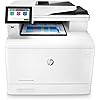
HP Color LaserJet Enterprise M480f Multifunction Duplex Printer (Renewed Premium)

  • Based on 45 reviews
Condition: Refurbished - Excellent
Checking for the best price...
$689.99 Why this price?

Buy Now, Pay Later


As low as / mo
  • – Up to 36-month term if approved
  • – No impact on credit to apply
  • – Instant approval decision
  • – Secure and straightforward checkout

Ready to go? Add this product to your cart and select a plan during checkout.

Payment plans are offered through our trusted finance partners Klarna, Affirm, Afterpay, Apple Pay, and PayTomorrow. No-credit-needed leasing options through Acima may also be available at checkout.

Learn more about financing & leasing here.

Selected Option

Free shipping on this product

This item is eligible for return within 30 days of receipt

To qualify for a full refund, items must be returned in their original, unused condition. If an item is returned in a used, damaged, or materially different state, you may be granted a partial refund.

To initiate a return, please visit our Returns Center.

View our full returns policy here.


Availability: Only 2 left in stock, order soon!
Fulfilled by AIM Distribution_Renewed

Arrives Sunday, May 17
Order within 17 hours and 24 minutes
Available payment plans shown during checkout

Protection Plan Protect Your Purchase
Checking for protection plans...

Model name: Renewed Premium


Features

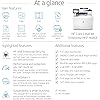
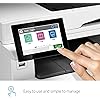
  • Easy to use, simple to manage: Print, scan, copy and fax with the entry-level HP Color LaserJet Enterprise M480f Multifunction Printer, a laser printer with speeds up to 29 ppm, a 50-sheet automatic document feeder and strong security
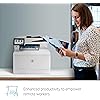
  • Enhanced productivity to empower work teams: Support mobile workers with optional multifunction apps that meet your specific business needs
  • Build business efficiency: Centralize control of your printing environment with HP Web JetAdmin
  • HP Wolf Enterprise Security: The world's most secure printers are always on guard with defensive layers to detect and self-heal from malware, and protect your data and business
  • Automatic 2-sided printing: Speed through tasks and save paper by printing two-sided documents

Description

Get the world's most secure printing, enhanced productivity and sustainability with the HP Color LaserJet Enterprise M480f Multifunction Printer. This color laser printer's dynamic security continually monitors memory activity to detect and stop attacks in real time, and automatically checks firmware during startup. With multifunction versatility, print speeds up to 29 ppm and first page out as fast as 9.3 seconds (black) and 10.9 seconds (color), this entry- level enterprise printer empowers your team to complete tasks quickly. Save paper with automatic two-sided printing and help reduce wasted supplies with HP Roam for Business. Protect your color printer and produce high-quality color graphics while avoiding reprints with Original HP toner cartridges with JetIntelligence.

Brand: HP


Connectivity Technology: Ethernet, USB


Printing Technology: Laser


Special Feature: Auto-Duplex, Network-Ready


Color: White


Model Name: Renewed Premium


Printer Output: Color


Maximum Print Speed (Color): 29 ppm


Max Printspeed Monochrome: 29 ppm


Item Weight: 51.14 Pounds


Printer Type: Laser


Other Special Features of the Product: Auto-Duplex, Network-Ready


Printer Output Type: Color


Item Weight: 51.14 Pounds


Item Dimensions D x W x H: 16.35"D x 15.74"W x 18.58"H


Controller Type: Android


Print media: Card stock, Envelopes, Labels, Paper (plain), Transparencies


Scanner Type: Sheetfed


Maximum Copy Speed Black and White: 29 ppm


Compatible Devices: PC, Smartphones


Warranty Type: 90 days limited warranty


Maximum Copies Per Run: 28


Ink Color: black, cyan, magenta, yellow


Additional Printer Functions: Copy, Fax, Scan


Control Method: App


Compatible Cartridge: HP Black, Cyan, Magenta, Yellow Original LaserJet Toner Cartridges


Number of Trays: 2


Processor Count: 1


Number of Drivers: 3


Resolution: 600 x 600


Display Type: LCD


Color: White


Color Depth: 24 bits_per_pixel


Printer Connectivity Type: Ethernet, USB


Hardware Interface: Ethernet


Number of Ethernet Ports: 1


Total USB 2.0 Ports: 1


Total Usb Ports: 1


Maximum Copy Resolution Color: 1200 x 1200 dpi


Maximum Copy Resolution Black and White: 1200 dpi


Brand: HP


Model Name: Renewed Premium


Model Number: M480f


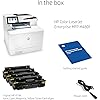
Built-In Media: HP Color LaserJet Enterprise MFP M480f printer; HP Black Original LaserJet Toner Cartridge (~2,400 pages) HP Cyan, Magenta, Yellow Original LaserJet Toner Cartridges (~2,100 pages each); Getting started Guide; 1 Power cord


Series Number: 480


Model Series: M480f


Specific Uses For Product: business


UPC: 195697945816 656942706373


Manufacturer: HP


Warranty Description: One year limited


Item Type Name: Laser Printer


Color Pages per Minute: 29 ppm


B&W Pages per Minute: 29 ppm


Initial Page Print Time: 9.3 seconds (Black), 10.9 seconds (Color)


Maximum Media Size: 8.5 x 14 inch


Maximum Sheet Capacity: 300


Paper Size: 3 x 5 to 8.5 x 14


Maximum print Resolution Color: 1200 x 1200 dpi


Maximum Print Resolution Black and White: 1200 x 1200 dpi


Power Consumption: 581 Watts


Wattage: 581 watts


Dual-sided printing: Yes


Duplex: Automatic


Frequently asked questions

If you place your order now, the estimated arrival date for this product is: Sunday, May 17

Yes, absolutely! You may return this product for a full refund within 30 days of receiving it.

To initiate a return, please visit our Returns Center.

View our full returns policy here.

  • Klarna Financing
  • Affirm Pay in 4
  • Affirm Financing
  • Afterpay Financing
  • PayTomorrow Financing
  • Financing through Apple Pay
Leasing options through Acima may also be available during checkout.

Learn more about financing & leasing here.

Top Amazon Reviews


  • Do not purchase
Model name: New
I bought this to replace my no longer functioning M479. This is the biggest piece of junk. Absolutely nothing has been easy about this printer, and to make matters worse, it's plug in ONLY. I don't recall reading anywhere that this printer doesn't support wireless. I ended up going to Staples and buying a Brother monochrome printer. The much cheaper monochrome works like a charm PLUS it's cheaper to run. HP wasn't much help at all; aside from having NO PATIENCE, they had no knowledge. I don't know if I can return this. I'm still in the window but threw all the packaging away. I thought there would be no issues since I had the HP 479 for so long. Don't waste your money on this! ... show more
Reviewed in the United States on April 21, 2024 by Lorraine K

  • Fails as an MFP with horrible scanning, but good printing
Model name: New
The scanner functionality of the M480f we received had significant flaws. First, the ADF frequently fed pages in crooked, no matter how carefully we inserted the pages or adjusted the page guides, so scanned images ended up askew. This is a problem that I see some other reviews have mentioned about the M480f and similar M479 model. Second, the scan-to-file as a PDF created very low-quality images, looking worse than even a fax at 150 dpi despite having set the PDF output to 300 dpi (default is 200), with the high compression mode disabled (default is enabled), and the base compression rate set to low (default is medium). We frequently use other brands of scanners that generate very clean, crisp scans to PDF at 300 dpi with a medium compression rate, so we know what we are doing and what to expect in terms of PDF creation. We even made sure to run a scanner calibration, but it did not improve. Interestingly, a copy operation (internal scan-to-print) would generate a much cleaner printed image, although strangely regular non bold text on the original would come out bold on the copy, presumably as part of the HP image enhancement in the copy program. Among other documents, we used the first page of the printer’s own configuration report as a test original. One would expect the copy defaults to produce as close to a one-for-one match as possible, but even with various tweaks to the settings we were unable to get a suitable “copy” that one can generally expect from units doing internal scan-to-print as a copy function. It seems there are multiple issues with the internal scanning and output firmware. The printer side was a much better experience. The color output was excellent for this class of laser printer. Both business graphics and photos printed with good detail, no banding, and accurate colors on plain paper with the default “Normal” quality setting of the Windows print driver. In testing the “Enhanced” quality setting, which causes slower output with supposedly a higher interpolated resolution a la HP ImageREt, we perceived a reduction in photo detail and more washout of contrasting lighter colors. In this regard there seems to be no point in opting for the slower, reportedly higher quality setting. So, in summary, I’m rating the M480f as 1 star due to the horrible scanning behavior, which is a key part of an MFP. I’d give it 4 stars for the printer functionally alone. Because of the scanner issues we returned the M480f and plan to replace it with an M455dn print only unit which is the equivalent bottom half of the MFP. For scanning we will be sticking with other brands that we know work much better and will avoid buying HP MFPs. ... show more
Reviewed in the United States on November 1, 2021 by Forum

  • Heavyweight boxer with a glass jaw
Model name: New
TL;DR — copy/scan/print/communicate is excellent, but flimsy physical construction is worrisome. This model prints/scans/copies/communicates VERY well… no significant issues with quality, speed, duplexing, input and output functions. It quickly spits out a ream-plus of color duplex copies/printouts without breaking a sweat. Scan quality is fine for home-office use. It communicates effortlessly with my laptop and mobile phone. I also bought the CF404A 550-sheet paper tray accessory, and the 3JN69A Jetdirect 3100w wireless accessory. And I am happy to say good riddance to the soul-sucking, long-term costs of printer ink. ISSUES: construction/design, installation, automatic document feeder (ADF) WEAK CONSTRUCTION/ DESIGN !!! This is clearly where corners were cut on manufacturing costs. It is so incredibly flimsy and cheaply made compared to its Hewlett Packard Laser Jet (HPLJ) predecessors, such as the HPLJ 3 and HPLJ 5 and even HPLJ 4250, which felt rock solid for every operator touch/manual task — buttons, trays, guides, hinges, clips, toner replacement, sides, panel access locking tabs, etc. Those models could fall over or drop 2 inches, and still operate flawlessly without a second thought. I would gladly pay for an additional $10 worth of thicker/rugged plastic construction in this current model so that it could nonchalantly tolerate real-world operator use, rather than hesitantly handle something that feels only slightly stronger than papier-mâché . The physical design tolerances are poor. This model is definitely not the pinnacle of fine German engineering. Like its better-designed HPLJ antecedents noted earlier, you would expect this model's trays to track smoothly, solidly, and surely for a modern $1,000+ purchase (including accessories), but not so. Both paper trays simply sway from side-to-side by over a full inch every time I pull one out/push one in to restock it with paper, just begging for a retaining clip to snap off or the tray to crack from a sure-handed tug or push. Also, the paper guides inside the trays (A4, letter) and ADF are wiggly and unsure. Even opening the ADF lid feels dicey, as though the lid hinges will break from the stress of routine use, or simply leaving the lid in the up/open position for a while. The wires from the ADF lid to the main body’s logic board move with each open/close of the lid, and are shielded by the thinnest piece of flexible plastic — the copper wires and plastic are destined for premature metal fatigue/ breakage as they bend with each ADF lid opening and closing. Just the flimsy sounds when the operator performs manual actions expose the lowest-bidder physical construction of the platform. When you tap any side of the platform, it feels/sounds thin and hollow. You expect cheap construction from cheap ink-jet printers. However, this high-end home-office model’s physical design quality does not live up to its comparable HPLJ predecessors. SETUP IS USER-HOSTILE. You would expect integrated wireless on this high-end consumer model tier; alas, no. I had to buy the Jetdirect 3100w Wi-Fi accessory and trip through that installation procedure using the non-intuitive prompts on the integrated display screen. The display could really stand to be at least one diagonal inch larger to dramatically improve operator ease-of-use for tactile/legibility aspects. Once the Wi-Fi was installed, it has worked fine since then with both 2.4GHz & 5GHz Wi-Fi bands with both my HP Envy laptop and iPhone 11. Installing the printer itself to my laptop was arduous. Clearly, Microsoft and HP no longer play nice. Rather than simply have Windows 10 recognize the accessory and automatically load the drivers as we’ve been trained for years…. this accessory required installing HP’s own printer software, declining their account/marketing offers, and divining the obtuse steps for setup. Installation succeeded on the second or third attempt. Once installed, it has worked fine since then. ADF CAN BE DODGY ON SMALL JOBS. This probably goes back to the cheap construction of the ADF’s grip and guide mechanism. It’s fine for large volume work, but occasionally on single sheet jobs, it feeds at an angle, which provides a distorted/canted scan or copy. I gave up fighting and just lay the original on the glass, as needed. In summary, everything you expect and need it to do, it does VERY well; but its weak construction/ design leaves me wondering how long it will be able to do it. TL;DR — copy/scan/print/communicate is excellent, but flimsy physical construction is worrisome. ... show more
Reviewed in the United States on October 15, 2021 by Crossover Calvin

  • WORST. PRINTER. EVER.
Model name: New
I have had nothing but problems with this machine since the day I bought it. It is super pricey which I was okay with since I knew the toners would likely last me a long time, but the machine is awful. It prints when it wants to. There is NO TECH SUPPORT from HP. It stopped scanning at one point and does not scan anymore and like I said NO TECH SUPPORT from HP on the issue. DON'T BUY THIS VERY EXPENSIVE POS. ... show more
Reviewed in the United States on April 7, 2022 by TinaLynn

  • Difficult to setup for taking advantage of all features.
Model name: New
Compared to other HP mfp printers I have owned, it is a big pain to add to a wired network. While print quality is the usual HP great, the management software is terrible. Out of the box, HP Smart does not recognize the scanner (!!!), and a bunch of settings have to be changed through the admin interface. If you are not willing to invest IT professional-level effort to get access to the full capabilities, better look elsewhere. ... show more
Reviewed in the United States on December 3, 2021 by Aris

Can't find a product?

Find it on Amazon first, then paste the link below.
Checking for best price...