Search  for anything...

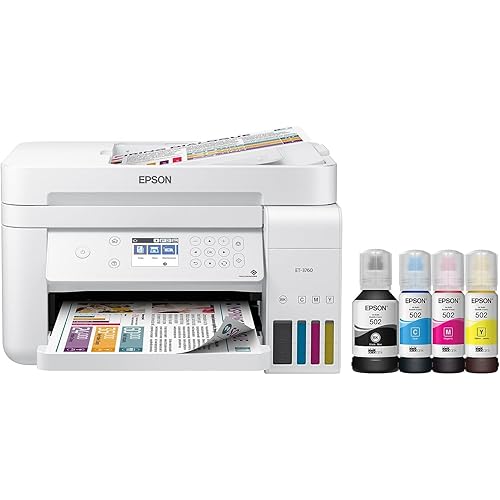
Epson Workforce Pro WF-4833 Wireless All-in-One Color Inkjet Printer, Black - Print Scan Copy Fax - 4.3" LCD, 25 ppm, 4800x2400 dpi, Auto 2-Sided Printing, 50-Sheet ADF, 500-Sheet, Ethernet, DAODYANG

  • Based on 18 reviews
Condition: New
Checking for the best price...
$229.00 Why this price?
Save $231.50 was $460.50

Buy Now, Pay Later


As low as $38.17 / mo
  • – 6-month term
  • – No impact on credit to apply
  • – Instant approval decision
  • – Secure and straightforward checkout

Ready to go? Add this product to your cart and select a plan during checkout.

Payment plans are offered through our trusted finance partners Klarna, Affirm, Afterpay, Zip, Apple Pay, and Google Pay. No-credit-needed leasing options through Acima may also be available at checkout.

Learn more about financing & leasing here.

Free shipping on this product

30-day refund/replacement

To qualify for a full refund, items must be returned in their original, unused condition. If an item is returned in a used, damaged, or materially different state, you may be granted a partial refund.

To initiate a return, please visit our Returns Center.

View our full returns policy here.


Availability: Only 1 left in stock, order soon!
Fulfilled by TechEdge Computers(SN recorded)

Arrives Sep 1 – Sep 3
Order within 15 hours and 2 minutes
Available payment plans shown during checkout

Protection Plan Protect Your Purchase
Checking for protection plans...

Features

  • SZC twIpps 4-in-1 with Wi-Fi: Print / Copy / Scan / Fax. Epson WorkForce Pro WF-4833 is All-In-One color printer that functions as a printer, scanner, fax, and copier. It comes with a printing speed of 25 (PPM) For Mono and 12 (PPM) For Color.
  • Maximize productivity with 500-sheet paper capacity; includes two 250-sheet trays for added convenience. Complete duplex solution auto 2-sided print, copy, scan and fax; plus 50-sheet ADF.
  • 4.3 inches LCD Touchscreen Display. USB, Ethernet, Wireless Connectivity; Android Print, Apple AirPrint, and Mopria Print Service Mobile Printing Capability.
  • Epson printing system is designed to be used exclusively with Epson Genuine Cartridges. High-volume reliability for heavy workloads innovative heat-free technology designed for reliability and reduced downtime
  • What's in the box: WorkForce Pro WF-4833 printer; Quick setup guide; CD-ROM with drivers; Power cord; 4x DURABrite Ultra Ink cartridges (1x Black ink cartridge and 3x color ink cartridges: 1x Cyan, 1x Magenta, 1x Yellow).

Description

Epson WorkForce Pro WF-4833 SpecificationsManufacturer EpsonDisplay 4.3 inches LCD TouchscreenInk Palette Colors Cyan, Magenta, Yellow, and Black (Supported)Printer Functions Printer, Fax, Scanner, and CopierPrinting Speed 25 (PPM) For Mono and 12 (PPM) For Color.Connectivity Medium USB, Ethernet, WirelessMobile Printing Capability Android Print, Apple AirPrint, and Mopria Print ServiceInput Trays Capacity 500 Sheets (Max)Document Feeder Capacity 50 Sheets (Max)Document Feeder Type ADF (Automatic Document Feeder)Media Size Class LegalMonthly Duty Cycle 33,000 Pages (Max)Recommended Monthly Volume 1600 pages per monthColor Availability BlackDimensions (Overall) 13 Inches (H) x 16.7 Inches (W) x 19.8 Inches (D)Weight 26.2 Pounds

Brand: Epson


Connectivity Technology: Ethernet, USB, Wi-Fi


Printing Technology: Inkjet


Special Feature: Wireless


Color: Black


Model Name: WorkForce Pro


Printer Output: Color


Maximum Print Speed (Color): 12 pages_per_minute


Max Printspeed Monochrome: 25 pages_per_minute


Item Weight: 19.4 pounds


Printer Type: Inkjet


Other Special Features of the Product: Wireless


Printer Output Type: Color


Item Weight: 19.4 pounds


Item Dimensions D x W x H: 14.9"D x 16.7"W x 9.8"H


Controller Type: Android


Print media: Paper (plain)


Scanner Type: Sheetfed


Maximum Copy Speed Black and White: 25 pages_per_minute


Compatible Devices: Smartphones


Warranty Type: limited warranty


Ink Color: Cyan, Magenta, Yellow, Black


Additional Printer Functions: All In One


Control Method: Touch


Number of Trays: 2


Display Type: LCD


Resolution: 4800 x 2400


Maximum Media Size: 13 x 19 inches


Maximum Sheet Capacity: 500


Paper Size: 11.5 x 16.5, 11 x 17, 13 x 19, 8.3 × 11.7, 4.1 × 5.8, 8.3 × 11.7, 4.1 × 5.8 inches


Printer Connectivity Type: Ethernet, USB, Wi-Fi


Hardware Interface: Ethernet, USB


Total Usb Ports: 1


Maximum Copy Resolution Color: 4800x2400 dpi


Maximum Copy Resolution Black and White: 4800 x 2400 dpi


Brand: Epson


Model Name: WorkForce Pro


Model Number: WF-4833


Built-In Media: 1


Model Series: WorkForce Pro


Specific Uses For Product: home office


UPC: 010343940215


Unit Count: 1 Count


Manufacturer: Epson


Warranty Description: 1


Color Pages per Minute: 12 pages_per_minute


B&W Pages per Minute: 25 pages_per_minute


Color: Black


Color Depth: 24 bits_per_pixel


Maximum print Resolution Color: 4800 x 2400 dpi


Maximum Print Resolution Black and White: 4800 dpi


Duplex: Automatic


Frequently asked questions

If you place your order now, the estimated arrival date for this product is: Sep 1 – Sep 3

Yes, absolutely! You may return this product for a full refund within 30 days of receiving it.

To initiate a return, please visit our Returns Center.

View our full returns policy here.

  • Klarna Financing
  • Affirm Pay in 4
  • Affirm Financing
  • Afterpay Financing
  • Zip Pay in 4
  • Financing through Apple Pay
  • Financing through Google Pay
Leasing options through Acima may also be available during checkout.

Learn more about financing & leasing here.

Top Amazon Reviews


  • This is the one to get!
Great, fast prints. Love the 2 paper cartridges. I use one for envelopes and the other for paper. Does use color ink fast. Note: Sleep mode does not work at 1 minute. Had to set to 5 minutes.
Reviewed in the United States on February 18, 2023 by DJ

  • Decent for home
My wife actually was able to set it up by herself, setup wi-fi on it, find it on network, insert inc, print test page, do two-sided scan, etc. Perfect for home office.
Reviewed in the United States on February 27, 2023 by hel_dar

  • The most frustrating printer I have ever had
THe first printer I got was so broken it wouldn't boot up. The replacement did manage to boot up. Both of them were obviously not new from the factory even though it said they were. They came in beat up old boxes and the internal wrapping and taping to hold it together were done in a horrible way. Then there was getting it to work. It was hell. And to be clear I am a computer professional not some person who doesn't know how to download a driver. Getting it connected to wifi was hell, then expecting it to actually print was hell. I frequently have to reboot it to get it to print and it very, very frequently misfeeds so you get one page printed over two or three. Finally tonight I tried hooking it up to USB to get it working that way. I couldn't get it to print at all. I installed the driver and the printer didn't appear. It kept getting confused with the fax driver. Plus the software itself is terrible, like something out of the 1990s. I have sat here for two hours trying to get it to print over a simple USB cable (which I tested and works just fine) and nothing. Printers are always a pain, butt his is undoubtedly the worst experience I have ever had with a printer. I feel ripped off both because it doesn't work and also because it was sold as new and it is CLEARLY in a box that has been opened, and badly repacked. Presumably whoever had it before found it didn't work and sent it back and they figured they'd just resend it to some other shmuck. ... show more
Reviewed in the United States on December 13, 2022 by FRASER ORR

  • Great printer - disappointed about it being used
It is a great printer, however, it arrived with Amazon tape over the corners. After going through the setup if found that the printer had already been registered with Epson Connect. In itself, not a big deal. It is easy to unregistered and register anew. This said, the printer was sold as new. Very very disappointing from Amazon. ... show more
Reviewed in the United States on December 17, 2022 by IT Dept

  • I liked it, but now I don't
Bought this as it came highly rated as an all-in-one and actually printed well, although it sometime seemed to take exceptionally long for the job to arrive at the printer. However, just learned (too late) to NEVER DO FIRMWARE updates if you plan to use third party (much less expensive) ink! Was working fine for 3 months until firmware update 2 days ago and now it rejects my half-full color cartridges which were working perfectly. It won't even let me print with the Epson black ink cartridge installed! Are you kidding? Really?!! This is a method to force us to buy the brand name, highly overpriced Epson ink and although I've owned three Epson all-in-one printers, I'm now moving on to a different brand as it will be equitable to the price of the four Epson replacement cartridges. Another feature that is aggravating is you have to manually wake this printer by touching the screen. My last one would wake up when a print job was sent. I'm so done with this one and Epson altogether. ... show more
Reviewed in the United States on March 2, 2023 by DIY Dad

  • Misaligns labels horribly
I was super stoked when I got this printer because the print quality was so much better than my previous printer. I am printing labels for my business and it was consistently misaligning the labels. I tried slowing the print job down so it wouldn't pull the paper through as fast. I tried adjusting my margins, both through the printer and through the label program I was using. I printed specifically from Adobe because that was supposed to be better and print to scale, but still they were always yanked through and misaligned. I called technical support...wow, I think I knew more about the printer than this guy did. He was looking through his manual to help me, and had no real answers for me. I finally told him I could make do with it on my own, just so I could end this conversation. It was two weeks of me trying to print my labels, I wasted about 30 sheets of labels just before the printer told me I was out of ink. Biggest mistake was buying this for a small business. I am sure this could work well for plain documents, but I would steer clear of this printer for labels. I've never been so close to chucking it out the window out of frustration. ... show more
Reviewed in the United States on October 16, 2022 by Joe

  • Wanted to like it
My printer got paper jams right out of the box. I thought I may have messed something up but everything was correct. I didn’t realize when you update the printer you can no longer use generic ink. The ink cartridges are expensive and use a lot of ink. I wish I would have purchased a different brand. It’s upsetting that the big printer manufacturers are locking out generic ink. You basically have to buy an older model to use it. ... show more
Reviewed in the United States on December 8, 2022 by John

  • Crappy printer, even worse support
Total POS. Don't waste your money. Goes through frequent firmware updates and each time it messes up settings and tanks the printer function. The latest one June 2026 killer it completely. It will not recognize any cartridge, even Epson OEM cartridges now. EPSON support is no help.
Reviewed in the United States on June 27, 2026 by Kim Wallis

Can't find a product?

Find it on Amazon first, then paste the link below.
Checking for best price...