Prime Day deals end soon! View Deals
Search  for anything...

Epson Workforce WF-7720 Wireless Wide-Format Color Inkjet Printer with Copy, Scan, Fax, Wi-Fi Direct and Ethernet, Amazon Dash Replenishment Ready

  • Based on 2,024 reviews
Condition: New
Checking for the best price...
$1,061.15 Why this price?
Prime Day Deal · 24% off was $1,401.60

Buy Now, Pay Later


As low as / mo
  • – Up to 36-month term if approved
  • – No impact on credit to apply
  • – Instant approval decision
  • – Secure and straightforward checkout

Ready to go? Add this product to your cart and select a plan during checkout.

Payment plans are offered through our trusted finance partners Klarna, Affirm, Afterpay, Apple Pay, and PayTomorrow. No-credit-needed leasing options through Acima may also be available at checkout.

Learn more about financing & leasing here.

Free shipping on this product

This item is eligible for return within 30 days of receipt

To qualify for a full refund, items must be returned in their original, unused condition. If an item is returned in a used, damaged, or materially different state, you may be granted a partial refund.

To initiate a return, please visit our Returns Center.

View our full returns policy here.


Availability: Only 3 left in stock, order soon!
Fulfilled by ElectroSupplyCo (Serial Numbers Recorded)

Arrives Saturday, Jul 4
Order within 16 hours and 40 minutes
Available payment plans shown during checkout

Protection Plan Protect Your Purchase
Checking for protection plans...

Features

  • Epson strongly recommends the use of Genuine Epson inks for a quality printing experience. Non Epson inks and inks not formulated for your specific printer may cause damage that is not covered by the Epson warranty.
  • Get performance beyond laser the workforce WF-7720, powered by Precision Core
  • Print-shop quality borderless prints upto 13" X 19". Operating Systems - Windows 10 (32-bit, 64-bit), Windows 8/8.1 (32-bit, 64-bit), Windows 7 (32-bit, 64-bit), Windows Vista (32-bit, 64-bit), Windows Server 2003 (SP2) Windows Server 20167, Mac OS X 10.6.8 macOS 10.12.x8
  • Economical uses upto 80 percent less power vs. Color laser printers (4)
  • High-volume printing 500-sheet capacity, dual trays, Plus a rear feed for specialty paper; 125-sheet output tray
  • Note: This printer is designed for use with Epson cartridges only, not third-party cartridges or ink. See product description for more details
  • Auto 2-sided Print, copy, scan and fax Plus 35-page auto document feeder
  • Easy navigation and control Intuitive 4. 3" color touchscreen
  • Ultimate wireless printing and networking Print from iPad, iPhone, Android tablets and smartphones); Includes Wi-Fi Direct), Ethernet and NFC)
  • Large scans easily scan upto 11" X 17" With 2-sided auto document feeder

Description

Powered by Precision Core, the workforce WF-7720 wide-format all-in-one printer quickly produces print-shop-quality borderless prints up to 13" X 19" And scans up to 11" X 17". A versatile inkjet, it features 500-sheet capacity, dual trays, Plus a rear feed for specialty paper, ensuring powerful productivity for any office. It also includes auto 2-sided Print, copy, scan and fax, Plus a 35-page auto document feeder. Use the 4. 3" Color touchscreen for easy navigation and control. Featuring the ultimate in wired and wireless networking, the WF-7720 makes it easy to print from tablets and smartphones), and includes Wi-Fi direct(2), Ethernet and NFC). This Epson printer is designed for use with only genuine Epson-brand cartridges. Other brands of ink cartridges and ink supplies are not compatible and, even if described as Compatible, may not function properly or at all. Epson provides information about the design of the printer on the box and in many other locations and materials Included with the printer and on the website. Epson periodically provides firmware updates to address issues of security, performance, minor bug fixes and ensure the printer functions as designed. This printer was designed to work only with genuine Epson ink cartridges and some updates may affect the functionality of third party ink. Non-Epson branded or Altered Epson cartridges that functioned prior to a firmware update may not continue to function. Black and color print speeds are measured in accordance with ISO/IEC 24734. Actual print times will vary based on system configuration, software, and page complexity. For more information, visit www. Epsonbination/printspeed1 most features require an Internet connection to the printer, as well as an Internet- and/or email-enabled device. For a list of Epson Connect enabled printers and compatible devices and apps, visit www. Epsonbination/connect2 Wi-Fi certified; level of performance subject to the range of the router being used. Wi-Fi Direct may require printer software. 3 NFC requires use of a device that includes NFC, and may require additional software. 4 Up to 80 percent based on comparing manufacturers’ reported Tec values of the best-selling, A3 color laser printers priced at $999 (USD) or less with print Speeds of 30 ppm or less as of December 2016. Actual power savings will vary by product Model and usage. 5 see our website for convenient and reasonable recycling options at www. Epsonbination/recycle6 smart way is an innovative partnership of the U. S. Environmental Protection Agency that reduces greenhouse gases and other air pollutants and improves fuel efficiency.

Brand: Epson


Connectivity Technology: Wi-Fi


Printing Technology: Inkjet


Special Feature: Ethernet,Wireless


Color: Black


Model Name: WorkForce


Printer Output: Color


Maximum Print Speed (Color): 1319


Max Printspeed Monochrome: 18 ppm


Item Weight: 40.8 Pounds


Printer Type: Inkjet


Other Special Features of the Product: Ethernet,Wireless


Printer Output Type: Color


Item Weight: 40.8 Pounds


Item Dimensions D x W x H: 22.3"D x 32.2"W x 13.4"H


Print media: Paper (plain)


Scanner Type: Sheetfed


Maximum Copy Speed Black and White: 30 ppm


Compatible Devices: Laptops, PC


Warranty Type: Limited Warranty


Maximum Copies Per Run: 35


Ink Color: Color


Additional Printer Functions: All In One


Control Method: App


Compatible Cartridge: Epson


Number of Trays: 3


Processor Count: 1


Resolution: 4800 x 1200


Display Type: LCD


Maximum Media Size: 13 x 19 inch


Maximum Sheet Capacity: 500


Paper Size: 4" x 6", 5" x 7", 8" x 10", Letter, A4, A3, US B


Output sheet capacity: 125


Printer Connectivity Type: Wi-Fi


Hardware Interface: Ethernet, USB


Number of Ethernet Ports: 1


Total Usb Ports: 1


Maximum Copy Resolution Color: 600 x 2400 dpi


Maximum Copy Resolution Black and White: 600


Brand: Epson


Model Name: WorkForce


Model Number: WF-7720


Built-In Media: 4x DURABrite Ultra Ink cartridges (1x Black ink cartridge and 3x color ink cartridges 1x Cyan, 1x Magenta, 1x Yellow), Power Cord, WorkForce WF-7720 all-in-one, instruction manual


Model Series: WorkForce


Specific Uses For Product: Office


UPC: 010343935945


Global Trade Identification Number: 45


Manufacturer: Epson


Warranty Description: 1-year limited warranty in the U.S. and Canada


Item Type Name: WorkForce WF-7720 Wireless Wide-format Color Inkjet Printer with Copy, Scan, Fax, Wi-Fi Direct and Ethernet


Unit Count: 1.0 Count


Color Pages per Minute: 1319


B&W Pages per Minute: 18 ppm


Initial Page Print Time: 10 seconds


Color: Black


Maximum print Resolution Color: 5760 x 1440 dpi


Maximum Print Resolution Black and White: 5760 x 1440 dpi


Power Consumption: 19 Watts


Wattage: 19 watts


Dual-sided printing: Yes


Duplex: Automatic


Frequently asked questions

If you place your order now, the estimated arrival date for this product is: Saturday, Jul 4

Yes, absolutely! You may return this product for a full refund within 30 days of receiving it.

To initiate a return, please visit our Returns Center.

View our full returns policy here.

  • Klarna Financing
  • Affirm Pay in 4
  • Affirm Financing
  • Afterpay Financing
  • PayTomorrow Financing
  • Financing through Apple Pay
Leasing options through Acima may also be available during checkout.

Learn more about financing & leasing here.

Top Amazon Reviews


  • Works Great
Style: Printer (WF-7720)
So ... this printer is huge! The stated dimensions are correct, and it's hard to be smaller and handle 13x19 prints and 11x17 scans, but buyer beware--this printer is massive. Anyway, once you get over the size, there's a lot to love For starters it does everything you'd expect (scan, copy, print, fax,etc...) but again, it can do all of the above at enormous sizes (while still handling letter sized tasks with aplomb). It supports two sided printing and scans, and it has huge trays for stuff going in (35 page feeder for scans and 500 page paper tray) as well as output. Being an Epson, it does pretty darn good photo printing (even edge to edge prints at poster sizes), but this is more of a office printer that is aimed at PowerPoints than a large format photo printer (Epson will sell you one of those for quite a bit more, but they'll blow you away). In the context of small office use, it's crazy fast, doesn't need to warmup (like a laser), and uses pigment inks (bleed less and simply are better than dye based inks). It's easy to add to a network, does quite a bit without a PC (using the small but effective screen), and supports various phones and tablets. What's not to like? Well, if you don't need large format printing AND scanning, there are options that print large format prints and scan legal size documents that are much smaller, and ones that max out for legal sized prints and scans that are smaller still. The price is very competitive, but you aren't getting the heavy build of a HP LaserJet (especially the ones of years gone by), and consumables do add up. I'd recommend this for a small office that needs more than a consumer printer but doesn't want to get into managed printing or invest in a laser printer. ... show more
Reviewed in the United States on June 3, 2020 by Amazon Customer

  • Professional Prints
Style: Printer (WF-7720)
The quality of the prints is Excellent. I am extremely pleased with my purchase. Make sure you push the paper up to the guide or it might slightly angle the page. Not enough not to use, but it's better to be sure to keep against the guide. Have scanned and the picture came out in detail. Easy to load the paper. Easy to load the ink when you find the correct option on the touch screen. Touch screen works very well. Double prints beautifully, but be sure to have the catch tray pulled out. I forgot once and it caused it to pull in two pages at once which messed up the printing. My mistake, not something wrong with the printer. Haven't set up a fax number yet, but I don't expect any trouble their either. Use the WiFi to connect to the printer/scanner. It had step by step instructions. Had it up and running within a half hour. Biggest trouble was finding something big enough to set it on. I recommend a separate table for the printer. I've only had to replace the black ink so far and I bought a cartridge larger than the original, to make it last longer this time. ... show more
Reviewed in the United States on July 16, 2020 by Deborah Smith-Seadler

  • All-around very nice printer
Style: Printer (WF-7720)
So, I mainly have great things to say about this thing. I've had great results printing sublimation and transfers with it using 3rd party ink and cartridges. The borderless feature works and works well. All the ways of feeding paper work well and adjust easily to different sizes. It takes a little while to properly convert to and prime for sublimation. But it's definitly worth the price and wait. My only concern is that occasionally the edges of paper will have a little bleeding (for lack of a better term) but adjusting the kind of paper in the settings seems to be stifling that issue. Use glossy for gloss and matte for matte, etc. Overall, so far, this thing is great and the oversized paper feature is amazing for what I'm doing. Scanner works great and produces great quality images. I haven't tried scanning 2-sided images. I think there's a way to do that automatically. But I haven't messed with it because I do not need that function as of yet. ... show more
Reviewed in the United States on December 11, 2019 by Tom Segura

  • If you like calling tech support, shipping things, and wasting ink this printer is for you!! If you like calling tech support, shipping things, and wasting ink this printer is for you!!
Style: Printer (WF-7720)
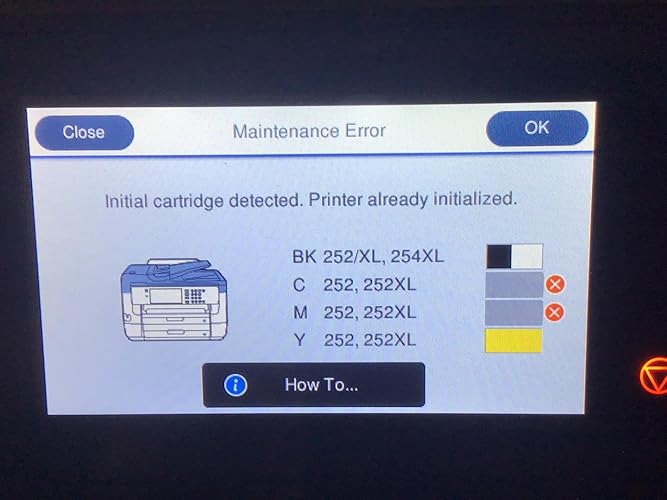
I purchased my first one less than a year ago, and it printed fine for a few documents. Once I switched to my real set of EPSON ink (the real ink from Epson) that's when I started having issues with it. The issue is it stopped recognizing the cartridges. I would go to replace it after just installing it, and it was still be full. The lines when printing out the alignment page kept disappearing slowly after each one; colors would be missing from documents. The thing that this printer does well is notify you of errors and to check on it. It's a very needy printer; like having a kid. I tried everything, and EPSON did send me new ink since it was all wasted in trying to clean the print heads. Once I got the new cartridge I had to have my dad call back EPSON support to see what I needed to do next because I had to go to work...the call centers weren't open during convenient times because I live in Hawaii. There was a language barrier with the call center to where we had to go to me taking pictures of the issues, and emailing it to him when I made my initial call. In the end, that first printer had to get shipped back to EPSON, and they sent me a new one. Now for the surprise. I've had this new printer for about a month, and same results!! It's not recognizing the cartridges again. The cartridges I just put in are brand new. I've owned various printers over the past two decades, and never had issues like this. My last Epson printer was in 2002, and was great...I think a 782 or something like that. This printer's performance is so far away from what my 2002 printer was at that you have to take a plane and then a ship to where it is...just kidding about that, but I'm just saying the quality is not the same. This is a purchase I regret, and hopefully we'll see if they give me a third replacement within a year. Just know, this printer has a good scanner once you figure it out...it's BIG!! The achilles heel is printing; it is a little grainy when you try to print multiple pages on one sheet of paper. It looks very impressive on your printer stand or table because of the size, and that's pretty much what you'll be buying it for. It's best served as an oversized scanner and place to store paper so you can write down the information from tech support as you try to mail it back through FedEx via your car. Like I said, if you like calling tech support, shipping things, and wasting ink this is your printer. (Don't buy it, but if you do GET the extended warranty because you'll need it). The picture I attached has three new ink cartridges...Cyan, Magenta, and Yellow. Yes, two of them show empty, but they were just opened and installed 10 minutes before the photo. I even reinstalled them to make sure. ... show more
Reviewed in the United States on March 24, 2020 Reviewed in the United States on March 24, 2020 by Geocon

  • GREAT UPGRADE
Style: Printer (WF-7720)
The printer is great for me. It’s my first reliable inkjet printer and it has a lot of functionality that businesses need. If you want to scan to your email address, you can type in the email server information manually using scan to email or you can use scan to cloud to scan to any email address you want without typing in the email server information manually. You can only print borderless prints in the first and rear trays and you can only print up to 13x19 in the rear tray. You can only print one 13x19 print at a time, so make sure there is one peice of paper in the rear tray at a time. It uses a lot of ink, you will only be able to print less than 10 full color, double sided 11x17 prints and less than 5 13x19 prints on XL ink cartridges. It comes with standard ink cartridges, so you have to buy additional ink if you know you are going to need more. The flat bed scanner can scan up to 11x17 at a resolution up to 600 dpi and the feeder can do the same. The flat bed scanner would be better to use for scanning photos and the feeder would be better for documents that are single or double sided. The document feeder can scan both sides of a document without intervention. This printer also operates as a FAX, which is easy to set up. Since the printer has so many settings, you might get overwheled when navigating the settings on the touch screen display. It might be easier to access the printer’s settings from your web browser and change settings from there. I have a Wired connection from my router to the printer, but it has Wireless capability that may not be as stable as a Wired connection. I have never experienced a disconnect when the printer is using a Wired connection. Please note that I am giving this printer a 4-star rating because there are limitations that aren’t specified in the product description. ... show more
Reviewed in the United States on December 8, 2018 by Stellarspace

  • Heavy duty
Style: Printer (WF-7720)
We really like this heavy-duty printer. I've had it a week. It has two paper trays. The top paper tray can be adjusted from copy paper to 4" x 6" photo paper size. You set the paper size for each tray with the large touch screen. The bottom tray doesn't adjust that small. Both trays will hold about half a ream. I have it hooked up to the network with an Ethernet cable. It works wirelessly to our phones (we have a wireless router on the network). Downloaded Epson software to phones. Came with an installation CD that worked well. Software is very basic for scanning. We don't have a land line so do not use FAX. Heavy construction. Doesn't have larger black print cartridge. Printed nice photo. I recommend it so far. Addendum: Haven't used that much but needed nozzle cleaning already. Maybe that's why. Also, it started jamming paper, making horrible grinding noise. Stopped after 20 sheets or so. Dissappointing. When making a copy of 8.5x11 it wants to use top paper tray which is designed to hold photo 4x6, e.g.. So you have to tell it to use the bottom tray which has 8.5x11 paper in it. They should put 8.5x11 tray in top tray and photo enabled tray as bottom tray. ... show more
Reviewed in the United States on March 12, 2020 by Jennifer

  • One great printer!
Style: Printer (WF-7720)
So far have not found anything I don't like. There are many things I like about it, print quality is very good and fast. Just printed a merge file in MS Word and Excel of about 280 letters, no problems at all. It does a very good job printing in color. We have any Epson XL15000 for printing photografts. The scanner/copier can that up to 13x19 paper which is very helpful. Very pleased with the quality of the reproductions. I have not set up the fax yet, so I can tell you anything about the fax. It comes with 2 trays for paper plus a rear feed for larger paper, easy to work with and the software that comes with the printer is very nice, works very easy to work with. Right now we are using the printer in wireless mode, we have 4 computers hooked up to it right now and no problems with it. I am not sure how long it took to set, it went fast for all the things it had to set up. The other three computers went faster. We just moved and once we get the wired network installed I will move the printers over to it. ... show more
Reviewed in the United States on January 26, 2020 by Wes the train man

  • Great Printer. Great Printer.
Style: Printer (WF-7720)
I been ready all the reviews and i must say, I bought mine in the middle of 2020 and i have none of these problems. It works flawless. a couple of head cleans and thats it. WiFi works perfect colors are on point. the feeder works great after almost two years and i use it daily. It's sad that other people have had so many issues, However i have experienced non of these issues. Price wise Im glad i purchased it when i did. Its a $1000.00 more than when i got it. CRAZY. Any way its a dam good printer. i work with both my MAC's and i and print from either one with no lagging with the print time. Sorry for all those who had problems, there is a trouble shooting guide on the Epson website and its easy to read and EXTREMELY HELPFUL. Maybe if you look it up, it can help you with the issue you're having. Again GREAT PRINTER!!!!!!!!!!!!!!! ... show more
Reviewed in the United States on March 22, 2022 Reviewed in the United States on March 22, 2022 by David B.

Can't find a product?

Find it on Amazon first, then paste the link below.
Checking for best price...