Buy Now, Pay Later
- – Up to 36-month term if approved
- – No impact on credit to apply
- – Instant approval decision
- – Secure and straightforward checkout
Ready to go? Add this product to your cart and select a plan during checkout.
Payment plans are offered through our trusted finance partners Klarna, Affirm, Afterpay, Zip, Apple Pay, and Google Pay. No-credit-needed leasing options through Acima may also be available at checkout.
Learn more about financing & leasing here.
Selected Option
This item is eligible for return within 30 days of receipt
To qualify for a full refund, items must be returned in their original, unused condition. If an item is returned in a used, damaged, or materially different state, you may be granted a partial refund.
To initiate a return, please visit our Returns Center.
View our full returns policy here.
Recently Viewed


At a glance
- Condition
- New
- Style
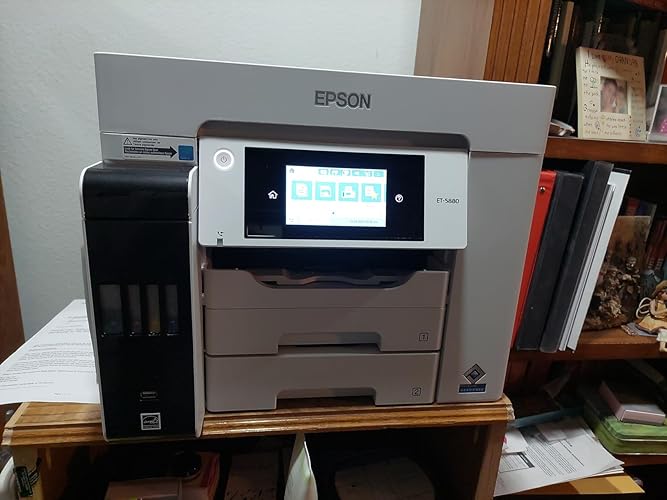
- ET-5880
- Set
- FAX/Print/Copy/Scan
- Dimensions
- 32.4"D x 16.7"W x 18.1"H
- Weight
- 39.2 lb
- Color
- White
- Printing Technology
- Inkjet
- Warranty
- 2 Years Limited Warranty
- Works with
- Laptops, PC
Features 5
- Sold as 1 Each.
- Set of replacement bottles includes enough ink to print up to 7,500 pages black/6,000 color Ultimate wireless solution, plus Ethernet includes Wi-Fi
- Fast and convenient powered by PrecisionCore Heat-Free Technology; print speeds up to 25 ISO ppm black and color; no warmup time for fast first page out; PCL/PostScript support. 500-sheet paper capacity two front trays plus a rear feed for specialty paper. Product protection you can count on 2-year limited warranty with registration, plus key security features; WPA2 for both wireless and Wi-Fi Direct, user-initiated data erase and network protocol disablement. Safety Data Sheet.
- Print-shop quality Epson DURABrite Inks are pigment-based for crisp, vibrant prints in black-and-white and color that are instant-dry; borderless prints up to 8.5" x 14". High productivity auto 2-sided print/copy/scan/fax; 4.3" color touchscreen; hands-free voice-activated printing; reliable performance for an extreme workload duty cycle. Genuine Epson Ink for Genuine Epson Quality Epson strongly recommends the use of genuine ink to ensure optimal print quality and performance. Use of
- Less waste zero-cartridge waste with high-yield ink bottles; very low energy consumption. Exclusive EcoFit ink bottle design uniquely keyed for easy filling of each color.
Description
The EcoTank Pro ET-5880 wireless all-in-one offers fast Cartridge-Free Printing with easy-to-fill supersized ink tanks. You can save up to 80 percent with low-cost replacement ink bottles vs. standard-capacity color laser toner cartridges (2) – about 2 cents per color ISO page versus 14 cents with cartridges (2). PrecisionCore Heat-Free Technology delivers high-volume, print-shop-quality output, plus speeds up to 25 ISO ppm black and color (ƚ). This all-in-one with Epson DURABrite pigment-based ink delivers vibrant borderless prints up to 8.5" x 14". Each replacement ink set includes enough ink to print up to 6,000 pages (3). Plus, there’s zero cartridge waste and very low energy consumption (4). The ET-5880 features a 500-sheet front tray paper capacity and rear specialty-paper feed, plus a 4.3" color touchscreen and hands-free voice-activated printing (5). And, it offers PCL/PostScript support (1). The NPD Group, Total Channel Tracking Service, U.S. & Canada, Inkjet SF/MF Printers, Refillable ink tank included, based on units, February 2019 - January 2020. Supertank printers are defined as refillable ink tank printers. Promo valid for ET-5150, ET-5170, ET-5180 ET-5800, ET-5850, ET-5880, ET-16600 or ET-16650 printers purchased from 10/1/2021 to 3/31/2025. Product must be registered within 30 days of purchase. Limit four 542 ink bottles per claim. Each claim cannot contain multiple bottles of the same color. Retain your empty 542 ink bottle for submission along with rebate form. Promotion applies to ink only. Printer covered by Epson 2-year ltd warranty with registration. For promo participation, you must register your product. See manufacturer’s website for details. Ƚ Black and color print speeds are measured in accordance with ISO/IEC 24734. Actual print times will vary based on factors including system configuration, software, and page complexity. 1. Actual savings and costs will vary considerably based on print tasks, print volumes and usage conditions. Savings and cost per ISO page are based on the cost of replacement ink bottles and the cost of enough standard-capacity color laser toner cartridges to achieve the total page yields of the ink bottles using the manufacturers' online prices and yields for the best-selling similarly featured color laser printers, available at retail, priced at $999 or less (USD) with speeds of 40 ppm or less per industry-available data as of July 2019. Savings of up to $600 (USD) and cost per ISO page of about $0.09 (USD) for XL-capacity color laser toner cartridges based on the same methodology. 2. Part of the ink from the included bottles is used for initial setup; yields are lower than those of replacement ink bottles. Replacement and included ink bottle yields based on the ISO/IEC 24712 pattern with Epson’s methodology. Actual ink yields will vary considerably for reasons including images printed, print settings, temperature and humidity. Yields may be lower when printing infrequently or predominantly with one ink color. All ink colors are used for printing and printer maintenance, and all colors must be available for printing. 3. Based on comparing manufacturers’ reported TEC values of the best-selling, similarly featured color laser printers priced about $999 (USD) or less with print speeds of 40 ppm or less as of July 2019. 4 Epson Connect. account and voice-activated account registration required. 5. Most features require an Internet connection to the printer, as well as an Internet- and/or email-enabled device. 6. Wi-Fi CERTIFIED; level of performance subject to the range of the router being used. Wi-Fi Direct may require printer software. 7. 12 months of standard limited warranty or 80,000 plain paper sheets (whichever happens first). For an additional 12-month extended service plan (total of 24 months or 80,000 plain paper sheets, whichever happens first), register your product and use Epson genuine ink bottles. See Limited Warranty for details. 8. SmartWay is an innovative partnership of the U.S. Environmental Protection Agency that reduces greenhouse gases and other air pollutants and improves fuel efficiency.
Specs 51
| Brand | Epson |
|---|---|
| Connectivity Technology | Wi-Fi |
| Printing Technology | Inkjet |
| Special Feature | Refillable Ink Tank |
| Color | White |
| Model Name | EcoTank ET-5880 |
| Printer Output | Color |
| Maximum Print Speed (Color) | 25 ppm |
| Max Printspeed Monochrome | 25 ppm |
| Item Weight | 39.2 pounds |
| Printer Type | Inkjet |
| Other Special Features of the Product | Refillable Ink Tank |
| Printer Output Type | Color |
| Item Dimensions D x W x H | 32.4"D x 16.7"W x 18.1"H |
| Controller Type | Push Button |
| Print media | Paper (plain) |
| Scanner Type | Sheetfed |
| Maximum Copy Speed Black and White | 40 ppm |
| Warranty Type | standard limited warranty |
| Ink Color | Black |
| Additional Printer Functions | Scan |
| Control Method | Touch |
| Number of Trays | 1 |
| Processor Count | 1 |
| Display Type | color touchscreen |
| Resolution | 4800 x 2400 |
| Color Depth | 24 bpp |
| Maximum print Resolution Color | 4800 x 2400 dpi |
| Maximum Print Resolution Black and White | 2400 dpi |
| Power Consumption | 19 watts |
| Wattage | 19 watts |
| Duplex | Automatic |
| Model Number | ET-5880 |
| Built-In Media | EcoTank Pro ET-5880 all-in-one, power cord, 2 bottles of 542 Black ink (127 mL) and 2 bottles each of 542 Cyan, Magenta, Yellow (70 mL), CD-ROM for product setup |
| Model Series | EcoTank Pro |
| Specific Uses For Product | Office |
| UPC | 010343952782 |
| Item Type Name | Printer |
| Manufacturer | Epson |
| Color Pages per Minute | 25 ppm |
| B&W Pages per Minute | 25 ppm |
| Maximum Media Size | 8.5 x 14 inch |
| Maximum Sheet Capacity | 500 |
| Paper Size | 8.5 x 14 |
| Printer Connectivity Type | Wi-Fi |
| Hardware Interface | Ethernet |
| Number of Ethernet Ports | 1 |
| Total USB 2.0 Ports | 1 |
| Total Usb Ports | 1 |
| Maximum Copy Resolution Color | 1200 dpi |
| Maximum Copy Resolution Black and White | 1200 dpi |
No specs match.
Frequently asked questions
To initiate a return, please visit our Returns Center.
View our full returns policy here.
- Klarna Financing
- Affirm Pay in 4
- Affirm Financing
- Afterpay Financing
- Zip Pay in 4
- Financing through Apple Pay
- Financing through Google Pay
Learn more about financing & leasing here.
Similar Products




Top Amazon Reviews