Search  for anything...

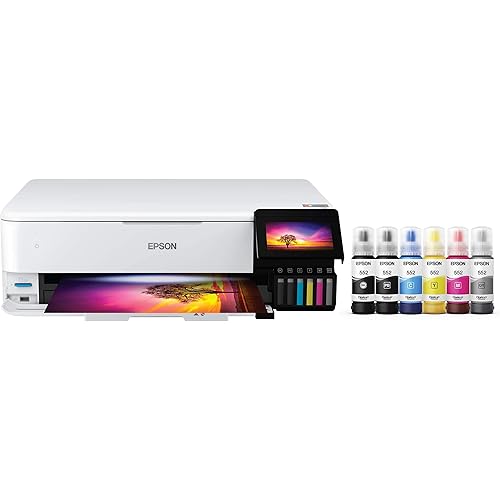
Epson EcoTank ET-2800 Wireless Color All-in-One Cartridge-Free Supertank with Scan and Copy, The Ideal Basic Home Printer - White

  • Based on 17,936 reviews
Condition: New
Checking for the best price...
$239.99 Why this price?

Buy Now, Pay Later


As low as $40.00 / mo
  • – 6-month term
  • – No impact on credit
  • – Instant approval decision
  • – Secure and straightforward checkout

Ready to go? Add this product to your cart and select a plan during checkout.

Payment plans are offered through our trusted finance partners Klarna, Affirm, Afterpay, Apple Pay, and PayTomorrow. No-credit-needed leasing options through Acima may also be available at checkout.

Learn more about financing & leasing here.

Selected Option

Free shipping on this product

FREE 30-day refund/replacement

To qualify for a full refund, items must be returned in their original, unused condition. If an item is returned in a used, damaged, or materially different state, you may be granted a partial refund.

To initiate a return, please visit our Returns Center.

View our full returns policy here.


Availability: Only 10 left in stock, order soon!
Fulfilled by MyOfficeInnovations/Staples, Inc.

Arrives Thursday, Feb 19
Order within 18 hours and 5 minutes
Available payment plans shown during checkout

Protection Plan Protect Your Purchase
Checking for protection plans...

Color: White


Style: ET-2800-W


Pattern Name: Printer


Features

  • Innovative Cartridge-Free Printing High-capacity ink tanks mean no more tiny, expensive ink cartridges; Epsons exclusive EcoFit ink bottles make filling easy and worry-free.Operating Temperature : 50 to 95 F (10 to 35 C)
  • Dramatic Savings on Replacement Ink Save up to 90% with replacement ink bottles vs. ink cartridges (1) thats enough to print up to 4,500 pages black/7,500 color (2), equivalent to about 90 individual ink cartridges (3)
  • Stress-Free Printing Up to 2 years of ink in the box (4) and with every replacement ink set for fewer out of ink frustrations
  • Zero Cartridge Waste By using an EcoTank printer, you can help reduce the amount of cartridge waste ending up in landfills
  • Impressive Print Quality Unique Micro Piezo Heat-Free Technology produces sharp text plus impressive color photos and graphics on virtually any paper type
  • Built-in Scanner and Copier High-resolution flatbed scanner and a color display for easy document copying and navigation
  • Designed for Reliability Worry-free 2-year limited warranty with registration (8), including full unit replacement
  • Ultra high-yield replacement ink bottles

Description

Your family needs a printer that’s fast, affordable, and easy to use. That’s why we developed the EcoTank ET-2800 – an innovative cartridge-free solution that uses high-capacity, easily refillable ink tanks. So you’ll worry less about running out of ink, and save a lot on replacement ink (1). The ET-2800 features genuine Epson print quality, a high-resolution flatbed scanner, and convenient color display – making it the ideal basic home printer. Epson strongly recommends the use of genuine ink to ensure optimal print quality and performance. Use of non-genuine ink could cause damage not covered under the printer’s ltd. wnty. | 1. Actual savings and costs will vary considerably based on print tasks, print volumes and usage conditions. Savings and cost per ISO page are based on the cost of replacement ink bottles and the cost of enough standard cartridges to achieve the total page yields of the bottles using the MSRP (USD) and yields for Epson standard-capacity ink cartridges for similarly featured Epson consumer inkjet printers as of March 2024. | 2. Individual cartridges estimate based on print yields of an included or replacement set of black and color ink bottles as compared to Epson standard- capacity ink cartridges for similarly featured printers as of March 2024. | 3. Part of the ink from the included bottles is used for initial setup; yields are lower than those of replacement ink bottles. Replacement and included ink bottle yields based on the ISO/IEC 24712 pattern with Epson’s methodology. Actual ink yields will vary considerably for reasons including images printed, print settings, temperature and humidity. Yields may be lower when printing infrequently or predominantly with one ink color. All ink colors are used for printing and printer maintenance, and all colors must be available for printing. For more information, visit | 4. Based on average monthly document print volumes of about 125 pages. | 5. See for device compatibility. Epson Connect™ account and voice-activated account registration required. | 6. Most features require an Internet connection to the printer, as well as an Internet- and/or email- enabled device. For a list of Epson Connect enabled printers and compatible devices and apps, visit | 7. Requires Epson Smart Panel app download. Data usage fees may apply.

Specs & Other Info

Specification Details
Maker Epson
Connection Options Wi-Fi and USB Supported
Print Technology Inkjet System
Unique Features Can Refill Ink Tank and Mobile Printing Enabled
Product Color White
Model Identity ET-2800 White
Output Type Colorful
Max Color Speed Up to 5 ppm
Maximum Speed (Black and White) Up to 10 ppm
Operating System Compatibility Various MacOS, Windows, and OS X versions
Product Weight Approximately 5.65 kg
Product Size 14.8"D x 22.8"W x 10"H (Approximately)
Maximum Media Size Can Accommodate Up to 8.5 x 14 inches
Components Included EcoTank ET-2800 all-in-one, Setup CD-ROM, Power Cord, and Four 65 mL Ink Bottles
Design Style ET-2800-W
Compatible Print Media Paper, Glossy Photo Paper, Envelopes
Scanner Type Flatbed
Resolution High - 5760 x 1440 DPI
Additional Functions Scanning and Copying
Control Access Through Application
Product Introduction Date June 10, 2021
Manufacturer Epson

Frequently asked questions

Cartridge-free in the context of the EcoTank ET-2800 means instead of using traditional ink cartridges, the printer features a built-in supersized ink tank that you refill with ink bottles. This helps to reduce waste and lowers running costs as compared to cartridge-based printers.

Yes, the Epson EcoTank ET-2800 features wireless connectivity. This allows you to print from your computer, smartphone, or tablet without a direct cable connection to the printer. It is compatible with various mobile printing solutions including the Epson iPrint app.

Yes, the EcoTank ET-2800 is a color printer. It uses four different colors of ink to produce high-quality color prints. The separate ink bottles for black, cyan, magenta, and yellow allow you to refill only the color that's depleted.

The EcoTank ET-2800 printer is an all-in-one printer, which means it's designed to handle more than just printing. The scan function allows you to digitize documents or images, and the copy function makes it easy to create duplicates of your documents directly from the printer without requiring a computer.

Top Amazon Reviews

🚀 Abunda's Overview

This is our summary and key points to consider based on customer reviews.


The Epson EcoTank ET-2800 is a versatile home printer that can handle heavy card stocks and offers excellent print quality. While the printer is prized for its cost-effective ink usage and wireless capabilities, set up and usability appear to be areas for improvement. Additionally, the printer's bulky design and relative noise during operation were other points of concern raised in the reviews.

Pros

  • 🖨️ Excellent print quality and can handle 110# card stock.
  • 💰 Cost-effective ink usage.
  • 🌐 Wireless capabilities allow for easy integration and operation with multiple devices.

Cons

  • 🔧 Some users found the set-up process slightly challenging.
  • 🔕 The printer can be somewhat noisy during operation.
  • 📏 Occupies significant desk space.
  • 💡 Higher than desirable energy consumption.

Should I Buy It?

If the priority is on print quality and cost-effectiveness of ink, the Epson EcoTank ET-2800 comes off as an excellent choice. But if a quiet, compact, and easy-to-set-up printer is a priority, it might be worth considering other options. Overall, it seems like a solid choice for home use, particularly for those not overly bothered about speed or advanced features.


  • Great Printer for Everyday Use With Very Low Ink Cost
Color: Black Style: ET-2800-B Pattern Name: Printer
The Epson EcoTank ET-2800 works well for everyday printing, scanning, and copying. Setup is straightforward, and the cartridge-free ink system is a huge plus. Filling the ink tanks is easy and much less wasteful than traditional cartridges. Print quality is solid for documents and basic color printing, and it handles regular home use without issues. One of the best things about this printer is how long the ink lasts, which saves money and hassle over time. It’s not the fastest printer, and it’s best suited for home or light office use rather than heavy workloads. As long as expectations are set correctly, it performs reliably. Overall, a great option if you want affordable printing with minimal ink replacement. ... show more
Reviewed in the United States on February 2, 2026 by Freestorm

  • WOW! This printer has been VERY impressive thus far *UPDATE*
Color: Black Style: ET-2800-B Pattern Name: Printer
My old printer broke (sooner than I would have liked) so I did A LOT of research before deciding to buy this Epson EcoTank printer for home office use. This is my honest review of it this far and I will definitely update my review if I run into any issues. So far, this printer has been pretty impressive (I've been using it for about a month). The price was pretty average for a printer... but I personally think all printers are overpriced so it was a bit more than I would have liked to spend. It is smaller and more lightweight than I was expecting which is a plus because it takes up less desk space than my previous HP printer. It is very easy to set up, comes with step-by-step easy instructions and guided instructions through the app. It only took me about 10 minutes (Mostly just waiting for the printer to initialize on its own). It is very easy and surprisingly satisfying to fill the ink tank. I like the idea that this ink might last longer than traditional cartridges and won't have as much plastic waste that went along with my old HP Inkjet. I have printed plain black and white documents as well as photos. I print all my photos at home, which is most of the printing that I do, so quality was important to me. The photos came out with pretty good quality! No ink smudges or off colors, colors are bright/vivid, and it is easy to modify what paper you're using with automatic prompts on the printer. Now for the negatives and the reason I'm giving this 4 stars... app to printer connection issues. This was a big issue with my old printer as well. I'm pretty tech savvy and I just have no idea why this is still always an issue for me. There is an extra Epson app that you are supposed to download for printing. Sometimes it can find my printer, sometimes it can't. Sometimes it gives me printer errors or won't let me print documents. And now every time I go to print something it says the paper being used doesn't match the paper settings so I have to bypass that error message (even though it does match in settings and the app, and this happens for both regular paper and photo paper). I've turned everything off and back on again, but the issues with consistent connection and error messages are still an issue. Usually with some fiddling around, I can get the documents/pictures to print but sometimes it feels like I'm jumping through unnecessary hoops. I'm still working out the kinks so if I find some magic solution I'll update my review. Considering this is an issue with most home printers I've used, it's not a deal breaker. All in all, if you are looking for a new home printer, I would definitely recommend this one. The quality has been great for me and I am pleased with my purchase (so far). Hope this helps! *UPDATE*: I have now printed HUNDREDS of photos, they are all excellent quality, and my ink tanks are still mostly full. This is WAY better than my HP printer as far as ink longevity. Changing my review to 5 stars just based on how long this ink lasts. User interface is still a tad annoying but so worth it regardless. ... show more
Reviewed in the United States on May 10, 2024 by Lyla Mae

  • Easiest Setup Ever - Excellent Quality Hardware, Firmware and Output
Color: Black Style: ET-2800-B Pattern Name: Printer
This printer replaced a cheap HP (which is en route back to Amazon), which replaced an HP printer that committed suicide, which replaced an HP printer that was broken, and so on. The tech gods seemed to be telling me to try something else. A couple of issues (I'll get to those shortly), but overall the quality is excellent. I chose to set this up from an Android tablet. The Epson app recognized the printer immediately. (It uses GPS to locate the printer, which is quite clever. Then you just follow the prompts. It takes about 15 minutes to initialize the tanks and three minutes to initialize the WiFi. Other than those unattended spans, the whole thing is quite quick. The KDE desktop (Fedora) recognized the new printer almost instantly. With an HP, the search process always failed. I always had to use the secondary system, which requires entering the IP. With Linux, this installs with a driverless setup. Text and colors are clean and sharp. No bleeds. The first page prints immediately. My last HP Deskjet required several minutes to print the first page of any job. The only problem of any significance lies with the internal web server. There is no way to scan anything directly into the computer. I have to scan using the Android app on my tablet and then transfer the image to the computer. I will try to set up either an NFS or Samba share so that I can save scans directly to the computer. The other issue is unique ot me. I print checks from raw safety stock. This requires MICR (magnetic) ink, which is, apparently, not available. I'll figure something out. The bottom line is that this is a well-designed and built printer with superior printing at a reasonable price. The tank concept is new to me, but, presumably, the ink tanks last a great deal longer than cartridges. The downside, of course, is that, with cartridges, you obtain a new print head with every cartridge change. Time will tell if this becomes an issue. ... show more
Reviewed in the United States on January 21, 2026 by Eyeconic

Can't find a product?

Find it on Amazon first, then paste the link below.
Checking for best price...