Search  for anything...

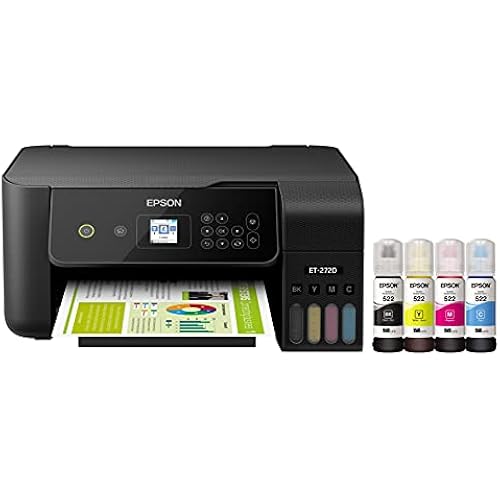
Epson EcoTank ET-2988 All-in-One Printer with Scanner, Copier, ADF, Wireless, Ethernet, White

  • Based on 0 reviews
Condition: Used - Like New
Checking for the best price...
$216.99 Why this price?
Save $43.00 was $259.99

Buy Now, Pay Later


As low as $36.17 / mo
  • – 6-month term
  • – No impact on credit to apply
  • – Instant approval decision
  • – Secure and straightforward checkout

Ready to go? Add this product to your cart and select a plan during checkout.

Payment plans are offered through our trusted finance partners Klarna, Affirm, Afterpay, Apple Pay, and PayTomorrow. No-credit-needed leasing options through Acima may also be available at checkout.

Learn more about financing & leasing here.

Free shipping on this product

This item is eligible for return within 30 days of receipt

To qualify for a full refund, items must be returned in their original, unused condition. If an item is returned in a used, damaged, or materially different state, you may be granted a partial refund.

To initiate a return, please visit our Returns Center.

View our full returns policy here.


Availability: Only 2 left in stock, order soon!
Fulfilled by Flashing Deals (WE RECORD SN)

Arrives Apr 16 – Apr 18
Order within 13 hours and 55 seconds
Available payment plans shown during checkout

Protection Plan Protect Your Purchase
Checking for protection plans...

Description

Features: Up to 3 years of Ink Included in the Box Includes Bonus Replacement Ink Bottle Simple Ink Refilling with EcoFit Bottles Auto 2-sided Printing Easy Wireless Mobile Printing

Brand: Epson


Connectivity Technology: Wi-Fi


Printing Technology: Inkjet


Color: white


Model Name: ET-2988


Printer Output: Color


Max Printspeed Monochrome: 17 ppm


Item Weight: 15 Pounds


Maximum Media Size: Letter/A4


Print media: Paper (plain)


Printer Type: Inkjet


Printer Output Type: Color


Item Weight: 15 Pounds


Print media: Paper (plain)


Scanner Type: Sheetfed


Warranty Type: limited warranty


EU Spare Part Availability Duration: 3 Years


Ink Color: cyan, magenta, yellow, black


Resolution: 600 x 600


Additional Printer Functions: Copy, Scan


Number of Trays: 1


Maximum Media Size: Letter/A4


Maximum Sheet Capacity: 150


Maximum print Resolution Color: 600 Dots Per Inch


Maximum Print Resolution Black and White: 600 dots_per_inch


Dual-sided printing: Yes


Duplex: Automatic


Brand: Epson


Model Name: ET-2988


Model Number: ET-2988


Model Series: EcoTank


UPC: 198390000578


Manufacturer: Epson


B&W Pages per Minute: 17 ppm


Color: white


Color Depth: 24 bits_per_pixel


Printer Connectivity Type: Wi-Fi


Hardware Interface: Ethernet


Maximum Copy Resolution Color: 600 dpi


Maximum Copy Resolution Black and White: 600 dpi


Frequently asked questions

If you place your order now, the estimated arrival date for this product is: Apr 16 – Apr 18

Yes, absolutely! You may return this product for a full refund within 30 days of receiving it.

To initiate a return, please visit our Returns Center.

View our full returns policy here.

  • Klarna Financing
  • Affirm Pay in 4
  • Affirm Financing
  • Afterpay Financing
  • PayTomorrow Financing
  • Financing through Apple Pay
Leasing options through Acima may also be available during checkout.

Learn more about financing & leasing here.

Top Amazon Reviews


  • Very nice printer
So far I’m very satisfied with the copier. It took a little time to set up but the Epson app was amazing, walking you through every step. It’s nice to have the ink bottles instead of the cartridges. I’ve printed, and scanned but, have not yet printed a photo. Otherwise I like the product
Reviewed in the United States on April 3, 2026 by Robert W.

  • Best printer I have ever used!
Best printer I have ever used. No more expensive cartridges. Setup was a bit of a struggle if you don't want to connect it using your smartphone. Once I worked through that, the printer has been perfect.
Reviewed in the United States on December 7, 2025 by David S. Booth

  • Good printer
Good printer, love the ink goes into printer from bottles. Does take some time to getting used to how to configure it to print the way you want it to.
Reviewed in the United States on August 26, 2025 by Ken Marshall

  • Good product
Very Good printer and saves money
Reviewed in the United States on October 20, 2025 by Jeffrey Staggs

  • Terrible, no document feeder.
Terrible. Hard to set up and no document feeder. Returned.
Reviewed in the United States on October 29, 2025 by Isabella G Beggs

  • Stable connection, great print quality, light and compact
I read some poor reviews on this printer, ranging from install problems to connection problems, to "paid subscriptions" on apps to get full printer capabilities. I encountered none of these problems. The setup was pretty straight forward after you scan the QR code and download the correct app. It guides you through a step by step install, which takes about 15 minutes (including pouring in the ink and initialization of the ink). The only tricky part was the color calibration via scanner because I was not familiar with the printer buttons, and because the printer screen is REALLY TINY. But once the 2988 was set up, it connected easily and offered pretty impressive print quality. I was surprised that it printed more sharply than my Canon LBP622CDW laser color printer. The only drawbacks for the 2988 are: 1) slow duplex printing speed vs laser printer, and 2) unforgivably small screen (should be at least 2x-3x bigger). Hopefully, I won't need the screen after setup. Advice: Use the QR Code to set up the printer. Select the correct printer. Follow instructions carefully. And no, there isn't some sort of paid annual subscription that’s required to activate the printer's capabilities. ... show more
Reviewed in the United States on July 9, 2025 by CYC

  • Very good printer. Epson has improved black densities
I actually purchased the ET-2980 and was sent the 2988 which is the same printer but, includes and extra bottle of black ink. I set the printer up with an iPad with Epson's Smart Panel app and it went very smoothly. I bought a ream of Epson EcoTank Paper and it prints very good on that. I had some HP Presentation paper and it printed even better with deeper colors and contrast on that. I also had some old Epson Photo Luster paper and that printed exceptionally great. I did all the printing from a M1 MacBook Pro 14" and while it worked fine, there is not as much control in the print dialog as the last time I owned an Epson which was probably around 2005. The scanner works fine. After filling the ink tanks the printer does an 11 minute initialization which pumps ink through the tubes to the print heads. That brought the ink level down a little bit so, after that I had some in the bottles and filled the tank up to full again. Except the black was still slightly below full. I will wait for the level to go down about one quarter of the way before opening the extra black bottle. A full image letter page prints in about a minute in best mode with plain paper setting. With Photo Paper in Best setting a full letter page takes about 3 minutes to print. Unfortunately I bought this printer to give Epson a try because my HP Smart Tank 7602 got a clog in the color head and I couldn't clear it. Not with printing purge color pages, built in head cleaning or fluid flushing I watched on YouTube. I looked this printer up on rtings.com and it looked like Epson had improved their black density and they have. Blacks print nice and black now. On the downside, text is not quite as sharp as the HP Smart Tank but, still very good. Epson is still using the same print head alignment and nozzle check as they did 20 plus years ago and much more difficult to determine than HP's way of doing it. This Amazon page says the printer has ADF and Ethernet but, it doesn't but, I knew it didn't. I am going to print something in black and color every day to try to make sure I don't clog any of the head nozzles. The warranty says 1 Yr warranty or 50,000 prints which ever comes first and if registered within 1 year you get 2 year warranty or 50,000 prints. If the heads don't clog I will be very happy with this printer. ... show more
Reviewed in the United States on September 3, 2025 by Robert A. Elliott Sr.

Can't find a product?

Find it on Amazon first, then paste the link below.
Checking for best price...