Search  for anything...

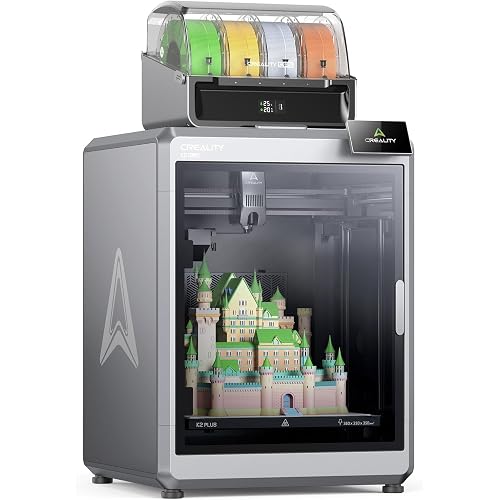
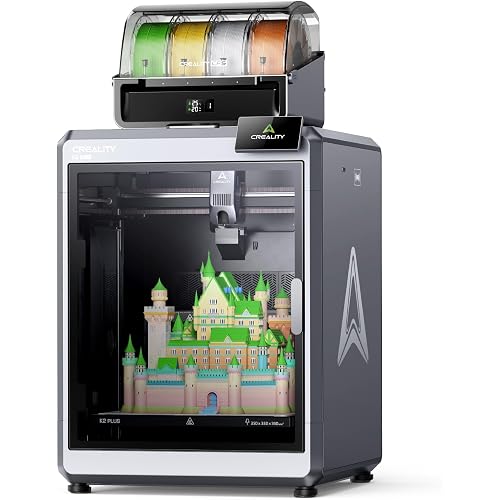
Creality K2 Pro (A) 3D Printer, Support Multi Color 3D Printing Needs CFS, 600mm/s High-Speed Printing, Smart Auto Leveling, Active Chamber Heating, Dual AI Cameras, Large Build Volume 300×300×300 mm

  • Based on 0 reviews
Condition: New
Checking for the best price...
$1,049.00 Why this price?

Buy Now, Pay Later


As low as / mo
  • – Up to 36-month term if approved
  • – No impact on credit to apply
  • – Instant approval decision
  • – Secure and straightforward checkout

Ready to go? Add this product to your cart and select a plan during checkout.

Payment plans are offered through our trusted finance partners Klarna, Affirm, Afterpay, Apple Pay, and PayTomorrow. No-credit-needed leasing options through Acima may also be available at checkout.

Learn more about financing & leasing here.

Selected Option

Free shipping on this product

30-day refund / replacement

To qualify for a full refund, items must be returned in their original, unused condition. If an item is returned in a used, damaged, or materially different state, you may be granted a partial refund.

To initiate a return, please visit our Returns Center.

View our full returns policy here.


Availability: Only 10 left in stock, order soon!
Fulfilled by Amazon

Arrives Wednesday, Apr 22
Order within 16 hours and 53 minutes
Available payment plans shown during checkout

Protection Plan Protect Your Purchase
Checking for protection plans...

Set name: K2 Pro


Features

  • Multicolor Printing with CFSThe Creality K2 Pro 3D printer is compatible with the CFS Smart Filament System, enabling advanced multicolor and multi-material printing for more creative works.
  • 300300300mm Large Build Volume Creality K2 Pro 3D Printer features a spacious 300300300mm build area, perfect for large models or printing multiple parts at once. Boost efficiency, save time, and bring imaginative designs to life in one go.
  • 600mm/s Ultra High-Speed PrintingThis Creality 3d printer reaches 600 mm/s printing speed and 20,000 mm/s2 acceleration powered by FOC step-servo motors and linear rails, delivering fast, stable, and precise performance.
  • Active Chamber Heating for More Stable PrintsThe K2 Pro maintains a consistent chamber temperature of up to 60 C, effectively reducing warping and cracking when printing with advanced filaments like ASA and PPA. It supports a wide range of materials including PLA, ABS, ASA, PPA-CF, and PET-CF, ensuring reliable results for every print.
  • Intelligent Auto LevelingBy probing only the areas where your model will be printed,The Creality K2 Pro 3D printer can automatically and intelligently levels your print bed dramatically reducing setup time while ensuring perfect first-layer adhesion and reliable, high-quality results every time.
  • Dual AI Cameras for Smart ControlThis 3D Printer integrates Chamber and Nozzle AI Cameras for real-time monitoring, automatic flow calibration, pressure advance tuning, and blockage detection, ensuring consistent and high-precision printing performance.
  • High-Performance Direct Drive ExtruderThe K2 Pro features a high-performance direct drive extruder with hardened steel gears that easily handle abrasive filaments like carbon fiber, ensuring smooth, clog-free printing at up to 40mm3/s high flow. A built-in sensor enables automatic filament cutting, while the quick-swap hotend allows easy maintenance for fast, reliable, professional results.
  • Seamless Integration & Reliable PerformancePowered by Creality OS, the K2 Pro supports WiFi/LAN control, remote monitoring, and OTA updates for effortless operation. With filament detection, power-loss recovery, and wide material compatibility, it ensures stable, safe, and versatile printing for creative, educational, and industrial applications

Brand: Creality


Material: Plastic Filament


Color: black


Product Dimensions: 17.5"D x 19"W x 33"H


Item Weight: 7 Kilograms


Product Dimensions: 17 x 20 x 18 inches


Item Weight: 15.4 pounds


Item model number: Creality K2 Pro


Date First Available: June 17, 2025


Manufacturer: Creality


Frequently asked questions

If you place your order now, the estimated arrival date for this product is: Wednesday, Apr 22

Yes, absolutely! You may return this product for a full refund within 30 days of receiving it.

To initiate a return, please visit our Returns Center.

View our full returns policy here.

  • Klarna Financing
  • Affirm Pay in 4
  • Affirm Financing
  • Afterpay Financing
  • PayTomorrow Financing
  • Financing through Apple Pay
Leasing options through Acima may also be available during checkout.

Learn more about financing & leasing here.

Top Amazon Reviews


  • Good quality out of the box!
Set name: Creality K1C
Really nice printer... I've been using it for a couple weeks now and printed many things... The best thing to do is to get a dryer along with the 3d printer... It will improve your prints greatly. Also learning to fines the settings helped a lot. I saw a big difference in PETG print quality just changing the temp of the hot bed from 57C to 56C... I recommend downloading other peoples 3d modles from online sources like [Printable.com, makerworld.com or thangs.com] for the door hinges, front plate, exhaust fan upgrades and (riser plates (if you intend on using CF filaments)) to get started and learn about how the cad models work and need to be physically one piece for the Creality Print or Cura to work with them. Most software can only do so much to "repair" models someone might create in Blender... FreeCAD isn't that great but using TinkerCAD with Blender has shown me some decent results and is completely free. AutoDesks 360 fusion looks nice if you have some cash for softwawre they also have a free trial where you can make 9 editable files with there cloudbased software. I have enjoyed this new device since I'm always looking to fix or upgrade things and this allows for SOOOO much more inventive creativity. It has a setting called [ Silent ] too, which slows the printer down to silent volumes which is very awesome since I live next to persnickety people in apartments. It won't turn down the "travel" speed that much so the setting will need to be adjusted inside Creality print advanced settings if true silence is needed since it has insanely quick and efficient motors. It has auto leveling/calibrations, Lan and usb connectivity if you don't trust Wifi and I don't in apartments. It's easy enough to mess the prints up let alone having wifi hackers interrupting file transmissions.. I've heard and seen lid risers are needed to print Carbon Fiber prints due to the angle of the Bowden stock tube... ASA makes a good filament for the risers since its high working temp, rigidness and resistance to chemicals like those emited during prints sometimes. Since starting I haven't had to do much of anything to make it work soundly (since I haven't used CF filaments yet) and that is awesome! Make sure to use glue stick. Customer support is responsive for any needs and many videos online to help replace, upgrade, install, and maintain the device. I used the original plastic off the sides of the machine to help create a better seal on the front door (looks ugly but it's free and came with the machine), this keeps everything nice inside when printing and lowers the dB volume outside. Make sure if you decide to upgrade the back fan that you use a DC24v fan. You can place a piece of active carbon filter where the original fan once was... I also put a 5lbs sand back on the edge of the top of the machine which reduces vibrations and movement of the machine when travel is going fast... Don't place it in the center or you will scratch the bottom of the plate like I accidentally did... Risers would have stopped that but I haven't finished them yet... an old tooth brush with either isopropyl alcohol or water works really well to clean the build plate rather than using rags and having to wash them... plus if you do it right you can use the old glue and just make a nice finish with just a little water and effort. ... show more
Reviewed in the United States on April 30, 2025 by Randomguy

  • Great printer
Set name: Creality K1C
I've been using this printer for over a year now with little to no issues. The printer itself is great easy to use. This was my first printer and never had any issues i couldn't fix myself. Its easy to take apart the printing head for cleaning. I would recommend this for a beginner or someone looking to upgrade from a bed slinger. ... show more
Reviewed in the United States on April 1, 2026 by Luis Diaz

  • Sigh... machine down after a month of light use.
Set name: K2 Pro Combo
Worked for a month, now down. Month in; dozen prints or so and now stuck with a giant paperweight. After a couple hours of troubleshooting vague error messages, TR2852:Filament detector triggered abnormally, possibly due to external spool holder being used with CFS. Error logs and troubleshooting is a stepdown from klipper days; not finding a lot of info and working on hotend is nightmarish. Started with MCU task scheduled error; shotgun some parts at it is the wiki link / FAQ. Disappointed, will sell and buy other brand; i should of known better but have always been partial to ender since ender3/ender5 days. Ender: if you want to compete with Bambu; flagship product cannot go down in 1month with light use. Troubleshooting the filament error needs to be much easier and point at what part is failing. Not swap and pray troubleshooting. ... show more
Reviewed in the United States on December 31, 2025 by zerobane

  • The best upgrade you can ever make
Set name: Creality K1C
Such an amazing upgrade from my Ender 3. It is an amazing 3d printer. Speed increase is amazing, what took 2 hours on my old 3d printer now takes 15 min or less. Best upgrade I have ever purchased. There is also a kit to use multiple filaments.
Reviewed in the United States on February 25, 2026 by Scott M.

  • Awesome Machine
Set name: Creality K1C
I have been having a great time printing on this for the past six months. I am usually bad with electronic but this was super easy to set up. I have had no major issues with using the printer, other than a singke clog. It also very durable. The noise level is fairly quiet compared to other printers I've seen. I would say this is a great option for those who want to learn how to 3D print. The only negative is the smell. sometimes when printing you can smell the melted filamen, so I would suggest using it in a room with good ventilation. ... show more
Reviewed in the United States on June 14, 2025 by Mihai

  • Great beginner printer
Set name: K2 Pro Combo
I'll never buy a Bambu Lab again. Easy to troubleshoot. Printer throws an error code and will take you right to the Wiki, WITH a video. You can fix a problem right away without having to fill out a work ticket and without 3D printer or CAD experience.
Reviewed in the United States on March 28, 2026 by Chimentos Mementos

  • Easy setup and great initial outcome
Set name: K2 Pro Combo
This printer is solid and easy to use. I wish I had one when I was younger. However, its use crosses generations. I bought the printer for my daughter. With the help of some downloaded instructions the setup was easy and she completed it in no time (so a big thanks to all the folks who gave setup instructions). My daughter printed a couple of small pieces to assess the speed and functionality of the printer. All corners and edges came out smooth and we will continue to assess durability. I purchased multiple colors, the piece was beautiful with minimal filament loss. I would recommend this printer to others based on its initial use. We can comment later about above when we have used over time. ... show more
Reviewed in the United States on January 25, 2026 by RLA

Can't find a product?

Find it on Amazon first, then paste the link below.
Checking for best price...