Search  for anything...

Creality K1C 3D Printer, 600mm/s Fast Speed Auto Leveling 3D Printers

Based on 233 reviews
Condition: New
Checking for the best price...
$368.99
Holiday Deal · 6% off was $392.99

Buy Now, Pay Later


As low as / mo
  • – Up to 36-month term if approved
  • – No impact on credit to apply
  • – Instant approval decision
  • – Secure and straightforward checkout

Ready to go? Add this product to your cart and select a plan during checkout.

Payment plans are offered through our trusted finance partners Klarna, Affirm, Afterpay, Zip, Apple Pay, and Google Pay. No-credit-needed leasing options through Acima may also be available at checkout.

Learn more about financing & leasing here.

Selected Option

Free shipping on this product
This item's return window has been extended for the holiday season: FREE refund/replacement until Jan 31, 2027

To qualify for a full refund, items must be returned in their original, unused condition. If an item is returned in a used, damaged, or materially different state, you may be granted a partial refund.

To initiate a return, please visit our Returns Center.

View our full returns policy here.


Availability: Only 1 left in stock, order soon!
Fulfilled by Amazon

Arrives Friday, Nov 13
Order within 11 hours and 58 minutes

Available payment plans shown during checkout

Protect Your Purchase

Easy claims online, fast replacements, no fees

Checking for protection plans...

At a glance

Condition
New
Set
K1C
Dimensions
9.84"D x 9.84"W x 9.84"H
Weight
12.5 kg
Color
K1C (Black)
Material
Aluminum

Features 5

  • CoreXY, High Speed Printing: Creality K1C 3D Printer is a new upgrade to the K1, K1 SE and K1 Max. It inherits the K1's lightweight and compact CoreXY system; with speeds of up to 600mm/s, accelerations of up to 20,000mm/s and vibration resistance; it can print at high speeds while maintaining excellent print quality;12 times faster than a typical 3D printer.
  • Clog-free Extruder, Quick-swap Tri-metal Nozzle: Stable 3D printer extrusion system for smoother material flow and 1,000 hours of clog-free extrusion; The nozzle and thermal barrier in one unit blocks thermal creep and ensures easy replacement
  • K1C with AI Camera: AI camera can monitor in real time and time-lapse shooting; Proactively alerts you to errors in the printing process; when an individual print fails in batch printing, you can just exclude it from the batch
  • Silent Mode, Air Purifier: switch to the silent mode where the noise is45dB, as quiet as turning a book. Meanwhile, the built-in active carbon filter purifies compounds and particles arising from molten filaments; You can be reassured to live and work day and night in the same place with Creality K1C 3D printer

Description

The Creality K1C 3D printer extruder is well enhanced to grip on filament tightly without slackening off. Meanwhile, the steel-tipped copper nozzle is integrated with a titanium alloy heatbreak to block heatcreep and enable quick swap. As an upgraded version of Creality K1 series, Creality K1C can be better applied to carbon fiber printing, perfectly adapted to PLA-CF, PA-CF, PET-CF, ASA and other filament to print 3D models with excellent mechanical strength and outstanding abrasion and deformation resistance. Creality K2 Plus Combo Creality K2 Pro Combo (A) Creality K2 Combo Creality K1C Creality K2 SE Creality K1 Max Creality K2 Plus 540+ Patented Technology, 3.5 Million+ Number of users Better Performance Achieved with Creality Official 3d Printer Filament Creality 3D Technology Co., Ltd. focuses on the design, research, production of 3D printers and 3D printing related products. Consisting of professional researchers and skilled engineers, our R&D team constantly strives for creative function and excellent user experience. The R&D investments on 3d printing cover FDM/resin 3D printers, 3D scanners, filaments, resin, as well as 3D printed drones and robots that back up STEAM education.

Specs 7

Brand Creality
Material Aluminum
Color K1C (Black)
Product Dimensions 9.84"D x 9.84"W x 9.84"H
Item Weight 12.5 kg
Item model number K1C
Manufacturer Creality

Frequently asked questions

If you place your order now, the estimated arrival date for this product is: Friday, Nov 13

Yes, absolutely! This item's return window has been extended for the holiday season: FREE refund/replacement until Jan 31, 2027.

To initiate a return, please visit our Returns Center.

View our full returns policy here.

  • Klarna Financing
  • Affirm Pay in 4
  • Affirm Financing
  • Afterpay Financing
  • Zip Pay in 4
  • Financing through Apple Pay
  • Financing through Google Pay
Leasing options through Acima may also be available during checkout.

Learn more about financing & leasing here.

Top Amazon Reviews


Great printer, good price... but where's the textured sheet (see details)? Highly Recommended
Why am I using a glue stick in 2024… for PLA, of all things? It was about at this point that I started to feel regret at selecting the Creality K1C. My printer was also missing the spool holder, though I’m using a filament dryer while I’m waiting for Creality support to send me a replacement part. The packaging, unboxing, and assembly experience is way different than the only other Creality FDM printer I’ve had before (an Ender 3 S1). The box is beefy, with large foam blocks. Remove three bed screws, connect and mount the screen, put the door handle on, flip the voltage switch, and that’s about it. Everything was ready to go within 10 minutes of unboxing (except for the missing spool holder). The air filter is pretty ineffective. Build quality is pretty good – the unit is handsome, solid, and fairly efficient from an exterior dimension vs. interior dimension standpoint. That said, the printer is WAY smaller and lighter than my QIDI i-fast. More on that in a minute. The filament tube arrangement isn’t my favorite, but loading and unloading filament is still pretty straightforward. The initial input shaper calibration and bed mesh measurement takes a while (10 minutes, maybe?). Almost ready to print… and that’s when I notice the smooth print sheet. Ugh. They recommend the use of a glue stick, ffs (and they include one in the box, like it’s 2014). I immediately ordered the “B Plate”, which is a textured PEI sheet. I tried the included sheet and had some adhesion problems, as you might expect. Glue, slowing the first couple layers way down, or a combination of both resolved any issues. I don’t really think that’s why you spend the money on this printer, though. Get the “B Plate”. It’s under $25, solves these problems, and it should have been included with the printer in the first place. As far as printing goes, I should mention that my first print was straight off of the included gcode files on the printer. I tried to print a top bracket. Just to get the printer set up, I put it on a standing desk that used to hold an Ender 3 S1. Big mistake. The acceleration and speeds were cranked so high on that print that the job failed about 70% in, when the print popped off of the plate. Maybe it was an adhesion issue. Maybe it was just a matter of how violently the printer was thrashing around. I moved the printer to the floor for all subsequent prints, and it dealt a bit better with the forces. I’ve found that I feel a bit more secure about the print job if I have the first few layers set to half speed. Maybe I’ll feel differently when I get a high mass, super rigid table/rack for this printer. As it is, I feel like the acceleration is maybe a but more than the printer’s mass can effectively deal with. I wish there was an option to bolt the printer down. Print quality is impressive. The part cooling is the best STOCK solution I’ve seen on a printer yet. Bridge performance is great. Print quality is better than my QIDI i-fast, and I consider that printer to be quite good. Regular vs. regular, I find the K1C’s output to be better than my Prusa, too. I turned down some the acceleration values in Orca a bit (reduced by about 20%). I’ll gradually bring them up as my understanding and confidence grow – and when I get a table solution that can tolerate the forces involved. I’ve used various types of PLA, ABS, and PETG so far. As long as you have the right build plate, all of the materials have worked great. UPDATE: I tried using the newest Creality Slicer, and it's great. I'd avoided it because I wasn't aware that they'd moved away from Cura. Guess what? Everything I like in OrcaSlicer, but with direct printer control and monitoring. If it's an Orca fork, I'm sure it won't be updated as frequently, but I don't see where that's a downside in my use cases. I wasn’t really sure what printer I was going to get next. I had narrowed it down to the Bambu P1S and the Creality K1C. In the end, I decided that I don’t really want to buy any more bedslingers, but I wasn’t ready to spend the money on a Bambu X1. With the K1C, I no longer have to send everything difficult or time-sensitive to my i-fast. Assuming the parts can print in 220mm, I have a second printer where I can print high quality parts without compromises. Aside from the lack of the textured plate, I don’t regret spending the $600 on the K1C. The fact that the printer is now about $100 less only makes it that much better a deal. Highly Recommended ... show more
Reviewed in the United States on September 18, 2024 by Dad, the engineer

Fantastic Upgrade from Ender 3 – Love This Printer!
I upgraded to the K1C from an Ender 3 after years of dealing with manual leveling, slower speeds, and the constant tweaking that comes with budget 3D printers. I had my eye on a Bambu Labs printer, but the price was just out of reach—so I decided to give the K1C a shot. I'm really glad I did. This thing is a beast. I've done over 200 prints so far, using a variety of filaments including TPU, PETG, PLA, and a few others. It handles them all like a champ. The self-leveling feature is a huge time saver and has worked flawlessly for me. No more spending ages trying to get that perfect first layer manually. Filament changes are quick and easy, which is great when you’re doing multiple colors or swapping materials. I also appreciate that it works seamlessly with ORCA slicer, which gives me a lot of control over my print settings. Build quality feels solid, and print quality is consistently excellent once you dial in your settings. It’s fast, reliable, and honestly, a joy to use. This feels like a major step up from the Ender 3, and while it’s not quite a Bambu Labs machine, it gets surprisingly close for a fraction of the price. Overall, I’m extremely happy with the K1C. If you’re looking for a powerful, affordable upgrade that can handle a wide range of materials with ease, this printer is a fantastic choice. ... show more
Reviewed in the United States on April 2, 2025 by James M.

Creality is a staple brand, solid andk1C is FAST but faulty screen led me to Bambu Labs instead
I wanted to love this printer. the price was pretty good, Creality is well known and lots of online enthusiasts that have posted many tips and knowledge. Except the touch screen s broken. I could use it but it had lines missing across the screen and was hard to read. I tried to just use my phone to control it on the app and it was fine. I liked the printer a lot. Easy to setup if you follow the instructions exactly. I watched several videos on youtube prior to the printer arriving so I knew what I was doing. But it isn't something you would want to try and figure out how to put together without reading instructions or watching a video. My first print was nearly perfect. I printed the benchy that came as a pre-installed gcode file. the first layer was the only issue because the inscription on the bottom wasn't printed cleanly but that could be my fault because I used filament I already had instead of the sample roll. Maybe my filament wasn't completely dry? Other than than, the printer is FAST! I didn't like the spool holder location but it comes with a file on the printer where you can print the kit to move the spool to the place they should have just designed it to be out of the box. But that is not a big deal. some people may prefer the original location. The build plate size was not as big as Bambu Labs printers. and that was limiting. I printed some PLA+ that I knew I should have swapped out the nozzle for but I wanted to test it to see the printers limits. Bad idea. I got filament clogged in the 0.4 nozzle and had to do "surgery." Removing the nozzle is not simple on this printer. It's annoying and tedious. so if you need to print using anything but a 0.4 nozzle, be prepared to remove tiny screws and wires and not forget the order in which to reinstall. I will say the nozzle gets super hot and now creality ships it with a steel tip so you can print Carbon Fiber filaments if you need. At the end, after 3 weeks, not having the touch screen work was annoying, Creality wanted to send me one piece at a time to replace and try and resolve (it could have been one or more of 3 different components that were causing the touch screen to be faulty). So, they wanted to send me one, replace it, try it and if it didn't fix it, call them and they would send me part 2 to try, etc. I gave up when I saw BestBuy had the Bambu Labs P1S COMBO on sale for $429 (Printer with the 4 spool color printing). I returned the Crealitly K1C. I think if the screen didnt arrive faulty, I would have kept it but in the end I went with Bambu. It isn't perfect either. I would score them both very similar scores, each having their own strengths and weaknesses. Happy Printing. ... show more
Reviewed in the United States on March 3, 2026 by Liam Nitz

Good price but not good enough for the hassle
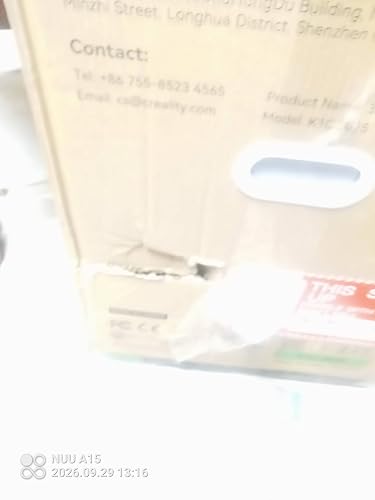
I ordered this because the price was great. When it was delivered box had a gouge in it. I thought ok its got packing inside no big deal. After assembly I noticed a dent/mark on the outside again no big deal. Set it up for testing and no power. Checked and rechecked everything could not find anything wrong just no power at all. Called amazon and was told to contact creality which I did. I don't hear so well and could barely understand the guy because of his accent. Finally got picture taken and sent out an email to creality so I can get the return/exchange process going. Hopefully this doesn't take forever. Will update review depending on outcome. ... show more
Reviewed in the United States on September 29, 2026 by Scott Janowiecki

The best for start in the 3D printing world
The K1C is a very easy printer to handle, recommended for a person new into the 3D printing world. Good value, easy configuration for different filament brands, noise level is ok.
Reviewed in the United States on September 21, 2026 by Amazon Customer

It’s great but not as big as I thought but is does an awesome job
Love it wish I bought the k2 pro
Reviewed in the United States on September 26, 2026 by Rick sackitt

Works great! A nice upgrade from an Ender 3
The Creality K1C works out of the box with a simple setup. This was an upgrade from my 5 year old Ender 3. A friend of mine talked me into it after I started to give up on 3d printing altogether. The K1C is a testament to how quickly the technology has improved in a relatively short amount of time. I didn't mess around, I used the included sample filament for some test prints and moved directly into PLA-CF filament. It's super fast and the quality of the prints beat my Ender 3 on the highest quality setting. I couldn't be happier! ... show more
Reviewed in the United States on May 8, 2025 by AmazonMonkey

Aboslute gem
The K1C is an absolute gem—especially for beginners. It's intuitive, user-friendly, and remarkably easy to set up. Coming from the Ender3, the difference is night and day. I had it up and printing within 15 minutes of unboxing. It truly doesn’t get much simpler than that. Creality’s support system is top-notch. When I ran into an issue, their team was responsive, professional, and went the extra mile to get me back up and running. They even offered compensation for the inconvenience, which speaks volumes about their commitment to customer satisfaction. After roughly 250 prints, the unit is still going strong. Couldn’t be happier with the reliability and performance. If you’re new to 3D printing or looking to upgrade, the K1C deserves serious consideration. ... show more
Reviewed in the United States on July 26, 2025 by TiTanRage
Checking for best price...