Search  for anything...

Creality K1C 3D Printer, 2024 New Version 600mm/s High-Speed Auto Leveling Clog-Free Robust Direct Extruder K1 Upgrade 3D Printer with AI Camera 300°C Printing Support Carbon Fiber Filaments

  • Based on 78 reviews
Condition: New
Checking for the best price...
$607.86 Why this price?
Save $142.13 was $749.99

Buy Now, Pay Later


As low as / mo
  • – Up to 36-month term if approved
  • – No impact on credit to apply
  • – Instant approval decision
  • – Secure and straightforward checkout

Ready to go? Add this product to your cart and select a plan during checkout.

Payment plans are offered through our trusted finance partners Klarna, Affirm, Afterpay, Zip, Apple Pay, and Google Pay. No-credit-needed leasing options through Acima may also be available at checkout.

Learn more about financing & leasing here.

Selected Option

Free shipping on this product

This item is eligible for return within 30 days of receipt

To qualify for a full refund, items must be returned in their original, unused condition. If an item is returned in a used, damaged, or materially different state, you may be granted a partial refund.

To initiate a return, please visit our Returns Center.

View our full returns policy here.


Availability: In Stock.
Fulfilled by Triplenet Pricing INC

Arrives Aug 19 – Aug 21
Order within 12 hours and 31 minutes
Available payment plans shown during checkout

Protection Plan Protect Your Purchase
Checking for protection plans...

Set name: i7 Pro


Features

  • CoreXY, 12X Super FastK1C 3D Printer inherits the lightweight and agile CoreXY system of K1, Max 600mm/s speed and 20000mm/s2 acceleration.It can maintain print quality while printing at high speed, it is 12 times faster than the other normal 3d printer
  • Clog-free Direct Extruder & Tri-metal "Unicorn" NozzleCreality K1C is an upgraded version of Creality K1, K1 SE and K1 Max. It has more powerful functions and supports printing carbon fiber filaments. K1C 3d printer equips a clog-free robust direct extrude, enhanced with a bolster spring and a ball plunger.It forms a strong grip, enhanced reliability that won't slacken off. Steel-tipped copper nozzle integrated with a titanium alloy heatbreak.It is free of clogs and can be swapped quickly
  • Hands-free Auto Calibratio Leveling & Dynamic Balancing for Reduced VibrationJust give a single tap, and this creality 3d printer auto-calibration gets leveling and everything ready for you with smart sensors. The weight of printhead fans is dynamically balanced so they are less likely to wobble, minimizing ringing or ghosting.
  • K1C with AI CameraK1C enclosed 3d printer is equipped with an AI camera as standard. It can always monitor whether there are foreign objects or malfunctions during the printing process. and enables real-time monitoring, time-lapse photography functions
  • Carbon Fiber Reinforced & Filaments Well SupportedK1C features a enclosed chamber design, 300C hotend and hardened steel nozzle tip. K1C can prints well with high-temp and wear-resistant PLA-CF, PA-CF, PET-CF, ASA, etc, K1C is suitable for carbon fiber 3d printing
  • Long-lasting Purification & Silent Mode 45dBAir purification system uses activated carbon bags to effectively purify odors and particles produced by melting consumables. During the 3d printing, you can switch to silent mode with one click, which can reduce noise to 45dB without affecting work or rest
  • Creality OS & Superb Software EcosystemCreallty OS based on Kipper, powerful, completely open source, support for custom optimization. Creality Print slicing software support for intelligent cooling, pumpback optimization, seedling tree support, but also to facilitate the user remote control of multiple printers

Description

The revolutionary K1 that transformed 3D printing received significant improvements. Creality's selling success has been improved, especially in the extrusion system. Now you can print with carbon fiber filaments, with less spout wear, less noise and vibration, and the extraordinary speed only the K1 line offers.

Brand: Creality


Material: Aluminum


Color: K1C


Product Dimensions: 13.9"D x 18"W x 13.9"H


Item Weight: 27 Pounds


Product Dimensions: 3.94 x 1.97 x 0.5 inches


Item Weight: 27 pounds


Item model number: K1C


Date First Available: July 10, 2024


Manufacturer: Creality 3D


Frequently asked questions

If you place your order now, the estimated arrival date for this product is: Aug 19 – Aug 21

Yes, absolutely! You may return this product for a full refund within 30 days of receiving it.

To initiate a return, please visit our Returns Center.

View our full returns policy here.

  • Klarna Financing
  • Affirm Pay in 4
  • Affirm Financing
  • Afterpay Financing
  • Zip Pay in 4
  • Financing through Apple Pay
  • Financing through Google Pay
Leasing options through Acima may also be available during checkout.

Learn more about financing & leasing here.

Top Amazon Reviews

  • A Surprisingly Capable Budget 3D Printer at $199
Set name: i7
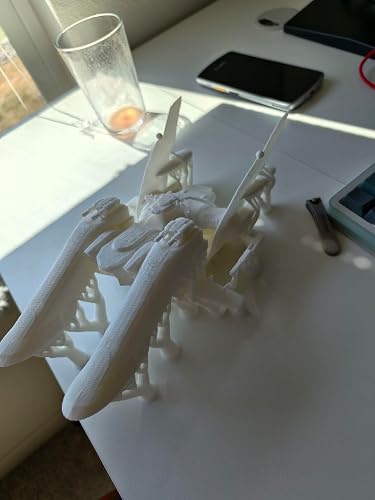
I came into the SPARKX i7 from a somewhat unusual direction. Most people begin their 3D printing journey with an entry-level machine, learn the fundamentals, and eventually work their way up to a more premium printer. I did the opposite. My first 3D printer was the top-of-the-line Bambu Lab H2C, and I immediately fell in love with it. I had waited nearly three months for Bambu Lab’s annual anniversary sale, and during that time I became deeply familiar with the Bambu ecosystem, Bambu Studio, and the types of prints I wanted to make. By the time the printer arrived, I already had dozens of projects saved and ready to go. Naturally, I wanted to take full advantage of what that machine could do. I dove in head-first, printing large multicolor AMS risers, storage drawers, and other larger organizers. That quickly created a problem: my brand-new, beautiful printer was tied up for days at a time, while I still had plenty of smaller single-color prints I was eager to try. So, after three days, I went to Best Buy and picked up a Bambu Lab A1 Mini for smaller one-color prints. It was on sale for $209, so the decision was easy. To my surprise, I loved it just as much. In fact, I liked it enough that I started considering buying another one. Like any enthusiastic beginner, I was also watching every 3D printing YouTube video I could find, trying to learn quickly and avoid wasting filament on rookie mistakes. That is when I started seeing reviews of the SPARKX i7. Then another. And another. Of course, YouTube reviews can sometimes be “unbiased” in the most biased way possible, so I took the praise with a healthy amount of skepticism. At $259, the machine already seemed interesting. But when I saw the base unit on Amazon for $199, with free 2-day shipping and easy returns if I was not satisfied, I decided it was worth the risk. I am very glad I did. The build quality is not quite on the same level as a Bambu Lab printer. The machine is lighter than expected, there is plenty of plastic throughout, the X-axis leadscrews appear thinner, and the extruder does not feel quite as robust. That said, the printer itself has been stable, reliable, and far more capable than I expected at this price. The print quality has been fantastic. So far, I have around 100 hours on the machine and have printed PLA and PLA Silk in single color only. Within that use case, the results have been on par with my other printers. I have also pushed the build volume with a 260 x 240 mm AMS drawer, and it completed the print without incident. The slicer took a little getting used to, but it is fairly similar to Bambu Studio. A few settings and button clicks are different, so there is a learning curve, but it was not nearly as difficult as I expected. I almost skipped this printer because I did not want to learn another slicer, and I am glad I did not let that stop me. The biggest strengths are the price, print quality, and build volume. At $199, getting a 260 x 260 x 255 mm build area is impressive. It also fits well on a standard desk, though I would recommend allowing about 22 inches wide by 24 inches deep for the full setup. There are some downsides. Long-term durability is still unknown, and there is a lot of plastic in the construction. It is also not as quiet as either of my Bambu Lab printers. It is not loud, just more noticeable. If you want multicolor printing, I would probably spend more and buy a Bambu Lab A1 with AMS instead. The Creality CFS Lite setup does not inspire the same confidence for prints with a lot of color changes. Also, the base unit requires some assembly. Most of the reviews I saw were for the combo version, which apparently ships fully assembled, so I was surprised when I opened the box and had to attach the carriage to the bed. It was not hard or time-consuming, but it was unexpected. Another thing to consider is that the printer only includes a single hotend, and replacement hotends currently appear to cost significantly more than comparable Bambu Lab replacements. Since this is a newer model, the community accessory library is also still limited. Overall, I would absolutely recommend the SPARKX i7 as a first printer, backup printer, or second machine for single-color prints. Just understand what you are buying. It does not feel as premium as a Bambu Lab printer, but the print results have been excellent, and the value at $199 is very hard to beat. When I bought the SPARKX i7, I was not coming from an older or budget printer. I was comparing it directly against machines I already really liked. I would not be surprised if I buy another one. One final tip: make your first print a poop bin, not a Benchy. ... show more
Reviewed in the United States on July 5, 2026 by Kotu

  • Great printer for beginners, but not only for beginners.
Set name: i7 Color Combo
I have been contemplating getting a printer for a few years, but always talked myself out of it due to price...always told myself I could spend the money better somewhere else. I finally pulled the trigger. I googled and read and fretted over the vast models on the market, afraid of getting the wrong one and being stuck with it. Again and again people were really happy with the SPARKX i7 and all of the features it came with. I finally decided it was now or never, so I went with it. I can say this is definitely beginner friendly. I literally pulled this thing out of the box, set it up, and within probably 30 minutes I was printing my first benchy, and it printed perfectly. Since then, I have about 60 hours of print time on it. I did have one issue with the nozzle getting backed up quite badly. It took me a while to figure out what happened after getting many z-axis errors and prints not sticking. I cleaned the hot end up and the machine printed good as new. I live in central AL and it's very humid here during the summer. It doesn't help that I have my printer in the garage. I have assisted with bed adhesion by using a glue stick on the printer bed. I usually get a couple of prints before I need to wash the plate. I have also found that dropping the nozzle temp for printing PLA to about 210 seems to help a little. I printed some dessicant holders for the CFS lite to see if I can get that humidity down a little bit from 45%-55% down to 35%-40%. I haven't tried anything but PLA at this point, but it's done everything I have needed thus far. All of this said, I do recommend this printer. It's fast, very beginner friendly but can scale up as your experience increases. The build seems quite sturdy and the components are good quality. It's a new unit relatively speaking, but there are already quite a few upgrades and prints available. A hint, on Creality Cloud make sure to put it in FlowPrint mode instead of classic. ... show more
Reviewed in the United States on July 13, 2026 by Brett

  • Hotend cover buzzing
Set name: i7
This printer works as intended without any issues. The prints are clear, and the app is easy to use, although it occasionally crashes when trying to send a print over. I’ve already started using tape to keep some pieces in place, especially the main cover where the filament comes out or it clicks like clockwork or buzzes. Despite being on a level table, the printer rocks due to certain prints, which sounds crazy. I’m happy with it as my first printer for cosplay items, but it’s definitely annoying at night. ... show more
Reviewed in the United States on July 14, 2026 by SpunkyD

  • Overall positive experience, easy to troubleshoot issues
Set name: i7 Color Combo
There’s a bit of a learning curve trying to load the filament using the CFS lite, but once you get the hang of it, it’s really easy. Print quality is great. A bit more filament waste than I expected for multi colored prints, but other than that, my overall experience is positive.
Reviewed in the United States on July 15, 2026 by ashdd81

  • for $200 I love it
Set name: i7
It has been nice so far, for this price range getting a big printing size printer i love it. took me 20 mins to set it up i love it, with the app I can just one click to print stuff, every easy to use. print speed is up to the details of the print job, most of them print over a day. it is good price for it. but ofc it does mess up sometimes but that could be just without turning on supports when printing. ... show more
Reviewed in the United States on July 19, 2026 by Gabriel

  • Not functioning.
Set name: i7
I've been using it without issue for a week. Honestly was really enjoying it. Suddenly it can't understand where its plate it. All sorts of sounds. Tried to recalibrate and its still trying to print off the plate. Literally tearing itself up.
Reviewed in the United States on July 10, 2026 by R

  • Simple and reliable, great value printer!
Set name: i7
Great printer for simple projects! Easy to use, been very reliable
Reviewed in the United States on June 29, 2026 by Ryan Sant

  • Pretty good
Set name: i7
Honestly happier with this than the Bambu A1 Mini. Setup instructions could be clearer, following them directly almost lead to breaking one of the cables.
Reviewed in the United States on July 18, 2026 by Quetzal Magana

Can't find a product?

Find it on Amazon first, then paste the link below.
Checking for best price...