Search  for anything...

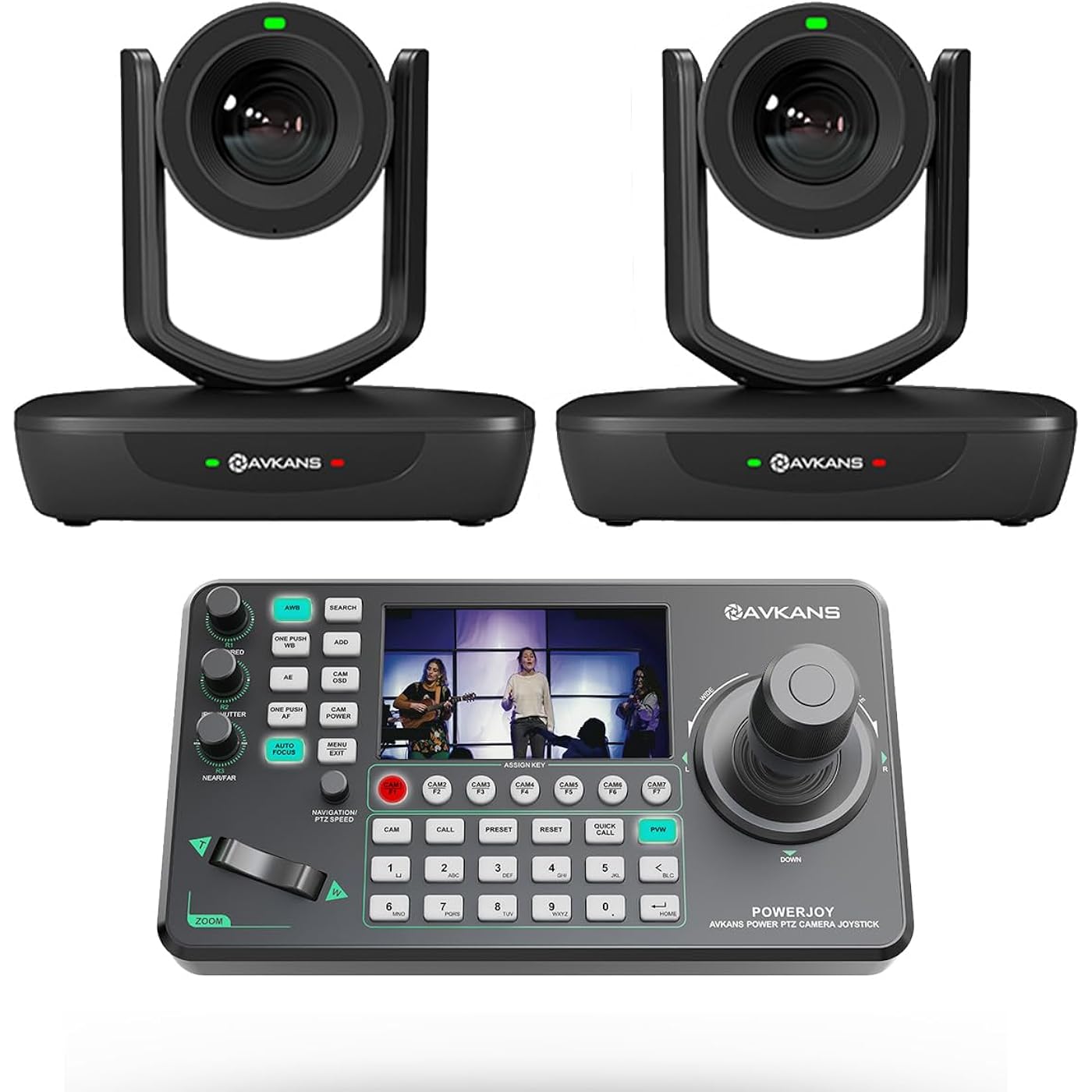
AVKANS 20X NDI PTZ Camera Kits - 2pcs 20X AI Auto Tracking NDI Camera with 1pcs IP Joystick Controller Package for Church Live Streaming Video Production(2X LV20N and 1x AV-Joy-IP)
  • Based on 335 reviews
Condition: New
Checking for the best price...
$1,099.00 Why this price?
Holiday Deal · 35% off was $1,699.00

Buy Now, Pay Later


As low as / mo
  • – Up to 36-month term if approved
  • – No impact on credit
  • – Instant approval decision
  • – Secure and straightforward checkout

Ready to go? Add this product to your cart and select a plan during checkout.

Payment plans are offered through our trusted finance partners Klarna, Affirm, Afterpay, Apple Pay, and PayTomorrow. No-credit-needed leasing options through Acima may also be available at checkout.

Learn more about financing & leasing here.

Selected Option

Free shipping on this product
This item's return window has been extended for the holiday season: FREE refund/replacement until Jan 31, 2026

To qualify for a full refund, items must be returned in their original, unused condition. If an item is returned in a used, damaged, or materially different state, you may be granted a partial refund.

To initiate a return, please visit our Returns Center.

View our full returns policy here.


Availability: Only 2 left in stock, order soon!
Fulfilled by Amazon

Arrives Tuesday, Dec 23
Order within 21 hours and 52 minutes
Available payment plans shown during checkout

Protection Plan Protect Your Purchase
Checking for protection plans...

Color: 20X NDI Camera 2pcs + Joystick 1pc (AI Tracking)


Features

  • AVKANS NDI PTZ Camera Package includes 2 pcs 20 NDI PTZ Cameras LV20N and 1 pcs Super IP Joystick Controller. Official 20X Auto tracking NDI Camera bundel for Church Live streaming and Worship, Live Event, School, Brocasting and other video recording and streaming.
  • AVKANS 20X NDI PTZ Camera with HDMI SDI IP Video Outputs, Studio Image Quality up to 1080P 60fps. Brocasting rates support as well.
  • NDI Camera PTZ Joystick Controller, easy to use and set it up. With one ethernet cable connecting to network, you can control up to 255 units cameras.
  • Official NDI Camera verified for both PTZ Cameras and Joystick Controller. Better integration with NDI software and NDI hardware.
  • LV20N is the AVAKSN Top seller, you will be surpriced by its quality at the price point.

Description

AVKANS NDI PTZ Camera Package includes 1 pcs 30X NDI PTZ Cameras and 1 pcs Super IP Joystick Controller.

Brand: AVKANS


Photo Sensor Technology: CMOS


Video Capture Resolution: 1080p


Maximum Focal Length: 20


Flash Memory Type: SDHC


Video Capture Format: MP4


Supported Audio Format: AAC


Screen Size: 0.01 Inches


Connectivity Technology: Wired


Color: 20X NDI Camera 2pcs + Joystick 1pc (AI Tracking)


Package Dimensions: 16.85 x 13.39 x 10.51 inches


Item Weight: 12.03 pounds


Item model number: NDI


Date First Available: October 28, 2022


Manufacturer: AVKANS


Frequently asked questions

If you place your order now, the estimated arrival date for this product is: Tuesday, Dec 23

Yes, absolutely! You may return this product for a full refund within 30 days of receiving it.

To initiate a return, please visit our Returns Center.

View our full returns policy here.

  • Klarna Financing
  • Affirm Pay in 4
  • Affirm Financing
  • Afterpay Financing
  • PayTomorrow Financing
  • Financing through Apple Pay
Leasing options through Acima may also be available during checkout.

Learn more about financing & leasing here.

Top Amazon Reviews


  • Exceptional value and quality for traditional worship applications. Put it at the top of your list.
Color: 20X Pro NDI Camera
This NDI camera is a game changer for us given the features and price point. Unless your streaming situation allows for an operator physically controlling a high quality camcorder/dslr on a tripod, this NDI PTZ should be at the top of your list. Our church currently uses a Canon HF G21 with a bescor pan tilt mount that is captured using an Elgato Camlink and brought into OBS. I have two separate remotes to control the zoom and the pan/tilt mount as a result of this setup. As our streaming usage has grown over the years, I've wanted to address three areas of improvement: 1. Have the video directly accessible on the network by multiple devices with low latency since we also broadcast the video locally with our in house audio. Putting the video on the network so it can be accessed by other devices is critical from a redundancy perspective so that our backup computers can stream if needed 2. Save zoom and pan settings for three fixed locations we constantly use. Throughout the service we switch between three different areas. Our operators have to use the remotes to pan and zoom while running the other AV systems. Having preset settings that can be controlled at the push of a button would simplify things for the operator 3. Improve low light quality. While I really wanted to go to a larger sensor device with removable lens, we don't have the man power or the space for someone to be at a camera throughout the service. Plus, we are a traditional worship and are not putting on pseudo concerts. The Avkans NDI camera checks all three boxes. NDI setup was straightforward for me. OBS was able to find the NDI stream once I put it on the network. In full disclosure, I am proficient with managing networks and have configured other NDI encoders and devices so I didn't find any of this particularly difficult. I purchased a huddlecam to use with the camera and it was plug and play. Saving zoom/pan/tilt presets worked right out of the box as did the manual joystick control. The motor is quiet and the pan tilt smoothness is comparable to our Bescor. Surprisingly, even though the sensor size of the Avkans (1/2.7") and the Canon G21 (1/2.84") are similar, and both lens are f1.8-2.8, the Avkans image is brighter and handles low light better. The image is also sharper despite the post-adjustments we do in OBS for the Canon. The cost of the Avkans camera is roughly equivalent to our current setup and is easily half the cost of other comparable PTZs. When you consider the fact that it not only replaces all of our existing functionality but adds NDI AND simplifies things for the operator, I wish we could've had this from the very beginning and used the extra money towards better lighting. Lastly, I did reach out to support when I was mounting the camera as I accidentally damaged the device. They were extremely responsive and worked with me to resolve the issue quickly. A lot of times warranty on products from overseas is useless but in this case the Avkans team aims to please. ... show more
Reviewed in the United States on June 20, 2021 by ekc

  • Great NDI Camera - Used For Church Live Streaming
Color: 20X Pro NDI Camera
I was specifically in the market for an NDI compatible PTZ camera that supports POE and didn't break the bank (since this was for a small church). This camera checks off those boxes and it also has HDMI and SDI outputs. When compared to other similarly spec'd PTZ cameras that are NDI capable and have optical zoom... this particular brand is a fantastic value. I was nervous to buy something that wasn't from one of the major PTZ manufacturers but I'm happy I went with this Minrray camera in the end. It looks and performs great! One of the awesome things about an NDI-PTZ-POE camera is that you only need one cable (CAT5 or 6) to power the device, view its stream, and control it's zoom/panning. This was also my first time with an NDI camera so there was a slight learning curve. Like all IP-based devices, it requires some knowledge of networking concepts to configure it. The camera ships with a static IP address (that's listed in the manual). In order to access it for the first time, you'll need to connect the camera directly to your computer's Ethernet port (or to a switch on the same network). You'll then need to temporarily set your computer's IPv4 settings to match the subnet of the camera. (One tip, here... disable WiFi on your computer first so Windows doesn't automatically switch to the network adapter that has an active internet connection... if you're directly connecting the camera to your computer's Ethernet port for configuration). Once you've set the IP settings to match the camera's subnet (as specified in manual), you can enter the camera's static IP address into your browser's address bar. That will take you into the camera's configuration page where you can adjust a number of settings. From there, you can change the static IP address to be on same subnet as all the other devices that on your network (if the camera's default subnet was different than your own network). Then, you can put your computer's IPv4 settings back into auto-mode and reconnect to your normal LAN. One other tip regarding the camera's browser-based settings. When you initially log into the camera's WebUI, you may find that it's in Chinese language by default. If you're hasty like me, you may have missed the language toggle on the login screen that allows you to switch the default to English. Once you're logged in, that language toggle isn't present. You'll need to log out and toggle it to English before logging back in. I tested this camera with vMix and a beta version of ManyCam (that now supports NDI cameras). I was initially having an issue with the NDI connection freezing when the camera's feed was sitting inactive in vMix's scene tray (ie, the camera feed wasn't actively set to either the Preview or Program output). It was occurring after about 30 minutes of inactivity. However, the issue may very well be with something in my home network setup (I use power-line Ethernet adapters to extend my network). Once I setup the camera in it's permanent location (on the wall of a church sanctuary with a dedicated LAN), I didn't experience this problem again. I also installed the "NDI Tools" software package (from NewTek) at one point and perhaps that added an addition driver that helped. With vMix, you're able to control the PTZ movement of this camera directly from within the application (with the appropriate version of vMix). However, I was more comfortable with ManyCam so I used that when setting up the camera for the Church's live stream. (Again, the beta version of ManyCam currently needs to be used in order to use NDI). When using ManyCam, I was still able to use the camera's browser-based preview page to control the PTZ functions and set pre-defined zooms/pan shots. With this less expensive camera, I was also pleasantly surprised by their support. I found a contact page on Minrray's website (minriglory) and "Mike" was quick to respond to my questions (Friday evening [EST] into Saturday!). He even went so far as to reach out to his contact at NewTek to help answer a question. I wasn't expecting such responsiveness from a camera manufacturer in this lower price range. Unlike one of the other reviewers, I didn't experience any problems with any NDI licensing errors. I suspect that might have something to do with software that was being used. (This review is regarding the Minrray 20X-NDI Camera) ... show more
Reviewed in the United States on June 17, 2020 by L.O.

  • Great camera
Color: 30X NDI Camera(with AI Auto Tracking)
This this is amazing. We love the AI tracking. Very easy to use and setup. One thing I’d like to see, the joystick isn’t programmable. I’d like pushing forward to go down and pulling backwards to go up. For me they are ‘reversed’ Excellent picture quality. Autofocus works great The ability to run this via CatV wiring was a huge selling point. No excess wiring for the camera or controller. White balance works great ... show more
Reviewed in the United States on September 10, 2025 by Stephanie Stuckey

  • Quality Engineering
Color: 30X NDI Camera(with AI Auto Tracking)
Why did you pick this product vs others?: Good specs and inexpensive. The image quality, autofocus and speed of motors is great. Documentation is a bit lacking as far as configuring the IP address of the camera is concerned, but support is great. Just email them and they will respond quickly. They used Team Viewer to connect to my computer then downloaded the correct software and configured the cam and now I know how to do it myself. ... show more
Reviewed in the United States on July 15, 2025 by chrismus

Can't find a product?

Find it on Amazon first, then paste the link below.
Checking for best price...