




XENCELABS DrawingTablet Medium, Graphic Tablets with 40 Customizable Quick Keys, 12" Ultrathin Pen Tablet with 2 Battery-Free Stylus, 8192 Levels Pressure for Win/Win 11 ARM/Mac/Linux, Nebula White





Buy Now, Pay Later
- – 6-month term
- – No impact on credit to apply
- – Instant approval decision
- – Secure and straightforward checkout
Ready to go? Add this product to your cart and select a plan during checkout.
Payment plans are offered through our trusted finance partners Klarna, Affirm, Afterpay, Zip, Apple Pay, and Google Pay. No-credit-needed leasing options through Acima may also be available at checkout.
Learn more about financing & leasing here.
Selected Option
FREE 30-day refund/replacement
To qualify for a full refund, items must be returned in their original, unused condition. If an item is returned in a used, damaged, or materially different state, you may be granted a partial refund.
To initiate a return, please visit our Returns Center.
View our full returns policy here.
Recently Viewed



Size: Medium Bundle SE
Features
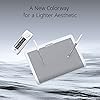
- A New Colorway for a Lighter Aesthetic: Xencelabs Pen Tablet Medium Bundle SE comes in Nebula White to appeal to creatives with a lighter workspace aesthetic. The exquisite appearance of the Pen Tablet aims to provide you with a much better creating experience. Now artists have a choice of what color graphics tablet they integrate into their personal workflow.
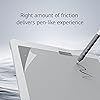
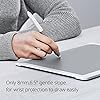
- Special Surface Design: This texture gives our included pens a surface that feels reminiscent of a pen to paper. The touch surface of our drawing tablet is made of special materials to offer an ultra-fine frosted textured surface with non-slip and wear-resistant. Exquisite craftsmanship and 6.5 gentle slope for wrist protection to draw easily and unleash your inspiration.
- Customizable Quick Keys: Working in unison with the Drawing tablet. The shortcut keys give you 5 sets of 8 keys a total of 40 programmable functions per application. An OLED display to show you each key assignment at a glance and 30 hours of sustainable working when fully charged can make any workflow much more easier.
- Two Advanced Digital Pens with Pen Case: 8192 levels of pressure sensitivity, 5080LPI pen resolution and virtually no lag to provide the most ultimate precision and control performance and realistic pen-to-paper feel. The digital pen features two different diameters and number of buttons to adapt to different drawing methods and effects.
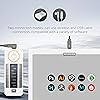
- Multiple Compatibility: Our driver is compatible with Linux, Windows, and Mac OS and software programs such as but not limited to: Adobe Suite, Adobe Substance Painter, Corel, Autodesk (Maya, Max & Fusion 360), Pixelogic, Toon Boom, Foundry (Nuke, Modo). You can quickly access the settings at the top of the graphic tablet.
Description
This professional drawing tablet comes in premium Nebula White. Advanced colour design enhances the beauty of the product. We are committed to giving you a better painting experience. The active area (10.3”x5.75”) of this pen tablet has a true 16:9 aspect ratio to match industry-standard displays to provide a fluent and quick graphic drawing design workflow. Special corner light design to let you more clearly perceive the work area and software switching. the color can be customizable for each software. This drawing tablet designed with a narrowed to only 5 mm thin curved 6.5° slope which reduces potential tension and stress to create a comfortable, natural drawing experience. The aluminum alloy is resistant to friction with stable color. There is also a non-slip pad pasted on the back panel to allow you to create artwork with peace in mind. This Graphic tablet is also equipped with a 3000mAh battery. When fully charged, it can last for 16 hours of wireless use which is more convenient for taking outside. The Quick Keys OLED display makes it easy to remember which keys are assigned to which shortcut and the programmable color ring indicates which function you are currently using. Physical Dial with colored LED lighting gives you control over brush size, zoom, or other functions as needed. Up to 4 models can be set, with the physical dial color set for each model. The Xencelabs Quick Keys provide a shortcut controller for left-handed or right-handed, wireless or wired, with 5 sets of 8 keys, that allows up to 40 programmable functions per application. Xecenlabs Quick Keys is designed with a powerful battery function along with working continuously for 25-53 hours after being fully charged. The shortcut Keys can be used horizontally or vertically, with the scroll wheel left or right, up or down. Suitable for left-handers and right-handers. The back of Quick Keys non-slip function, which can be used in multiple usage scenarios. Perfect to use with the pen tablet and pen display. The Pen Tablet ships with two battery-free digital pens of different diameters and number of buttons to meet different drawing needs. Both pens come with 8192 levels of pressure sensitivity and support ± 60° tilt. The thickness of the lines will change with the pressure you put on the pen, Multi-angle inducted and virtually no lag. The pens with soft-touch rubber grip, and well-positioned buttons to provide a comfortable drawing experience for 2D design. Especially suit for people who want natural drawing feeling in the hand. Both Pens move seamlessly from 2D drawing to 3D applications without changing drawing pens. You can tailor for your specific needs with featured programmable buttons + eraser. Xencelabs pen tablet is compatible with Windows 7 or later. Mac OS X 10.12 or later and Linux operating system. Internet access is needed to access and download the driver. GIMP, Krita, Inkscape, Adobe Photoshop, Adobe Illustrator, Adobe Substance painter, ArtRage, Sketchbook, Corel Painter, Toonboom storyboard Pro, Toonboom Harmony and many more. Our downloadable driver is accessible right from the Pen Tablet and allows artists to customize their preferences. Can be installed and used quickly with the concise and clear installation interface. Medium Bundle SE Quick Keys Pen Tablet Medium Bundle Medium Standard Pen Tablet Small Can this be used with a chromebook? I am interested in getting it for my daughter who is into digital art. Yes, with very limited functions. To take full advantage of the features and functions of the Pen Tablet I would suggest using it with either a current or near current computer running a macOS, Windows 10/11, or Linux operating system. Is this compatible with ux/ui softwares like figma? That is a great question. Yes, the Xencelabs Pen Tablet Bundle will work with just about any current or near current macOS or Windows operating system you can download and install your application on. Do you have pen holder, or have one you recommend for the larger pen? There is not a pen holder that comes with our tablets. The Pen Case is designed to store and hold your pens. With that said, we have received many customers asking for a more traditional digital pen hold, and we are looking into that. Is this tablet only for drawing or can you watch movies and play games on it? The Pen Tablet is not only for drawing. You can use it as a mouse replacement. And with the Quick Keys, you can control other applications also. Its features allow you to use it as more than just a drawing tablet. Does this come with the Glove and Carrying Case? That is a great question! Yes, both the Drawing Glove and the Carrying Sheeve come with the Pen Tablet Bundle, among other items. When you receive your Pen Tablet Bundle, you will be ready to draw.
Brand: XENCELABS
Connectivity Technology: Wireless, USB
Pressure Sensitivity: 8192 levels
Operating System: Win/Win 11 ARM/Mac/Linux
Special Feature: Security Slot
Brand: XENCELABS
Model Name: BPH1212W-K02-A
Built-In Media: Xencelabs Pen Tablet Medium Bundle SE, 2 Digital Pens, Pen Case, USB-A to USB-C Adapter, Felt Nibs, Quick Guide/Thank You Card, Warranty Card, Carry Case, Glove, Triangle Sticker, Nib Extracting Ring, Cables
Target Audience: Teacher
Model Number: XMCTBMFRES-SE
Manufacturer: XENCELABS
UPC: 850013593002
External Testing Certification: Não aplicável
Mfr Part Number: 819020463
Connectivity Technology: Wireless, USB
Pressure Sensitivity: 8192 levels
Operating System: Win/Win 11 ARM/Mac/Linux
Additional Features: Security Slot
Specific Uses For Product: Drawing
Compatible Devices: Compatible With Laptops/Desktop/Monitor Models
Display Type: LED, OLED
Screen Size: 12 inches
Item Weight: 2 kg
Item Dimensions L x W: 12.6"L x 9.17"W
Active Surface Area: 10.33 x 5.8 in / 262.4 x 147.4 mm
Color: Nebula White
Software Update Supported to Date: unknown
Frequently asked questions
To initiate a return, please visit our Returns Center.
View our full returns policy here.
- Klarna Financing
- Affirm Pay in 4
- Affirm Financing
- Afterpay Financing
- Zip Pay in 4
- Financing through Apple Pay
- Financing through Google Pay
Learn more about financing & leasing here.


