Search  for anything...

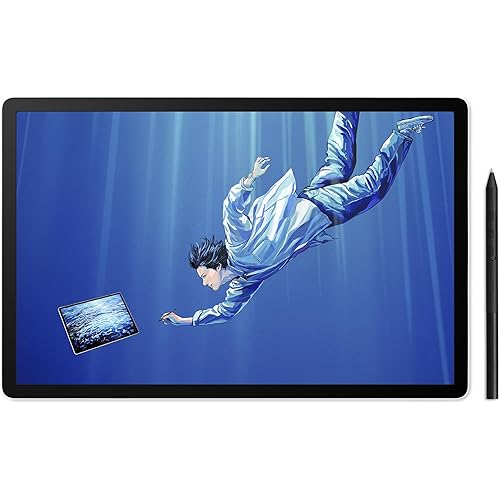
Wacom Intuos Pro Large Bluetooth Professional Graphic Drawing Tablet with Pro Pen 3, Compatible with Mac, Windows - 2025 Edition

  • Based on 91 reviews
Condition: New
Checking for the best price...
$429.95 Why this price?
Holiday Deal · 14% off was $499.95

Buy Now, Pay Later


As low as / mo
  • – Up to 36-month term if approved
  • – No impact on credit
  • – Instant approval decision
  • – Secure and straightforward checkout

Ready to go? Add this product to your cart and select a plan during checkout.

Payment plans are offered through our trusted finance partners Klarna, Affirm, Afterpay, Apple Pay, and PayTomorrow. No-credit-needed leasing options through Acima may also be available at checkout.

Learn more about financing & leasing here.

Selected Option

Free shipping on this product
This item's return window has been extended for the holiday season: FREE refund/replacement until Jan 31, 2026

To qualify for a full refund, items must be returned in their original, unused condition. If an item is returned in a used, damaged, or materially different state, you may be granted a partial refund.

To initiate a return, please visit our Returns Center.

View our full returns policy here.


Availability: In Stock.
Fulfilled by Amazon

Arrives Saturday, Dec 13
Order within 3 hours and 48 minutes
Available payment plans shown during checkout

Protection Plan Protect Your Purchase
Checking for protection plans...

Size: Large


Style: Pro Pen 3


Features

  • WACOMS BEST PEN TECHNOLOGY: Pro Pen 3 offers amazing precision, 8192 pressure levels, tilt support & lag-free tracking for smooth, precise strokes; choose slim, straight or flared grip, adjust balance & button layout for precision and comfort
  • DIAL INTO PRODUCTIVITY: Speed up and stay in the creative flow with 10 customizable tablet ExpressKeys & 2 mechanical dials conveniently located at the top of the tablet and close to your keyboard for efficiency
  • DESIGNED FOR MODERN MONITORS: With a versatile 16:9 format perfect for multiple monitors and wide displays; large size has a large active area with a small footprint 14.8 x 9.9 / 377 x 253 mm
  • SLEEK AND STURDY: Measuring 4mm at its thinnest this professional-grade drawing tablet feels like pen-on-paper on your desk, combined with the robust durability of magnesium making it equally suited for your office or life on the go
  • WIRELESS FREEDOM: use Intuos Pro with USB or connect wirelessly via Bluetooth to multiple computers with a simple switch

Brand: Wacom


Connectivity Technology: Bluetooth, USB-C to USB-A, USB-C to USB-C


Pressure Sensitivity: 8192 Levels


Operating System: "Windows 10 or later, macOS 13 or later"


Special Feature: 10 Programmable Expresskeys, 60° Tilt Support, Ergonomic


Product Dimensions: 14.84 x 9.96 x 0.04 inches


Item Weight: 1.46 pounds


Item model number: PTK870K0A


Batteries: 1 Lithium Polymer batteries required. (included)


Date First Available: March 12, 2025


Manufacturer: Wacom Technology Corporation


Frequently asked questions

If you place your order now, the estimated arrival date for this product is: Saturday, Dec 13

Yes, absolutely! You may return this product for a full refund within 30 days of receiving it.

To initiate a return, please visit our Returns Center.

View our full returns policy here.

  • Klarna Financing
  • Affirm Pay in 4
  • Affirm Financing
  • Afterpay Financing
  • PayTomorrow Financing
  • Financing through Apple Pay
Leasing options through Acima may also be available during checkout.

Learn more about financing & leasing here.

Top Amazon Reviews


  • Improvements are more "quality of life" vs an actual "necessary" upgrade vs the 2017s
Size: Medium Style: Pro Pen 3
I already had the Wacom Intuos Pro 2017 (and have had all three sizes at various points) and overall was happy with it, but I decided the improvements of the 2025 model made it worth upgrading to: • Smaller physical footprint: I mainly work at my desk at home, but for the times when I take my laptop out to, say, a coffee shop, it's a more comfortable fit for both my laptop and Wacom 2025 Medium on a table versus the wider 2017s. I could fit the 2017 Medium but just barely, and it was a tight fit depending on the table size. With the 2025 that's no longer a problem. • Larger active area. While the active area on a 2017 Medium is adequate, depending on your monitor size it can still feel too crampt, but the 2025 active area is a lot more roomy. (This has the somewhat negative side effect of losing the bevels to rest your hand on, but the device is now thin enough that you get used to it pretty quick when you're on the edges; it's not a problem for me, but if you use it for drawing as opposed to photo editing it could be an issue.) • Third button on pen. I had the Wacom Movink briefly last year and while they included the Wacom Pro Pen 3, it was the barebones pen itself minus the grips, which I disliked. Fortunately for the Intuos Pros, they include all of the pen's accessories and I have the flair grip on the pen, which makes it great to use. I also love the third button (I rarely used the eraser button, so I don't miss that not being included here), as it enables more flexibility and convenience. • Bluetooth 5.3. I've seen multiple reviews, including here, going on about how bad the Bluetooth is, but I've noticed they are all on Windows 11, whereas I'm on a Mac, so I'm guessing the issue lies there. I've had issues with Wacoms drivers in the past on my Mac, so I'm just saying in this instance bluetooth works great; in face I've had ZERO connectivity issues on the 2025, whereas I regularly had problems on the 2017 even when plugged in, and it wasn't rare that I'd have to reboot the computer in order to get the tablet working again. That hasn't been an issue here. However, you can't ignore the complaints from the Windows 11 users, so if that's what you work on, be advised and maybe wait until Wacom fixes it. But on a Mac it's been an underrated bonus for it to "just work" when I power up my computer without having to make a fuss over connecting it, which was common on the 2017 (which has Bluetooth 4.2). Other things: • Photos don't do this device justice. People have complained that it looks "cheap", but when you actually have it in front of you and handle it, it is a premium device that is totally professional. • I use a Tourbox for my shortcut keys so I don't use the quick keys on the tablet itself, so their position at the top now instead of the side is a non-issue for me, and in fact is a net benefit in that it's allowed the device to be narrower (see above). • The 2025s no longer feature touch sensitivity, but I only used that feature as a cursor after I'd set the pen down to type something, so it's not a big loss for me. If touch was something you used extensively for actual editing (rotating the canvas, zooming in, etc), then you'll want to go with the 2017. In closing, this is a great recommendation, although if you feel the price is too steep, you can find great deals on used 2017s on eBay for less than half the price. ... show more
Reviewed in the United States on May 5, 2025 by Brian Rice

  • Absolutely Outstanding – A Must-Have for Creative Professionals
Size: Medium Style: Pro Pen 3
I absolutely love the Wacom Intuos Pro Medium with the new Pro Pen 3. This tablet has completely transformed my workflow. The pen is incredibly responsive, with natural pressure sensitivity and tilt support that make every stroke feel like traditional media — only better. The customization options for the pen and tablet buttons are intuitive and powerful, allowing me to work faster and more efficiently across multiple applications. The Bluetooth connectivity is rock-solid and keeps my desk clean and uncluttered. The build quality feels premium, and the surface texture is just right — enough tooth to feel like you're drawing on paper, but smooth enough for precision work. Whether I'm doing pyrography design planning, custom engraving layouts, or digital sketching, this tablet keeps up with me flawlessly. It’s a true professional-grade tool that feels worth every penny. Highly recommended for any serious artist, designer, or creative pro. ... show more
Reviewed in the United States on November 6, 2025 by Albert M. Kruegel

  • I Love It! What an upgrade!
Size: Small Style: Pro Pen 3
First thing is the size, this thing just disappears under my hand and is smooth to the stroke. Really start to forget I’m not just drawing on the table. After that it’s powerful, I’ve had no issues connecting to my Mac mini (m4) and MacBook (m1) or switching between the two. They dual Bluetooth channels is awesome when switching between. I have connected via a cable, but I imagine it’s just the same. Also, the express key and dial are awesome, I haven’t customized them, but having them within quick reach is an easy workflow. The X3 pen is phenomenal, it just feels great. The friction is great. The weight is great. The nibs are great. I’ve just been having a really amazing time with it. The tilt accuracy and pressure sensitivity really fine tune the work I’m doing. And the buttons are easy to use and become intuitive to operate. This is a portable power house in small form. It lives on my desk and doesn’t clutter it up. And when I’m on the go it easily disappears in my bag. It’s becoming indispensable in my daily work flow. ... show more
Reviewed in the United States on May 21, 2025 by E.Johnson

  • Perfect for Photo Editing.
Size: Small Style: Pro Pen 3
Perfect size and responsiveness for photo editing. Great product.
Reviewed in the United States on November 18, 2025 by Grant

  • Great Ergonomics and Function Tablet
Size: Medium Style: Pro Pen 3
This Wacom Pro medium is the perfect tablet. Every option I can think of and more. Easy to use, compact, travels well, with great functionality. Connect either via USB cable or (two) Bluetooth channels making it easy to switch between two devices. Love it.
Reviewed in the United States on August 5, 2025 by Dwight McCann

Can't find a product?

Find it on Amazon first, then paste the link below.
Checking for best price...