Search  for anything...

tp link, wifi plug deco m3, mesh networking, wi-fi router system, network extender wireless internet whole home wifi, ac1200, booster, range extender, gigabit, repeater

  • Based on 6,083 reviews
Condition: New
Checking for the best price...
$249.99 Why this price?

Buy Now, Pay Later


As low as $41.67 / mo
  • – 6-month term
  • – No impact on credit to apply
  • – Instant approval decision
  • – Secure and straightforward checkout

Ready to go? Add this product to your cart and select a plan during checkout.

Payment plans are offered through our trusted finance partners Klarna, Affirm, Afterpay, Apple Pay, and PayTomorrow. No-credit-needed leasing options through Acima may also be available at checkout.

Learn more about financing & leasing here.

Free shipping on this product

This item is eligible for return within 30 days of receipt

To qualify for a full refund, items must be returned in their original, unused condition. If an item is returned in a used, damaged, or materially different state, you may be granted a partial refund.

To initiate a return, please visit our Returns Center.

View our full returns policy here.


Availability: Only 2 left in stock, order soon!
Fulfilled by ARF Tech

Arrives Wednesday, Jul 15
Order within 23 hours and 4 minutes
Available payment plans shown during checkout

Protection Plan Protect Your Purchase
Checking for protection plans...

Features

  • Better than traditional WiFi Booster: TP-Link mesh technology allows Deco units to form a single mesh network optimize Wi-Fi traffic and keep connected devices running at top speeds as you move around your house
  • Long Range Coverage: Deco uses a system of units to achieve seamless whole home WiFi coverage up to 4,500 sq. ft and eliminate wifi dead zones.
  • Dual Band WiFi Mesh Network System: Fast AC1200 Dual Band WiFi makes the deco capable of providing high speed wifi and lag-free connections for more devices.
  • Convenient plug-in design to extender Wi-Fi to wherever you want to enjoy smooth browsing and streaming throughout your home
  • Robust parental control limits online time and blocks inappropriate websites according to unique profiles created for each family member
  • Setup is easier than ever with the Deco app there to walk you through every step
  • Industry leading 2 year and 24/7 technical Support
  • All the TP-Link Deco Mesh can work together

Description

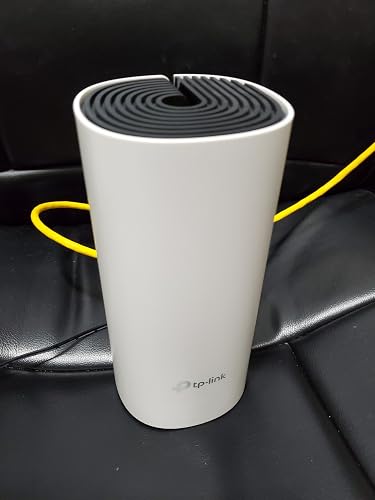
TP-Link AC1200 Whole Home Mesh WiFi System (Deco M3 3-pack) WiFi Dead-Zone Killer Deco M3 is a simple way to provide a strong WiFi signal in every corner of your home up to 4,500 square feet. 2.4 GHz and 5 GHz wireless connections work together to provide even faster network speeds and truly seamless coverage. Plug-In Coverage The Deco M3W makes complicated setup a thing of the past. Simply plug the compact M3W unit into a wall outlet, download the Deco app and follow the on-screen directions for quick and easy setup. If you need additional WiFi coverage, no problem. Simply add another Deco M3W, or another Deco product, to increase coverage at any time. Deco M3W only with Deco routers to extend Mesh WiFi Seamless Roaming with One WiFi Name TP-Link Mesh means Deco units work together to form a unified network with a single network name. Enjoy uninterrupted streaming, downloading, gaming and more as you move through your home, and no more switching WiFi names, creating a truly seamless online experience. All Decos Work Together Deco M3 is compatible with other Deco models to form Mesh network. Expand Mesh WiFi coverage anytime by simply adding more Decos

Brand: TP-Link


Model Name: Deco M3


Special Feature: Parental Control, Wi-Fi


Frequency Band Class: Dual-Band


Wireless Communication Standard: 802.11ac


Compatible Devices: Desktop, Gaming Console, Laptop, Security Camera, Smartphone, Tablet


Recommended Uses For Product: Home


Included Components: Mesh Router, Satellite, Power Supply, Network Cable


Connectivity Technology: Bluetooth


Color: 3 Pack


Other Special Features of the Product: Parental Control, Wi-Fi


Frequency Band Class: Dual-Band


Wireless Compability: 802.11ac


Compatible Devices: Desktop, Gaming Console, Laptop, Security Camera, Smartphone, Tablet


Antenna Location: Home


Connectivity Technology: Bluetooth


Antenna Type: Internal


Operating System: TP-Link OS


Security Protocol: WPA2-PSK


Number of Ports: 2


Control Method: Voice


Data Transfer Rate: 1 Gigabits Per Second


LAN Port Bandwidth: 1200 Mbps


Voltage: 100240 Volts


Maximum Upstream Data Transfer Rate: 867 Megabits Per Second


Number of Antennas: 2


Smart Home Compatibility: Smart Home Compatible


Router Firewall Security Level: Basic


Wi-Fi Generation: Wi-Fi 5


Has Internet Connectivity: Yes


Router Network Type: Mesh


Connectivity Range: 4500 Square Feet


Is Modem Compatible: No


Connectivity Protocol: bluetooth, wi-fi


Coverage: 4500 square feet


Frequency: 2.4 GHz


Brand: TP-Link


Model Name: Deco M3


Built-In Media: Mesh Router, Satellite, Power Supply, Network Cable


Model Number: DECO M3(3-PACK)


UPC: 840030700354


Global Trade Identification Number: 54


Manufacturer: TP-Link


Mfr Part Number: DECO M3(3-PACK)


Item Type Name: Mesh WiFi


Unit Count: 1.0 Count


Warranty Description: 2 year manufacturer


Item Weight: 3.1 Pounds


Item Dimensions L x W x H: 7.48"L x 3.57"W x 3.57"H


Color: 3 Pack


Has Security Updates: Yes


Frequently asked questions

If you place your order now, the estimated arrival date for this product is: Wednesday, Jul 15

Yes, absolutely! You may return this product for a full refund within 30 days of receiving it.

To initiate a return, please visit our Returns Center.

View our full returns policy here.

  • Klarna Financing
  • Affirm Pay in 4
  • Affirm Financing
  • Afterpay Financing
  • PayTomorrow Financing
  • Financing through Apple Pay
Leasing options through Acima may also be available during checkout.

Learn more about financing & leasing here.

Top Amazon Reviews


  • What an amazing device!!! What an amazing device!!!
In my opinion the best easy to setup device for wifi mesh networks, the setup is very intuitive and specific describing step be step everything, i usually does not like to setup wifi products trough an app i preffer web browser "old fashion" but mesh syatems rarely has this option. The Deco app is simply amazing. The system works flawleslly and for the price is unbeatable, i paid about hundred for one router and 2 satellites. The only cons at least for me is that the performance is not so powerfull as i expected wich is understandable at this price point. I have 400MB of download and other mesh devices and routers i testes reach this speed. The deco system goes about 250MB for the router and 150MB for the satelites, wich is not bad and this covers the majority of needs for a wifi network, streaming gaming etc. But i want more, latency was great and the performance overall, but is not for me, i want close to 400mb wich i reach with othwr devices i tested. Another plus is this system cames with a free access to control your network, what devices are connected, ban pause or control the wifi, even give high priority to certain devices on the network. Very professional and free, the majority of companies charge you to have acces to manage your network wich in my opnion is a scam. Very recommended product. Just if you have a really high speed, try another high end Deco, more expensive and Wifi 6 capable. If i get one i will post my impresions about it. ... show more
Reviewed in the United States on June 19, 2021 Reviewed in the United States on June 19, 2021 by JhonSnow777

  • Seamless, instant improvement!
I have about an 1,800 sq ft home with the router in the basement, next to the modem's line to the house. The signal would barely reach the first floor, let alone the second. I came up with a scattered network architecture of MoCa adapters and wired repeaters, but it became a real pain to switch between APs manually. Signal was never ideal, either. Deco fixed all that in less than 5 minutes. It's pretty much plug and play with the app setup. The base hub has two gigabit ethernet ports, so you can insert it in to an existing wired connection and piggyback from there. Or, you can simply plug it right in to your modem or router on its own line. Coverage is excellent, as the repeater units leverage a powerline connection instead of just repeating a wireless signal of questionable strength. It's really nice having a single SSID and letting devices automatically connect to the strongest AP. Running speedtest, I'm getting the same speed over wireless that I pull down from a wired outbound connection - both upload and download. This might not be the best solution if you're a hardcore hardware nerd or want a ton of customizability. I've heard there is no web interface and you have to use the app. Not sure how it's handling DHCP or if the router is still doing that. For me, it just works right out of the box and fixed a pesky issue right away. No more running multiple routers and repeaters with dropped connections. ... show more
Reviewed in the United States on February 13, 2020 by JB

  • Mobile Wi-Fi At Home
Honestly, it seems more & more we are staying at home and trying to do everything due to the coronavirus pandemic. It is hard to believe, but we are at a place where most of us are being isolated with everything in one place. So for most of us, we do need to make small adjustments to just keep us secure with our live. In regards to our internet connection, we need to upgrade to have a connection with everything for our work, school and our entertainment with streaming movies online. So for me, I had to consider changing my router, because I wanted to keep up with everyone while streaming online. I have had many different routers, but today we need to consider having a mesh router for our everyday needs. But I did not want to spend more than I could afford. So, I found one affordable mesh router, but it had some kinks in it. TP-Link's Deco M3 Mesh Wi-Fi system is a inexpensive and affordable mesh router system that handles well in its price, but with a few hiccups along the way. The mesh Wi-Fi system is easy to connect and setup, but runs mainly from a app on your tablet or smartphone (a casualty for those whom do not own a smartphone in the process.) Still, the speed is fairly good, and is a step up from the Wireless-N routers. The speed is mostly reliable, but there are a few faults along the way. For one, you cannot control the wireless channels the mesh Wi-Fi can be on, unlike prior routers. That in itself is a problem, especially if you want to remove pings from your connection for a faster speed. I had talked to Tp-Link itself, and they tech support was lousy in regards to helping me setup a faster connection. If TP-Link did manage to put that in the software, it would've made excellent customer service. Another fault is the lack of connectivity my mother received while streaming her movies online in her bedroom. The connection was lagging at times, and I had to use my cable companies Wi-Fi for a better connection. Still, for what it is worth, there are not a lot of cheap options you can get for better Wi-Fi, but the Deco M3 Wi-Fi system from TP-Link is one that can handle well. While many people would rather spend more for the money, with so many people struggling in their lives from the pandemic, this would be one of the few options I would suggest you go to, but hopefully it can be a lesson for TP-Link to help provide better options for speed and reliability. Price: B- Convenience & Setup: B- Speed & Reliability: C+ Overall: B- ... show more
Reviewed in the United States on March 13, 2021 by Michael Kerner

  • Great product, but incorrect square footage.
TP Link does work as expecred, devices dont get confused during roaming, setuo was mostly easy, issues were mostly caused by me not having common sense. I wish the app was better at assisting installs thoigh, as not all exact models are shown on the list. Images help however. The claimed 4500 square feet is not exactly accurate. If they were connected in the field with no walls to attenuate and refract the signal that would be correct. I initially thought to only connect 2 terminals in my 2500 square ft home but after doing site survey i found a bunch of dead zones or places where signal dropped below -60 which is not reliable enough. Relocating hotspots and connecting all 3 solved that, now signal doesnt drop below -30 which is excellent. Also an average iser doesnt know the difference between AP mode and a wi-fi switch mode. I think in most cases AP mode should be the default setting to keep wifi devices on the same network as the wired ones. Otherwise some issues may occur with discovery for certain products. E.g. wired in alarm panel but wirelessly connected perifirials like cameras and garage openers. Same goes for wireless printers being unable to discover wired desktops since printers address is on a different network. ... show more
Reviewed in the United States on April 22, 2020 by Michael&Victoria

  • Solved all Wifi problems
Installed last weekend and replaced a failing single wireless router. Took about 10 minutes total and that included plugging a 5 port switch into it and rebooting the cable modem. The 2 satellites when plugged in took less than 30 seconds to connect. I got full coverage throughout a 5000 sq foot single story house as well as good coverage outside the house. Smart Tvs went from stuttering all the time to playing 1080P streamed videos on 2 TVs as well as casual internet browsing with no issues. I unplugged one of the satellites and moved it further away from the main router and it came back online in less than a minute. Initially the app to control everything was very limited in scope (I run a whole Unifi set up in my house so I am spoiled). The app automatically updated the firmware on all the nodes right after install and then again 2 days later. They added in additional controls for QOS, port forwarding, static IPs, selecting a DNS server, blacklisting users, etc. They added in some features for SIP and IPTV which I have not played around with. You can also set Vlans. Not as full featured as a full blown router but pretty impressive. The app allows you to control and maintain the network even when not on site which is helpful since this setup is for my parents who sometimes need help with the "internet." Overall I am very pleased with this purchase and more importantly I am not getting phone calls about the internet not working anymore. ... show more
Reviewed in the United States on July 25, 2019 by John

  • It REALLY Works!
We have dismal wi-fi service to begin with from our provider, so a product like this was a crap shoot. But we went ahead and upgraded our router to a newer, 5g capable version and then I set this up with 3 of the the compact plug-ins. 2 came with the system, but I went ahead and bought a third when I ordered the system. We put one in our living room, farthest bathroom, and the 3rd outside in our notoriously signal killing shop for our smart TV and music streaming. Said shop is about 60ft from our house with a tin roof, but closest to the end of the house where we placed the mesh with our router. We now get full signal (and 5g which our provider said wouldn't happen, but here we are...) all through the house and to the shop. We live on 11 acres set as a rectangle and no joke we now get wi-fi at the farthest ends of the property one of which is 600ft away and the other is 700-800ft away. It's 1 of 3 bars, but it still shows up no problem, catches, and is usable! I couldn't believe it. 3 months from the purchase date and the only issues we've had were from our service provider, not the mesh. It is pretty simple to set up, too. I don't know about any of the other technical stuff it may or may not do, but as long as it keeps us connected, we're happy. ... show more
Reviewed in the United States on February 21, 2020 by ISHOPTOOMUCH

  • Decent Performance, Abysmal App
To clarify, there are three products shown on the page from which I purchased my system. The package on the one I bought was labeled "Deco M3" but contained 1 Deco M4R router and 2 Deco M3W extenders. People reviewing other items also sold also on the same page may have had different experiences. There were two "Quick Installation Guides" in the box. One for the M4R and another for the two M3Ws. Both say to scan a tiny QR code to download an iOS or Android App which will guide the user through the installation. The App requires the user first register on TP-Link's website. Registration requires the user to respond to an e-mail. My internet is via satellite and the TP-Link website didn't allow enough time to receive the e-mail before it timed out. Ultimately, I was able to get logged in, but this was not a good beninning. The App directs the user to power down their existing modem, connect the M4R to it and then power both devices on. It doesn't tell the user what to do with the M3Ws. The App proceeds to set up the network in Router Mode without asking whether the user wants it as an Access Point. The App automatically locates the M4R, sets it up, updates the firmware, prompts the user to log in and ends. It does not tell the user what to do with the M3W extenders, it just stops. The list of so-called "Hot Questions" was not available until after the App had already completed the first part of the setup. The App doesn't include a link to the Users Manual. I went to the TP-Link website and downloaded the Users Manual for this product - or at least the nearest one they had - and found it to be only a little more helpful than the App. At this point, I was ready to return the entire thing to Amazon. The Plus Sign (+) in the upper-right corner opens a menu to select and install the M3W extenders. The App then set up the extenders, updated their firmware and once again quit. More tapping found the "grayed-out" MORE menu at the lower-right of the App leads to a screen where the Operating Mode can be changed from "Router" to "Access Point". A single screen displayed when the App is first launched pointing out the need to make the decision about the Operating Mode and the need to add the range extenders as a separate, manual, operation would be very helpful. My concerns about the setup aside, the system delivers good performance (45 Mbps) to a bedroom about 30 feet from the router and acceptable performance (30 Mbps) to another bedroom nearly 100 feet distant from the router. So long as the system does not succumb to the reliability problems reported by at least one other reviewer, I think I will be happy with this system. ... show more
Reviewed in the United States on March 8, 2020 by Hugh Whitledge

  • Solved All of My Issues!
I've been searching for a solution to my wifi problem for years and the Deco system has done it! I own a 1600 sq ft home and have both a 1000 sq ft barn and a 640 sq ft metal backyard bar behind it. Unfortunately, my internet enters my home at the furthest possible spot away from both of the other buildings. I've tried wifi extenders and various other combinations to try to broadcast my signal to them with very little luck. When I would happen to catch it would be intermittent at best... and that wasnt very often. I was about to finally break down and run aerial cat-6 to the other structures -- something I've avoided for years because it very seldomly looks nice. I've also avoided doing direct burial because I do tons of gardening and landscaping and am always digging up the yard for one or the other. Luckily, I tried out the mesh technology and it solved everything. It easily tosses my signal across my home and out into the other structures, including the metal bar which normally has trouble receiving or transmitting signal from anything -- including mobile data on my phone. In fact, I loved the mesh setup so much I ended up buying additional units and added to it "just in case" there were any deadzones I may have missed. Since then, I've walked around my property, which is about 10,000 sq ft total, and found that I catch great signal everywhere. Pros: I love the fact that it's a seamless connection as I bounce around the property, no longer having to wait for extenders or a router to reconnect. The units are aesthetically pleasing and don't stick out like sore thumbs. There's various options as you look across the product line, but each one is minimalistic and can be placed in plain sight without an issue. Setup was straightforward with the app. Much cheaper than the alternatives and I can't fathom paying more for the other company's branding when I know how well these units from TP-Link work. I have a Plex server and the mesh makes it a breeze to transmit data "in network" so that the quality is original and it doesn't affect my data cap. Cons: none yet. ... show more
Reviewed in the United States on April 23, 2020 by Sweetjumpkicks

Can't find a product?

Find it on Amazon first, then paste the link below.
Checking for best price...