Search  for anything...

Tapo ColorPro Wi-Fi Outdoor Camera, PoE, Plug-in, Daylight Clarity at Night, 2K QHD, Person/Pet/Vehicle Detection, Local/Cloud Storage, 127° FOV, Built-in Siren C325WB

  • Based on 18 reviews
Condition: New
Checking for the best price...
$70.98 Why this price?
Save $19.01 was $89.99

Buy Now, Pay Later


As low as $11.83 / mo
  • – 6-month term
  • – No impact on credit to apply
  • – Instant approval decision
  • – Secure and straightforward checkout

Ready to go? Add this product to your cart and select a plan during checkout.

Payment plans are offered through our trusted finance partners Klarna, Affirm, Afterpay, Apple Pay, and PayTomorrow. No-credit-needed leasing options through Acima may also be available at checkout.

Learn more about financing & leasing here.

Selected Option

Free shipping on this product

FREE 30-day refund/replacement

To qualify for a full refund, items must be returned in their original, unused condition. If an item is returned in a used, damaged, or materially different state, you may be granted a partial refund.

To initiate a return, please visit our Returns Center.

View our full returns policy here.


Availability: 15 left in stock
Fulfilled by Amazon

Arrives Friday, Jun 5
Order within 17 hours and 32 minutes
Available payment plans shown during checkout

Protection Plan Protect Your Purchase
Checking for protection plans...

Style: 2K QHD + ColorPro Night Vision


Features

  • ColorPro Night Vision Experience unparalleled clarity in low-light conditions with Tapo's cutting-edge ColorPro Night Vision technology. Our cameras effortlessly pierce the darkness, capturing vivid and detailed imagery around the clock.
  • Superior to Floodlight/Starlight SensorOutperforms traditional color night vision dependent on spotlights or floodlights. Our ColorPro Night Vision captures true-to-life colors in darkness, all without causing light pollution or dark corners.
  • Stunning 2K QHD & HDR PerformanceWitness crystal-clear surveillance with the impressive 2K QHD/4MP high resolution. Advanced HDR technology ensures optimal image quality, even in overexposed or underexposed settings. Connects via 2.4GHz Wi-Fi Band.
  • Flexible Connectivity: PoE or Wi-FiChoose between Power over Ethernet (PoE) for a stable, wired connection with a single cable for power and data, or connect via Wi-Fi for easier, cable-free installation. (PoE switch, injector, and Ethernet cable not included)
  • Exceptional Outdoor UseSecure your property with our robust, weatherproof security camera designed for outdoor use. The 9.8 ft power cable allows for flexible installation, while the Ethernet port ensures stable, uninterrupted monitoring.
  • Secure Local or Cloud StorageSave footage on up to a 512 GB microSD card (not included) or subscribe to Tapo Care for cloud storage for 30-day video history and extra features. [Check the TP-Link FAQ for microSD card compatibility before purchase.
  • Person/Pet/Vehicle Detection Get accurate alerts with advanced AI that detects people, pets, and vehicles. Reduce false alarms from motion like swaying leaves, and focus only on what matters with smarter, clearer detection.
  • 2-Way Audio & Built-In SirenCommunicate clearly with our push-to-talk microphone and speaker system. Deter potential intruders using the built-in siren and light alarm. Use our Customizable Alarm feature to record your own audio alarms.

Description

Introducing Tapo ColorPro Wired Outdoor Camera - your ultimate solution for round-the-clock surveillance with exceptional clarity. Our top-of-the-line ColorPro Night Vision technology guarantees unparalleled image quality in low- light conditions, ensuring you never miss a moment, even in the darkest nights.Boasting a stunning 2K QHD resolution and advanced HDR technology, the ColorPro Wired Outdoor Camera captures every crucial detail for your peace of mind. Install the camera with ease, indoors or outdoors, thanks to our weatherproof design and versatile 3-Meter POWER CABLE. The built-in Ethernet port ensures stable internet connectivity for uninterrupted monitoring. Save footage continuously on up to a 512 GB microSD card (not included) or subscribe to Tapo Care for cloud storage which saves 30-day video history and provides additional benefits such as motion tracking, baby crying detection, and more. [Before purchasing a microSD card, please check the TP-Link website FAQ to ensure compatibility with your device.] Our smart AI algorithm accurately detects people, pets, and vehicles, providing timely notifications tailored to your needs at no extra cost.Communicate effortlessly with crystal- clear 2-way audio and deter intruders using the built-in siren and light alarm. Customize your alarms by recording your own audio for a personalized touch. Enjoy seamless integration with Amazon Alexa and Google Assistant, and easily access your security footage on Amazon Echo Show or larger displays with Google Chromecast.

Recommended Uses For Product: Outdoor Security


Brand: Tapo


Model Name: Tapo outdoor cameras


Connectivity Technology: Wired


Special Feature: 2-Way Audio


Other Special Features of the Product: 2-Way Audio


Indoor Outdoor Usage: Outdoor


Compatible Devices: Smartphone


Mount Type: Wall Mount


Color: 2K QHD + ColorPro


Form Factor: Bullet


Installation Type: Screw In


Water Resistance Level: Waterproof


Alert Type: Motion Only


Room Type: Classroom, Kitchen, Living Room, Office


Effective Still Resolution: 4 MP


Waterproof Rating: IP66


Photo Sensor Resolution: 4 MP


Control Method: App, Voice


Power Source: Corded Electric


Wattage: 7 watts


Are Batteries Required: No


Number of Channels: 4


Video Capture Format: MPEG-4


Night Vision Range: 98 Feet


Flash Memory Installed Size: 512 GB


Antenna Location: Outdoor Security


Brand: Tapo


Model Name: Tapo outdoor cameras


Number of Items: 1


Built-In Media: Camera and Manual


Model Number: Tapo outdoor cameras


Manufacturer Warranty Description: 2 year manufacturer


UPC: 840030705427


Manufacturer: TP-Link


Item Type Name: ColorPro Wired Outdoor Camera


Connectivity Technology: Wired


Connectivity Protocol: Wi-Fi


Wireless Technology: Wi-Fi


Video Capture Resolution: 2K


Focus Type: Manual Focus


Field Of View: 127 Degrees


Item Dimensions: 3 x 4 x 5 inches


Item Weight: 230 Grams


Unit Count: 1.0 Count


Frequently asked questions

If you place your order now, the estimated arrival date for this product is: Friday, Jun 5

Yes, absolutely! You may return this product for a full refund within 30 days of receiving it.

To initiate a return, please visit our Returns Center.

View our full returns policy here.

  • Klarna Financing
  • Affirm Pay in 4
  • Affirm Financing
  • Afterpay Financing
  • PayTomorrow Financing
  • Financing through Apple Pay
Leasing options through Acima may also be available during checkout.

Learn more about financing & leasing here.

Top Amazon Reviews


  • Another Great camera from Tapo
Style: 2K QHD
I bought the 2 pack Tapo security camera last month as a upgrade from a similar camera. On my review of that order, I noted that I planned to expand my system with more cameras in the future . About a month has gone by and my feelings for this system are still the same. I added this OUTDOOR camera to replace an older camera on my driveway. The COLOR night time view literally blew me away. At first , I started getting too many false alerts picking up cars on the road. I then made a "BOX" for the motion sensing that didn't include the road...Boom..No more false alerts.. I did notice if I enable the " AI "mode for vehicles..It still picks up the cars that I didn't include in my motion area I chose...it seems Like it overrides the box and looks at the whole screen. This was easily fixed by disabling the AI for AUTOs. Setup was a breeze , just adding it to my other 2 Tapo cameras . Details are clear and I can easily read a license plate anywhere in my driveway. Alerts are sent almost instantly , and I will probably activate the free trial on this camera for offline storage. Remember to buy the 256 gb SD card when you buy these cameras. 2 screws must be removed to put the SD card in , and they are tiny tiny screws. Once you insert the card , you will be good to go. The software will format the card , and you can choose 24/7 recording , or motion activated recording. Record the motion clips that you want , save them to memory , then go to memory and you can view , download , or delete the clips to your phone. You can do all of this without a subscription. It's a great addition to my security system , and I plan to add the Battery Powered cameras in time so I can view my backyard . Tapo has proven to be a great family of security cameras for all situations. Whether it a baby monitor , outdoor , wireless , battery powered, or motion tracking , this collection is great and all work together with one well written ,easy to use app. Keep up the great work Tapo ! UPDATE : After a couple of months use , I thought I would add to this review. Now , someone user left a Lengthy review and 90 percent of it is user error. You can EASILY record video to your phone from the SD card without removing anything. If you get a notification , So .... The way to save videos does actually vary between my indoor and outdoor cameras . The Indoor cameras have 3 dots after the clip , and if you select the 3 dots it gives you the option to DOWNLOAD the clip . Selecting this DOWNLOADS the clip to the MEMORY of your SD CARD ... Then if you look up toward the top of the screen .. You will be able to select " Memory " and all the clips you downloaded will be here .... Selecting the clip you want will give you the option to delete , view , or even Download this video to you phone . NOW ... the Outdoor camera has changed a little bit on how to do this without a subscription....When you are watching the selected video , you must press the little camera button while viewing the video , then press it again to stop the recording ... It will the save the clip you recorded to the " MEMORY " section of the SD CARD.. At this point you can click on the clip to view , delete , or DOWNLOAD it to your phone! It's 2 easy steps to save it on your phone...Once you know how to do it , it's very easy....Don't believe the users that say you can't save clips to your phone .. Now for an actual small issue I had . My outdoor camera has an occasional issue ...I attribute this to the distance from my router. Last week , the spotlight stayed on for a couple days???...I unplugged the unit..Rebooted it...multiple times and it was not working correctly... I will admit I was a little upset..but I decided to do a factory reset by pushing the reset button that's in the SD card cover...That was the best thing I could have done ..I reconnected it to my app ..And the camera is now working correct again.... No dropouts , Motion Spotlight works , and I am happy it was just a factory reset that it took to fix it .. It's been working good for 2 weeks straight now ...We did have a power outage a couple weeks ago , and I think that may have messed my outdoor camera up a bit ..Overall...I still think it's the best budget camera system you can get.. No monthly fees and still does everything I want it to do . After months of use, I came up with the following way to set my camera up as the best for my driveway ,and sidewalk . I DISABLED motion sensing , as ANY motion including trees , shadows , distant cars , would always trigger alerts , I disabled the vehicle sensing as it would alert me of all the cars on the road .. I set " Person " alert and this picks up all " people " riding or walking and works perfect ... The other setting I enabled was " Line crossing " and made a line that gives me a notification if anything crosses the middle of my driveway . The combo of Line crossing , and Person alert has made this system work the way I wanted it to .. I see my driveway , and the road but do not get alerts for the traffic on the road .. Only if they pull in my driveway ... The person detection seems to work great when a person is walking anywhere ... It took a little bit of playing to reduce false alerts ... But now that I have it tweaked out , it is an amazing system to have. ... show more
Reviewed in the United States on April 18, 2023 by ToddWisconsin

  • Great product, great price!
Style: 2K QHD
Don't expect some big tech review here, I just don't care that much about all that. Got this thig back in May and just now got it up and going in August. It's purpose is to watch over my birds for predators or whatever niffy might come around. I'll say this, it was super easy to install and get up and running. Cut the power cord and spliced in wire to tap into my 12vdc bus in the solar shed. Connected to my TP-Link wireless router and it's off to the races. Installed a 512 SD card, skip the cloud junk. Plenty of local storage for my needs. Image quality is awesome! Day and night. May add a little led tag lite to get color at night. Don't like the idea of running the light that comes in the camera all the time. Might be fine but still.... Very little lag in video or audio. Movement detection and alarming is spot on. Caught my kitty climbing around on top of one of my runs and a big ole coon walking by a bit later about 4am. Coyote movement is what I really want to know. Their days are numbered around here, killing my birds and wiping out the fawns. Even the grown deer are taking a beating with scars all over them. I may dig around in the settings and refine some stuff but right out of the box it pretty much does what I want. Only thing is now is that I need about three more of them. Maybe I can get those and install them a little quicker this time around. ... show more
Reviewed in the United States on August 11, 2025 by Steven Harper

  • Great camera
Style: 2K QHD + ColorPro Night Vision
It works perfectly. The image is very clear, even at night. Sensor is pretty sensitive. Installation was easy and app is easy to navigate. We’re very satisfied. We got it a while ago and performance continues to be great.
Reviewed in the United States on May 9, 2026 by Valeria Gusmao Bittencourt

  • Good for $29.99 - Converted to battery/solar Good for $29.99 - Converted to battery/solar
Style: 2K 3MP
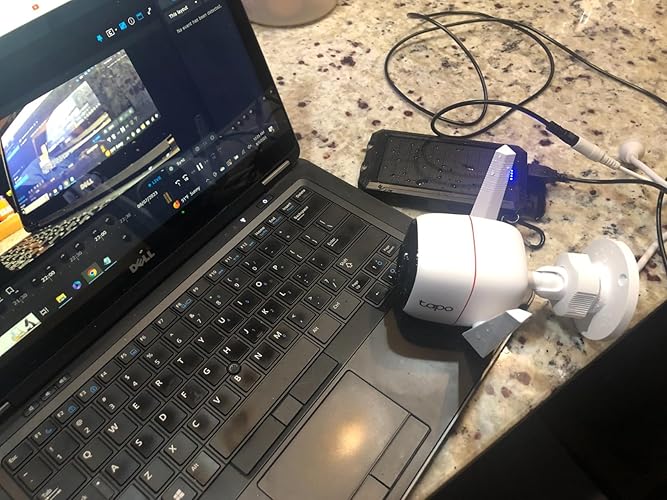
So far, the picture is decent (2k) and night vision is good, not great. I haven't played with the motion sensitivity a lot yet, but so far seems okay. As you can see in the photo, I converted this camera, as an proof-of-concept, to a true wireless, solar/battery camera, as I can find ZERO ONVIF solar or battery cameras on the market. I want to use it with an NVR; in my case, Synology Surveillance. So I added a 2.1mm to USB A cable (https://www.amazon.com/gp/product/B07JGR7JJQ) and a waterproof USB solar charger (https://www.amazon.com/gp/product/B08GPKBPJX). That was literally plug-n-play and the camera powered up and worked on the TP-Link Tapo (native) app. I did have some issues getting it to "pair" (last step in the setup process). I had to remove the tiny screws that revealed the SD card slot and the reset button to reset it, as it wouldn't pair after several tries. [the reset button is not labeled and is the black area (doesn't look like a button) just under the SD card slot]. The key in getting it paired is to unselect the "Private Wifi Address" in your direction wifi connection to the camera (I'm using iOS 16.x) AND keep trying. It took a few attempts. Then immediately update the firmware. Next, to get an ONVIF/RTSP connection to work, you need to create an account using the Tapo app (Camera settings | Advanced | Account - to create the settings - beware that the account/username is CASE sensitive, not just the pw - I learned that the hard way - also, seems no special characters can be used in the pw - I had to get rid of my * and then the RTSP authentication worked with that one change!). Lastly, you'll need your camera's ip address - easy to get from Tapo | Camera Settings | click on the camera thumbnail. Once I figured out the above, Synology Surveillance auto-discovered the camera and then authentication worked. That's the Synology app in the attached photo. So if you want to use this camera on a 3rd party app and/or go battery/solar and you're reading this review and/or setting up several of these cameras, this is a great deal. It's not the best camera but it's decent and works, making it a good value at $30 (plus cost of cable and solar charger if you want to go solar), in my case, an additional $24. But now I can add it to my existing Synology 1621+ to make a nice NVR system. ... show more
Reviewed in the United States on August 7, 2023 Reviewed in the United States on August 7, 2023 by Brian

  • Best cameras on the market… And yes we have tried them all! Best cameras on the market… And yes we have tried them all!
Style: 2K QHD
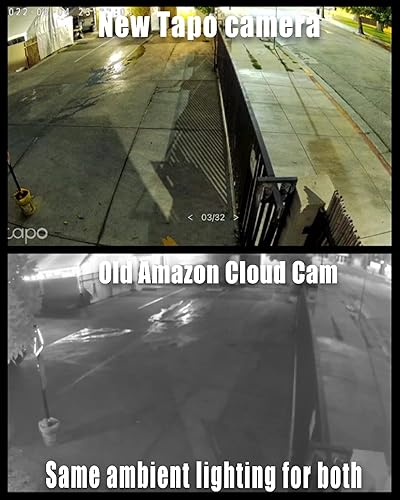
Hey guys! Don’t know if you heard but Amazon is shutting down their Cloud Cam service now that they own Blink and Ring >_< Sucks for us because cloud cam was a pretty decent cam, with good features, and was convenient to access. We tried their new Blink cams and it was hot garbage, felt and looked like a big step down in quality and features. Google cams were not any better, and we already knew from previous experience that Arlo is very unreliable. Ring is decent but can be quite a bit overpriced and doesn’t have live viewing for all cams or camera sharing to family members/house sitters, and in general are very bad for high traffic areas because they are battery powered. So we tried Tapo, a Brand that TP-Link owns and brought to the USA from EU just recently. These things have more features than I could imagine or need, and have AMAZING night vision and quality. We just finished swapping all our cams last night and are hugely impressed! They have so many customization features, if motion alerts don’t work for you because the traffic in my area is too high they have a amazing feature called lime crossing alerts where you can draw a line on the screen and it will only alert you if somebody or something crosses that line in the frame. Super convenient for high traffic areas!!! You can also customize how it alerts you and even have it send you a still frame image with the alert if it catches a person going into an area you have restricted. They have a much more powerful Wi-Fi signal than any camera I have ever used before and that’s probably due to the high-quality antennas installed on them, they are also weatherproof by design so I don’t have to go buy any third-party accessories to make them with resistant, or pay double the price for a weather resistant model like with Ring and Blink. You also have the option to wire them directly to an ethernet cable for a hardwire experience if your Wi-Fi is unreliable in your area. The cameras load very quickly and have a crystal clear image that blows all the other brands we have tried mentioned above out of the water. There’s simply is no contest. They even have a built-in siren and flashing lights that you can have set up as an alarm if someone goes into a restricted area you have set up. It’s not the loudest siren in the world but it will definitely get a would-be-thief’s attention and let them know they have been spotted, as well as get the attention of everyone else nearby. You also have the flexibility of setting those alarms on a schedule as well so you don’t have to worry about the mailman or something setting them off. I also enjoy the fact that you can live view multiple cameras at once, set up custom groups of cameras you want to see at the same time, share cameras with family friends and neighbors (they won’t be able to change any settings but they will be able to view the cameras and see alerts). And another amazing feature that it seems like every other brand is lacking you can put a SD memory card in the camera that lets you have a hard backup off the cloud. Or you could even use it as an offline camera and it will still record to the memory card and you can access your footage as long as you are on your local net work without any Internet access necessary (you only need Internet access for the initial set up). The memory card also allows you to run the cameras without needing the cloud service subscription !! Although you will lose certain premium features that rely on the cloud service in that mode operation. But the sheer flexibility of how they have set everything up shows that they have taken customer concerns and requests to heart, and actually acted on them! No other brand offers all of this. Did I also mention you can even access and manage your cameras from third-party software if you desire because they have that feature built-in as well! TP Link with their smart home devices has been known for quality and features for several years now, and I am very happy to say they continue to step up their game with this new Tapo line! They simply blow every other home camera system out of the water with quality and features m, there just is no comparison. ... show more
Reviewed in the United States on June 5, 2022 Reviewed in the United States on June 5, 2022 by FTK

  • Great camera. One annoying problem - fixed!
Style: 2K QHD + ColorPro Night Vision
I recently installed two of these cameras. I wired one to a router and used Wifi for the other. The installations went well although the one installed over rough stucco took a little extra time to make sure the holes for the anchors were precisely drilled. The provided template didn't stick to stucco so I taped it to the wall and marked the holes in the stucco with a punch. The quality of the images is excellent and the app is fairly intuitive. My one issue occurs when I'm continuously streaming the image from either of the cameras to an iPad I bought specifically for that purpose. After a few minutes the image freezes and grays out with a message to "Tap to refresh." Tapping the screen does restore the image, but I can find nothing in the documentation, forums or FAQs that explains this issue. Is it a bug in the Tapo app? Is it a "feature?" All WiFi signals are good. I don't want to have to keep tapping the screen to monitor my cameras. Responses from TP-Link or other users are welcomed. Update August 11, 2023 I emailed TP-Link support about the problem I documented above. Their Technical Support team could not have been more responsive. Over a period of several weeks they asked me to collect and forward system logs from the camera (Micro SD card required which must be removed from the camera to access the logs) and logs from the app. They provided detailed instructions on how to collect the logs. At the end of that time they provided access to a beta version of the app to which they had added a fix, again providing instructions for accessing the beta. It worked without any interruption in viewing the cameras. I was told that the fix would be released in the Tapo 3.X app with no specific release date. However, I recently installed the latest release, 2.17.2 ("Fixed some bugs and improved stability.") which appears to have the fix included since I've experienced no "Tap to refresh" interruptions over several days. I'm changing my rating on the camera from 4 stars to 5. Great support! Update September 6, 2023 The Tapo 3.0 app (3.0.17) has been released. ... show more
Reviewed in the United States on June 28, 2023 by Pinot

  • Extraordinary Budget Friendly Camera
Style: 2K QHD
Since the first moment I installed this camera I was blown away. I have had plenty of experience with other low cost cameras, namely Wyze and then Eufy, but I believe Tapo is far superior in several aspects. It packs a lot of features that only more expensive cams offer. The picture quality both during the day and night is great, and the volume is quite adequate. It is packed with many features, but I will mention what was more important to me in particular. For my needs I preferred a wired camera able to record 24/7 and with no subscription required. The presence of an ethernet port was an unexpected surprise for a camera at this price point. When it comes to the “No Subscription Required” Tapo includes many features that other cameras do not. For example, if you want to be alerted when a person is detected, Tapo will do it for free, but other “no-subscription required” cameras will tell you that for that feature you DO need a subscription. For the amount of features offered as a “No Subscription Required” camera buying a Tapo camera was a no brainer. Also, keep in mind that this model will accept a micro SD card up to 512GB so you will be able to save a lot of footage if you are recording 24/7 like me. After using the apps from Eufy, Wyze and Tapo, I feel more comfortable with the Tapo app. It is more streamlined and clean, and also it is not constantly marketing other products with annoying in app ads. Another huge advantage is that Tapo cameras are better integrated with Google Assistant. If you have tried Eufy cameras you know you cannot cast the stream to Google devices. This Tapo camera is the first one where I have been able to use a voice command to flawlessly cast the camera stream to Chromecast, Google Nest, and other TVs that run the Google environment. When it comes to warranty, I have been burned too many times by Wyze and Eufy when it comes to their customer service and backing up their products. Although I have never contacted Tapo, it gives me great peace of mind to know that both Tapo and Kasa cameras are part of a reputable company like TP-Link. After buying this Tapo camera I have decided to eventually switch all my cameras and run under their ecosystem. My only regret is not having tried them earlier. I would conclude that Tapo is a budget friendly camera from a reputable brand that offers excellent quality and it is well integrated with Google Assistant. On the other hand, Eufy and Wyze offer cheap cameras at not so cheap prices, the kind of products that are marketed on the Tik Tok marketplace to the uninformed. ... show more
Reviewed in the United States on November 2, 2024 by freemoss

  • Great video quality, but the ability to access recordings is easier said than done.
Style: 2K QHD
First I have to say that I WISH this worked as advertised. Through the app the video quality is amazing, especially at night, and in our tests you can hear someone speaking to the camera more than 100 feet away clearly! Unfortunately, a Security Camera is of no use to anyone without the ability to save and keep recordings. At the physical level, the main problem is that the ONLY WAY to get continuous recordings is to use the microSD card which then must be physically removed from the bottom of the camera each time you want to save those videos to a computer. This is seriously bad for any camera placed on a high location like, say, outside your second floor window pointing at your yard. Worse is that while you can partially take the camera off without unscrewing it, the cable doesn't fully go through the mount so you have to dangle outside while flipping it upside down to get the microSD card out. Not a fun experience. What would have been better: A way to access the microSD cards via an FTP connection on the local network. This SHOULD be possible since the app is able to stream videos from the microSD card, but we can't even use the app as a workaround since there's no download button for these videos like there are for cloud videos. The only alternative I can think of is to daisy chain a bunch of microSD card extension cables just to be able to safely remove the card. (The issues others complained about with the weird shape of the outlet wasn't a problem for us because we just used a barrel plug extension cable to wire it inside the house. It's actually fairly easy to get that wire to go around the gap of a closed window.) There is a cloud service, which they advertise right here on Amazon as: "subscribe to Tapo Care which saves 30-day video history and provides additional benefits such as activity notifications with Snapshots, manual clip recording and video sharing." But that description isn't really honest. Yes, the cloud service supports 30-day video history, but idoes NOT support continuous recording which is implied by "30-day history". It only records under certain kinds of detection events. There was one event where the camera started recording AFTER someone littered in our yard, for example, but didn't record long enough to actually catch them in the act. (To be fair, we were recording our lot across the street so there may be a detection range here, but that still emphasizes how important it is to have access to continuous recordings.) Additionally, there are issues with accessing the cloud from a PC. While they advertise an ability to access the cloud recordings "anywhere", in reality, we can't. The app shows our active subscription, but logged into the same account from a web browser shows "unsubscribed". We emailed and called support about that multiple times and are still waiting on a resolution to that issue. Regarding the microSD card we are still trying to figure out that one. The default is detection only so you have to go into scheduling and manually set continuous recording for all time slots, but for some reason it changed itself back to detection only. After two days running, if it was on continuous, there SHOULD have been a max of 42 hours of video at 2k resolution on 128 GB, but there was only 2 video files totaling around half an hour and 460 placeholder files. The cloud had way more videos which were detection based so the detection setting alone doesn't explain why the microSD card was empty. We're going to run a few more tests to see if we can get the microSD card to work before deciding if we'll be returning or not, but mounting frustrations with the device and the lack of support prompted us to leave this one star review. ALSO: Of the files that were on the microSD card the time stamps inverted AM and PM. Which is especially weird since the app explicitly requires location settings to be turned on for "accurate time settings", while promising an ability to turn that off later, but the app does NOT actually have a setting to turn that off (though doesn't break if location is turned off for the phone) and there's no manual time entry so no way for me to fix the AM/PM time. Thiankfully the time stamp doesn't show AM/PM on the video itself, but having to manually change hundreds of video file time stamps will be an absolute pain. It would have been much better if instead of automatically setting the time it would let me set the time. Overall, so far at least, all we can really do with this is watch a live stream of our yard and talk to someone outside through a speaker. That's nice I guess, but that's not why we bought this. If somehow we are eventually able to make and keep continuous recordings or at least access the cloud to save videos properly we'll update this review, and we'd probably buy 3 more of these if that's the case, but otherwise we'd have to return this and try for a different one. Which we'd really prefer not doing so we already drilled into our house to mount this. Side Note: If a future version allows downloading videos from the microSD card to a PC via FTP or some other software such that we don't have to physically remove it (and lets us fix the time) we'd probably buy 10 more of these since, even without a cloud service working, that would mean we could mount these all over the place without needing physical access. Otherwise we'd have to think of these as being of use in very limited placements and get a different security system for the majority of the property even if these cameras end up working otherwise. __________________________________ Addendum: The issue with accessing videos from the microSD card was due to a bug in the app which caused it to occasionally change the recording frequency back to default so we have to occasionally check to make sure it's still set right. The actual file sizes for the footage is significantly less than it should be for 2k resolution though. A 2k video should be 3 GB an hour, but these videos are all 256 megabytes in size regardless of the selected resolution. If we select 720p (which is the default setting) the videos are 22 minutes and 45 seconds. The file properties show 1280x720 at 15 frames per second for the 720p videos. If, however, it's set to 2k the video files are 21 minutes and 6 seconds long with the file properties showing 2560x1440 at 15 frames per second. That means there's really no point using 720p since you only get a few extra minutes an hour whereas the 2k footage is 768 MB for an hour, a full 1/4th the file size that we'd expect. I am not really sure how they get the video that small, but comparing the video files it does appear to have the quality of 2k. The issue with the time stamps on the video files not matching the time of the video itself seems to be because the date of the file is based on when the placeholder file was created rather when the recording actually took place so we basically have to rename each and every video to show the correct timestamp otherwise we'd never find anything. The issue with their cloud subscription, however, appears to be intentional. Their latest response via support tickets were outright snarky telling us "that's just the way it works" (amidst bad English). The app does let you download cloud videos to the phone, but since phones typically don't have much in the ways of storage the lack of ability to access cloud videos from a PC makes it worthless to us. So, here's the thing: The only reason why anyone would really want a cloud storage option with a camera is to retain footage in the event of physical tampering. Without the ability to do 24/7 cloud recordings there is always the risk that someone might steal the camera to hide a crime in progress. And, of course, without the ability to save those videos even their detection based system is pretty much useless. They might respond by suggesting the cost of storing those files, but it's really not that much of a difference. They only store 30 days worth of footage on their servicers, which per my tests are around 900 GB, so for around the price of 2 cameras worth of cloud storage you could just pay for Google Drive, or Proton Drive, or any number of other cloud options to upload your videos to and it would cost around the same as what they are charging with the added benefit of storing ALL of the footage. The only downside is that you'd have to manually move the videos off each SD card once a week, but you'd have to do that anyway if you wanted to actually keep the videos. As an added bonus, by using an actual cloud service, we could create a share link for any video we want to share with the police easily whereas Tapo care doesn't appear to have any good way to let police see the video recordings online. That said, the camera itself does seem to make high quality recordings and the remote viewing is pretty good. (plus, more than one mobile device can be logged into the same account at the same time making it easier for a family to manage) When on the same network there doesn't appear to be a time lag, although when going over the internet there's a minor time lag which could be annoying if you were trying to talk to someone, but for monitoring purposes it's not too bad, so we are inclined to keep this with the understanding that there won't be any good cloud options to use. We did purchase microSD card extension cables and are going to test to see if we can daisy chain them inside for safe access and we'll update with how that goes. If that works out we'll probably buy up to 4 more of these, but with the understanding that they'd never use their cloud. Oh, another issue that we've noticed is that every other time we open the app we get a popup asking to opt into letting them collect data. We have to manually de-select the checkbox and click confirm each and every time and it's absolutely annoying. We're never going to use their cloud option ever again, and we're never going to give them permission to collect data, so we wish they'd just stop already. Nag notifications asking us to do something we keep saying no to is just badgering and no one responds well to that. __________________________________ Addendum 2: So, after getting 4 days of good continuous footage from the microSD card I then got a day without any footage at all again. I eventually figured out the reason: The camera creates 3 files on the SD card in addition to the videos: sys00.bin, sys01.bin, sys01b.bin. If you leave these files on the microSD card after removing one or more video files the camera thinks that there's less available space than there actually is. It acts like it's recording, it reports that the status is good, but it doesn't bother to check the microSD card at all for available space when the card is inserted even after power cycling the device which is very strange behavior. I was able to confirm this behavior by looking under "settings > microSD card" where it reported that that it was using nearly all of the capacity despite having removed all the video files from it. Specifically, the amount of the available capacity was identical to the size of the snapshot folder I moved off the card and since that was smaller than the 256 megabyte file size of the smallest video it wasn't able to record. When I then removed these 3 bin files it generated new bin files which then allowed it to properly record to the microSD card again. Turns out the problem is bigger than just not checking the available space on reboot though. If the placeholder files are not present when it boots up, even with new bin files created, it doesn't have anywhere to record over so stops recording. The solution is to either remove ALL the files each time and go into settings > microSD > format to initialize the card or create a backup of the newly initialized .bin files and placeholder files and replace them each time which seems to take much longer than formatting. For a 128 GB microSD card the placeholder files run from xxxxxxxx_000000_tp00000.mp4 to xxxxxxxx_000000_tp00455.mp4, each at 256 MB, leaving 4.96 GB free for the screenshots folder. This unexpected situation fully explains the irregular recording I was getting, why the app kept forgetting settings, etc. As long as I make sure to manually remove the microSD card every few days and fully remove ALL the files from it and then fully format it every time I put it back in it appears that I will be able to make continuous recordings. Still, it's problematic that it's designed this way. Their manuals didn't make this clear up front and their customer support representatives were no help at all in figuring out why it's doing this. Ordinarily you'd expect to need to leave system files on a microSD card and you'd expect that someone operating a security camera would remove just the files they want to keep and leave the rest to record over on a loop. If you try doing that, however, your loop will get smaller and smaller and you'll start having gaps in recordings which is bad. Regarding their cloud service? It still sucks. There's no workaround. We simply cannot download videos from their website and their support representatives are no help so going forward we are going to act under the assumption that their cloud service doesn't exist because it might as well not exist. Still, I haven't quite given up on the camera itself. Given video quality and price I really want it to be able to work. Given that, after I confirm that the recording problems are solved, I am going to try setting it up with microSD extension cables and if that works I'll update my review of photos of my setup. ... show more
Reviewed in the United States on May 25, 2023 by Elliander Eldridge

Can't find a product?

Find it on Amazon first, then paste the link below.
Checking for best price...