




$799.98
Save $29.95
was $829.93
Buy Now, Pay Later
As low as
/ mo
Learn more
- – Up to 36-month term if approved
- – No impact on credit to apply
- – Instant approval decision
- – Secure and straightforward checkout
Ready to go? Add this product to your cart and select a plan during checkout.
Payment plans are offered through our trusted finance partners Klarna, Affirm, Afterpay, Zip, Apple Pay, and Google Pay. No-credit-needed leasing options through Acima may also be available at checkout.
Learn more about financing & leasing here.
Free shipping on this product
Extended holiday returns
FREE refund/replacement until Jan 31, 2027 Learn more
FREE refund/replacement until Jan 31, 2027 Learn more
This item's return window has been extended for the holiday season: FREE refund/replacement until Jan 31, 2027
To qualify for a full refund, items must be returned in their original, unused condition. If an item is returned in a used, damaged, or materially different state, you may be granted a partial refund.
To initiate a return, please visit our Returns Center.
View our full returns policy here.
Availability:
Only 5 left in stock, order soon!
Arrives
Saturday, Nov 7
Recently Viewed


At a glance
- Condition
- New
- Model
- THINKSCAN 689BT PRO
- Screen size
- 8 in
- Power Source
- Battery Powered
- Operating System
- Android 10.0
- Language
- English
- Automotive Fit Type
- Universal Fit
- In the box
- 1* 3-in-1 Charger (US/UK/EU Plugs)1* Carrying Bag1* User Manual1* J2534 VCI1* THINKSCAN 689BT PRO1* Type-C Charging Cable
Features 8
- You can always trust ThinkcarNot happy with the product? If you experience any issues with the product after purchase(functions doesn't work or receive a used product), not sure about the compatibility with your car, please directly message to support @ mythinkcar. com, we also offer online technical support and consultation services to help you quickly get started, even if it's your first time. For select functions, we provide step-by-step guides, video tutorials, and direct support to ensure a smooth experience.
- Engineered for ExcellenceFavored by A Tremendous Loves of Users, from DIYers and technicians to top automotive influencers. The new intelligent AI-powered THINKSCAN 689BT PRO diagnostic tool provides comprehensive workshop solutions and diagnostic capabilities, topology mapping, J2534 pass-thru solution, new developed Tyler AI Agent, full bidirectional control, 35+ services, PMI, CANFD, DoIP, FCA gateway. While excellent software innovation requires stable hardware support. The THINKSCAN 689BT PRO is driven by Android 10, 4-core high-speed CPU, 4GB RAM, 64GB ROM, ensure 5X faster performance and empowers technicians to repair cars more efficiently, and deliver results with confidence.
- J2534 Pass-Thru SupportFeaturing an innovative factory-level VCI with the latest J2534 protocol standards, the THINKSCAN 689BT PRO scanner can function as a pass-thru device to achieve direct connectivity seamlessly with mainstream OEM softwares, including GDS2, Forscan, Witech2.0, ODIS, Techstream, ect. This means that with just one device, you can easily access factory level diagnostic, pr0gramming and maintenance functions on multiple brand models, greatly helping technicians get from scan to solution faster than ever.
- Pro-Level Topology Mapping for Full System InsightThe THINKSCAN 689BT PRO now features newly integrated topology mapping. It provides a complete and intuitive overview of complex system interconnections for the vehicle, displaying each accessible control module in different colors at a glance, as well as system counts, scanned systems, and diagnostic results. No need for endless scrolling menus, this smart zoom, pan, and highlight specific modules allows for pinpoint module selection. With the support of AI, you can also easily identify the cause of faults and obtain step-by-step repair assistance - empowering you with dealer-level intelligence and excellent efficiency at workshop speed.
- Revolutionary Tyler AI Agent Intelligent Scan ToolStop wasting cycles on manual code lookups and repetitive cross-referencing. The THINKSCAN 689BT PRO's Tyler AI intelligent system works as a full-time AI expert it automatically retrieve fault codes, generate reports, capture data for post-scan review, and analyze underlying vehicle issues in real time. But that's just the baseline. The built-in AI chatbot takes it further: ask it any question you wanna know, it delivers instant, context-aware troubleshooting guidance and technical resources without forcing you to flip through service manuals, Tyler AI Agent gives you the confidence of a pro, right from your driver's seat.
- Advanced Bidirectional Control, 4000+ Active Tests & AI Repair GuideThis bidirectional scan tool is built-in 4000+ active tests covering 99% actuators, allow technicians to confirm the operation of various components without having physical access to them. This capability leads to faster and more accurate diagnostics, like f.uel injector, c.oolant pump, wipers, windows, mirrors, etc. And the AI Repair guide provide data reference, step-by-step instructions for performing various service, active test, and diagnostic tasks for vehicles, greatly simplify complex operations and ensure the correct procedure in controlled.
- 35+ Reset ServicesThis escaner automotriz provides 35+ services for 10,000 vehicles, covering all your daily repair needs. Performs C.amshaft Learning, Power Balance, E.GR Adaptation, BMS Regist, G.earbox Matching, T.urbo Reset, A/C Learning, Oil/ABS/D.PF/SAS/B.rake/Seat/Headlamp/Airbag/S.uspension reset, etc. One THINKSCAN 689BT PRO obd2 scanner for all cars handles most daily maintenance tasks, no more switching between numerous diagnostic tools. Warm Tips: Compatibility varies by car model, please don't hesitate to reach out to us at support@ mythinkcar. com.
- ECU Coding & Unlock Hidden FeaturesTake full command of your vehicle's potential with the THINKSCAN 689BT PRO scan tool and its cutting-edge ECU coding suite. From power balancing and PMI to unlocking factory-hidden features and optimizing performance, this tool lets you disable annoying functions, customize OE settings, seamlessly match replacement parts, and recalibrate adaptive values for a smoother, more responsive ride, make your car feel more premium.
Specs 14
| Brand | thinkcar |
|---|---|
| Power Source | Battery Powered |
| Operating System | Android 10.0 |
| Screen Size | 8 inches |
| Language | English |
| Brand Name | thinkcar |
| UPC | 730093412618 |
| Number of Items | 1 |
| Manufacturer | THINKCAR |
| Model Number | THINKSCAN 689BT PRO |
| Manufacturer Part Number | THINKSCAN 689BTPRO |
| Manufacturer Warranty Description | 1 Year Warranty |
| Automotive Fit Type | Universal Fit |
| Item Highlight | Upgrade of 689BT, Tyler AI Agent, J2534 Pass-Thru, 4000+ Active Test, Full System, 35+ Service, OBD2 Scanner, Lifetime Update |
No specs match.
Frequently asked questions
If you place your order now, the estimated arrival date for this product is:
Saturday, Nov 7
Yes, absolutely! You may return this product for a full refund within 30 days of receiving it.
To initiate a return, please visit our Returns Center.
View our full returns policy here.
To initiate a return, please visit our Returns Center.
View our full returns policy here.
- Klarna Financing
- Affirm Pay in 4
- Affirm Financing
- Afterpay Financing
- Zip Pay in 4
- Financing through Apple Pay
- Financing through Google Pay
Learn more about financing & leasing here.
Similar Products




Top Amazon Reviews
Muy buen escanner

Muy buen escanner cumple todo lo q dice.he podido arreglar 2 autos q no podía sin el antes por los datos en vivo y las pruebas del evap
Reviewed in the United States on October 20, 2026 by Cliente de Kindle
🫶
Exelente
Reviewed in the United States on October 12, 2026 by Jose
Excellent Upgrade from previous version saves user time and money, Awesome!!


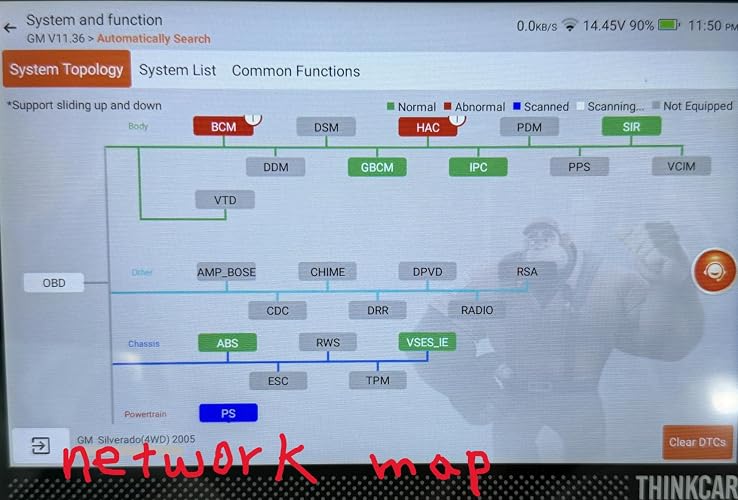


I've been using the Thinkcar 689BT for a few months now so when the Thinkcar 689BT PRO became available I didn't hesitate in pulling the trigger on it and here's the main reason why; network mapping also referred to as topology mapping. This one feature alone is a huge step up since it allows the user with a quick glance at the screen to see which modules are available on the network, which ones are communicating, which are not communicating and if any modules have any fault codes. This visual is especially helpful because the user can physically see if any failed modules appear on the same network branch which can indicate a failed common bus, wiring, and power or ground issues. And, from the same screen the user can access any of the modules simply by tapping on its icon. This one feature alone is a huge time saver but the 689BT PRO adds two more features that are very useful additions. The first of these is what Thinkcar refers to as Tyler AI agent. There are several ways to utilize the AI agent and the following example is just one method. For instance if a module on the network map has any stored codes, simply tap on the module icon and the user is taken to a page where the AI agent can be utilized to help diagnose the problem. In this case the PCM showed one fault and tapping the PCM icon allows access to the 'fault code detail' (see photo) for a P0332 (knock sensor 2 circuit low voltage) code. This page describes how the knock sensor works and gives the user several tabs for further guidance. Selecting 'Component test' takes the user to a detailed description of the pertinent test procedures. The AI agent can also be accessed from the home screen diagnose menu and selecting the Tyler AI Agent icon (last icon on the page) and entering the vehicle info and a fault code to view detailed info related to the code. Initially I wasn’t sure about the AI agents' utility but after using it I realize this helpful tool will definitely speed up productivity. The last of the 3 features on the PRO model is the VCI (vehicle communication interface) with J2534 pass-thru. This upgraded VCI acts as an interface for communicating between the vehicles modules and OEM software using a compatible Windows based PC. In other words it will allow the user to program a new module with the OEM software required so that it will communicate with the vehicle. The VCI pass thru is connected to the PC by a USB-C to USB-A cable that is included. I haven’t had the chance to use this feature yet but it is a great addition that makes the PRO model a great investment. The new PRO version is not a replacement for my 689BT but instead is an awesome addition to my tool arsenal that will greatly reduce diagnosing time and increase my capability to perform repairs.
...
show more
Reviewed in the United States on October 12, 2026 by O.B. Juan
So far so good
I got this because it does what I need day to day than my snap-on scanner and has a couple nicer features then it also. So far, it has done what I wanted it to do, although the set up seemed a little confusing, it worked itself out. I already had the software for auto auth and I ran it on a 2022 Dodge and it did everything I needed. On the other side of it, it seemed to disconnect the dongle, and I had to start from the beginner every time I went back into it. Had to authorize the Auto Auth each time, Snap-On autoloads it, and the speed of the unit is slower than snap-on. I haven't tried the AI part yet, but all in all I'll take the slower speeds over the cost of the snap-on any day
...
show more
Reviewed in the United States on October 18, 2026 by jeff Doyle
Totally Wireless and Works Great



As a long time Snap On Tools scanner owner and currently a Snap On Modis scanner owner I definitely have to give this THINKCAR THINKSCAN 689BT PRO two thumbs up. Let me start off with the cost of this very capable scanning tool. The last time I uploaded my Modis scanner was about a year ago and it cost me just over sixteen hundred dollars so double of what this 689 BT PRO cost and this scanner includes Free or included Lifetime Updates. What! Another huge plus is that if you need the capability of unlocking the Security Gateway Module (SGW) and don't want to mess around with a bypass cable which can definitely be a pain this unit is compatible with Auto Auth. This service cost at the time of this review $60.00 per year. With the THINKSCAN as long as I pay my annual fee everything works as it should but with the Snap On Modis I have to keep my scanner updated even though I own it or else Snap On will not allow Auto Auth to work. What! These guys are out of control and something needs to be done about it. I totally understand that having a Security Gateway Module (SGW) is supposedly protection against someone gaining unauthorized access to my vehicle but I should have access it my vehicle. Many vehicle now need a scan tool so that you are able to replace the rear brake pads among other things so access isn't an option it's a necessity. Getting back to the scanner I like the screen size,the overall feel and the speed that you get. The touchscreen is very responsive and works smoothly. The kickstand is also a nice feature that some don't include. Now the biggest thing that I absolutely love is this scanner is totally wireless! Nothing connecting the scanner to the car except for the VCI or a Dongle type unit. This makes everything so much easier and gives the freedom to move around without fighting a cable and some cables are very short. Now I can be outside of a vehicle without being tethered allowing me to walk around the vehicle if I choose. Ok how does this unit compare to my Modis? Being that I'm more familiar with the Modis I found this product a little more difficult to find things but after playing around with it using the demo mode and watching videos it's getting easier. As far eventually finding all of the needed information that is required this unit hasn't disappointed. For most this 689BT PRO will be more than enough but for the cost, more is better and why not you might learn something and that's not a bad thing. I have nothing negative to say about this product and have no problem recommending it to others.
...
show more
Reviewed in the United States on October 5, 2026 by Jeff G.
Great upgrade


This THINKCAR THINKSCAN 689BT PRO is a serious step up from the regular 689BT and feels like a proper professional bidirectional scan tool once you dig into it. At the core, both the 689BT and the 689BT PRO share the same solid foundation. You still get the 8-inch touchscreen tablet with 4GB of RAM and 64GB of storage, the same 4150mAh battery, Android-based interface, magnetic Bluetooth VCI that snaps cleanly to the back of the unit, dual-band Wi-Fi for updates, and lifetime free software updates (FCA AutoAuth still requires its own account/fees). Full-system diagnostics, ECU coding, bi-directional/active tests, 35+ service resets, CAN-FD, DoIP, FCA and Mercedes SGW access, AutoVIN, and AutoScan are all present on both. The PRO does not reinvent the basic diagnostic platform — it builds on it. Where the PRO actually changes the workflow is in three major added capabilities. Vehicle Topology Mapping is the biggest practical difference. On the regular 689BT you work from a conventional system list — you pick a module, read codes, look at live data, run an active test. On the PRO you get a visual network map of the vehicle’s control modules and how they communicate with each other. You can see at a glance which modules are online, which have faults, and how they are connected on the bus. For intermittent communication issues, gateway problems, or just understanding a complex modern vehicle architecture, this saves a lot of time versus hunting module by module. It turns a flat list into an actual network diagram you can work from. AI-Assisted Diagnostic / Repair Guidance is the second major addition. The PRO layers AI guidance on top of the normal code reading and live data. Instead of just showing a fault code and leaving you to research it, it can suggest likely causes, related systems to check, and guided paths based on the codes and data present. It is not a replacement for experience, but it speeds up the initial diagnostic direction, especially on vehicles or systems you do not work on every day. Combined with the topology view, it gives a clearer picture of where to start digging. J2534 Pass-Thru is the third big upgrade and the one that matters most if you ever need OEM-level programming or reflashing. The regular 689BT does ECU coding and many adaptations, but it does not support full J2534 pass-thru. The PRO does. That means you can use it as a pass-thru device with compatible OEM software for module programming, firmware updates, and certain factory-level procedures that a pure aftermarket scanner cannot perform on its own. For shops that occasionally need that capability without buying a separate dedicated J2534 interface, this is a meaningful addition. On the active test side the PRO is listed with 4000+ active tests versus the roughly 3000+ commonly quoted on the base 689BT. In practice both already cover a wide range of actuator tests (injectors, fans, pumps, windows, ABS components, EVAP, etc.), but the PRO expands the menu depth on more modules and makes those tests easier to locate within the topology and AI-guided flow. Physically the two units are very close. Same 8-inch tablet chassis, same overall dimensions, same magnetic Bluetooth VCI that docks to the rear, same kickstand, same general button layout and ports. The PRO does not feel like a completely different piece of hardware — it is clearly built on the same platform. The main physical experience difference is simply that you are using a more feature-rich software environment on essentially the same tablet and VCI hardware. The magnetic dongle still seats cleanly, the screen is still responsive, and the unit still feels solid enough for shop or mobile use. In day-to-day work the PRO is noticeably more efficient when you are dealing with communication faults, multi-module issues, or vehicles where you want a visual overview of the network before diving into individual systems. The combination of topology mapping + AI guidance + the expanded active test count changes how you approach a diagnostic session compared with the straight system-list workflow of the regular 689BT. Add J2534 pass-thru and it becomes a tool that can stay useful even when a job crosses into OEM programming territory. If you already own a 689BT and only need full-system scans, coding, bi-directional tests, and service resets, the base model is still very capable. The PRO is worth the step up when you want the network topology view, AI-assisted guidance, deeper active test coverage, and the ability to use the tool as a J2534 interface. It is a genuine functional upgrade rather than just a rebadge, and the extra features show up in real diagnostic workflow rather than just on a spec sheet.
...
show more
Reviewed in the United States on September 23, 2026 by W.S.W.N.W.B
Great value if you understand its limitations


I own three Thinkcar scanners and two scanners from other brands, so I have had a decent amount of experience comparing them. Overall, Thinkcar makes capable tools that can work well for serious DIY users and mechanics, depending on the type of vehicles and repairs your shop handles. These scanners are especially useful on vehicles that are more than five years old. Most common problems on those cars are already well documented, and the scanner usually provides enough information to point you in the right direction. The bidirectional controls and service functions can save a lot of time compared with using a basic code reader. The topology map on this Pro version is a great new feature. It gives you a much clearer view of the modules in the vehicle and makes it easier to see where communication problems may be happening. The interface is reasonably quick, and the larger screen makes the map and diagnostic information easier to work with. The new dongle is bigger than the previous version and now has a USB Type-C connection. I believe the Ethernet hardware is internal now and works through the Type-C connection. My older setup required a separate Ethernet cable and USB Ethernet adapter, so this design feels cleaner and easier to keep together. I also like the large LED on the reader because it is easy to see when working around the car. That said, the diagnostic information is not always accurate, especially with hybrids and more complex vehicles. On my 2017 Volvo, around half of the error-code descriptions have been wrong. For example, U201A62 relates to a communication issue involving the BECM, or Battery Energy Control Module, but the scanner showed information about a steering-column signal. That kind of incorrect description can send you in the wrong direction if you trust it without checking another source. It is still a great scanner, but you need to understand those limitations. For around $700, the combination of bidirectional testing, topology mapping, service functions, and forever updates makes it a good value. Just remember that it is a diagnostic tool, not a replacement for service information, experience, or factory-level equipment. This is probably too much scanner if you only want to reset a check-engine light or perform an oil-change reset. At the same time, it may come up short for a professional mechanic regularly servicing complicated BMW, Volvo, or hybrid systems, unless the shop mainly handles oil changes, brakes, and common repairs :D For advanced DIY work or a general repair shop that knows when to verify the information, it offers a lot for the price.
...
show more
Reviewed in the United States on September 10, 2026 by Natucha
Great professional car diagnostic scan tool
This a great affordable professional car diagnostic scan tool. Have own high-end handheld bidirectional cable scan tool. But this scan tool is so much better as its VCI uses wireless Bluetooth, so I can freely take the tablet around the car with limitation of the cable. The topology is wonderful as it gives the great overview of the scan result. Note that it needs to be connected to internet in order for the topology to work. I would just connect it to my phone hotspot when am too far away from home internet. Otherwise, it would give the system in a list format. The unit have instruction on how to use loaded, so great for first time users. Its Tyler AI is available in various places. My favorite is after doing the full scan, I can have it do an AI analysis report which provide an excellent detailed description of all the DTCs, what they mean, their severity, estimated cost to repair, and separate recommended troubleshooting instructions for the owner and for the professional. The report can then be shared via Bluetooth or email. All scans are automatically saved, so can refer back when needed. Being a professional tool, it has many functions as other higher priced competitors. But its free lifetime updates make it a clear winner over other scanners whose annual subscription would cost hundreds of dollars. And it supports the J2534 pass-thru, it also beats out other lower or equally priced scanners. Personally, I do not believe I would be using the J2534 pass-thru. But it is great to know I can in case I ever need to connect with the car manufacture service data base. Priced at $800. it is an excellent value for such an all-around professional scan tool with free updates.
...
show more
Reviewed in the United States on October 13, 2026 by Benny