Search  for anything...

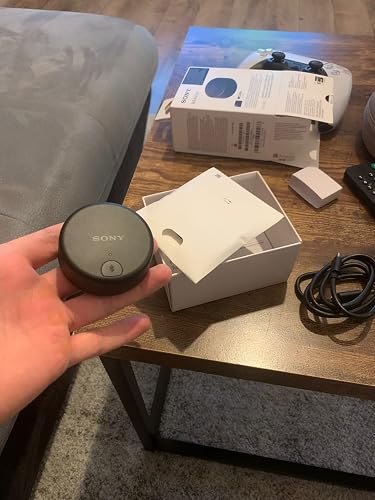
Sony WLA-NS7 Wireless TV Adapter for TV Watching Compatible with Most Wireless Headphones and Neckband Speakers, Black

  • Based on 137 reviews
Condition: Used - Like New
Checking for inventory...

Notify me when this product is back in stock

Buy Now, Pay Later


As low as $13.13 / mo
  • – 6-month term
  • – No impact on credit to apply
  • – Instant approval decision
  • – Secure and straightforward checkout

Payment plans are offered through our trusted finance partners Klarna, Affirm, Afterpay, Apple Pay, and PayTomorrow. No-credit-needed leasing options through Acima may also be available at checkout.

Learn more about financing & leasing here.

Free shipping on this product

This item is eligible for return within 30 days of receipt

To qualify for a full refund, items must be returned in their original, unused condition. If an item is returned in a used, damaged, or materially different state, you may be granted a partial refund.

To initiate a return, please visit our Returns Center.

View our full returns policy here.


Availability: Unavailable
Fulfilled by Amazon
Available payment plans shown during checkout

Features

  • Connect seamlessly to your TV
  • Experience Dolby Atmos with select sony headphones and Bravia XR TV
  • Compatible with most TVs
  • Lower lag time then a traditional Bluetooth connection
  • Compatible with most Sony headphones (Compatible models: WH1000XM3, WF1000XM3, WHXB900N, WHXB700, WI1000XM2, WHH810, WHH910N, WH1000XM4, WF1000XM4, WFC500, WHXB910N, SRS-NS7.)

Description

Watch TV with 360 Spatial Sound using your existing Sony wireless headphones with Bravia XR TV’s. The WLA-NS7 Wireless Transmitter utilizes a Bluetooth® connection to make your favorite content even more immersive. Simply connect the transmitter to your TV, pair your headphones, and personalize the sound using the Sony | 360 Spatial Sound Personalizer App.

Special Feature: Wireless


Brand: Sony


Connectivity Technology: Bluetooth


Power Source: DC


Material: Plastic


Product Dimensions: 3.26 x 4.48 x 1.49 inches


Item Weight: 1.02 ounces


Manufacturer: SONY


Item model number: WLANS7


Is Discontinued By Manufacturer: No


Date First Available: October 4, 2021


Frequently asked questions

This product is currently out of stock. Please check back later for shipping info.

Yes, absolutely! You may return this product for a full refund within 30 days of receiving it.

To initiate a return, please visit our Returns Center.

View our full returns policy here.

  • Klarna Financing
  • Affirm Pay in 4
  • Affirm Financing
  • Afterpay Financing
  • PayTomorrow Financing
  • Financing through Apple Pay
Leasing options through Acima may also be available during checkout.

Learn more about financing & leasing here.

Top Amazon Reviews


  • Does What Sony Says It Does
I am thrilled with this product. I read the instructions and followed the directions and my unit was up and running in no time. I connected with my new Sony XM5 headphones and followed the on-screen instructions, did the 360-degree setup procedure, and gave it a tryout. Went right to Disney+ and selected an Atmos/Dolby movie "War of the Planet of the Apes". The sound was excellent, very open and wide sound stage, turned on noise canceling and things became immediate and present with zero outside noise, turning it off or to the adaptive NC setting I could hear the air conditioner turn on and running, once noise canceling was on dead quiet. So read the setup instructions, follow the on-screen information and you should be good to go and enjoy. On my Sony TV as soon as I powered up the WLA-NS7 it came right up on my screen, ran my fiber optic cable to it, an AQ Fiber Optics, and my SonyTV showed the process on everything working and connecting properly. The only downside and it is nothing is the unit weight zip so my heavier Fiber Optic Cable could pull it and the stiff cord of the powering cable. But once it was in place and I played with the power cable it sat just fine and stayed in place. This unit made my Sony Headphones even better for watching movies, what also must be mentioned is when connected this way, you can still use your soundbar or TV for sound without losing them when you have the headphones hook up through your TV for Bluetooth. By using the fiber optic cable to the transmitter, your audio setting is being used, so the EARC is on as well as the fiber optic, where if paired to the TV Bluetooth settings were turned off. Now with the transmitter you can listen both ways, all you have to do is turn off the WLA-NS7 in settings and select Audio the audio setting, then both Fiber Optic and EARC are on and the Transmitter is off. Then if you want when listening along, you just select the on setting of the Transmitter. So by owning this unit, you open up the options you have while watching TV. The sound of the Sony XM5 headphones while connected to this transmitter is great, more open, and spacious, either way, the Headphones sound great the connection with the transmitter just enables Sony 360 sound. Cheap and worth the price but also worth the flexibility and performance of my Headphones. ... show more
Reviewed in the United States on August 12, 2024 by Philly of Cleve

  • The fix for the Sony Headphone/Samsung TV issue!
I prefer Sony headphones and recently purchased the XM5's and love them. Of course, if you have a Samsung TV, this is where the problem starts. Samsung TV's bluetooth does not like Sony headphones. Google it and you'll see what I mean. But I love the XM5's sound so wanted to find a solution. This did the trick. Easy to install and pair. Just need to make sure you set your sound to PCM, which can get annoying switching it back to regular settings if you use an external sound system (I use Sonos). But minor annoyance. The sound with this is great, it sounds better than any other headphones I've used with the Samsung TV. I would usually use my AirPods Pro's, but have also tried the Bose 700's. With this device, you can use your Sony headphones with Samsung TV's and get great sound. ... show more
Reviewed in the United States on December 25, 2022 by Chaks3

  • a workaround for syncing issues between wh1000xm4 and samsung tv
To the Sony wh1000xm4 community (especially those affected by the Samsung TV incompatibility). When I purchased my Sony wh100xm4 headphones in 2021, I fell in love almost instantly (the eq needed a bit of tweaking but at least Sony allows you to do that in the app). However, I was devastated that they were incompatible with my Samung TV (I own a Samsung Serif, but the issue is widespread among Samsung TVs and there are several forums on this issue). The bluetooth connects, but the audio goes out of sync over time (sometimes you might also hear static). It's a codec issue. In case you're interested, I tried the Bose qc35ii's, and although they were compatible with my Samsung TV, the audio quality as awful (sounded very flat and almost "muted"). The top headband also caused me headaches, and the app felt like Bose was policing me (it also didn't allow custom eq). I'm sure some of these issues were addressed inthe qc45's, but they went with an uglier/larger design (similar to the ugly design for the Sony wh1000xm5 - both headphones made some sacrifices to please the masses). On that note, I hear that the xm5's still have the issue with some Samsung TVs (though I didn't bother to try it myself). When I found this product on Amazon, I was so optimistic that I purchased a pair of Sony wh1000xm4's along with it (i purchased them renewed from Amazon). And... indeed, it works. I can now watch TV with my Sony wh100mx4's. This device is a miracle. To be clear - this is not Sony's fault. Samsung is at fault. If it were Sony's fault, I would not give this product a 5-star rating, because it would suggest that I am encouraging Sony for forcing customer to purchase accessories - which it isn't. The Sony wh1000xm4s work flawlessly with every other device I own and use on an everyday basis - particularly my Lenovo ThinkPad laptop and my iPhone 13 mini (in fact, they remain connected to both devices running two different operating systems at once). This adapted was not made for Samsung TVs, but for outdated Sony Bravia TVs that don't offer connectivity to external headphones. Here's my setup, in case anyone is interested: I have my wh1000xm4's connected to my PC and iPhone at all times (it is limited to 2 simultaneous connections at a time). When I watch tv (on my Samsung Serif), I generally disconnect them from one of the two (2 screens is enough...), and more often I disconnect all other devices because I really don't like being disrupted during a film. To connect these to the Sony wh1000xm4's, do the following: Connect the adapter to your tv with the USB A and Optical cables. Make sure you're putting the cables into the right ports. The USB charges the device (and perhaps informs your tv of the device), while the optical send the audio signal. Next, put your xm4's into pairing mode (hold down the on/off button). Then, put the adapter into pairing mode (hold down the top button until the light begin blinking blue). I wore my headphones while doing this, so I was 2 feet away. The headphones automatically pair to the adapter. So, you do not go through your TV for pairing; you pair them directly to the adapted by placing both in pairing mode at the same time. This surprised me. Once the xm4s and the adapter are paired, change the TV's audio/sound settings to "Optical." You may also want to mute your TV, because in my experience, I had audio coming out of TV's speakers (slight) and my xm4's simultaneously. When I'm done watching tv, I simply turn my tv off and (I think) this also causes my headphones to disconnect. When I want to reconnect my xm4's to the adapter/TV, I turn on my TV and headphones and then the button on the adapter one time; this causes them to pair with the headphones right away. I'm sure there is another way to reconnect, but I found this most convenient, because it keeps my other two devices as primary (i keep my pc and iphone as primary). One minor issue with this approach is that you cannot regulate sound using the remote when you are in this mode; you can only use the headset gestures. The volume control freezes. I haven't attempted to fix this, so perhaps there is a way. However, I really don't mind this at all, and perhaps I overlooked something in settings. Hope this helps. ... show more
Reviewed in the United States on September 4, 2022 by Alen

Can't find a product?

Find it on Amazon first, then paste the link below.
Checking for inventory...